Laptop cooler

endlssorrow

Arch-Supremacy Member
Joined
Apr 11, 2007
Messages
11,087
Reaction score
850
I’m still looking for one simple gaming laptop to replace my 4-5 years acer.

While looking at some models like aftershock, acer, asus

I’m looking at their cooler master also. Wonder how to gauge their which cooler system is better?

One of the way is by google?
 

Viper0402

Senior Member
Joined
Jan 1, 2000
Messages
647
Reaction score
58
1) Laptop cooler:
Coolermaster Notepal X3 has been cooling my Dell Vostro 3750 Notebook since 2013 which this notebook was purchased 2nd hand back then.
Both cooler and notebook still working perfectly, no ports, no parts, or anything not working.
Notepal X3 has been over the years awarded and proven and still in production and a current model, imagine just that!
For higher price, also award winning, get the Cooler Master SF-17 180mm Fan Gaming Notebook Cooler.

2) Simple gaming laptop:
I gotten the following (you will never get such specs at this price from other brands)

Lenovo IdeaPad L340-17IRH Gaming at SG$1,390.00 (stated in invoice)
Part No: 81LLCTO1WW

Configuration Details
● Intel Core i7-9750H Processor (12MB Cache, up to 4.50GHz with Turbo Boost)
● Windows 10 Home 64
● Microsoft Office Trial
● 16GB DDR4 2400MHz SoDIMM
● 512GB Solid State Drive, M.2 2280, PCIe-NVMe
● 17.3" FHD (1920x1080), LED Backlight, IPS, 300nits, Anti-glare
● NVIDIA GeForce GTX1650 4GB GDDR5 128bit
● Keyboard Backlit Black English
● HD 720P Camera with Dual Mic
● IMR
● HM370
● PC/ABS
● 3 Cell Li-Cyllinder Internal Battery, 45Wh
● 135W AC Adapter (3pin)-UK
● Lenovo Wireless 2x2AC, Bluetooth Version 4.1
● Publication-English/Simplied Chinese/Traditional Chinese
● Ideapad 1 Year Depot or Carry-in

 

endlssorrow

Arch-Supremacy Member
Joined
Apr 11, 2007
Messages
11,087
Reaction score
850
For your no 2) the graphic is conside very good already. How is it called simple gaming? Haha
1) Laptop cooler:
Coolermaster Notepal X3 has been cooling my Dell Vostro 3750 Notebook since 2013 which this notebook was purchased 2nd hand back then.
Both cooler and notebook still working perfectly, no ports, no parts, or anything not working.
Notepal X3 has been over the years awarded and proven and still in production and a current model, imagine just that!
For higher price, also award winning, get the Cooler Master SF-17 180mm Fan Gaming Notebook Cooler.

2) Simple gaming laptop:
I gotten the following (you will never get such specs at this price from other brands)

Lenovo IdeaPad L340-17IRH Gaming at SG$1,390.00 (stated in invoice)
Part No: 81LLCTO1WW

Configuration Details
● Intel Core i7-9750H Processor (12MB Cache, up to 4.50GHz with Turbo Boost)
● Windows 10 Home 64
● Microsoft Office Trial
● 16GB DDR4 2400MHz SoDIMM
● 512GB Solid State Drive, M.2 2280, PCIe-NVMe
● 17.3" FHD (1920x1080), LED Backlight, IPS, 300nits, Anti-glare
● NVIDIA GeForce GTX1650 4GB GDDR5 128bit
● Keyboard Backlit Black English
● HD 720P Camera with Dual Mic
● IMR
● HM370
● PC/ABS
● 3 Cell Li-Cyllinder Internal Battery, 45Wh
● 135W AC Adapter (3pin)-UK
● Lenovo Wireless 2x2AC, Bluetooth Version 4.1
● Publication-English/Simplied Chinese/Traditional Chinese
● Ideapad 1 Year Depot or Carry-in
 

endlssorrow

Arch-Supremacy Member
Joined
Apr 11, 2007
Messages
11,087
Reaction score
850
For aftershock, they using THERMAL COMPOUND,
Fx504 got ANTI-DUST TUNNELS,
 

aarontansp

Arch-Supremacy Member
Joined
Oct 22, 2000
Messages
15,903
Reaction score
3,050
I dont use laptop cooler because external cooling has no effect on internal cooling efficiency.
17 inch laptop is really heavy and power hungry. Plus the power brick, it will weight a ton.
I will only do it if you're not going to bring it out. otherwise go for a 15.6 inch and get a monitor at home.
 

watzup_ken

High Supremacy Member
Joined
Nov 21, 2003
Messages
25,669
Reaction score
2,123
My recommendation will be the Coolermaster NotePal U2/U3. Been using the U2 for many years and I like the fact that you can position the fans according to the vents of the laptop. You can even determine you want the fan to blow or exhaust, and therefore, is very versatile.

However one thing to also mention is that laptop coolers don't make a lot of difference to the temps. I feel at most you should only be seeing a couple of degs difference from my observation.
 

ckkoh1

Senior Member
Joined
May 12, 2000
Messages
1,387
Reaction score
0
I dont use laptop cooler because external cooling has no effect on internal cooling efficiency.
17 inch laptop is really heavy and power hungry. Plus the power brick, it will weight a ton.
I will only do it if you're not going to bring it out. otherwise go for a 15.6 inch and get a monitor at home.

I agree. Multiple tests have shown that laptop coolers offer very little/ or even no improvement to laptop temperatures. They are a waste of money IMO.
 

Viper0402

Senior Member
Joined
Jan 1, 2000
Messages
647
Reaction score
58
For your no 2) the graphic is conside very good already. How is it called simple gaming? Haha

So you know your OWN answer to your question duh!
Then buy from those notebook vendors at this price but without any GPU. If have, would be something like MX150 for "simple" gaming LOL!
 
Last edited:

Viper0402

Senior Member
Joined
Jan 1, 2000
Messages
647
Reaction score
58
1) Laptop cooler:
Coolermaster Notepal X3 has been cooling my Dell Vostro 3750 Notebook since 2013 which this notebook was purchased 2nd hand back then.
Both cooler and notebook still working perfectly, no ports, no parts, or anything not working.
Notepal X3 has been over the years awarded and proven and still in production and a current model, imagine just that!
For higher price, also award winning, get the Cooler Master SF-17 180mm Fan Gaming Notebook Cooler.

2) Simple gaming laptop:
I gotten the following (you will never get such specs at this price from other brands)

Lenovo IdeaPad L340-17IRH Gaming at SG$1,390.00 (stated in invoice)
Part No: 81LLCTO1WW

Configuration Details
● Intel Core i7-9750H Processor (12MB Cache, up to 4.50GHz with Turbo Boost)
● Windows 10 Home 64
● Microsoft Office Trial
● 16GB DDR4 2400MHz SoDIMM
● 512GB Solid State Drive, M.2 2280, PCIe-NVMe
● 17.3" FHD (1920x1080), LED Backlight, IPS, 300nits, Anti-glare
● NVIDIA GeForce GTX1650 4GB GDDR5 128bit
● Keyboard Backlit Black English
● HD 720P Camera with Dual Mic
● IMR
● HM370
● PC/ABS
● 3 Cell Li-Cyllinder Internal Battery, 45Wh
● 135W AC Adapter (3pin)-UK
● Lenovo Wireless 2x2AC, Bluetooth Version 4.1
● Publication-English/Simplied Chinese/Traditional Chinese
● Ideapad 1 Year Depot or Carry-in


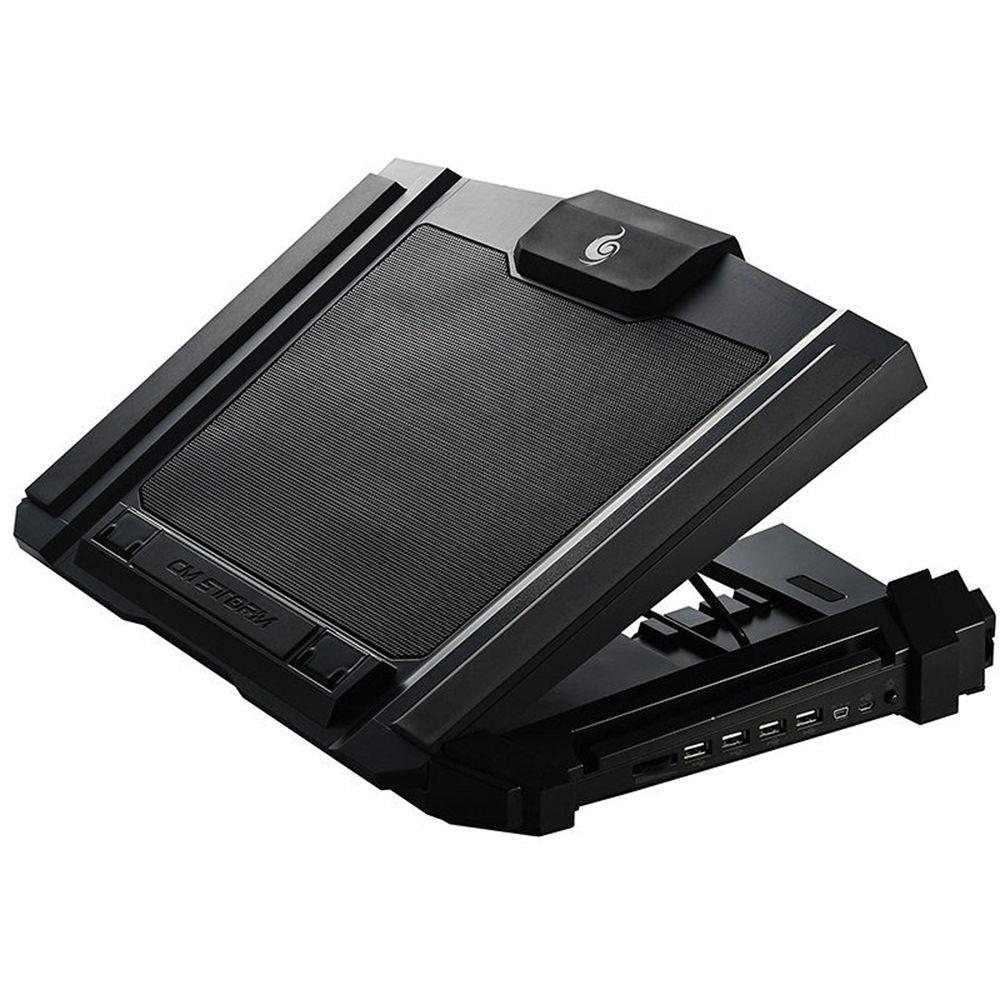
Cooler Master SF-17 180mm Fan Gaming Notebook Cooler (fan speed rated at 700 - 1200 RPM ± 15%), bought at $74.39 during Lazada Mid-Year sale, after $10 Lazada voucher.

Cooling my Lenovo IdeaPad L340 Gaming 17.3" - i7-9750H at 4.5GHz, GTX1650 4GB rather well. Fan turned up MAX.
38°C idle, gaming constant 58°C to 62°C, while gaming at 98°C for a few seconds at short intervals.
Game played - Forza Motorsport 6: Apex at ULTRA settings, 60fps constant.

This cooler pad is 1 of the top 5 reviewed.
Don't blame on notebook cooler pads waste of $$$ if you are buying cheap ones, with lousy fans and/or cheap plastic material.

The Cooler Master SF-17 allows few heights adjustable, with enough ventilation beneath the notebook.

R9-NBC-SF7K-GP.jpg
 
Last edited:

Reesey

Member
Joined
May 26, 2011
Messages
149
Reaction score
0
unless its active cooling aka directly pulling the heat off crucial components or blowing cold air on the intake vent else those fancy cooler basically just improve the airflow.
 
Important Forum Advisory Note
This forum is moderated by volunteer moderators who will react only to members' feedback on posts. Moderators are not employees or representatives of HWZ Forums. Forum members and moderators are responsible for their own posts. Please refer to our Community Guidelines and Standards and Terms and Conditions for more information.
Top