

Laptop Rams Questions & Recommendation

wad3v3r

Arch-Supremacy Member
Joined
Nov 21, 2003
Messages
12,745
Reaction score
8
Hello everyone,

I've just received my acer laptop and would like to add on another stick of rams to it as it only came with a 16gb hynix ram.

Tried to source for another exact piece however seems like its only sold overseas .


Should i just get another stick of 2666mhz with similar clocks to just dual channel it?|


Or do you guys recommend me decently priced 32 gb kits for laptops
 
Last edited:

royfrosty

High Supremacy Member
Joined
Jul 23, 2009
Messages
27,727
Reaction score
1,553
What do you really do on your laptop. If you not going to do anything intensive, dont see why you need to upgrade.
 

Albertphoon

Member
Joined
Mar 28, 2001
Messages
290
Reaction score
1
What do you really do on your laptop. If you not going to do anything intensive, dont see why you need to upgrade.
Fully agreed. If you do a mem task usage, usually is around 60% of 8gb. So 16Gb is more than enough. It become redundant. Unless running special or ram intensive app.
But The M2 SSD now come in different write/read speed. So you can see a vast different in your PC or laptop.
 

wad3v3r

Arch-Supremacy Member
Joined
Nov 21, 2003
Messages
12,745
Reaction score
8
Actually i do mostly gaming . :s13: but it seems like it affects fps quite abit..
I've been trying to increase the fps in dota 2 since i have a high refresh rate panel.


I've tried doing afew setting changes using throttle stop to lower voltage and changing geforce settings to maximum performance .. however seems like i cannot get pass 100 fps.


based on youtube benchmark reviews of laptops with similar specs ( i9750h + 1660ti ) it seems to me that i can push it to average 130-140 at least however i am unable to
 

wad3v3r

Arch-Supremacy Member
Joined
Nov 21, 2003
Messages
12,745
Reaction score
8
Fully agreed. If you do a mem task usage, usually is around 60% of 8gb. So 16Gb is more than enough. It become redundant. Unless running special or ram intensive app.
But The M2 SSD now come in different write/read speed. So you can see a vast different in your PC or laptop.

There is a micron nvme pcie 1tb ssd which i assume shouldnt be the problem here..

my zotac 2.5" sata ssd is okay for my use on my desktop ..
 

royfrosty

High Supremacy Member
Joined
Jul 23, 2009
Messages
27,727
Reaction score
1,553
Actually i do mostly gaming . :s13: but it seems like it affects fps quite abit..

I've been trying to increase the fps in dota 2 since i have a high refresh rate panel.


I've tried doing afew setting changes using throttle stop to lower voltage and changing geforce settings to maximum performance .. however seems like i cannot get pass 100 fps.


based on youtube benchmark reviews of laptops with similar specs ( i9750h + 1660ti ) it seems to me that i can push it to average 130-140 at least however i am unable to

Then high likely there is something wrong with the laptop. Adding another ram to make it dual channel will not increase your fps by almost 40-50%. There is likely somewhere gone wrong.

I dont think the throttle stop is good to use. Stuffing your cpu to boost properly will just make performance to take a dip. Just run it properly.
 

wad3v3r

Arch-Supremacy Member
Joined
Nov 21, 2003
Messages
12,745
Reaction score
8
Then high likely there is something wrong with the laptop. Adding another ram to make it dual channel will not increase your fps by almost 40-50%. There is likely somewhere gone wrong.

I dont think the throttle stop is good to use. Stuffing your cpu to boost properly will just make performance to take a dip. Just run it properly.

okay. Will default it and as per usual to look again
 

Intrinion

Senior Moderator
Senior Moderator
Joined
Dec 15, 2012
Messages
36,421
Reaction score
3,239
Actually i do mostly gaming . :s13: but it seems like it affects fps quite abit..

I've been trying to increase the fps in dota 2 since i have a high refresh rate panel.


I've tried doing afew setting changes using throttle stop to lower voltage and changing geforce settings to maximum performance .. however seems like i cannot get pass 100 fps.


based on youtube benchmark reviews of laptops with similar specs ( i9750h + 1660ti ) it seems to me that i can push it to average 130-140 at least however i am unable to

There's a multitude of factors to FPS. This includes laptop thermal, graphic settings and drivers as well as in game graphic settings (resolution, aa etc.) Assuming single stick configuration there might be miniscule improvements in framerates consistencies if its in dual channel setup.

A suggestion, if you are sticking to Acer's provided graphical drivers; To perhaps utilize display driver uninstaller (DDU) to remove any remnants and then installing stock drivers from Nvidia. This may result in improved performance or reduced performance as graphical drivers provided by OEMs (Acer) are signed and optimsed for the laptop for reasons of performance and thermals.
 
Last edited:

wad3v3r

Arch-Supremacy Member
Joined
Nov 21, 2003
Messages
12,745
Reaction score
8
There's a multitude of factors to FPS. This includes laptop thermal, graphic settings and drivers as well as in game graphic settings (resolution, aa etc.) Assuming single stick configuration there might be miniscule improvements in framerates consistencies if its in dual channel setup.

A suggestion, if you are sticking to Acer's provided graphical drivers; To perhaps utilize display driver uninstaller (DDU) to remove any remnants and then installing stock drivers from Nvidia. This may result in improved performance or reduced performance as graphical drivers provided by OEMs (Acer) are signed and optimsed for the laptop for reasons of performance and thermals.
ive used clean installation on drivers from geforce experience .. wondering if that works
 

Intrinion

Senior Moderator
Senior Moderator
Joined
Dec 15, 2012
Messages
36,421
Reaction score
3,239
Did the installer shows that it is successful or failed? Haha OEM Drivers are super annoying, from experience it will typically revert back to its previous version.

Do check the driver versions on device manager before and after installation to verify
ive used clean installation on drivers from geforce experience .. wondering if that works


wad3v3r

Arch-Supremacy Member
Joined
Nov 21, 2003
Messages
12,745
Reaction score
8
Did the installer shows that it is successful or failed? Haha OEM Drivers are super annoying, from experience it will typically revert back to its previous version.

Do check the driver versions on device manager before and after installation to verify


successful.. Anyway i did the proper way of booting into safe mode -> DDU -> installed the standard drivers
 

86technie

High Supremacy Member
Joined
Jun 8, 2006
Messages
40,447
Reaction score
6,006
Actually i do mostly gaming . :s13: but it seems like it affects fps quite abit..

I've been trying to increase the fps in dota 2 since i have a high refresh rate panel.


I've tried doing afew setting changes using throttle stop to lower voltage and changing geforce settings to maximum performance .. however seems like i cannot get pass 100 fps.


based on youtube benchmark reviews of laptops with similar specs ( i9750h + 1660ti ) it seems to me that i can push it to average 130-140 at least however i am unable to

Unless it is same model with same specs you can compare the benchmark with it. Different laptop had different design especially cooling and TDP.
There is also lower TDP of 1660 ti which is Max-q version.

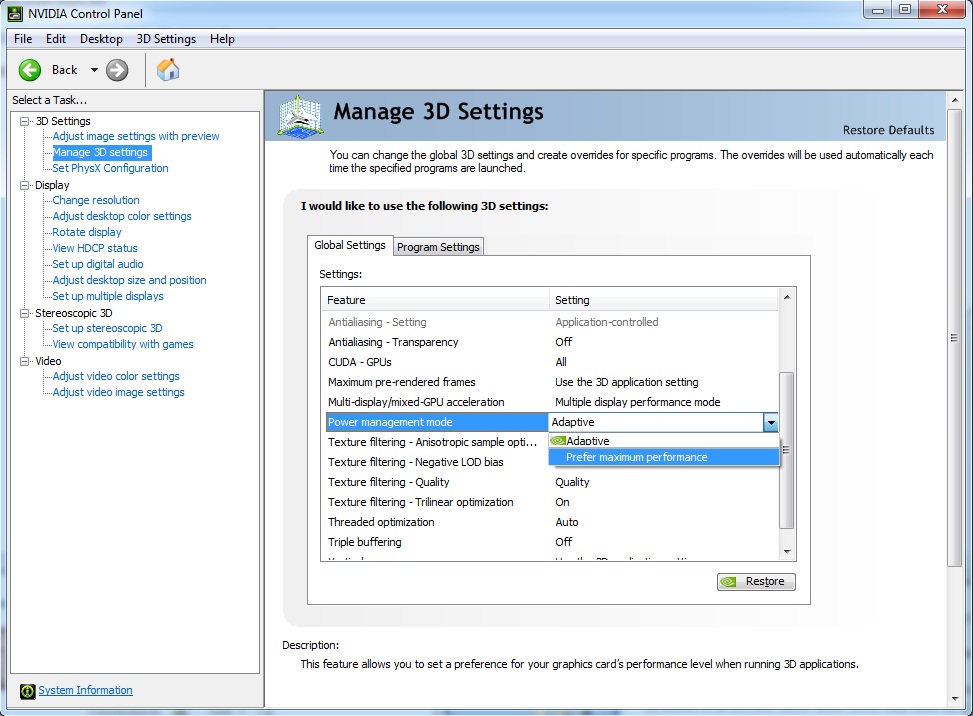
One thing you can try is under Geforce control panel for games.
Under power management set to Max performance.

adaptive_performance.jpg


However except louder fan as the graphic card will be running at full clock speed until you exit the game.
 

Intrinion

Senior Moderator
Senior Moderator
Joined
Dec 15, 2012
Messages
36,421
Reaction score
3,239
successful.. Anyway i did the proper way of booting into safe mode -> DDU -> installed the standard drivers

Give it a shot, no harm.
If things go wacky, like they sometime do, revert back to Acer's gpu drivers :s13:
 

wad3v3r

Arch-Supremacy Member
Joined
Nov 21, 2003
Messages
12,745
Reaction score
8
Unless it is same model with same specs you can compare the benchmark with it. Different laptop had different design especially cooling and TDP.
There is also lower TDP of 1660 ti which is Max-q version.

One thing you can try is under Geforce control panel for games.
Under power management set to Max performance.

adaptive_performance.jpg


However except louder fan as the graphic card will be running at full clock speed until you exit the game.

done this and yes i actually compared similar models. hardware wise.
Which is the nitro 5 model with 1660ti and 9750h.

based on jarrod's tech he reviewed it and got average fps of 130..
i have sort of given up after managing to push it up to 100~- 110 fps whilst it dropping to 80-90 during situations with many mobs

Maybe its just the game updates that made it worst

I have actually asked the youtuber himself and he actually said that he left it at stock


Bought it because i manage to get it at a pretty good pricing with decently good specs
 

Zeltos

Master Member
Joined
Nov 12, 2001
Messages
3,222
Reaction score
219
Hello everyone,

I've just received my acer laptop and would like to add on another stick of rams to it as it only came with a 16gb hynix ram.

Tried to source for another exact piece however seems like its only sold overseas .


Should i just get another stick of 2666mhz with similar clocks to just dual channel it?|


Or do you guys recommend me decently priced 32 gb kits for laptops

No one really need 32gb of ram unless making long video or running 3d modeling in autocad.
 

Intrinion

Senior Moderator
Senior Moderator
Joined
Dec 15, 2012
Messages
36,421
Reaction score
3,239
No one really need 32gb of ram unless making long video or running 3d modeling in autocad.

:s13: Very true.
My slab of concrete is on 32gb, and that's on the low end for simulation work.
 
Important Forum Advisory Note
This forum is moderated by volunteer moderators who will react only to members' feedback on posts. Moderators are not employees or representatives of HWZ Forums. Forum members and moderators are responsible for their own posts. Please refer to our Community Guidelines and Standards and Terms and Conditions for more information.
Top