
You are using an out of date browser. It may not display this or other websites correctly.
You should upgrade or use an alternative browser.
You should upgrade or use an alternative browser.
[Lex1989] PC Modification Required!
- Thread starter Lex1989
- Start date
More options
Who Replied?

localITguy
Suspended
- Joined
- Dec 13, 2013
- Messages
- 17,788
- Reaction score
- 1,674
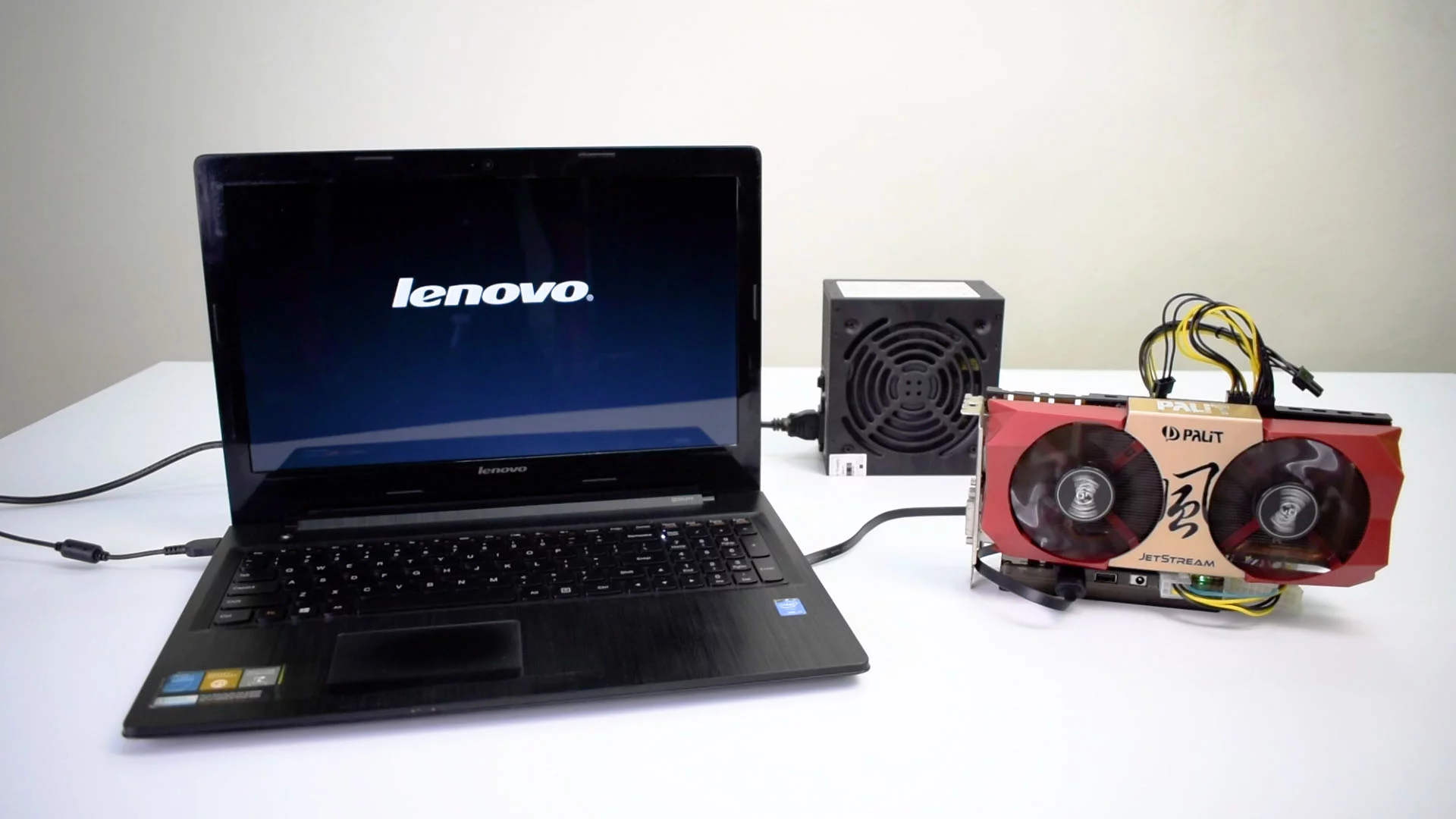
u siao?I have got a working PC like this.
Possible for me to grab a PCIE Extender Cable, for Galax RTX 3060 TI to be installed?
I know i will need another PSU to fire it up.
Any comments are welcome!

miht aswell get a extl gpu enclosure

Lex1989
Banned
- Joined
- Nov 15, 2008
- Messages
- 19,845
- Reaction score
- 2,480
GPU enclosure is like EGPU which uses thunderbolt?u siao?
miht aswell get a extl gpu enclosure
localITguy
Suspended
- Joined
- Dec 13, 2013
- Messages
- 17,788
- Reaction score
- 1,674
yeah. if u want put gpu can la. if u find small enough gu and need to swap the PSUGPU enclosure is like EGPU which uses thunderbolt?

Entry Level PC
Banned
- Joined
- Oct 26, 2011
- Messages
- 48,310
- Reaction score
- 7,450
I have got a working PC like this.
Possible for me to grab a PCIE Extender Cable, for Galax RTX 3060 TI to be installed?
I know i will need another PSU to fire it up.
Any comments are welcome!
Got M.2 or not?
If yes you can do this.
localITguy
Suspended
- Joined
- Dec 13, 2013
- Messages
- 17,788
- Reaction score
- 1,674
Got M.2 or not?
If yes you can do this.
good idea
Lex1989
Banned
- Joined
- Nov 15, 2008
- Messages
- 19,845
- Reaction score
- 2,480
Yah, thats why i want to direct use the PCIE extender cable.But now the thunderbolt also not full bandwidth

wwenze
Greater Supremacy Member
- Joined
- Dec 2, 2002
- Messages
- 87,199
- Reaction score
- 30,763
There are multiple ways to do this. Including this one.

This is really no different from how some ITX cases use PCI-E cables to connect their GPU.
You will need an adapter cable for your PSU so that the mobo turns on both the original PSU and the new external PSU together.
Alternatively you can just remove the original PSU and use the new external PSU to power both.
External GPU docks using thunderbolt have no issue with multiple PSUs, because the dock itself can tell the PSU when to turn on. These thunderbolt docks are also hot-pluggable, while PCI-E is not. (Well, theoretically they are, but you want to try removing your GPU from your PCI-E slot while it is running?
This is really no different from how some ITX cases use PCI-E cables to connect their GPU.
You will need an adapter cable for your PSU so that the mobo turns on both the original PSU and the new external PSU together.
Alternatively you can just remove the original PSU and use the new external PSU to power both.
External GPU docks using thunderbolt have no issue with multiple PSUs, because the dock itself can tell the PSU when to turn on. These thunderbolt docks are also hot-pluggable, while PCI-E is not. (Well, theoretically they are, but you want to try removing your GPU from your PCI-E slot while it is running?

NightRaven49
Master Member
- Joined
- May 17, 2019
- Messages
- 3,746
- Reaction score
- 1,583
if u are already going to buy a new psu, might as well buy a new case to go along with it so u dont have to deal with such janky solutions.
Lex1989
Banned
- Joined
- Nov 15, 2008
- Messages
- 19,845
- Reaction score
- 2,480
There are multiple ways to do this. Including this one.
This is really no different from how some ITX cases use PCI-E cables to connect their GPU.
You will need an adapter cable for your PSU so that the mobo turns on both the original PSU and the new external PSU together.
Alternatively you can just remove the original PSU and use the new external PSU to power both.
External GPU docks using thunderbolt have no issue with multiple PSUs, because the dock itself can tell the PSU when to turn on. These thunderbolt docks are also hot-pluggable, while PCI-E is not. (Well, theoretically they are, but you want to try removing your GPU from your PCI-E slot while it is running?
From what i understand here is that,
If i use separate PSU, for MB and GPU, it will clash?
Lex1989
Banned
- Joined
- Nov 15, 2008
- Messages
- 19,845
- Reaction score
- 2,480
You are right thou!if u are already going to buy a new psu, might as well buy a new case to go along with it so u dont have to deal with such janky solutions.
Must well make a new built right? :/

- Joined
- Mar 9, 2004
- Messages
- 125,374
- Reaction score
- 6,614
It's a OEM pc? If DIY you could just shift to a bigger casing. If it's OEM, you could too but do check the 20/24 pins. Some OEM are on 20 pins or so.
wwenze
Greater Supremacy Member
- Joined
- Dec 2, 2002
- Messages
- 87,199
- Reaction score
- 30,763
There's no problem with multiple PSUsFrom what i understand here is that,
If i use separate PSU, for MB and GPU, it will clash?
However to turn on the PSU, the green wire needs to be shorted to ground. The motherboard does that for you. When you have two PSUs and one motherboard, who shorts the second PSU's green wire?
That's why there is a y cable that allows both ATX24 pin from both PSUs to connect to the same motherboard, so that one motherboard turns on both PSUs at the same time.
In external GPU docks, the dock is smart enough to do that by itself.
The second part of my comment is practicality. If you need a ATX PSU anyway, it can handle both the gpu and cpu without problem. Save your rare tfx PSU, they are expensive to replace.
Lex1989
Banned
- Joined
- Nov 15, 2008
- Messages
- 19,845
- Reaction score
- 2,480
Thanks man! Very technical! :/There's no problem with multiple PSUs
However to turn on the PSU, the green wire needs to be shorted to ground. The motherboard does that for you. When you have two PSUs and one motherboard, who shorts the second PSU's green wire?
That's why there is a y cable that allows both ATX24 pin from both PSUs to connect to the same motherboard, so that one motherboard turns on both PSUs at the same time.
In external GPU docks, the dock is smart enough to do that by itself.
The second part of my comment is practicality. If you need a ATX PSU anyway, it can handle both the gpu and cpu without problem. Save your rare tfx PSU, they are expensive to replace.
Lex1989
Banned
- Joined
- Nov 15, 2008
- Messages
- 19,845
- Reaction score
- 2,480
This is a DIY built, yes able to shift to bigger case.It's a OEM pc? If DIY you could just shift to a bigger casing. If it's OEM, you could too but do check the 20/24 pins. Some OEM are on 20 pins or so.
You just need a new ITX case though which is like $100 for a nice one.You are right thou!
Must well make a new built right? :/
Lex1989
Banned
- Joined
- Nov 15, 2008
- Messages
- 19,845
- Reaction score
- 2,480
Any recommendations?You just need a new ITX case though which is like $100 for a nice one.
Important Forum Advisory Note
This forum is moderated by volunteer moderators who will react only to members' feedback on posts. Moderators are not employees or representatives of HWZ Forums. Forum members and moderators are responsible for their own posts.
Please refer to our Community Guidelines and Standards and Terms and Conditions for more information.
