M4 Ipad Pro Keyboard Case

Snoweagle

Arch-Supremacy Member
Joined
Sep 6, 2005
Messages
20,309
Reaction score
1,807
i just got the Logitech Combo for the 11" M4 and i must say im impressed. Although adds on the bulk, but it comes with full protection and the flexibility of having the keyboard removed as and when i need. I have never used the MK before so i can't really compare it, but i guess its good enough for me.

I have both but on my current M2 iPad Pro. I got the Combo Touch first before I got the Magic Keyboard. The CT is great, though bulkier, more protection and has a larger desk footprint, and not suitable for use on your lap. But the idea of being able to detach the keyboard, flip it over and stow behind the iPad is great for reading on the go.

The MK is very convenient, just open up and able to use already, whether on lap or desk. Though no side protection, it has pass-through charging, slightly less bulky and have a slightly better keyboard. Guess the absence of side protection is the reason it's also less bulky. The MK also has less viewing angle as compared the CT's kickstand, and must detach from the keyboard itself if want to play games.

Heard that now the new CT uses a similar silicone material just like the MK. Honestly I prefer the fabric material on the older one, gives it a unique feel and should be more durable.
 
Last edited:

GolferZzAxis

Member
Joined
Nov 10, 2010
Messages
354
Reaction score
290
I have both but on my current M2 iPad Pro. I got the Combo Touch first before I got the Magic Keyboard. The CT is great, though bulkier, more protection and has a larger desk footprint, and not suitable for use on your lap. But the idea of being able to detach the keyboard, flip it over and stow behind the iPad is great for reading on the go.

The MK is very convenient, just open up and able to use already, whether on lap or desk. Though no side protection, it has pass-through charging, slightly less bulky and have a slightly netter keyboard. Guess the absence of side protection is the reason it's also less bulky. The MK also has less viewing angle as compared the CT's kickstand, and must detach from the keyboard itself if want to play games.

Heard that now the new CT uses a similar silicone material just like the MK. Honestly I prefer the fabric material on the older one, gives it a unique feel and should be more durable.

Believe it or not, the new CT is actually lighter than the MK. Logitech really outdid themselves with the 2024 redesigned CT compared to the old one. It's much lighter and less thicker since the fabric material was also removed.

It's just the presence of the all-around protection that makes it looks bulkier.

CT 11" / 13" - 474g / 660g
MK 11" / 13" - 581g / 662g

Honestly, i admit the MK is very, very sleek looking and the pass-through charging port is also very useful.

But the decision on wanting to opt for the MK, I think for this one must ask yourself this question - is your iPad a tablet, or a laptop?

I tried to stick with my MK on my previous iPad Pro and used it as a laptop, and i gradually grew to dislike my iPad. iPadOS is absolutely terrible especially if you try to use it as a laptop replacement. I nearly pulled out my hair multiple times while trying to use it like one. And the fact that you have to remove it to write notes or draw with the Pencil is a design decision by Apple that i have never gotten around to this day.

Is it a sleek looking case? Yes, it is. The best looking keyboard case in the market? Yes definitely. But is it worth spending 500 to limit yourself to treating an iPad as a psuedo-laptop? In my honest opinion, no.

I ended up selling away my MK instead (on my old iPad, that is) and opted for the CT.
(Heck if Apple still sells the Smart Keyboard Folio for the new M4 iPad Pro i would have took that in a heartbeat.)
 
Last edited:

maxheadroom

Senior Member
Joined
Jan 1, 2000
Messages
1,631
Reaction score
30
Believe it or not, the new CT is actually lighter than the MK. Logitech really outdid themselves with the 2024 redesigned CT compared to the old one. It's much lighter and less thicker since the fabric material was also removed.

It's just the presence of the all-around protection that makes it looks bulkier.

CT 11" / 13" - 474g / 660g
MK 11" / 13" - 581g / 662g

Honestly, i admit the MK is very, very sleek looking and the pass-through charging port is also very useful.

But the decision on wanting to opt for the MK, I think for this one must ask yourself this question - is your iPad a tablet, or a laptop?

I tried to stick with my MK on my previous iPad Pro and used it as a laptop, and i gradually grew to dislike my iPad. iPadOS is absolutely terrible especially if you try to use it as a laptop replacement. I nearly pulled out my hair multiple times while trying to use it like one. And the fact that you have to remove it to write notes or draw with the Pencil is a design decision by Apple that i have never gotten around to this day.

Is it a sleek looking case? Yes, it is. The best looking keyboard case in the market? Yes definitely. But is it worth spending 500 to limit yourself to treating an iPad as a psuedo-laptop? In my honest opinion, no.

I ended up selling away my MK instead (on my old iPad, that is) and opted for the CT.
(Heck if Apple still sells the Smart Keyboard Folio for the new M4 iPad Pro i would have took that in a heartbeat.)

Good to know… and you giving me lot of confident to buy my next keyboard once my ESR break down.
 

Snoweagle

Arch-Supremacy Member
Joined
Sep 6, 2005
Messages
20,309
Reaction score
1,807
Believe it or not, the new CT is actually lighter than the MK. Logitech really outdid themselves with the 2024 redesigned CT compared to the old one. It's much lighter and less thicker since the fabric material was also removed.

It's just the presence of the all-around protection that makes it looks bulkier.

CT 11" / 13" - 474g / 660g
MK 11" / 13" - 581g / 662g

Honestly, i admit the MK is very, very sleek looking and the pass-through charging port is also very useful.

But the decision on wanting to opt for the MK, I think for this one must ask yourself this question - is your iPad a tablet, or a laptop?

I tried to stick with my MK on my previous iPad Pro and used it as a laptop, and i gradually grew to dislike my iPad. iPadOS is absolutely terrible especially if you try to use it as a laptop replacement. I nearly pulled out my hair multiple times while trying to use it like one. And the fact that you have to remove it to write notes or draw with the Pencil is a design decision by Apple that i have never gotten around to this day.

Is it a sleek looking case? Yes, it is. The best looking keyboard case in the market? Yes definitely. But is it worth spending 500 to limit yourself to treating an iPad as a psuedo-laptop? In my honest opinion, no.

I ended up selling away my MK instead (on my old iPad, that is) and opted for the CT.
(Heck if Apple still sells the Smart Keyboard Folio for the new M4 iPad Pro i would have took that in a heartbeat.)

I agree on the versatility of the CT and it's super convenient when reading on the move and taking notes as well. Now on my MK while reading, I've to open up the MK and hold it like a book. But when playing games, have to remove it from the MK.

I've never treated the iPad as a laptop replacement in which my MacBook Pro handles all the main computing work. The iPad is just for traveling and a supplement to the MacBook.
 

stanlawj

Supremacy Member
Joined
Jul 11, 2021
Messages
8,520
Reaction score
4,502
Logitech Combo Touch for M4 Ipad Pro.


I won't be buying the Logitech CT. Waiting for Nillkin to release theirs first.
 

maxheadroom

Senior Member
Joined
Jan 1, 2000
Messages
1,631
Reaction score
30
Manage to buy ESR Rebound Magnetic Keyboard case 360, as it next to best resemble like apple Magic Keyboard for iPad pro. And I do also own the ESR Ascend Keyboard.

Am very happy that I upgrade case 360

I writing for the benefit for friends here deciding to get Ascend or 360…

Both weight is almost the same. & that is heavy. My work require me to travel around not just on road, but on flight as well. And having carrying both Ascend for 3 weeks and now 360, I find that the concern about the weight problem, naturally be forgotten.

Ascend have a larger mouse pad compare to 360 which is a smaller size. Unlike Ascend keyboard, 360 keyboard will have to be leave 3” space because of the iPad Pro hovering, therefore making it less space. And the keys on the keyboard is also bigger on Ascend. Therefore making Ascend typing, and track pad to have a better experience.

Although Ascend have an adjustable angle , but it will require to look down while work. Perviously I own logictech combo touch & it the same. Neck will feel tired and usually I will bring my head up to release the tension. But with 360, it elevate my ipad making my neck less stressful. And I can elevate my iPad to level 2 heigh, which the Apple Magic Keyboard is not able do so. Which I am very impress.

For some also ask me that Ascend and 360 have an inner case. Are they the same and if they are, will they work for both. The answer is no. they both have magnet, but both inner case magnet is in diff area. 360 magnet needs to hold the iPad to level 2 high.

I use my iPad most of the time. And reason I choosing ESR keyboard case, it is because I dont have to worry about expensive keyboard & it happen if spoilt kind of stuff. Easy to get same or other replacement.
 

stanlawj

Supremacy Member
Joined
Jul 11, 2021
Messages
8,520
Reaction score
4,502
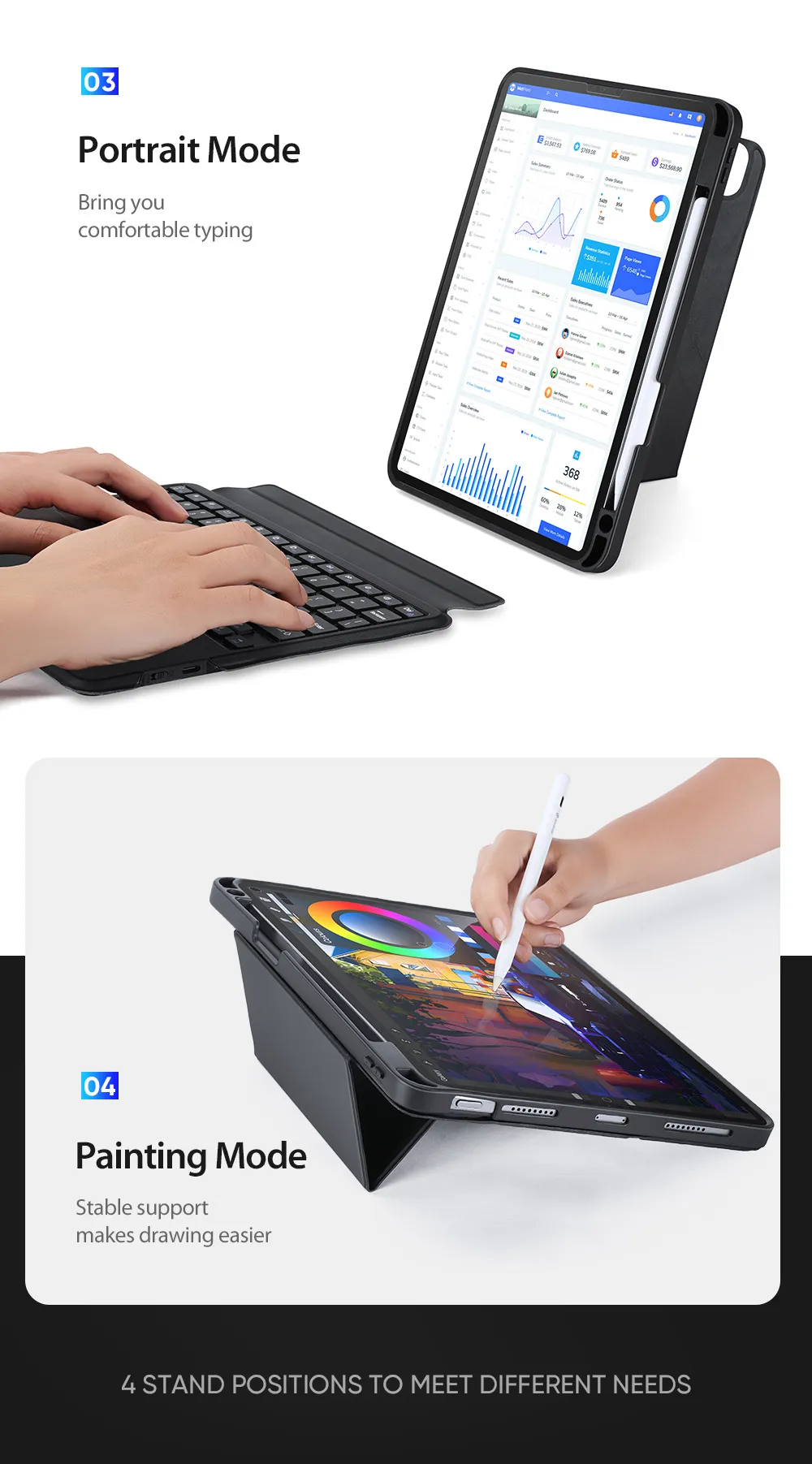
Anvers Ipad Pro 2024 keyboard case.

https://www.lazada.sg/products/anve...-111292018-2022-i2940991862-s20227206174.html

This brand seems to be reseller of OEM goods. https://anvers.sg/ (defunct)

Anvers have been established in Singapore since 2021 and we continue to build our strengths around tech gadgets that Singaporeans loved. With our office, we offer the local support that our customers love and continue to live up to fast delivery expectations of our customers.


b802404f122d24b12aa9f46b877f31c6.jpg_2200x2200q80.jpg_.webp


Review of older model:

Dux Ducis promotional video of older models:


Build quality: looks cheap. But functional. About 1kg.
 
Last edited:

stanlawj

Supremacy Member
Joined
Jul 11, 2021
Messages
8,520
Reaction score
4,502
Manage to buy ESR Rebound Magnetic Keyboard case 360, as it next to best resemble like apple Magic Keyboard for iPad pro. And I do also own the ESR Ascend Keyboard.

Am very happy that I upgrade case 360

I writing for the benefit for friends here deciding to get Ascend or 360…

Both weight is almost the same. & that is heavy. My work require me to travel around not just on road, but on flight as well. And having carrying both Ascend for 3 weeks and now 360, I find that the concern about the weight problem, naturally be forgotten.

Ascend have a larger mouse pad compare to 360 which is a smaller size. Unlike Ascend keyboard, 360 keyboard will have to be leave 3” space because of the iPad Pro hovering, therefore making it less space. And the keys on the keyboard is also bigger on Ascend. Therefore making Ascend typing, and track pad to have a better experience.

Although Ascend have an adjustable angle , but it will require to look down while work. Perviously I own logictech combo touch & it the same. Neck will feel tired and usually I will bring my head up to release the tension. But with 360, it elevate my ipad making my neck less stressful. And I can elevate my iPad to level 2 heigh, which the Apple Magic Keyboard is not able do so. Which I am very impress.

For some also ask me that Ascend and 360 have an inner case. Are they the same and if they are, will they work for both. The answer is no. they both have magnet, but both inner case magnet is in diff area. 360 magnet needs to hold the iPad to level 2 high.

I use my iPad most of the time. And reason I choosing ESR keyboard case, it is because I dont have to worry about expensive keyboard & it happen if spoilt kind of stuff. Easy to get same or other replacement.
Since you have the ESR Ascend and ESR Rebound 360 magnetic keyboard cases, can you let us know whether the case from the Rebound is able to stick magnetically on the Ascend's folding stand for tabletop use? Basically whether the cases are interchangeable between these two different models under ESR?
 
Last edited:

stanlawj

Supremacy Member
Joined
Jul 11, 2021
Messages
8,520
Reaction score
4,502
Logitech Keys To Go 2 for Ipad
This is a new Logitech Bluetooth-only keyboard with 3-multi-device (Ipad only) support.


36-months battery life at 2 hours/day, 2 user-replaceable coincell batteries, no backlight.

There are differences between the Ipad version vs regular version:
  • Ipad version only has key inscriptions for Ipad, none for other OS, also no Function (Fn) keys at all?
  • Ipad version sleep key replace del key on regular version. Because regular version backspace key is del in ipad version.
  • Ipad version has Globe key in the same position as Fn key in regular version, but regular cannot get back the Globe key (because Fn is a hardware switch function, and Logitech Options+ for remapping keys doesn't exist on Ipad. (Read more here) (What is the Globe key or Fn key in Mac).
  • regular version need to use Fn in conjunction with some keys to activate Ipad functions as secondary keys, but no Globe key can be seen (meaning not possible to get this key).
  • Ipad version does not have nice blue (actually lavender) color option, only dark grey or white :(.
TLDR: Ipad version only works with Ipads, and maybe Macs (but I don't know where the F1-F12 keys are to be found). 3 multi-device connection just means 3 different Ipads/Iphones/Macs(without F1-F12).

Since it has no trackpad, I suggest just buy Apple Trackpad if you really need it with this keyboard.
 
Last edited:

stanlawj

Supremacy Member
Joined
Jul 11, 2021
Messages
8,520
Reaction score
4,502
IMO this is the most flexible and lightest keyboard solution.

Y-fold case: $31
Logitech Keys-to-go 2 for Ipad: $120 (after discounts)
Apple Magic Trackpad 2: $160
Total = $311

embed


Keys-to-go 2 can pair with 3 Apple devices, i.e. it can share Apple devices (Iphone, Mac etc).

The trackpad is really optional because operating the Ipad touchscreen is more intuitive.
(Most of the time, that particular trackpad you see is being used with my Windows home PC instead).

There's really no need to buy Apple Magic Keyboard case.
 
Last edited:
Important Forum Advisory Note
This forum is moderated by volunteer moderators who will react only to members' feedback on posts. Moderators are not employees or representatives of HWZ Forums. Forum members and moderators are responsible for their own posts. Please refer to our Community Guidelines and Standards and Terms and Conditions for more information.
Top