MacBook Pro 15" late 2011

ukiake

Supremacy Member
Joined
Dec 8, 2006
Messages
7,478
Reaction score
14
i have a problem with my macbook pro 15" late 2011 the screen cant power on back logo apple no light screen totally black its like no power to it. can on hear chiam sound.
i change a brand new battery. cause is bloated.

i have done this few steps reset p.ram reset smc take out battery hold power button 10sec
i dont have external monitor to test.
 

reddevil0728

Great Supremacy Member
Joined
Dec 16, 2005
Messages
65,824
Reaction score
5,722
i have a problem with my macbook pro 15" late 2011 the screen cant power on back logo apple no light screen totally black its like no power to it. can on hear chiam sound.
i change a brand new battery. cause is bloated.

i have done this few steps reset p.ram reset smc take out battery hold power button 10sec
i dont have external monitor to test.
The next best step is really to find an external monitor to test, if not it might be dead
 

manofsorrows

Master Member
Joined
Jan 22, 2015
Messages
3,933
Reaction score
653
i have a problem with my macbook pro 15" late 2011 the screen cant power on back logo apple no light screen totally black its like no power to it. can on hear chiam sound.
i change a brand new battery. cause is bloated.

i have done this few steps reset p.ram reset smc take out battery hold power button 10sec
i dont have external monitor to test.
likely screen is dead. gonna be a chor repair for replacing the screen.
 

ukiake

Supremacy Member
Joined
Dec 8, 2006
Messages
7,478
Reaction score
14
i dont think the screen is dead.
when i change the battery and on.. the screen is able to do normally.
only after i reset NVRAM and P.ram. the screen totally black like theres no power to it.
 

everex

Senior Member
Joined
Jan 6, 2008
Messages
955
Reaction score
209
Perhaps time to upgrade as it’s already served ~12 years. 😁
 

szeli

Arch-Supremacy Member
Joined
Mar 24, 2003
Messages
21,376
Reaction score
3,119
just make an appointment at the  store and get it checked. find out what’s the issue. it’s free
 

ukiake

Supremacy Member
Joined
Dec 8, 2006
Messages
7,478
Reaction score
14

AHoser

Junior Member
Joined
Jun 23, 2018
Messages
8
Reaction score
0
The 2011 15" macbook pro has a known GPU issue. It is likely that this is your issue. You are lucky to have it operating until now! There was a repair program from Apple that was provided but that has since lapsed.

I would say keep rebooting the Mac and hope the screen comes back on.
 

abcdefgh123

Member
Joined
Apr 21, 2010
Messages
360
Reaction score
8
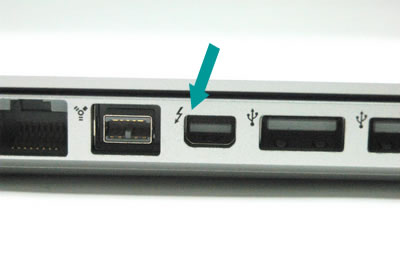
this is my macbook which one is for the mini dp to HDMI adapter slot?

beside usb port the square box
 

THFC78

Honorary Member
Joined
Mar 21, 2011
Messages
103,620
Reaction score
8,737
this is my macbook which one is for the mini dp to HDMI adapter slot?


The 4th port from the left, the one with thunderbolt symbol.

004528-1.jpg
 

THFC78

Honorary Member
Joined
Mar 21, 2011
Messages
103,620
Reaction score
8,737
The 2011 15" macbook pro has a known GPU issue. It is likely that this is your issue. You are lucky to have it operating until now! There was a repair program from Apple that was provided but that has since lapsed.

I would say keep rebooting the Mac and hope the screen comes back on.

Yeah, apart from replacing the chip, the other way to get your monitor back working again is to disable the faulty dGPU and forces the macbook to only use the integrated Intel graphics.

The downside is that you will lose the ability to drive an external display from the DisplayPort
 
Important Forum Advisory Note
This forum is moderated by volunteer moderators who will react only to members' feedback on posts. Moderators are not employees or representatives of HWZ Forums. Forum members and moderators are responsible for their own posts. Please refer to our Community Guidelines and Standards and Terms and Conditions for more information.
Top