MacBook Pro 2017 Touchbar Display issue

hereiam7788

Supremacy Member
Joined
Dec 10, 2015
Messages
5,220
Reaction score
973
anyone has the same display issue on macbook pro 2017 touchbar?

i have this horizontal lines appeared on mine. it turns out to ghosting issue after that. then eventually the screen will go flickering and eventually turn black.
 

grynove

Senior Member
Joined
Feb 7, 2006
Messages
1,535
Reaction score
49
you're not alone. im waiting orchard apple store to reopen. u can try connect external display. mine still works. build in display pretty much black.
 

hereiam7788

Supremacy Member
Joined
Dec 10, 2015
Messages
5,220
Reaction score
973
you're not alone. im waiting orchard apple store to reopen. u can try connect external display. mine still works. build in display pretty much black.

you are having the same issue as well?

which year and your model? macbook pro 2017 also?
 

lumpyme

Master Member
Joined
Mar 19, 2006
Messages
3,919
Reaction score
889
Seems pretty common, my office has a couple of MacBook Pro 2017 also got display issue
I suspect it's the display cable inside cannot take the flex from opening and closing the lid too many times
 

Noesis

Senior Member
Joined
Aug 26, 2008
Messages
1,127
Reaction score
39
You'll have to replace the whole screen. About $600+.

Source: I just did that a few weeks ago.
 

hereiam7788

Supremacy Member
Joined
Dec 10, 2015
Messages
5,220
Reaction score
973
You'll have to replace the whole screen. About $600+.

Source: I just did that a few weeks ago.

you did it at the apple authorised service centre like Qlab?

$600+ including diagnosis fee, labour charge and display replacement? how exactly they fix it?

did you have the exact same problem as mine?

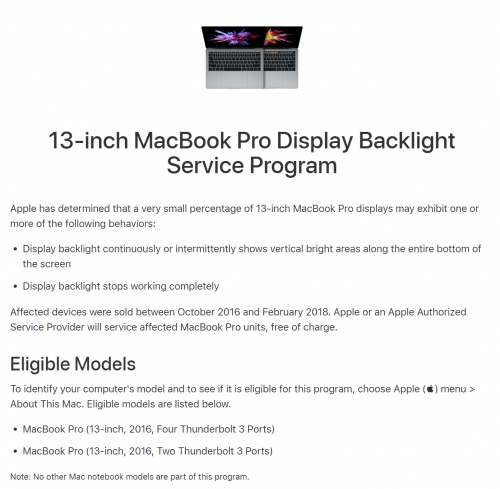
I seriously think that this is manufacturer defect that apple should replace it for free. They have the service program for free repair on this issue for 2016 MBP. the problem is exactly the same. no reason for mbp 2017 need to ownself fork out the money to repair.

apple orchard is opening soon, I will send in there for diagnosis instead, I will demand for free repair instead.
 

grynove

Senior Member
Joined
Feb 7, 2006
Messages
1,535
Reaction score
49
I'll update on my case next week. trying to find a slot at apple store orchard
 

hereiam7788

Supremacy Member
Joined
Dec 10, 2015
Messages
5,220
Reaction score
973
I'll update on my case next week. trying to find a slot at apple store orchard

yeah. i am experiencing exactly the same problem as shown in service program they have. i wonder why they did not include 2017 models which so many of us are experiencing too.

https://support.apple.com/en-sg/13-inch-macbook-pro-display-backlight-service

7ZWJVV.md.png


i have booked a lot at apple orchard on this coming wed, will update my status as well after that.
 

grynove

Senior Member
Joined
Feb 7, 2006
Messages
1,535
Reaction score
49
yeah this exactly what happened to my mac. and yes mine is 2016. even its not covered i think those flex cable wont be that expensive. can find alot of youtube video.flexgate. does yours start first with stage light symptoms?
 

hereiam7788

Supremacy Member
Joined
Dec 10, 2015
Messages
5,220
Reaction score
973
yeah this exactly what happened to my mac. and yes mine is 2016. even its not covered i think those flex cable wont be that expensive. can find alot of youtube video.flexgate. does yours start first with stage light symptoms?

if urs is 2016, it is safe. it is officially covered under the service program, it should be fixed for free.

mine is 2017, which is not covered. they may ask me to pay to fix i supposed.
but i need to demand them to fix for free as this is the same prob obviously. obviously the same problem affects 2016 to 2019 models as it is clearly a design flaw.

i am not sure how much does it cost to fix or whether it is as easy as to change a ribbon cable or so? obviously from the post earlier, someone has fixed it for the cost of $600 or more. this is ridiculuous.

mine does not starts with any stage light issue. but it is ghosting, flickering, screen off issues.
 

grynove

Senior Member
Joined
Feb 7, 2006
Messages
1,535
Reaction score
49
any idea when the timeslot reset to book for service appointment? very weird almost impossible to book appointment now
 

hereiam7788

Supremacy Member
Joined
Dec 10, 2015
Messages
5,220
Reaction score
973
they taking it for repair. 0$. its under the replacement program.

wah. good for you.:)

indeed 2016 models are cover under the repair program so it is supposed to be free anyway. ;)

mine is not so lucky. mine is 2017 model. and the lady at apple told me that mine is not the same problem as the backlight issue of 2016 models which is stage-like effect.

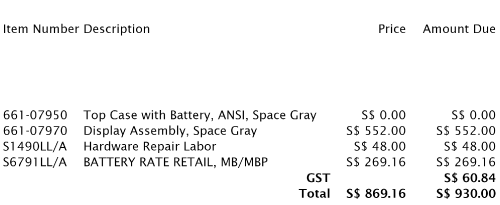
if mine to get repaired, it will cost sgd642. this is the same as one of the bros said here. he said he got it repaired at sgd6xx too.

to make thing worse, when she checked my macbook, she said the battery was already bloated and they can only repair my macbook after they replace the battery which costs sgd288. She said that because I connect my macbook to the power source all the time, so the battery got overcharged thus it gets bloated even after one year of usage.

total cost to fix the display + replace of battery cost = sgd930 which is insane. to get a new macbook pro which is similar to my current spec will cost about sgd2549 which comes with much better spec (my old one is alredy 3 years old now) and new battery too.

now i need to spend 36.48% of the price of a new macbook pro to fix my current one which is totally not worth it.

7gRciA.md.png


i hope eventually this display problem of 2017 macbook pro will be included in a new repair program. I am sure more with the 2017 macbook pro will surface the issues to apple soon. Most of owners like me have the problem surfaced since march 2020.

I had just bought a new sgd220 Dell 23-inch monitor to use it as the external display for my 2017 macbook pro. since i do not use my macbook pro on the go nowadays which my macbook is on 24x7 at home. I think it is the best solution for my case now. bigger display - better for entertainment and productivity than the 13-inch built-in display too.

if i really need a macbook on the go, i will just buy a new macbook pro instead. with this, i have two macbooks i can use for both home and on the go too.

 

grynove

Senior Member
Joined
Feb 7, 2006
Messages
1,535
Reaction score
49
you are rite not worth it. anyway part number is the same with the one they gave to me.
any idea about the keyboard replacement program are they replacing with the exact same thing or slightly different design. i see mixed review about it.
 

hereiam7788

Supremacy Member
Joined
Dec 10, 2015
Messages
5,220
Reaction score
973
you are rite not worth it. anyway part number is the same with the one they gave to me.
any idea about the keyboard replacement program are they replacing with the exact same thing or slightly different design. i see mixed review about it.

should be the same, as 2017 vs 2016, both are having the same hardware, including the keyboard etc. that's why it makes no sense why 2017 is not covered under the repair program.

likey replacement keybaord will have the newer design that has extra silicon underneath the keys.
 

JigSaw

Member
Joined
Jul 16, 2008
Messages
261
Reaction score
6
sorry for bumping an old thread

anyone managed to get the flexgate replace at Apple recently under the replacement program?

https://support.apple.com/en-sg/13-inch-macbook-pro-display-backlight-service
my 2016 model just started showing the stage light effect these few days and I have been trying to get them to replace via store appointments and support calls but they are quite adamant about not doing it for free because I'm late to the program (program started 2019 + 3 years validity)

not willing to pay for a manufacturer's defect that surfaced late :mad:
 

hereiam7788

Supremacy Member
Joined
Dec 10, 2015
Messages
5,220
Reaction score
973
sorry for bumping an old thread

anyone managed to get the flexgate replace at Apple recently under the replacement program?

https://support.apple.com/en-sg/13-inch-macbook-pro-display-backlight-service
my 2016 model just started showing the stage light effect these few days and I have been trying to get them to replace via store appointments and support calls but they are quite adamant about not doing it for free because I'm late to the program (program started 2019 + 3 years validity)

not willing to pay for a manufacturer's defect that surfaced late :mad:

u are late for the game. ur 2016 macbook pro is already inside their 'vintage' list. ;)

https://support.apple.com/en-sg/HT201624
 
Important Forum Advisory Note
This forum is moderated by volunteer moderators who will react only to members' feedback on posts. Moderators are not employees or representatives of HWZ Forums. Forum members and moderators are responsible for their own posts. Please refer to our Community Guidelines and Standards and Terms and Conditions for more information.
Top