Maiden DIY project

imohan1911

Member
Joined
Feb 8, 2005
Messages
137
Reaction score
0
Just completed a skills future sponsored computer maintenance course and very thrilled to put what i have learnt into practice. I should not have problem in coming up with a low budget generic computer. However i want to take on some challenges if i can say so. I have learnt about this UEFI features that allows for fan management which in turn will lead to quiet computing.

I am considering incorporating this UEFI featured MB for my project but because of the cost involved i need some advise of the gurus here. Before proceeding any further allow me list down what the desktop is going to be used for. General web browsing and entry level gaming and video editing. Btw i have never played games or video editing before so please bear with me if i did not provide sufficient details. Hope to get answers to the following questions :

Is the UEFI feature worth the investment?
Which is the cheapest MB that that comes with UEFI?
And what kind of a configuration would you suggest for a retiree on a shoe string budget?. ( No UEFI also can liao).
 

Koenig168

Supremacy Member
Joined
Nov 4, 2007
Messages
9,879
Reaction score
1,647
UEFI is the modern version of BIOS, both of which control a computer's hardware.

Newer motherboards will come with UEFI instead of BIOS but for the practical stuff, there is little you need to do in UEFI which you can't already do in BIOS.

A new computer with all the requisite peripherals will set you back at least 1K. You can consider used computers. LGA775 systems are dirt cheap but perfectly adequate for light usage.
 

Koenig168

Supremacy Member
Joined
Nov 4, 2007
Messages
9,879
Reaction score
1,647
I've PMed you a link for a used LGA775 rig. Cheap way to get started on PCs.

P.S. I'm not the seller.
 

imohan1911

Member
Joined
Feb 8, 2005
Messages
137
Reaction score
0
I've PMed you a link for a used LGA775 rig. Cheap way to get started on PCs.

P.S. I'm not the seller.

Thanks for the suggestion. Sure looks like a good deal. But nothing beats the experience of building one from scratch. That is my objective.
 

spiky0180

Senior Member
Joined
Jul 16, 2009
Messages
539
Reaction score
0
Perhaps you let us know what is your exact budget so that the guys here can recommend you something since you are really dead-sure that you want to DIY from scratch.

Also if you are able to give more details for entry level gaming and video editing will be helpful. Playing casual MOBA games vs Fallout 4 can be quite different.
 

imohan1911

Member
Joined
Feb 8, 2005
Messages
137
Reaction score
0
Appreciate your comments Spiky, as I mentioned fm the onset that i have never played any games be it h/p or PC. I really do not know what to specify. If MOBA is the least demanding game that is good to go for me. As for video editing just able to do the following task. Nothing commercial just want to keep myself occupied as i am entering semi retirement.

Rearranging, adding and/or removing sections of video clips and/or audio clips.
Applying colour correction, filters and other enhancements.
Creating transitions between clips.

As for the budget $600 without the monitor. Possible?
 

spiky0180

Senior Member
Joined
Jul 16, 2009
Messages
539
Reaction score
0
Appreciate your comments Spiky, as I mentioned fm the onset that i have never played any games be it h/p or PC. I really do not know what to specify. If MOBA is the least demanding game that is good to go for me. As for video editing just able to do the following task. Nothing commercial just want to keep myself occupied as i am entering semi retirement.

Rearranging, adding and/or removing sections of video clips and/or audio clips.
Applying colour correction, filters and other enhancements.
Creating transitions between clips.

As for the budget $600 without the monitor. Possible?

Not impossible, but will need to compromise a little bit on the components. I am thinking something along the lines of:

i3 4160 + Asrock H81M-HDS
Kingston DDR3 8gb Valueram
Western Digital 1tb HDD
Palit 750ti Stormx dual
FSP 300W OEM
Coolermaster N200 case

Estimate about $600+. Can consider buying RAM and 750ti from lazada for more discounts. Wait for other forumers to advise on how to further stretch your budget.This is the best I can come up with thus far. But should have no problems playing MOBA, CS:GO and other non-graphic intensive games.
 

imohan1911

Member
Joined
Feb 8, 2005
Messages
137
Reaction score
0
Not impossible, but will need to compromise a little bit on the components. I am thinking something along the lines of:

i3 4160 + Asrock H81M-HDS
Kingston DDR3 8gb Valueram
Western Digital 1tb HDD
Palit 750ti Stormx dual
FSP 300W OEM
Coolermaster N200 case

Estimate about $600+. Can consider buying RAM and 750ti from lazada for more discounts. Wait for other forumers to advise on how to further stretch your budget.This is the best I can come up with thus far. But should have no problems playing MOBA, CS:GO and other non-graphic intensive games.

No issue with the compromise. Looks neat. Cant wait to get started:s12::s12:. Thanks a million.
 

shadow84

High Supremacy Member
Joined
Apr 15, 2009
Messages
34,278
Reaction score
419
Not impossible, but will need to compromise a little bit on the components. I am thinking something along the lines of:

i3 4160 + Asrock H81M-HDS
Kingston DDR3 8gb Valueram
Western Digital 1tb HDD
Palit 750ti Stormx dual
FSP 300W OEM
Coolermaster N200 case

Estimate about $600+. Can consider buying RAM and 750ti from lazada for more discounts. Wait for other forumers to advise on how to further stretch your budget.This is the best I can come up with thus far. But should have no problems playing MOBA, CS:GO and other non-graphic intensive games.

No ssd? A 240gb ssd is quite cheap.

Also, do consider msi h81m e35. Diff is that it has 4 usb3.0 at back as compared to 2 on asrock
 

imohan1911

Member
Joined
Feb 8, 2005
Messages
137
Reaction score
0
No ssd? A 240gb ssd is quite cheap.

Also, do consider msi h81m e35. Diff is that it has 4 usb3.0 at back as compared to 2 on asrock

Noted yr comments. SSD looks like a luxury with $600 budget. Nevertheless once get the basics going will be motivated to invest in a SSD. Compared the specs of the 2MB
MSI H81M - HDS : 4 USB 3.0 ports, No integrated graphic card
ASRock H81M-HDS : 2 USB 3.0 ports, c/w Integrated graphic card

One has more usb 3.0 ports but at the expense of an integrated graphic card. Now i am confused. Since i already have a dedicated graphic card does it make sense to go for the one with more USB 3.0 ports or just stick with the graphic card and add usb 3.0 hubs
 

alifffresto

Senior Member
Joined
Oct 2, 2013
Messages
1,636
Reaction score
286
Noted yr comments. SSD looks like a luxury with $600 budget. Nevertheless once get the basics going will be motivated to invest in a SSD. Compared the specs of the 2MB
MSI H81M - HDS : 4 USB 3.0 ports, No integrated graphic card
ASRock H81M-HDS : 2 USB 3.0 ports, c/w Integrated graphic card

One has more usb 3.0 ports but at the expense of an integrated graphic card. Now i am confused. Since i already have a dedicated graphic card does it make sense to go for the one with more USB 3.0 ports or just stick with the graphic card and add usb 3.0 hubs

integrated graphics is by your cpu not motherboard, unless you talk about the olden days.
 

kandinsky

Master Member
Joined
Jan 7, 2015
Messages
4,693
Reaction score
10
MSI H81M - HDS : 4 USB 3.0 ports, No integrated graphic card
ASRock H81M-HDS : 2 USB 3.0 ports, c/w Integrated graphic card

One has more usb 3.0 ports but at the expense of an integrated graphic card. Now i am confused. Since i already have a dedicated graphic card does it make sense to go for the one with more USB 3.0 ports or just stick with the graphic card and add usb 3.0 hubs

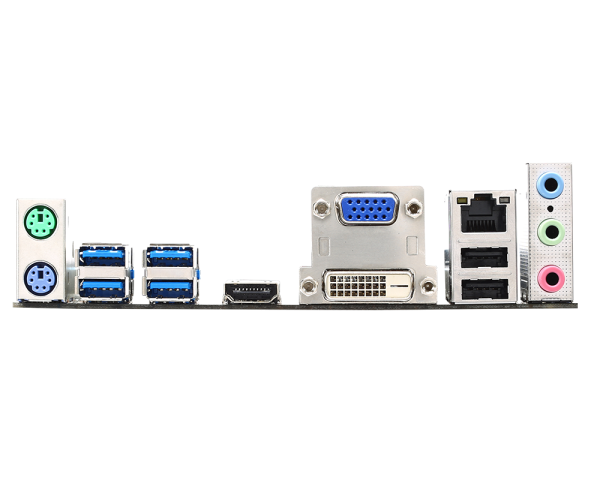
There's no MSI H81M-HDS, I think you meant H81M-E35, which was what shadow84 recommended. If the price doesn't differ too much, of course always better to go for the one with more built-in ports.

Based on the specs it does support CPU with integrated graphics. It wouldn't come with these ports if it didn't.

600.png


- 1 x HDMI port, supporting the maximum resolutions of 2560x1600@60Hz, 24bpp/ 1920x1080@60Hz, 36bpp
- 1 x VGA port, supporting a maximum resolution of 1920x1200@60Hz, 24bpp
- 1 x DVI-D port, supporting a maximum resolution of 1920x1200@60Hz, 24bpp

https://www.msi.com/Motherboard/H81M-E35-V2.html#hero-specification
 

shadow84

High Supremacy Member
Joined
Apr 15, 2009
Messages
34,278
Reaction score
419
Noted yr comments. SSD looks like a luxury with $600 budget. Nevertheless once get the basics going will be motivated to invest in a SSD. Compared the specs of the 2MB
MSI H81M - HDS : 4 USB 3.0 ports, No integrated graphic card
ASRock H81M-HDS : 2 USB 3.0 ports, c/w Integrated graphic card

One has more usb 3.0 ports but at the expense of an integrated graphic card. Now i am confused. Since i already have a dedicated graphic card does it make sense to go for the one with more USB 3.0 ports or just stick with the graphic card and add usb 3.0 hubs

Igpu is by cpu, not mobo.
 
Important Forum Advisory Note
This forum is moderated by volunteer moderators who will react only to members' feedback on posts. Moderators are not employees or representatives of HWZ Forums. Forum members and moderators are responsible for their own posts. Please refer to our Community Guidelines and Standards and Terms and Conditions for more information.
Top