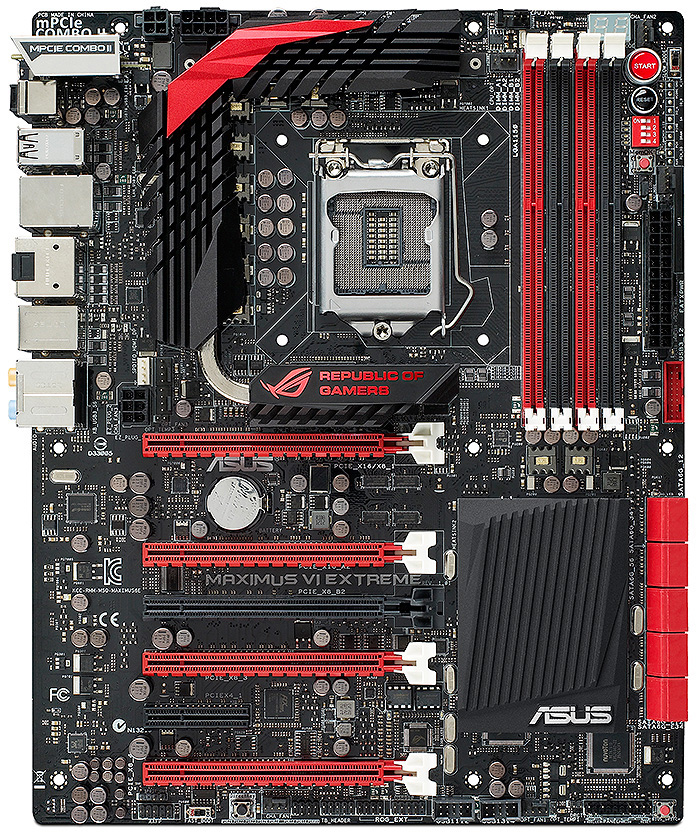
Maximus Vi Extreme

ducati_848

Member
Joined
Apr 26, 2008
Messages
202
Reaction score
0
Hi, anybody familiar with the above mobo diagnostic no power up issue? Checked all power cords and psu, both are in working condition. Tested with a spare mobo, everything work whereas install the above mobo, it only show a little orange light on the mobo but can’t power on.
 

86technie

High Supremacy Member
Joined
Jun 8, 2006
Messages
40,356
Reaction score
5,948
ROG_Maximus_VI_Extreme-1.jpg


- Check the top the QCode LED, what is the code.
Hopefully it is not 00 as this means mobo issue.

- If QCode LED is not 00.
The Diagnostic LED beside the 24pin ATX power connector.
If CPU/DRAM lit up, most likely RAM issue.

- Change CMOS battery

High chance is RAM issue that is if there are no code 00 if not....
FYI brand new DDR3 RAMs still can brought at SLS like Fuwell.
 

ducati_848

Member
Joined
Apr 26, 2008
Messages
202
Reaction score
0
ROG_Maximus_VI_Extreme-1.jpg


- Check the top the QCode LED, what is the code.
Hopefully it is not 00 as this means mobo issue.

- If QCode LED is not 00.
The Diagnostic LED beside the 24pin ATX power connector.
If CPU/DRAM lit up, most likely RAM issue.

- Change CMOS battery

High chance is RAM issue that is if there are no code 00 if not....
FYI brand new DDR3 RAMs still can brought at SLS like Fuwell.

Hi, thank for revert. All those that you mentioned issues are not there. When I try to press the power on button, there no number appear on the mobo and no beep sound and it only show a small little orange light on it mobo. Replaced Cmos battery still cannot power on.
 

86technie

High Supremacy Member
Joined
Jun 8, 2006
Messages
40,356
Reaction score
5,948
Hi, thank for revert. All those that you mentioned issues are not there. When I try to press the power on button, there no number appear on the mobo and no beep sound and it only show a small little orange light on it mobo. Replaced Cmos battery still cannot power on.

Any photo of the orange light? Any wording beside it like DRAM, Boot or something.
 

ducati_848

Member
Joined
Apr 26, 2008
Messages
202
Reaction score
0
I never took a picture on that, from what I know, the small orange light appeared somewhere near the gpu slot area. I think that might be the bios light for switching from bios 1- bios 2 if I’m correct.
 

86technie

High Supremacy Member
Joined
Jun 8, 2006
Messages
40,356
Reaction score
5,948
I never took a picture on that, from what I know, the small orange light appeared somewhere near the gpu slot area. I think that might be the bios light for switching from bios 1- bios 2 if I’m correct.

Have you tried toggling between both BIOS?
 

ducati_848

Member
Joined
Apr 26, 2008
Messages
202
Reaction score
0
I have tried pressing on the bios button and it seem that the orange light won’t switch. Normally when installed and power on it will show some number coding on the top right. Now mobo totally cannot power on.
 

Koenig168

Arch-Supremacy Member
Joined
Nov 4, 2007
Messages
10,037
Reaction score
1,748
You can test with the minimum number of parts installed i.e. single stick of RAM, iGPU etc and see if it will power on.
 

ducati_848

Member
Joined
Apr 26, 2008
Messages
202
Reaction score
0
Already tried those methods while goggle search. None of them work & I’m pretty sure it might due to mobo issues which I can’t figure out what causes it. Maybe there some experts out there can solve. If mobo rip, I assume that the bios orange light would not be light up right?
 

86technie

High Supremacy Member
Joined
Jun 8, 2006
Messages
40,356
Reaction score
5,948
I have tried pressing on the bios button and it seem that the orange light won’t switch. Normally when installed and power on it will show some number coding on the top right. Now mobo totally cannot power on.

Yap that is correct usually if mobo starts the top QCode LED should show something.
If you want, you can consider bring to PC care and solutions at SLS let them diagnose.
Given the situation, mobo most likely dead.

You can also try testing the mobo on a open test bench.
 
Important Forum Advisory Note
This forum is moderated by volunteer moderators who will react only to members' feedback on posts. Moderators are not employees or representatives of HWZ Forums. Forum members and moderators are responsible for their own posts. Please refer to our Community Guidelines and Standards and Terms and Conditions for more information.
Top