

tangpx
Senior Member
- Joined
- Oct 29, 2000
- Messages
- 768
- Reaction score
- 10
tried the new firmware... still same speed issues with MR 1Gbps
what is wrong w Asus :/
unable to download.
tried the new firmware... still same speed issues with MR 1Gbps
what is wrong w Asus :/

Local set with warranty?
i have purchased the RT-AC68U from qoo1O Video-Pro.Com On-Line Store,
offer price $339- qoo discount $2.00 - qoo point $10.00 = $327


Saw Shockwave selling local set, 3 yrs warranty, for $290.
Dunno is it net price or not.
Dunno whether this is allowed or not:any url link? or where is this seller?
singtel 500mbpsi have purchased the RT-AC68U from qoo1O Video-Pro.Com On-Line Store,
offer price $339- qoo discount $2.00 - qoo point $10.00 = $327

Hi,
I just got my RT-AC68U couple of days back. Connection is ok when browsing static page. Whenever loading youtube video the feed will freezing and I can either jump to another frame or reload the entire video. Even when doing so it will still freeze at the same point. It's buffering seem to stop entirely. I am experiencing this on both wireless 2.4Ghz and 5Ghz.
I did try to make a direct connection from laptop LAN to ONT box. No problem with youtube feed.
Strangely the wireless seem to be giving some problem. current firmware is 5656.
Anyone knows what can be done to overcome this problem?
Hi, just got the RT-AC 68U, try setting up my singnet connection to the ONT. But it keep prompting that it can't detect the set up type. I just choose automatic detect for most of the setting. Is there anything miss out or must manually configure for singnet?

Hi, just got the RT-AC 68U, try setting up my singnet connection to the ONT. But it keep prompting that it can't detect the set up type. I just choose automatic detect for most of the setting. Is there anything miss out or must manually configure for singnet?
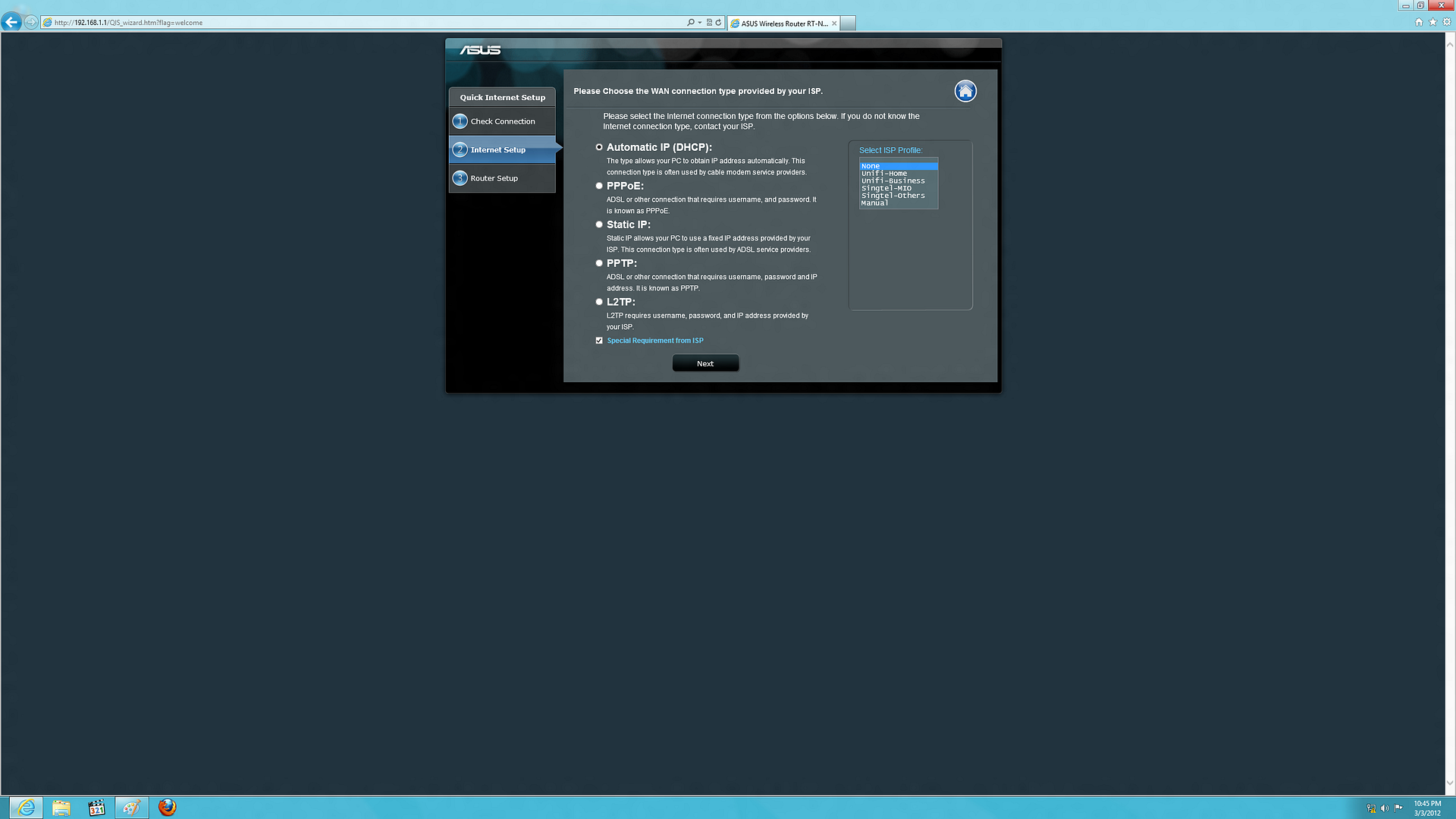
Singtel-MIO Preset
 TP
 l
 ONT
 l
 Asus RT-N66U /N56U
 l
 l--Port1--> Computer
 l--Port2--> Computer
 l--Port3--> 2Wire --> mioVoice
 l--Port4--> mioTV


Singtel-Others Preset
 TP
 l
 ONT
 l
 Asus RT-N66U /N56U
 l
 l--Port1--> Computer
 l--Port2--> Computer
 l--Port3--> Computer
l--Port4--> mioTVYou need to tick the special requirements from ISP and select either SingTel MIO or SingTel others depending on your setup.
Code:Singtel-MIO Preset TP l ONT l Asus RT-N66U /N56U l l--Port1--> Computer l--Port2--> Computer l--Port3--> 2Wire --> mioVoice l--Port4--> mioTV Singtel-Others Preset TP l ONT l Asus RT-N66U /N56U l l--Port1--> Computer l--Port2--> Computer l--Port3--> Computer l--Port4--> mioTV
Diagram by ngbc
Thanks for the info, so meaning if i need MIO TV than choose Sing Tel Mio? if not just choose Sing Tel Others will do?
The new firmware fix ViewQwest IPV6?

Nope, not yet from what i know.


Hi I need some advise on what is the optimal speed I should get for LAN, 2.4GHz and 5.0 GHz?
I am currently on MR 1Gbps with RT-AC68U and I am testing on network adapter Dell wireless 1540 80211a/g/n (2.4 GHz/ 5.0 GHz) and my firmware is on 5656.
Connection direct to ONT = 900 +/- Mbps
Connection via LAN to RT-AC68U = 900 +/- Mbps
Connection via 2.4Ghz to RT-AC68U = 75 +/- Mbps
Connection via 5.0Ghz to RT-AC68U = 95 +/- Mbp
TIA!

