
Some users faced the issue of wireless instability which I think is not a new thing with MikroTik wireless router.Not sure if anyone is using the following MikroTik Wifi 6 router. The cost is quite reasonable.
hAP ax2: Quad-Core CPU ARM64 IPQ6010, 1GB RAM, 5-port Gigabit Ethernet (one with PoE out), Wifi 6 AX1800
https://mikrotik.com/product/hap_ax2 (around S$168)
https://www.lazada.sg/products/mikr...l-band-wireless-i2575045060-s16271034763.html
hAP ax3: Quad-Core CPU ARM64 IPQ6010, 1GB RAM, 2.5G port + 4-port Gigabit Ethernet (1 with PoE out), USB 3 port, Wifi 6 AX1800
https://mikrotik.com/product/hap_ax3 (around S$238)
https://www.lazada.sg/products/mikr...-portal-hotspot-i2639402389-s16905411352.html
You are using an out of date browser. It may not display this or other websites correctly.
You should upgrade or use an alternative browser.
You should upgrade or use an alternative browser.
MikroTik Router/Switch/Wireless
- Thread starter s_alagas
- Start date
More options
Who Replied?- Joined
- Sep 16, 2018
- Messages
- 36,442
- Reaction score
- 12,355
Some users faced the issue of wireless instability which I think is not a new thing with MikroTik wireless router.
Indeed a quick Google search shows that there are some WiFi issues reported for hAP ax2 and the previous generation hAP ac2. hAP ax3 is relatively new but it seems to have some WiFi issues as well.
I actually have the hAP ac2 but I just played it a bit. My intention was to use it as a learning playground and later a managed switch. But my experiment did not go very far.
Their routers and switches are quite powerful or feature-rich but with a steep learning curve.Indeed a quick Google search shows that there are some WiFi issues reported for hAP ax2 and the previous generation hAP ac2. hAP ax3 is relatively new but it seems to have some WiFi issues as well.
I actually have the hAP ac2 but I just played it a bit. My intention was to use it as a learning playground and later a managed switch. But my experiment did not go very far.

- Joined
- Jan 17, 2001
- Messages
- 8,889
- Reaction score
- 4,902
I didn't find the learning curve that steep with Winbox. It's not too different from Ubiquiti's Edge series imo.Their routers and switches are quite powerful or feature-rich but with a steep learning curve.
My first few EdgeRouters I set up entirely via CLI, so that was a much steeper learning curve.

TanKianW
Supremacy Member
- Joined
- Apr 21, 2005
- Messages
- 6,911
- Reaction score
- 3,620
There are quite a few users of MikroTik’s appliance which I come across who thought that upgrading ROS is “upgrading the firmware”. But actually, after upgrading ROS, you still need to upgrade the firmware from System-> RouterBOARD -> Upgrade, followed by a reboot. Just in case some wondered why their MikroTik hardware are buggy.
Reason why there is “current firmware” and “upgrade firmware” under the RouterBOARD section:

Sometimes, your MikroTik appliance just do not register the changes made no matter how much you configure on Winbox. You can verify the configuration using the “export” command over Terminal. During such scenario, only a hard reset and reconfigure will resolve it.
I will say for most, a simple configuration over Winbox/Webfig will get your MikroTik appliance up and running in no time. Even though the more advanced firewall rules will require a more competent guy with understanding of Linux networking to do the job. I had a few hAP ac3 on the field that worked really well. At the same time, MikroTik also gives you so much granular control (even CLI) that most just do not get to use it. This could sometimes be its own Achilles' heel.
Reason why there is “current firmware” and “upgrade firmware” under the RouterBOARD section:
Sometimes, your MikroTik appliance just do not register the changes made no matter how much you configure on Winbox. You can verify the configuration using the “export” command over Terminal. During such scenario, only a hard reset and reconfigure will resolve it.
I will say for most, a simple configuration over Winbox/Webfig will get your MikroTik appliance up and running in no time. Even though the more advanced firewall rules will require a more competent guy with understanding of Linux networking to do the job. I had a few hAP ac3 on the field that worked really well. At the same time, MikroTik also gives you so much granular control (even CLI) that most just do not get to use it. This could sometimes be its own Achilles' heel.
Last edited:
TanKianW
Supremacy Member
- Joined
- Apr 21, 2005
- Messages
- 6,911
- Reaction score
- 3,620
The hAP AC/AX series can also be managed by CAPSMAN, so that's pretty cool that one of them can be designated as the AP controller, and the rest just added to easily expand the network.
Users can also add APs to their hAP, since they are very competitively priced. I've seen wall-mounted 802.11ac APs going for some $50-ish.
I've been testing a CCR for a few weeks now, and I like it quite a bit. The learning curve is there, but it's doable if one has a general understanding of what's happening. I still need guides tho, since I'm not fully familiar with the interface. I like Winbox tho, and its ability to connect to RouterOS via MAC address is pretty cool.
I can only find a few places for help and plenty of reading. They are the MikroTik wiki (which seems to be out of date for some topics with ROSv7), the newer MikroTik help net and MikroTik community forum. As for walkthrough on some specific topic, you can check out “networkberg” on YT. But take note that he is a more “wired network guy” rather than a “wireless network guy”.
As for practice and hands-on it will be over a physical CCR (like what you are doing), a CHR on a hypervisor or just over the EVE-ng network emulator, esp if you are learning and figuring out the L3HW, OSPF, BGP, MPLS functions on ROSv7.
Last edited:
- Joined
- Jan 17, 2001
- Messages
- 8,889
- Reaction score
- 4,902
For sure, the CCR has replaced my ERL3 as my router. pfSense is sitting in cold storage due to the weird ability on StarHub of dropping IPv6. radvd crashes, and I have a hunch StarHub misconfigured their IPv6 - for one, putting their v6 server within the BOGON address list is pretty bad imo.
I can only find a few places for help and plenty of reading. They are the MikroTik wiki (which seems to be out of date for some topics with ROSv7), the newer MikroTik help net and MikroTik community forum. As for walkthrough on some specific topic, you can check out “networkberg” on YT. But take note that he is a more “wired network guy” rather than a “wireless network guy”.
As for practice and hands-on it will be over a physical CCR (like what you are doing), a CHR on a hypervisor or just over the EVE-ng network emulator, esp if you are learning and figuring out the L3HW, OSPF, BGP, MPLS functions on ROSv7.
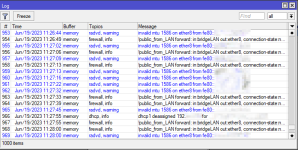
I've been getting this error thrown up in my logs for the WAN/StarHub port on the Mikrotik every few seconds: invalid mtu 1586 on ether8 from fe80::<redactacted>. Wonder if it's the reason why radvd crashes on pfsense every day or so.
Last edited:
TanKianW
Supremacy Member
- Joined
- Apr 21, 2005
- Messages
- 6,911
- Reaction score
- 3,620
For sure, the CCR has replaced my ERL3 as my router. pfSense is sitting in cold storage due to the weird ability on StarHub of dropping IPv6. radvd crashes, and I have a hunch StarHub misconfigured their IPv6 - for one, putting their v6 server within the BOGON address list is pretty bad imo.
I've been getting this error thrown up in my logs for the WAN/StarHub port on the Mikrotik every few seconds: invalid mtu 1586 on ether8 from fe80::<redactacted>. Wonder if it's the reason why radvd crashes on pfsense every day or so.
View attachment 40329
If I read it correctly (I may be wrong), the error log seems to imply that there is an invalid mtu size. Not sure if your port (ether8) is a “bridge” member and WAN facing, causing the MTU error. *Just a guess…
Since looking at the error logs might just be a one-sided story. Exporting your config (from terminal), remove the sensitive data and paste here might help on checking thru the config.
Last edited:
- Joined
- Jan 17, 2001
- Messages
- 8,889
- Reaction score
- 4,902
It's not a bridge member, but yeah it is my WAN facing uplink port. I haven't had time to sanitise my config.
If I read it correctly (I may be wrong), the error log seems to imply that there is an invalid mtu size. And your ether8 on a bridge might be “WAN facing”. Not sure if your WAN facing port (ether8) is a “bridge” member, causing the MTU error. *Just a guess…
Since looking at the error logs might just be a one-sided story. Exporting your config (from terminal), remove the sensitive data and paste here might help on checking thru the config.
Was just a bit surprised the MTU is 1586, but admittedly I haven't got around to calculating it.
TanKianW
Supremacy Member
- Joined
- Apr 21, 2005
- Messages
- 6,911
- Reaction score
- 3,620
Just sharing my personal experience.
Overall, I like the MikroTik CRS series switches which comes with dual boot SwOS/ROS. MikroTik offers great value with their L3HW offload features when deploy together with their CCR, but (L3HW) does not play well with pfsense, and only resorted to L2 features.
I have deployed several of their 10G/25G CRS switches (for connecting to enterprise servers/services), some upgrade to my client’s infrastructures and find them rock solid (except for a case fan which I need to replace on a CRS312). Most importantly it comes with a reasonable price tag with lots of granular control/features that is not held back by the software (ROS). For the network savvy bunch of homelabers, I think it is worth exploring and give it a try. You will be greatly rewarded.
Overall, I like the MikroTik CRS series switches which comes with dual boot SwOS/ROS. MikroTik offers great value with their L3HW offload features when deploy together with their CCR, but (L3HW) does not play well with pfsense, and only resorted to L2 features.
I have deployed several of their 10G/25G CRS switches (for connecting to enterprise servers/services), some upgrade to my client’s infrastructures and find them rock solid (except for a case fan which I need to replace on a CRS312). Most importantly it comes with a reasonable price tag with lots of granular control/features that is not held back by the software (ROS). For the network savvy bunch of homelabers, I think it is worth exploring and give it a try. You will be greatly rewarded.
I find the routerOS is really great for understanding how things work. Everytime after making a configuration, I always learn something new from the process.
For example, port forwarding is like a magic function in all other routers, you set it then it will magically"forward"the request. But in routerOS it's not called port forwarding, it's configured under NAT which is how the "forwarding" works.
So it forces you to understand the concept before you can successfully change the setting. Thus trial and error with routerOS is quite rewarding.
For example, port forwarding is like a magic function in all other routers, you set it then it will magically"forward"the request. But in routerOS it's not called port forwarding, it's configured under NAT which is how the "forwarding" works.
So it forces you to understand the concept before you can successfully change the setting. Thus trial and error with routerOS is quite rewarding.
- Joined
- Sep 16, 2018
- Messages
- 36,442
- Reaction score
- 12,355
I find the routerOS is really great for understanding how things work. Everytime after making a configuration, I always learn something new from the process.
For example, port forwarding is like a magic function in all other routers, you set it then it will magically"forward"the request. But in routerOS it's not called port forwarding, it's configured under NAT which is how the "forwarding" works.
So it forces you to understand the concept before you can successfully change the setting. Thus trial and error with routerOS is quite rewarding.
Interesting perspective. I have not played with routerOS much myself.
Personally I use OpenWRT for similar reasons. It is not as smooth as pfSense but the good thing is that I can see all the configuration files after changing the configurations. For certain functions there is almost no way to use GUI but force you to use command line -- which I actually think is a good thing.
After a while, it becomes no fun for me to use pfSense since the GUI is so good.
On a similar note, I like Asus router as well. After the installation of Entware (with or without Merlin), it becomes a Linux computer. It is nice to be able to run many networking related Linux utilites from within the router (using SSH).
- Joined
- Jan 17, 2001
- Messages
- 8,889
- Reaction score
- 4,902
Yes, I enjoy my mikrotik because it forces me to know what I'm doing. That in itself is rewarding.I find the routerOS is really great for understanding how things work. Everytime after making a configuration, I always learn something new from the process.
For example, port forwarding is like a magic function in all other routers, you set it then it will magically"forward"the request. But in routerOS it's not called port forwarding, it's configured under NAT which is how the "forwarding" works.
So it forces you to understand the concept before you can successfully change the setting. Thus trial and error with routerOS is quite rewarding.
Even setting it up from scratch is not automated or scripted (there is a default setup, but I don't use it). Purposefully designating a port with an intention, finding which ports are connected to the switch chip, designating WAN/LAN etc. Even firewall rules - we can always copy/paste a script, but most of us know to at least read through the script to make sure it's correct.
Funny how I stopped using pfSense after switching to Starhub, only because that IPv6 was unstable. Mikrotik gives a very stable IPv6, which is lovely. It also reboots so much quicker, to my delight.
- Joined
- Sep 16, 2018
- Messages
- 36,442
- Reaction score
- 12,355
Using GNS3 Open Source Emulator to learn MikroTik networking
- Joined
- Sep 16, 2018
- Messages
- 36,442
- Reaction score
- 12,355
CHR Licensing fee does not seem to be expensive, especially for P1 at US$45 and P10 at US$95.
All about CHR Licensing.
Installation of CHR under Proxmox.
All about CHR Licensing.
Installation of CHR under Proxmox.

BBCWatcher
Arch-Supremacy Member
- Joined
- Jun 15, 2010
- Messages
- 24,614
- Reaction score
- 5,598
Fairly recently MikroTik released some upgraded Wi-Fi driver packages with many functional improvements. They're compatible with many but not all MikroTik products with Wi-Fi radios. The driver package name is "wifi-qcom-ac" for compatible 802.11ac devices and "wifi-qcom" for 802.11ax devices. They replace the "wireless" and "WifiWave2" driver packages. (The WifiWave2 driver package is no longer available in newer RouterOS releases, but the classic wireless driver package is still available and supported.) New features across all the "qcom" drivers include WPA3, OWE, 802.11w, 802.11r/k/v, MU-MIMO and beamforming, and wide channel support in 2.4 GHz for some devices. (But please don't use 40 MHz wide channels in 2.4 GHz spectrum.) A few features and configuration settings are dropped, but you probably won't miss them. If you miss them, the wireless driver package is still available.
If you're using CAPsMAN then you cannot mix devices running the wireless driver package with devices running the wifi-qcom-ac/wifi-qcom driver packages. But wifi-qcom-ac and wifi-qcom devices can be mixed in the same CAPsMAN group. Being able to support 802.11r/k/v (wireless roaming) even with many of the older 802.11ac devices in a group is a nice feature.
On some devices such as the hAP ac2 the wifi-qcom-ac package is a tight fit, but it fits as long as you don't have any other packages besides the base RouterOS.
Companies such as RUCKUS and HPE Networks (Aruba) offer Wi-Fi products that have advantages over MikroTik's products even with the new driver packages. However, the new driver packages help.
If you're using CAPsMAN then you cannot mix devices running the wireless driver package with devices running the wifi-qcom-ac/wifi-qcom driver packages. But wifi-qcom-ac and wifi-qcom devices can be mixed in the same CAPsMAN group. Being able to support 802.11r/k/v (wireless roaming) even with many of the older 802.11ac devices in a group is a nice feature.
On some devices such as the hAP ac2 the wifi-qcom-ac package is a tight fit, but it fits as long as you don't have any other packages besides the base RouterOS.
Companies such as RUCKUS and HPE Networks (Aruba) offer Wi-Fi products that have advantages over MikroTik's products even with the new driver packages. However, the new driver packages help.
BBCWatcher
Arch-Supremacy Member
- Joined
- Jun 15, 2010
- Messages
- 24,614
- Reaction score
- 5,598
I'm fairly impressed with MikroTik's support for Wi-Fi roaming (802.11r — plus 802.11k and 802.11v) in their newer RouterOS releases with wifi-qcom-ac and wifi-qcom packages. Here are some anecdotal tips that might help, although YMMV.
First, it's important to understand that wireless client devices still decide which access points they'll associate with (or not). Some devices make questionable decisions. There's only so much you can do to persuade poorly behaving clients to roam across access points in a sensible way. For example, for a while I had a "smart" TV that frequently associated with the "wrong" access point. On that access point I added a MAC address-based block, to shove away the not-so-smart TV and prod it to associate with the better access point. That worked, but eventually I shifted the TV from a wireless to a wired connection. Another strategy to deal with older and less capable Wi-Fi clients (such as "IoT" devices) is to shift them to a separate, isolated, "legacy" Wi-Fi network — preferably with a separate radio if you can spare one.
In RouterOS you have to set up CAPsMAN if you want 802.11r (and k/v) to work across different physical access points. CAPsMAN configuration is odd in certain respects, so be sure to read the documentation carefully before you set it up. For example, when you run CAPsMAN on Access Point #1, you don't actually include AP1's own radios in any CAPsMAN-related configuration. In other words, CAPsMAN is used to manage remote radios. The local, on-device radios are effectively already within the CAPsMAN "group."
On each of the radios in the "group" I found there are a couple critical settings to make roaming work well:
Channel selection (and width) is "interesting" in this urban jungle named Singapore. I've recently settled on some limited, controlled automatic channel (re)selection that occurs every night in the early morning hours.
Good luck!
First, it's important to understand that wireless client devices still decide which access points they'll associate with (or not). Some devices make questionable decisions. There's only so much you can do to persuade poorly behaving clients to roam across access points in a sensible way. For example, for a while I had a "smart" TV that frequently associated with the "wrong" access point. On that access point I added a MAC address-based block, to shove away the not-so-smart TV and prod it to associate with the better access point. That worked, but eventually I shifted the TV from a wireless to a wired connection. Another strategy to deal with older and less capable Wi-Fi clients (such as "IoT" devices) is to shift them to a separate, isolated, "legacy" Wi-Fi network — preferably with a separate radio if you can spare one.
In RouterOS you have to set up CAPsMAN if you want 802.11r (and k/v) to work across different physical access points. CAPsMAN configuration is odd in certain respects, so be sure to read the documentation carefully before you set it up. For example, when you run CAPsMAN on Access Point #1, you don't actually include AP1's own radios in any CAPsMAN-related configuration. In other words, CAPsMAN is used to manage remote radios. The local, on-device radios are effectively already within the CAPsMAN "group."
On each of the radios in the "group" I found there are a couple critical settings to make roaming work well:
- connect-priority: 0/1
This setting seems to allow the client to connect immediately to a new access point and assumes the client should be immediately dropped from the "old" access point. - ft: yes
This parameter should be obvious: it's the one that enables any 802.11r. - ft-over-ds: no
No is the default. Some Apple devices reportedly have trouble if this setting is enabled. I didn't have trouble when I tried it, but I also didn't observe any benefits. So I'm keeping the default.
- management-protection: required
All my wireless devices seem to be new enough to support management frame protection. You can skip this parameter if you're only using WPA3 since "required" is then the default. - disable-pmkid: yes
This parameter is especially (but not only) important when you're using 802.11r. - group-key-update: 1h
Makes some attacks a little tougher.
Channel selection (and width) is "interesting" in this urban jungle named Singapore. I've recently settled on some limited, controlled automatic channel (re)selection that occurs every night in the early morning hours.
Good luck!
BBCWatcher
Arch-Supremacy Member
- Joined
- Jun 15, 2010
- Messages
- 24,614
- Reaction score
- 5,598
MikroTik has introduced a new, more affordable Wi-Fi 6 wireless router called the hAP ax S. It's broadly similar to the hAP ax2 but with a different mix of features. Here's what it adds compared to the hAP ax2:
- triple chain 5 GHz (instead of dual chain)
- one 2.5 GbE SFP cage
- MediaTek wireless chipset (instead of Qualcomm), which makes future OpenWrt support more likely
- one USB-A port
- higher tested maximum operating temperature (70°C instead of 50°C)
- 512MB of RAM (instead of 1GB on the hAP ax2)
- dual core ARM32 CPU (instead of quad core ARM64 CPU on the hAP ax2), albeit at a slightly higher clock speed
- US$20 off the suggested retail price (US$79 v. US$99 for the hAP ax2)
BBCWatcher
Arch-Supremacy Member
- Joined
- Jun 15, 2010
- Messages
- 24,614
- Reaction score
- 5,598
MikroTik has teased upcoming availability of their hAP be3 Media device, stylized as hAP be³ Media. The MikroTik hAP be3 Media is a triple band Wi-Fi 7 router with five (5) 2.5GBASE-T ports, 1 USB-C port, 2 USB-A ports, a microSD card slot, Bluetooth 5.4, PoE-in, and support for Matter and Thread "smart home" technologies. It has a 64-bit quad core ARM processor, 2GB of RAM, and 512MB of onboard NAND flash for RouterOS. The data sheet isn't available on MikroTik's Web site yet, but it leaked here. Retail prices aren't available yet, but one distributor suggests it may be as low as €119 (currently about S$180) — plus shipping and GST to Singapore. The formal model code is MA53UG+HbeH.
Last edited:
BBCWatcher
Arch-Supremacy Member
- Joined
- Jun 15, 2010
- Messages
- 24,614
- Reaction score
- 5,598
MikroTik has released their first Long Term RouterOS build in their Version 7.x stream: RouterOS Version 7.20.7. MikroTik reached this milestone more than 4 years after releasing Version 7.1 to their Stable channel.
Important Forum Advisory Note
This forum is moderated by volunteer moderators who will react only to members' feedback on posts. Moderators are not employees or representatives of HWZ Forums. Forum members and moderators are responsible for their own posts.
Please refer to our Community Guidelines and Standards and Terms and Conditions for more information.
