
You are using an out of date browser. It may not display this or other websites correctly.
You should upgrade or use an alternative browser.
You should upgrade or use an alternative browser.
Min GPU Needed to Run AOC Q2963PM @
- Thread starter joeacid
- Start date
More options
Who Replied?Hi Guys,
I'm trying to find out what's the minimum GPU I will need to run my new monitor at 2560x1080.
I don't wana overspend of overkill.
Can some bros here advise?
Thanks
29" - Q2963PM - Monitors - AOC - North America: U.S.
What will you be doing with it? If just watching movie just about any gpu will do fine. Your gtx 275 should be able to run it. Im not sure about the connection between your monitor and your gpu though.
Last edited:

joeacid
Member
- Joined
- Aug 27, 2005
- Messages
- 439
- Reaction score
- 0
Hi guys, thanks for your replies.
Some of you might laugh at me, here's my situation. And i'm not sure what to do T.T
1. I'm using DVI to connect to my monitor.
2. I generally use it to watch movies.
3. As much as i would like to change my screen resolution to 2560x1080, the maximum i can go is 1920x1080. Whenever i change it to 2560x1080, it will go blank and later go into extremely low resolution.
This is my Card:
GIGABYTE - Graphics Card - NVIDIA - PCI Express Solution - GeForce 200 Series - GV-N275UD-896I
Some of you might laugh at me, here's my situation. And i'm not sure what to do T.T
1. I'm using DVI to connect to my monitor.
2. I generally use it to watch movies.
3. As much as i would like to change my screen resolution to 2560x1080, the maximum i can go is 1920x1080. Whenever i change it to 2560x1080, it will go blank and later go into extremely low resolution.
This is my Card:
GIGABYTE - Graphics Card - NVIDIA - PCI Express Solution - GeForce 200 Series - GV-N275UD-896I
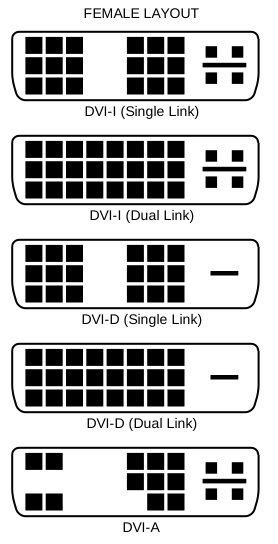
I suspect you are using a single-link DVI cable. You need a dual-link cable to enable anything over 1920x1200. Check your cable to see if its dual-link or single link. Your card does dual-link on both connectors so that should not be a problem.
joeacid
Member
- Joined
- Aug 27, 2005
- Messages
- 439
- Reaction score
- 0
I suspect you are using a single-link DVI cable. You need a dual-link cable to enable anything over 1920x1200. Check your cable to see if its dual-link or single link. Your card does dual-link on both connectors so that should not be a problem.
You are sooooo right!!! After i changed my cable, it worked now!!!
Thank you!!!!
Hi Guys,
I'm trying to find out what's the minimum GPU I will need to run my new monitor at 2560x1080.
I don't wana overspend of overkill.
Can some bros here advise?
Thanks
29" - Q2963PM - Monitors - AOC - North America: U.S.
Why don't you use HDMI when both your monitor and card support it?
HDMI cables are rather cheap & many devices now have support for the connection, even MHL/miniHDMI for mobile devices like tablets & mobile phones.
Important Forum Advisory Note
This forum is moderated by volunteer moderators who will react only to members' feedback on posts. Moderators are not employees or representatives of HWZ Forums. Forum members and moderators are responsible for their own posts.
Please refer to our Community Guidelines and Standards and Terms and Conditions for more information.
