mobo died?

NightRaven49

Master Member
Joined
May 17, 2019
Messages
3,741
Reaction score
1,579
specs --->​

basically last week after getting a free copy of gta v from the epic games store, i was adjusting my graphics settings when my pc suddenly hang. try to reset, pc turns on but no display output. so got fan spin, rgb turns on all that but monitor say no output. plug in usb keyboard also no power. unplug ssd wait to boot into bios also nothing.

so far i have reseated ram, asked my friend to borrow ram and gpu, swapped with his parts also still cannot boot. psu fan spins when try to power on so i do not think it is the issue either. so now narrow down to either cpu or mobo, but since lga2011 (non v3) is such an old platform i do not know of anyone who has spare parts i can borrow to troubleshoot.

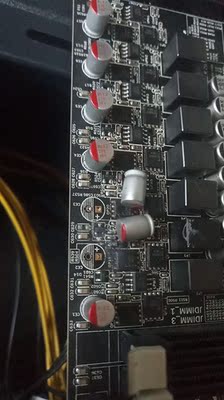
currently i suspect is the mobo issue, since it was a pretty shady listing and the vrms do not have heatsink. when my other friend help me build he noted on speccy the vrm temperature as 120deg c constantly. listing here: https://detail.tmall.com/item.htm?id=583078077137. i am not asking to be flamed for using taobao parts :o as it had served me well for the past (almost exactly one) year but from the situation i have described, do u guys also think it is a mobo failure? wanting to buy replacement mobo (with vrm heatsink) but really want to be sure my "diagnosis" is correct before pulling the trigger.
 
Last edited:

hafiz116

Senior Member
Joined
Sep 27, 2008
Messages
1,151
Reaction score
0
The last check would be to try a known working PSU. If that also does not work then yes the motherboard is fried!
 

wongminmin

High Supremacy Member
Joined
Nov 10, 2014
Messages
34,709
Reaction score
18,894
check for burn marks etc.......
O1CN01EzCNmg1nA1shpBppY_!!0-rate.jpg_400x400.jpg


next time check the reviews before purchase, averagely 1 month lifespan for this mobo.
 

Koenig168

Arch-Supremacy Member
Joined
Nov 4, 2007
Messages
10,037
Reaction score
1,748
Rather than buy another old MB, you can consider upgrading to Ryzen instead.
 

singupingu

Supremacy Member
Joined
Jan 19, 2016
Messages
6,939
Reaction score
3
Either a mobo or PSU problem. Likely mobo though.

If you think you want to save money with no problem waiting for taobao to deliver you another board, then feel free to get a replacement mobo. Get one with VRM heatsink at least. I bought one before for my 3930K which work until now and still serving my friend for his need. Don't ask me for link. I can't find it anymore for the one I am using no longer listed.

If you don't want to deal with the issue and have the budget to do so, upgrade to a Ryzen system. Ryzen 5 3600 is a good value for money CPU while the Ryzen 7 3700X is a good higher-end option.
 

Albertphoon

Member
Joined
Mar 28, 2001
Messages
290
Reaction score
1
specs --->​

basically last week after getting a free copy of gta v from the epic games store, i was adjusting my graphics settings when my pc suddenly hang. try to reset, pc turns on but no display output. so got fan spin, rgb turns on all that but monitor say no output. plug in usb keyboard also no power. unplug ssd wait to boot into bios also nothing.

so far i have reseated ram, asked my friend to borrow ram and gpu, swapped with his parts also still cannot boot. psu fan spins when try to power on so i do not think it is the issue either. so now narrow down to either cpu or mobo, but since lga2011 (non v3) is such an old platform i do not know of anyone who has spare parts i can borrow to troubleshoot.

currently i suspect is the mobo issue, since it was a pretty shady listing and the vrms do not have heatsink. when my other friend help me build he noted on speccy the vrm temperature as 120deg c constantly. listing here: https://detail.tmall.com/item.htm?id=583078077137. i am not asking to be flamed for using taobao parts :o as it had served me well for the past (almost exactly one) year but from the situation i have described, do u guys also think it is a mobo failure? wanting to buy replacement mobo (with vrm heatsink) but really want to be sure my "diagnosis" is correct before pulling the trigger.

Which LGA 2011 mobo and cpu are you using?
For narrow down to which chip might have failed due to you overclocking the GPU setting.
 

NightRaven49

Master Member
Joined
May 17, 2019
Messages
3,741
Reaction score
1,579
thanks for ur suggestions bros. gonna bring my entire pc down to friend's house to definitively rule out psu issue, then buy new mobo.

Rather than buy another old MB, you can consider upgrading to Ryzen instead.

time for ryzen upgrade

currently that would necessitate not only cpu and mobo change but also ram, which would be $300 at the minimum for a decent build. thanks for the suggestion but i don't really have that much budget currently, and the xeon itself was satisfactory while i was still using it.

Which LGA 2011 mobo and cpu are you using?
For narrow down to which chip might have failed due to you overclocking the GPU setting.

u can open up the desktop site, everything is listed (my first line of op already pointing to it). anyway, i usually underclock my gpu.
 

Albertphoon

Member
Joined
Mar 28, 2001
Messages
290
Reaction score
1
thanks for ur suggestions bros. gonna bring my entire pc down to friend's house to definitively rule out psu issue, then buy new mobo.


currently that would necessitate not only cpu and mobo change but also ram, which would be $300 at the minimum for a decent build. thanks for the suggestion but i don't really have that much budget currently, and the xeon itself was satisfactory while i was still using it.


u can open up the desktop site, everything is listed (my first line of op already pointing to it). anyway, i usually underclock my gpu.

Ok. if you have underclock or overclock the motherboard default setting . The motherboard will either have/not enough power to bootup.
Try power off the AC supply, remove the battery from the motherboard, and reset the bios setting by shorting the jumper pin.
Next put back the battery and Jumper Pin to it correct position.
And try again.
Good Luck
 

NightRaven49

Master Member
Joined
May 17, 2019
Messages
3,741
Reaction score
1,579
Ok. if you have underclock or overclock the motherboard default setting . The motherboard will either have/not enough power to bootup.
Try power off the AC supply, remove the battery from the motherboard, and reset the bios setting by shorting the jumper pin.
Next put back the battery and Jumper Pin to it correct position.
And try again.
Good Luck

never touched bios settings, mobo unable to overclock. also have tried taking out cmos battery but still no luck.
 

Albertphoon

Member
Joined
Mar 28, 2001
Messages
290
Reaction score
1
never touched bios settings, mobo unable to overclock. also have tried taking out cmos battery but still no luck.

Quote: --- "I was adjusting my graphic setting when my PC suddenly hangs"

Think of it this way, Will the PC hangs if I dun adjusting my graphic setting.
But adjusting means .......
Thus it is the adjustment that causes the failure.
So usually the mobo component will give way.
Your taobao mobo might not have the safety cutoff point.
 

NightRaven49

Master Member
Joined
May 17, 2019
Messages
3,741
Reaction score
1,579
Quote: --- "I was adjusting my graphic setting when my PC suddenly hangs"

Think of it this way, Will the PC hangs if I dun adjusting my graphic setting.
But adjusting means .......
Thus it is the adjustment that causes the failure.
So usually the mobo component will give way.
Your taobao mobo might not have the safety cutoff point.

I was adjusting graphics settings in the game, not gpu clocks or cpu clocks or anything else system related.
 

Albertphoon

Member
Joined
Mar 28, 2001
Messages
290
Reaction score
1
I was adjusting graphics settings in the game, not gpu clocks or cpu clocks or anything else system related.

my friend was adjusting the graphic setting in the game, not gpu clock or cpu clocks or anything else system related on his Laptop. Or the brightness on the keyboard.
Guess what happen? The fan started spinning faster and the Battery last shorter.
Next he readjust the setting again. The fan stop and battery last longer.

He told me , why lah. "I never adjust the fan and battery what?"
I also dun know how to answer him. Which part of his body does not belong to his the human system.
 
Important Forum Advisory Note
This forum is moderated by volunteer moderators who will react only to members' feedback on posts. Moderators are not employees or representatives of HWZ Forums. Forum members and moderators are responsible for their own posts. Please refer to our Community Guidelines and Standards and Terms and Conditions for more information.
Top