Mobo or mouse problem?

rarenick

High Supremacy Member
Joined
Jul 12, 2008
Messages
26,125
Reaction score
3,653
After i setup the gigabyte B550i, i plugged in the usual mouse+keyboard and other USB devices at the back of the tower. The stock wireless ax antenna is also connected to its dedicated points.

From then, the mouse n keyboard have so much lag that they are almost unusable. I changed to another brand new wireless mouse but reuse the keyboard. All my new n old peripherals are logitech which i think using 2.4ghz frequency. Mouse seems to get better for a while but still quite laggy. So i removed the USB wireless adapters of these peripherals and plug them to the front USB ports instead. It got much better but occasionally still got lag.

Wondering what's going on and how i can tackle the problem?

Currently only ext hdd and USB speakers plugged into these two ports behind.

7fRu83Pl.jpg


aLRs8gil.jpg


Sent from Samsung SM-G970F using GAGT
 
Last edited:

rarenick

High Supremacy Member
Joined
Jul 12, 2008
Messages
26,125
Reaction score
3,653
Also wish to know why there are USB 3.2 bios port and red colour USB 3.2 port. Can i simply use them for any USB devices?

Sent from Samsung SM-G970F using GAGT
 

jasonwsc

Member
Joined
Jun 28, 2013
Messages
415
Reaction score
147
Use the USB 2.0 ports for the wireless dongle. USB 3.0 sometimes have interference.
 

shadow84

High Supremacy Member
Joined
Apr 15, 2009
Messages
34,286
Reaction score
420
Also wish to know why there are USB 3.2 bios port and red colour USB 3.2 port. Can i simply use them for any USB devices?

Sent from Samsung SM-G970F using GAGT

Red USB ports are USB 3.2 Gen 2, blue shld be Gen 1. Faster speeds if you can saturate them.

The USB bios port is for updating of bios remotely in the event you cant enter bios or windows to update. But not sure if can use it for thumbdrive, no harm trying unless u really used up all USB ports le.
 

86technie

High Supremacy Member
Joined
Jun 8, 2006
Messages
40,356
Reaction score
5,948
- Have you tried installing AMD Chipset driver.
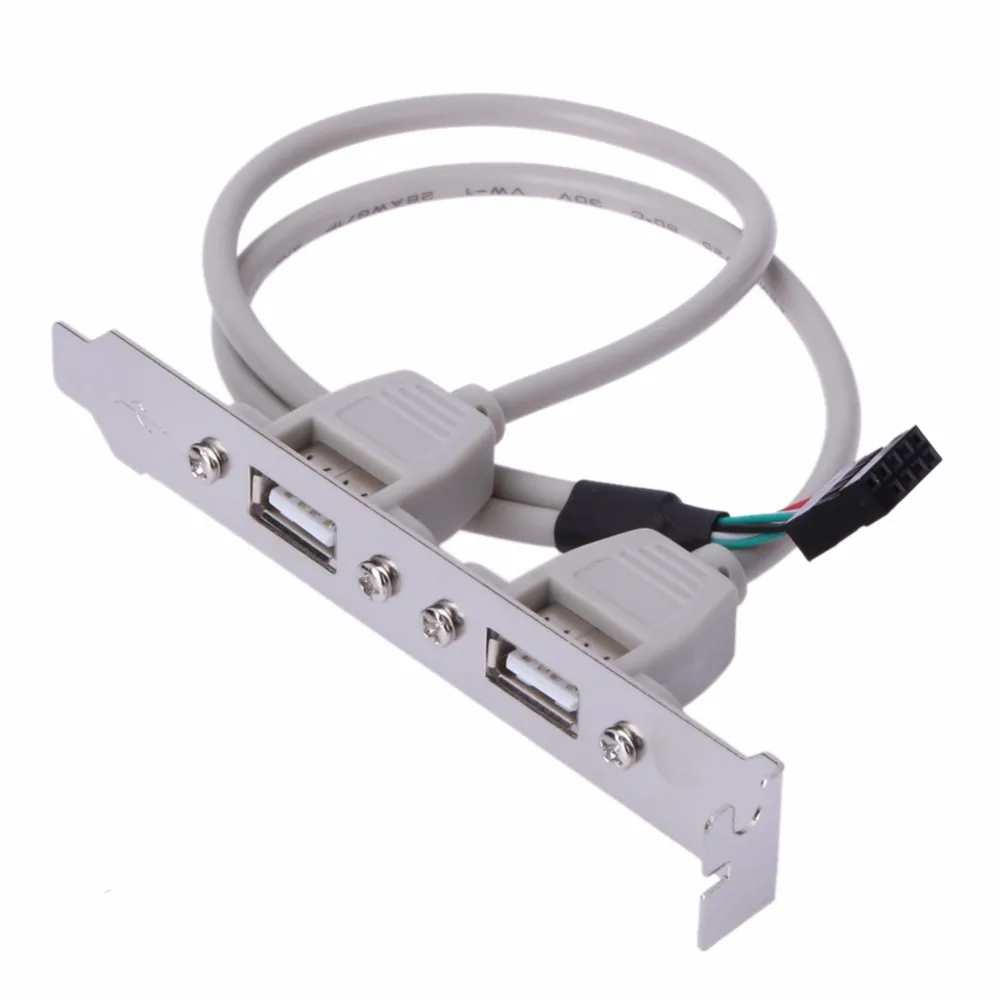
- Can get USB 2.0 header for keyboard and mouse.
External-2-Ports-USB-Rear-Panel-Bracket-Motherboard-Cable-USB-2-0-Connector-Cable-Adapter-Computer.jpg


SLS LV6 Worldwide Computer Pte Ltd The store near to the lift got many of these.
 

rarenick

High Supremacy Member
Joined
Jul 12, 2008
Messages
26,125
Reaction score
3,653
- Have you tried installing AMD Chipset driver.
- Can get USB 2.0 header for keyboard and mouse.
External-2-Ports-USB-Rear-Panel-Bracket-Motherboard-Cable-USB-2-0-Connector-Cable-Adapter-Computer.jpg


SLS LV6 Worldwide Computer Pte Ltd The store near to the lift got many of these.
Bought pc from aftershock. I suppose they already installed amd chipset driver.

My casing is Impulse, which is very small form factor. No slots to add USB 2 ports.

Sent from Samsung SM-G970F using GAGT
 

Koenig168

Arch-Supremacy Member
Joined
Nov 4, 2007
Messages
10,037
Reaction score
1,748
Bought pc from aftershock. I suppose they already installed amd chipset driver.

My casing is Impulse, which is very small form factor. No slots to add USB 2 ports.

Sent from Samsung SM-G970F using GAGT

Aftershock should be solving this problem for you.
 

rarenick

High Supremacy Member
Joined
Jul 12, 2008
Messages
26,125
Reaction score
3,653
Aftershock should be solving this problem for you.
I doubt so. Sure say my own setup n peripherals problems. But yeah... I will try that as well. Thanks for the reminder.

Sent from Samsung SM-G970F using GAGT
 

86technie

High Supremacy Member
Joined
Jun 8, 2006
Messages
40,356
Reaction score
5,948
Bought pc from aftershock. I suppose they already installed amd chipset driver.

My casing is Impulse, which is very small form factor. No slots to add USB 2 ports.

Sent from Samsung SM-G970F using GAGT

Think best you check under programs whether is there a
AMD chipset driver.
 

rarenick

High Supremacy Member
Joined
Jul 12, 2008
Messages
26,125
Reaction score
3,653

cscs3

Arch-Supremacy Member
Joined
Jun 4, 2000
Messages
21,733
Reaction score
133
Use the USB 2.0 ports for the wireless dongle. USB 3.0 sometimes have interference.

You are right, depending on the USB chipser used for the mother board. Some device may not be ready (for use) soon after boot up. Use USB2 for keyboard and mouse for safe. Also check mother board setting making sure USB lacacy model is set to enable.
 

rarenick

High Supremacy Member
Joined
Jul 12, 2008
Messages
26,125
Reaction score
3,653
You are right, depending on the USB chipser used for the mother board. Some device may not be ready (for use) soon after boot up. Use USB2 for keyboard and mouse for safe. Also check mother board setting making sure USB lacacy model is set to enable.
Problem is my pc no USB 2 slots

Sent from Samsung SM-G970F using GAGT
 

cscs3

Arch-Supremacy Member
Joined
Jun 4, 2000
Messages
21,733
Reaction score
133
Problem is my pc no USB 2 slots

Sent from Samsung SM-G970F using GAGT

Think should have USB lacacy model to select.
Try that. Some pc also has bios setting for usb keyboard and mouse support.
 

cscs3

Arch-Supremacy Member
Joined
Jun 4, 2000
Messages
21,733
Reaction score
133
Not sure your mother board is B550I AORUS PRO AX Motherboard, I checked that manual and found there is USB2.1 support on mother board. It has to connect via USB header.

This is also from manual just in case you have this option turn off by accident:

ƒ USB Configuration
& Legacy USB Support
Allows USB keyboard/mouse to be used in MS-DOS. (Default: Enabled)
 
Last edited:

Yongkit

Supremacy Member
Joined
Oct 9, 2015
Messages
5,904
Reaction score
2,493
Pls also try to remove the external hard drive.

Check if still lagging without the external hard drive connected?
 
Important Forum Advisory Note
This forum is moderated by volunteer moderators who will react only to members' feedback on posts. Moderators are not employees or representatives of HWZ Forums. Forum members and moderators are responsible for their own posts. Please refer to our Community Guidelines and Standards and Terms and Conditions for more information.
Top