Monitor Flickering via USB-C Hub.

Sambuca78

Supremacy Member
Joined
Apr 14, 2001
Messages
6,960
Reaction score
474
Not sure if this is the right forum to ask this... :(

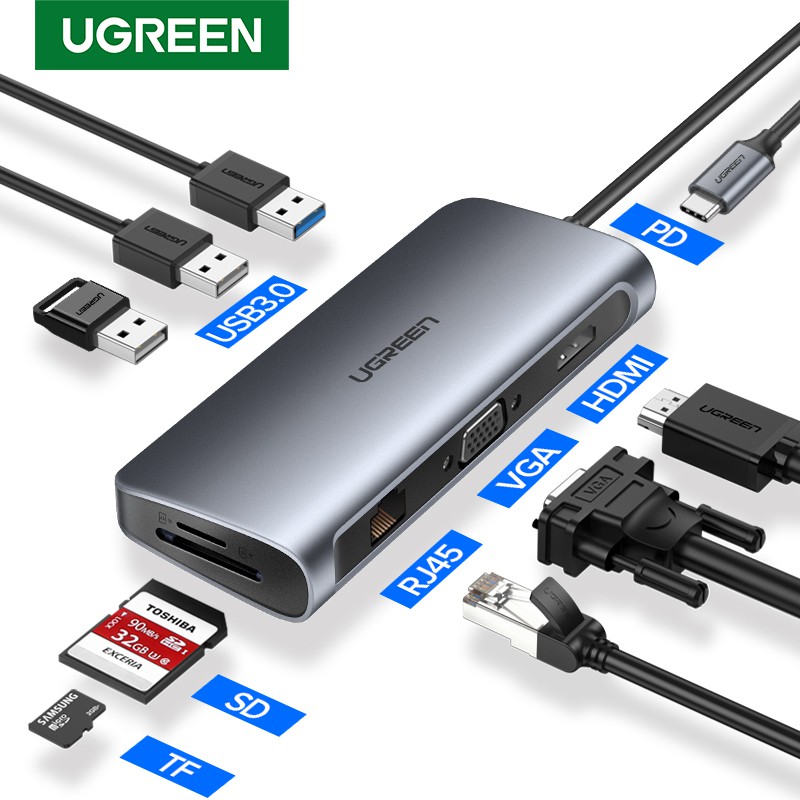
Just bot a 75hz IPS monitor, connect it to the HDMI port of the Ugreen USB-C hub then to my Dell laptop, however it flickered.

Not sure how to post the video clip. :(
https://i.imgur.com/Ar8jket.mp4


Ugreen USB-C hub
a5341ce97c6c4430b97ee7df910e6721


Tried with multiple HDMI (High speed, with ferrite, etc) cables, and it is still the same, but no issue when I connect directly into my laptop.

Anyone know how to resolve this? Thanks...
 
Last edited:

zuoom

High Supremacy Member
Joined
Feb 18, 2002
Messages
37,125
Reaction score
1,082
75hz monitor. The output for configure for 75hz? Usually is 60hz.
 

86technie

High Supremacy Member
Joined
Jun 8, 2006
Messages
40,223
Reaction score
5,884
I don't think it have to do with shielding or so.
If you look at Dell official USB-C docking station, there is AC-adapter.

Probably the power draw isn't enough thus it causes issues.

6b50ae55a1b396ad5c95f57b415eabaf.jpg


Dell USB dock are on the high price side but definitely they will
work with Dell laptop.
Alternative is change your monitor to a model which uses Type-C.
 

Sambuca78

Supremacy Member
Joined
Apr 14, 2001
Messages
6,960
Reaction score
474
Thanks, not sure but there is no issue when I connect the monitor via VGA port into the same ugreen hub. :(
 

Swiftbladez

Master Member
Joined
Nov 24, 2006
Messages
4,381
Reaction score
10
Seems like the hub's port is faulty. Have you tried just plugging hdmi without any other peripherals plugged to the hub?

might be an issue with power draw too. VGA and hdmi different requirements.
 

joesph

Supremacy Member
Joined
May 15, 2005
Messages
9,372
Reaction score
711
maybe buy the new microsoft travel hub $135-$150. how much your hub cost?
 

elmohootbigbird

Supremacy Member
Joined
May 22, 2019
Messages
8,674
Reaction score
2,870
maybe try the hub on another device using the hdmi? your phone if it supports maybe?
 
Last edited:

Sambuca78

Supremacy Member
Joined
Apr 14, 2001
Messages
6,960
Reaction score
474
Thanks all for the comments. :)

I updated my laptop drivers today and it worked! All is good now!
 

KleoZy

Supremacy Member
Joined
Jan 1, 2000
Messages
5,774
Reaction score
1,052
TMD, this morning on my laptop, same problem again. 😠

first of all what monitor size are you using? and is your windows set to 59 or 60 hz refresh rate? This ugreen is just for basic usage and does not project above 60hz. second will be, on which PD wattage are you using? if you are projecting a 21 to 24" monitor, 45Watts is ok but above that you will need a 65watts PD (Power Delivery)

I did encounter your issue before and found out that it's my 27" monitor that is casing this issue (Flickering), as on 32" no show (Blackout)


Sambuca78

Supremacy Member
Joined
Apr 14, 2001
Messages
6,960
Reaction score
474
I did encounter your issue before and found out that it's my 27" monitor that is casing this issue (Flickering), as on 32" no show (Blackout)


1) first of all what monitor size are you using?

- 23.8" LG

2) and is your windows set to 59 or 60 hz refresh rate? This ugreen is just for basic usage and does not project above 60hz.

- Tried both 59 or 60 hz refresh rate no differences, still flickering

3) second will be, on which PD wattage are you using? if you are projecting a 21 to 24" monitor, 45Watts is ok but above that you will need a 65watts PD (Power Delivery)

- I not using the PD as my 45w charger was burnt. I using my laptop charger to power my laptop + the USB-C hub.


I do have a similar concept as urs (exclude the desktop), but a simpler version.

Nice set up btw. :)
 

KleoZy

Supremacy Member
Joined
Jan 1, 2000
Messages
5,774
Reaction score
1,052
Thanks for the compliments. now is your laptop charger type C?

if it is, you might want to plug your laptop charger to the PD port on the UGREEN Device instead to your laptop.

you see if you plug the type c latop charger to your latop and then use the UGREEN to plug to your laptop. your UGREEN device will not have sufficient power.

if you worry that your notebook does not charge, you don't have to, even when you connect your laptop charger to the UGREEN unit, once the type c connector from the UGREEN device is plug to your laptop. your laptop will charge.
 
Last edited:

kandinsky

Master Member
Joined
Jan 7, 2015
Messages
4,693
Reaction score
10
I have a similar ugreen hub (no RJ45 I think). No issues with the hdmi on a lenovo and macbook, with or without PD plugged in no difference. This is with connecting to TV though, not monitor.

I would definitely try to rule out a fault with your hub/port.
- Try it with a different laptop.
- Try a different hub with the same laptop.
 

Sambuca78

Supremacy Member
Joined
Apr 14, 2001
Messages
6,960
Reaction score
474
Thanks for the compliments. now is your laptop charger type C?

if it is, you might want to plug your laptop charger to the PD port on the UGREEN Device instead to your laptop.

you see if you plug the type c latop charger to your latop and then use the UGREEN to plug to your laptop. your UGREEN device will not have sufficient power.

if you worry that your notebook does not charge, you don't have to, even when you connect your laptop charger to the UGREEN unit, once the type c connector from the UGREEN device is plug to your laptop. your laptop will charge.

Thanks a lot KleoZy! You r spot on, I get myself a new 65w ugreen PD charger and now the hdmi worked! :)

Below are my hub magnetically connect to my laptop for easy access. Pardon the messy cables.

HJw471I.jpg


1 thing I noticed...

When I used the HDMI via hub, there is a underpower 57w prompt when I start up my laptop, but not when I used VGA via hub.

So I guess this conclude that the USB-C hub indeed need at least 65w. :)
 

hg2

Supremacy Member
Joined
Jan 1, 2000
Messages
7,906
Reaction score
781
checklists
- Check if the screen is damaged
- Check refresh rate
- Check power supply
- Remove and update display driver
 

KleoZy

Supremacy Member
Joined
Jan 1, 2000
Messages
5,774
Reaction score
1,052
Thanks a lot KleoZy! You r spot on, I get myself a new 65w ugreen PD charger and now the hdmi worked! :)

Below are my hub magnetically connect to my laptop for easy access. Pardon the messy cables.

1 thing I noticed...

When I used the HDMI via hub, there is a underpower 57w prompt when I start up my laptop, but not when I used VGA via hub.

So I guess this conclude that the USB-C hub indeed need at least 65w. :)

you are most welcome la.. VGA is not power hunger, but HDMI is.. anyway glad it resolved your issue :)
 
Important Forum Advisory Note
This forum is moderated by volunteer moderators who will react only to members' feedback on posts. Moderators are not employees or representatives of HWZ Forums. Forum members and moderators are responsible for their own posts. Please refer to our Community Guidelines and Standards and Terms and Conditions for more information.
Top