Netflix SG

boonkang

Senior Member
Joined
Oct 5, 2007
Messages
738
Reaction score
308
TL;DR (Too long, don't read) :)

Actually what's the point of buying 8k when there is so little 8k content?

I am a frequent user of Netflix..so getting a 8k tv is pointless right?

https://mashable.com/article/8k-tvs/

Last time, during the early days of 4K TVs, the (same/similar) question was:
"Actually what's the point of buying 4K (TV) when there is so little 4K content?"

But that hasn't stopped TV makers from producing more & more models of 4K TVs -- to eventually now -- producing (more &) more models of 8K TVs.

So current lack of (much) 8K contents will not stop more 8K TVs from being produced & bought.
And also -- will not stop -- 12K/16K TVs from being produced in the future.

Then (many) years from now, people will ask the same/similar question again:
"Actually what's the point of buying 12K/16K (TV) when there is so little 12K/16K content?" Haha :s13:

One reality I've learned is that:
People have money -- so they can buy what they want including 8K TVs -- and you cannot tell people how to spend their money. Haha..

***
To appreciate 8k on such a size will require you to see within a metre.. you won't need the remote control anymore...

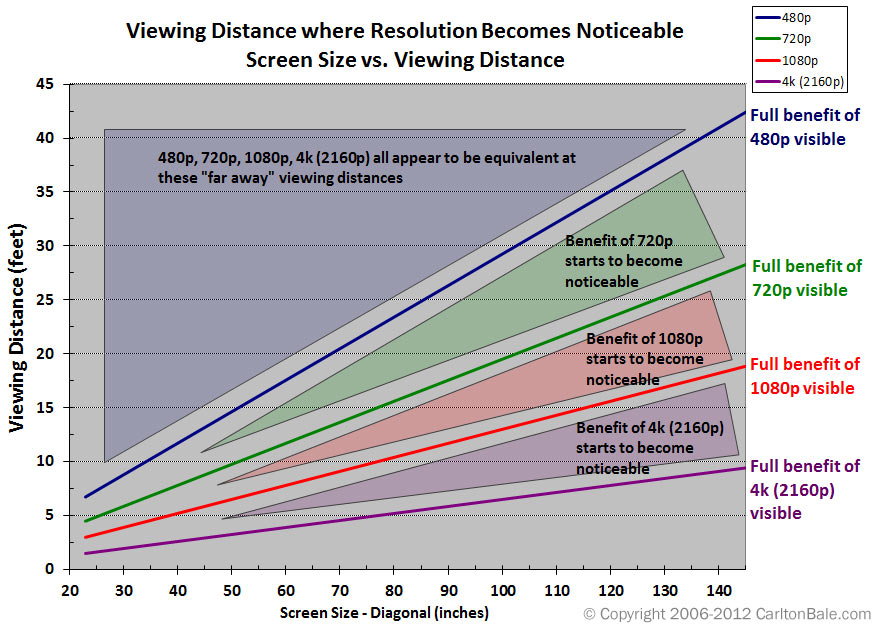
One (important) factor that determines if watching 4K contents will make a difference over watching 1080p/720p contents -- is viewing distance.

One of the viewing distance charts -- I used to like to show people -- is the one below:
viewingdistanceresolutioncomparison.jpg


After sharing the above chart many times, one reality I've learned is that:

It's not the case that the above chart is not informative -- but rather quite a lot of people don't know how to interpret the above (viewing distance) chart !! :s22:

The above chart tells us (simple) things like:
(a) If you buy a 65" 4K TV, it is necessary to sit as close as 6-7 feet (1.83m) -- in order for you to feel that watching 4K contents make a viewing difference over watching 1080p contents.
(b) For the same 65" 4K TV, if you sit further than 22 feet (6.71m) -- all 480p/720p/1080p/4K contents "appears to be equivalent" -- and thus make no viewing difference !!
(c) For a small TV like 32" TV -- despite sitting as close as 12 feet (3.66m) -- all 480p/720p/1080p/4K contents will still "appears to be equivalent".

Point (c) above, is (one of) the reason why 32" TVs are usually 720p/768p only -- plus there exists so few models of 32" 1080p TVs.

Nowadays, people can't avoid 4K TVs -- because as time passes -- people buy bigger & bigger TVs + 4K TV(s) gets cheaper & cheaper.
Currently, during promotions/flash sale -- you can buy (budget range) 55" 4K TVs -- at (well) below S$500. :s12:

***
So many buyers don't even use proper 4k sources...

Over the years, whenever I asked people what 4K shows/contents they watch -- a common reply is: "Netflix".
Yes, I know, I know -- there are many Netflix experts here ;)

It's only when I dig deep -- then I realised there's (so) much details -- just to be able to watch 4K Netflix properly, Haha :s13:

(0) You need a 4K TV to be able to watch 4K Netflix (this is obvious).
(1) If connect a TV box/device/player to your TV, your device must be Netflix certified -- else you won't get 4K Netflix.

(2) Your TV must support HDCP 2.2 + the device must connect to HDMI port on TV that supports HDCP 2.2 -- else you won't get 4K Netflix.
(2a) If you connect player/device to AVR (audio visual receiver) -- then AVR connect to TV, your AVR must also support 4K + HDCP 2.2 -- else you won't get 4K Netflix.

(3) You must use a HDMI 2.0 (or better) cable to connect device to TV -- else you won't get 4K Netflix.
(4) You must set device's video output to TV at 4K 60fps -- else you won't get 4K Netflix.
(5) You must subscribe to the highest cost Netflix streaming plan -- else you won't get 4K Netflix.

Even if you satisfy/meet all above conditions -- what you eventually watch on Netflix -- may still not be in 4K !! Why ?!?
Becasue not every single show on Netflix is available in 4K resolution !! Duh !!

***
Sitting further away? Then 8k is moot...

After all is said & done, some people will argue that buying high end 4K or even 8K TV is beneficial -- even if the stream/contents they watch is not in 4K/8K.
Because some people will argue that the (high end) expensive 4K/8K TV they buy -- has 4K/8K upscaling !!

So the high end 8K TV will upscale the (lower resolution) contents up to 8K -- thus allowing you to "enjoy" 8K viewing !!

Did I mentioned?

One reality I've learned is that:
People have money -- so they can buy what they want including 8K TVs -- and you cannot tell people how to spend their money. :)

Hope the above helps.
 

petetherock

Moderator
Moderator
Joined
Jan 7, 2007
Messages
10,036
Reaction score
1,071
Great post - copied it from another thread.
Very useful for those venturing into 4k and higher.

Viewing distance as well as checking what your TV supports.
 

wizardmao

High Supremacy Member
Joined
Nov 20, 2010
Messages
28,482
Reaction score
65
TL;DR (Too long, don't read) :)


Last time, during the early days of 4K TVs, the (same/similar) question was:
"Actually what's the point of buying 4K (TV) when there is so little 4K content?"

But that hasn't stopped TV makers from producing more & more models of 4K TVs -- to eventually now -- producing (more &) more models of 8K TVs.

So current lack of (much) 8K contents will not stop more 8K TVs from being produced & bought.
And also -- will not stop -- 12K/16K TVs from being produced in the future.

Then (many) years from now, people will ask the same/similar question again:
"Actually what's the point of buying 12K/16K (TV) when there is so little 12K/16K content?" Haha :s13:

One reality I've learned is that:
People have money -- so they can buy what they want including 8K TVs -- and you cannot tell people how to spend their money. Haha..

***


One (important) factor that determines if watching 4K contents will make a difference over watching 1080p/720p contents -- is viewing distance.

One of the viewing distance charts -- I used to like to show people -- is the one below:
viewingdistanceresolutioncomparison.jpg


After sharing the above chart many times, one reality I've learned is that:

It's not the case that the above chart is not informative -- but rather quite a lot of people don't know how to interpret the above (viewing distance) chart !! :s22:

The above chart tells us (simple) things like:
(a) If you buy a 65" 4K TV, it is necessary to sit as close as 6-7 feet (1.83m) -- in order for you to feel that watching 4K contents make a viewing difference over watching 1080p contents.
(b) For the same 65" 4K TV, if you sit further than 22 feet (6.71m) -- all 480p/720p/1080p/4K contents "appears to be equivalent" -- and thus make no viewing difference !!
(c) For a small TV like 32" TV -- despite sitting as close as 12 feet (3.66m) -- all 480p/720p/1080p/4K contents will still "appears to be equivalent".

Point (c) above, is (one of) the reason why 32" TVs are usually 720p/768p only -- plus there exists so few models of 32" 1080p TVs.

Nowadays, people can't avoid 4K TVs -- because as time passes -- people buy bigger & bigger TVs + 4K TV(s) gets cheaper & cheaper.
Currently, during promotions/flash sale -- you can buy (budget range) 55" 4K TVs -- at (well) below S$500. :s12:

***


Over the years, whenever I asked people what 4K shows/contents they watch -- a common reply is: "Netflix".
Yes, I know, I know -- there are many Netflix experts here ;)

It's only when I dig deep -- then I realised there's (so) much details -- just to be able to watch 4K Netflix properly, Haha :s13:

(0) You need a 4K TV to be able to watch 4K Netflix (this is obvious).
(1) If connect a TV box/device/player to your TV, your device must be Netflix certified -- else you won't get 4K Netflix.

(2) Your TV must support HDCP 2.2 + the device must connect to HDMI port on TV that supports HDCP 2.2 -- else you won't get 4K Netflix.
(2a) If you connect player/device to AVR (audio visual receiver) -- then AVR connect to TV, your AVR must also support 4K + HDCP 2.2 -- else you won't get 4K Netflix.

(3) You must use a HDMI 2.0 (or better) cable to connect device to TV -- else you won't get 4K Netflix.
(4) You must set device's video output to TV at 4K 60fps -- else you won't get 4K Netflix.
(5) You must subscribe to the highest cost Netflix streaming plan -- else you won't get 4K Netflix.

Even if you satisfy/meet all above conditions -- what you eventually watch on Netflix -- may still not be in 4K !! Why ?!?
Becasue not every single show on Netflix is available in 4K resolution !! Duh !!

***


After all is said & done, some people will argue that buying high end 4K or even 8K TV is beneficial -- even if the stream/contents they watch is not in 4K/8K.
Because some people will argue that the (high end) expensive 4K/8K TV they buy -- has 4K/8K upscaling !!

So the high end 8K TV will upscale the (lower resolution) contents up to 8K -- thus allowing you to "enjoy" 8K viewing !!

Did I mentioned?

One reality I've learned is that:
People have money -- so they can buy what they want including 8K TVs -- and you cannot tell people how to spend their money. :)

Hope the above helps.

Bookmarked for reference
 

mavis45

Junior Member
Joined
Jun 29, 2015
Messages
29
Reaction score
0
Hi all, I bought a 4k monitor recently and found out it does not support hdcp2.2, anyone knows of a way or a reliable splitter/bypass? Thanks in advance!
 

Haman

Senior Member
Joined
Aug 16, 2003
Messages
1,206
Reaction score
72
Hi all, I bought a 4k monitor recently and found out it does not support hdcp2.2, anyone knows of a way or a reliable splitter/bypass? Thanks in advance!
Hi, you can use one of the products from HDFury. Read up on it.
 

Teo Ming Ern

Arch-Supremacy Member
Joined
Jan 1, 2000
Messages
12,268
Reaction score
272
TL;DR (Too long, don't read) :)

*SNIP* to shorten the quote...

Hope the above helps.

Thanks! Does the above apply if the tv itself is able to stream Netflix at 4K resolution directly from the app without the need of a tv box? I thought most 4K TVs support the Netflix app out of the box which means that anyone using these tvs with the correct subscription will get 4K resolution for content that supports this resolution? Did I understand the situation correctly? Cos I just ordered a Xiaomi 4K tv which supports Netflix out of the box...
 

chaiscool

Arch-Supremacy Member
Joined
Mar 25, 2018
Messages
13,921
Reaction score
4,989
Thanks! Does the above apply if the tv itself is able to stream Netflix at 4K resolution directly from the app without the need of a tv box? I thought most 4K TVs support the Netflix app out of the box which means that anyone using these tvs with the correct subscription will get 4K resolution for content that supports this resolution? Did I understand the situation correctly? Cos I just ordered a Xiaomi 4K tv which supports Netflix out of the box...

Tv support 4k doesn’t mean the Netflix app playback 4k. Just check the resolution in netlfix to confirm. Some tv remote got “info” button for stats.

Some xiaomi phone has 1080p screen but the Netflix app only support 480p.
 
Last edited:

vegavega25

Senior Member
Joined
Aug 30, 2016
Messages
1,161
Reaction score
126
Interestingly all these years later Netflix moved from billing SG customers from Netherlands to finally billing them from within Singapore. No material difference, except that the DCC princely sum of 16 cents a month is saved.
 

Limestone

Member
Joined
Nov 22, 2001
Messages
380
Reaction score
48
is it just me, or that I cannot sign up for an account on netflix now? after CC fill up form, the next and last step is to verify phone number.. but no matter how many times i enter a SG phone number, it always produces an error in the page..

and no confirmation code is sent to any of my phones from netflix...
 

Alphas

High Supremacy Member
Joined
Oct 6, 2004
Messages
40,358
Reaction score
5,136
is it just me, or that I cannot sign up for an account on netflix now? after CC fill up form, the next and last step is to verify phone number.. but no matter how many times i enter a SG phone number, it always produces an error in the page..

and no confirmation code is sent to any of my phones from netflix...
Have you solved it, I am also facing this issue. None of the phone numbers from Giga (Starhub) works.
 
Important Forum Advisory Note
This forum is moderated by volunteer moderators who will react only to members' feedback on posts. Moderators are not employees or representatives of HWZ. Forum members and moderators are responsible for their own posts.

Please refer to our Community Guidelines and Standards, Terms of Service and Member T&Cs for more information.
Top