Network Diagnostic Applications

firesong

Supremacy Member
Deluxe Member
Joined
Jan 17, 2001
Messages
8,865
Reaction score
4,873
Starting a thread to share applications we can use to gather cellular network information for diagnostic reasons - like when we report to telcos about poor coverage in certain zones, these give additional information for troubleshooting. These apps are mainly for Android as the OS allows a deeper level of access to the networking hardware. iOS locks it down so the diagnostic information is very limited.

Posted this in the SIMBA thread, but realised it's applicable to all users, so reposting a thread here.

There's an app, normally a paid app but is on promotion so currently free on the Google Play Store, that gives detailed connectivity information to your cell tower. Recommend Android users to download and install quickly, even if they don't have to use it atm.Since it's free for now, you can add it to your Google Play account first - can always redownload in future once you've "bought" the app previously.

https://play.google.com/store/apps/details?id=com.wilysis.cellinfo
The manual:
https://www.m2catalyst.com/manual
Note that there are additional features if you wish to subscribe to their yearly pro subscription. I choose not to do that.

Edit: The app is no longer free and has gone back to $2.99. Here's a link to the free version with some features disabled.
https://play.google.com/store/apps/details?id=com.wilysis.cellinfolite
A feature comparison:
https://m2catalyst.com/apps/network-cell-info/featuresNCI Features.png
 
Last edited:

firesong

Supremacy Member
Deluxe Member
Joined
Jan 17, 2001
Messages
8,865
Reaction score
4,873
Last edited:

Mach3.2

Great Supremacy Member
Joined
Apr 8, 2011
Messages
72,508
Reaction score
2,485
It doesn't seem to work for me... Says no such app for FTMinternal.

Found this online:
On the dialer, enter *3001#12345#* on the keypad. Press call, and instead of actually making a call, it'll immediately open the FTMInernal-4 app.
That's odd, it works on my iPhone 13 running iOS 15.6. :spin:

The dialer method is another way to launch the hidden app, albeit a little more tedious.
 

lohsenglte

Supremacy Member
Joined
Dec 13, 2013
Messages
8,082
Reaction score
463
That's odd, it works on my iPhone 13 running iOS 15.6. :spin:

The dialer method is another way to launch the hidden app, albeit a little more tedious.
iOS 15.6, iPhone 13 Pro Max

ubLbFzZ.jpg
 

firesong

Supremacy Member
Deluxe Member
Joined
Jan 17, 2001
Messages
8,865
Reaction score
4,873
Starting a thread to share applications we can use to gather cellular network information for diagnostic reasons - like when we report to telcos about poor coverage in certain zones, these give additional information for troubleshooting. These apps are mainly for Android as the OS allows a deeper level of access to the networking hardware. iOS locks it down so the diagnostic information is very limited.

Posted this in the SIMBA thread, but realised it's applicable to all users, so reposting a thread here.

There's an app, normally a paid app but is on promotion so currently free on the Google Play Store, that gives detailed connectivity information to your cell tower. Recommend Android users to download and install quickly, even if they don't have to use it atm.Since it's free for now, you can add it to your Google Play account first - can always redownload in future once you've "bought" the app previously.

https://play.google.com/store/apps/details?id=com.wilysis.cellinfo
The manual:
https://www.m2catalyst.com/manual
Those who did not manage to snag the app while it was free (when I posted it), the price has reverted back to $2.99

The free version is here.
https://play.google.com/store/apps/details?id=com.wilysis.cellinfolite
 

firesong

Supremacy Member
Deluxe Member
Joined
Jan 17, 2001
Messages
8,865
Reaction score
4,873
wpa wps tester

it helped me to test my neighbour wifi security breach
Ah, but these are mainly cellular network tools, not wifi network tools. ;)

I know speed tests are for both, but since this is the Mobile clinic rather than the networking clinic, I hoped to focus more on Network/Operator reporting tools. ;)
 

firesong

Supremacy Member
Deluxe Member
Joined
Jan 17, 2001
Messages
8,865
Reaction score
4,873
Try adding the shortcut to your home screen and run it from there. I got the same error when I try to run it within the shortcuts app but it works just fine when triggered from the home screen.
Thanks. This works. We can't run it from Shortcuts directly, but adding it to Home Screen fixes it.
 

firesong

Supremacy Member
Deluxe Member
Joined
Jan 17, 2001
Messages
8,865
Reaction score
4,873
Results from yesterday. Was somewhere in the Siglap area for a bit, and decided to compare StarHub vs Zero1 (Singtel). 2 Samsung A52s, one StarHub SIM-only, one Zero1. Both tests were done a few times, from about 2pm to 6pm. Fairly consistent results, give and take a bit.

I remember having horrible connection with Singtel SIM-only within that area, at times almost no data connectivity. Now with NCI, I can clearly see why. Strange because there were better towers nearby for Singtel, but not that great. Screencaps are typical results - it was "-117dB for ST more often than it was -110dB-ish)
NCI - SH..jpegNCI - Z1..jpeg

With these graphs and charts, I can email the telcos my location and have proof to recommend them to expand data coverage (perhaps with a few picocells). It's clearer than saying "I was at location XXX, reception was bad."
 

firesong

Supremacy Member
Deluxe Member
Joined
Jan 17, 2001
Messages
8,865
Reaction score
4,873
Of all these apps, which one you recommend / prefer?


Sent from A universe Where pink PWNED everything
I use NCI. The screenshots show why.

I also have the OpenSignal app so I can contribute to a speedtest and statistics map for objective measurement. For those who do not know, OpenSignal as an independent contractor compiles this data to measure network performance and releases regular reports. You can download regular reports about the Singapore market here.
https://www.opensignal.com/singapore
Here's the latest OpenSignal report for Jun 2022:
https://www.opensignal.com/reports/2022/06/singapore/mobile-network-experienceMobile Network Experience Report _ June 2022 _ © Opensignal Limited.png
opensignal-consistency-ecq-overall.png

I've also participated in IMconnected trials, but I sense those trials seem to have a bias of sorts, as the OpenSignal reports are different at times.

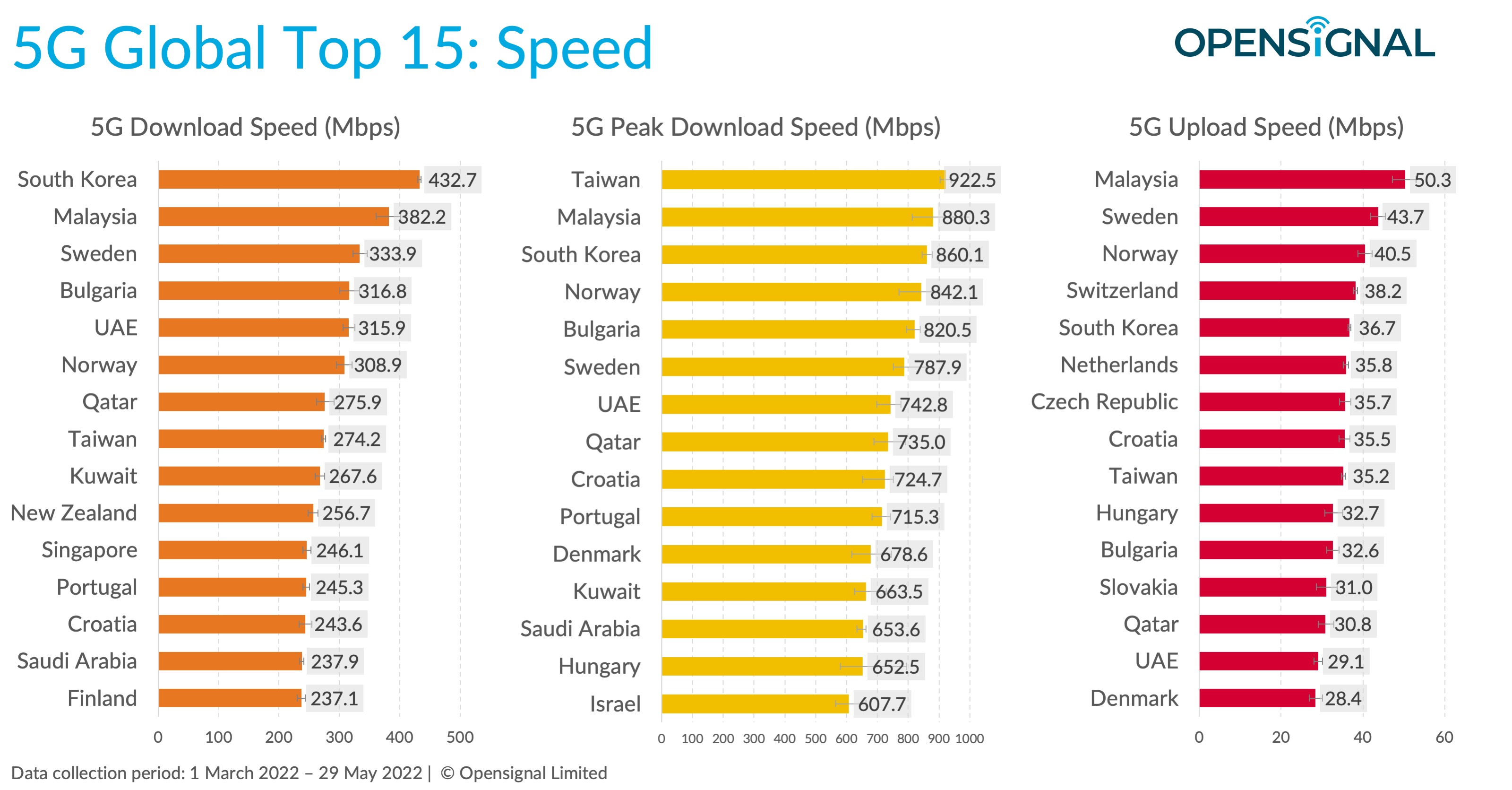
PS: Singapore has bragging rights to be the first city in the world with 95% coverage, but as of the June report, check out how far behind Malaysia Singapore really is. I'm waiting for the Q3 report to see if that will change. ;) After all, these are user experience reports.
202206_5g_global_benchmark_1.jpeg
 

Phen8210

High Supremacy Member
Joined
Jul 29, 2011
Messages
29,026
Reaction score
8,284
I use NCI. The screenshots show why.

I also have the OpenSignal app so I can contribute to a speedtest and statistics map for objective measurement. For those who do not know, OpenSignal as an independent contractor compiles this data to measure network performance and releases regular reports. You can download regular reports about the Singapore market here.
https://www.opensignal.com/singapore
Here's the latest OpenSignal report for Jun 2022:
https://www.opensignal.com/reports/2022/06/singapore/mobile-network-experienceView attachment 33255
View attachment 33256

I've also participated in IMconnected trials, but I sense those trials seem to have a bias of sorts, as the OpenSignal reports are different at times.

PS: Singapore has bragging rights to be the first city in the world with 95% coverage, but as of the June report, check out how far behind Malaysia Singapore really is. I'm waiting for the Q3 report to see if that will change. ;) After all, these are user experience reports.
202206_5g_global_benchmark_1.jpeg

I would suggest everyone looking at this not be too caught up.

From my experience, many first-world SEA countries, such as South Korea, have both coverage and speed. However, you can't say the same for Europe and America, and there are a lot of disconnections and dead spots. Getting 15-50Mbps stable in Europe and America while traveling from place to place is already godsent, don't even mention receiving a 5G signal.

Besides, the typical user won't be using the OpenSignal app on their mobile to test their cellular network speeds. That creates a selection bias. Also, when you look at some of the reports, it shows that SG TPG won Global Leaders for 4G availability. My experience with TPG and the people I knew who used TPG all agreed that TPG has one of the worst 4G availability in SG compared to the big 3 by a large margin.

It's quite obvious that these numbers are far from what one would typically experience.
 
Last edited:
Important Forum Advisory Note
This forum is moderated by volunteer moderators who will react only to members' feedback on posts. Moderators are not employees or representatives of HWZ Forums. Forum members and moderators are responsible for their own posts. Please refer to our Community Guidelines and Standards and Terms and Conditions for more information.
Top