New PC questions/recommendations (DC vs AS)

TeethOfMidas

Supremacy Member
Joined
Aug 24, 2016
Messages
5,185
Reaction score
3
Hi all, I'm looking to get a new PC but am unsure which would best fit my usage.

I'm mainly using it for the below:
- Microsoft Office apps
- Brave browser (Netflix, Youtube)
- Photo and (light) Video editing e.g. Canon Photo editor/Adobe suites/Davinci
- Dota2 (the only game I play)

Have contacted DreamCore and Aftershock, I'll list down the specs of their recommendations below for easier reference:

DreamCore: (~1.4k)
Intel i5-12400F | 4.4Ghz | 6 cores 12 threads
MSI Pro B660M-A WIFI DDR4
Palit RTX 3050 Dual 8G
Crucial Ballistix Gaming 16GB (2x8GB) DDR4 3600Mhz (White)
500GB Crucial P5 Plus Gen 4 SSD (R: 6600 W: 4000)
Cooler Master MWE750 80Plus White (Non modular)
On-board WiFi + Bluetooth

Aftershock: (~2.4k)
Processor : AMD Ryzen™ 5 5600X
Cooling System : AFTERSHOCK Glacier 240mm Watercooling
Motherboard : GIGABYTE B550M DS3H
Graphics Card : ZOTAC RTX 3080Ti TRINITY OC 12GB
Ram : 16GB KLEVV CRAS X RGB 4000MHz DDR4 (8GB x 2)
SSD : 1TB AFTERSHOCK HYPERSPEED Gen4 NVMe SSD
Power Supply : 800W FSP Hydro Pro 80+ Bronze
Wireless : Wireless + Bluetooth Included
Chassis : RAPID HIGH AIRFLOW MESH CHASSIS

There's a $1k difference between the 2 recommendations, and I can't judge which is the better choice.
Both are kinda within my budget, but I just don't wanna overpay/over-purchase what's more than necessary for my use.

Also, I read another thread right before posting this about the horrors of Aftershock's after-sales service, which is.. slightly worrying.

Any opinions/comments for me?
Is there a better alternative, or maybe even other recommendations if you have any!

Lastly:
My current PC build runs Windows 10 (activated) and also has Microsoft Office suite, is there... any way to 'transfer' them to the new PC>? Or must I re-pay for all of them again?

Thanks in advance!
 

86technie

High Supremacy Member
Joined
Jun 8, 2006
Messages
40,477
Reaction score
6,016
Hi all, I'm looking to get a new PC but am unsure which would best fit my usage.

I'm mainly using it for the below:
- Microsoft Office apps
- Brave browser (Netflix, Youtube)
- Photo and (light) Video editing e.g. Canon Photo editor/Adobe suites/Davinci
- Dota2 (the only game I play)

Have contacted DreamCore and Aftershock, I'll list down the specs of their recommendations below for easier reference:

DreamCore: (~1.4k)
Intel i5-12400F | 4.4Ghz | 6 cores 12 threads
MSI Pro B660M-A WIFI DDR4
Palit RTX 3050 Dual 8G
Crucial Ballistix Gaming 16GB (2x8GB) DDR4 3600Mhz (White)
500GB Crucial P5 Plus Gen 4 SSD (R: 6600 W: 4000)
Cooler Master MWE750 80Plus White (Non modular)
On-board WiFi + Bluetooth

Aftershock: (~2.4k)
Processor : AMD Ryzen™ 5 5600X
Cooling System : AFTERSHOCK Glacier 240mm Watercooling
Motherboard : GIGABYTE B550M DS3H
Graphics Card : ZOTAC RTX 3080Ti TRINITY OC 12GB
Ram : 16GB KLEVV CRAS X RGB 4000MHz DDR4 (8GB x 2)
SSD : 1TB AFTERSHOCK HYPERSPEED Gen4 NVMe SSD
Power Supply : 800W FSP Hydro Pro 80+ Bronze
Wireless : Wireless + Bluetooth Included
Chassis : RAPID HIGH AIRFLOW MESH CHASSIS

There's a $1k difference between the 2 recommendations, and I can't judge which is the better choice.
Both are kinda within my budget, but I just don't wanna overpay/over-purchase what's more than necessary for my use.

Also, I read another thread right before posting this about the horrors of Aftershock's after-sales service, which is.. slightly worrying.

Any opinions/comments for me?
Is there a better alternative, or maybe even other recommendations if you have any!

Lastly:
My current PC build runs Windows 10 (activated) and also has Microsoft Office suite, is there... any way to 'transfer' them to the new PC>? Or must I re-pay for all of them again?

Thanks in advance!

If you only play that game, DOTA 2 isn't a demanding game so the cheaper one will be OK.
What is your current PC specs? I don't see a need for a new rig for DOTA 2 unless your
current PC have issues.

FYI DOTA 2 system requirements:

OS: Windows 7 or newer
Processor: Dual core from Intel or AMD at 2.8 GHz
Memory: 4 GB RAM
Graphics: NVIDIA GeForce 8600/9600GT, ATI/AMD Radeon HD2600/3600 (Year 2009 graphic cards)
DirectX: Version 9.0c
Network: Broadband Internet connection
Storage: 15 GB available space
Sound Card: DirectX Compatible

So long the PC have a decent graphic card it will run fine.
 

tsteo77

Senior Member
Joined
Oct 28, 2011
Messages
1,543
Reaction score
216
Hi all, I'm looking to get a new PC but am unsure which would best fit my usage.

I'm mainly using it for the below:
- Microsoft Office apps
- Brave browser (Netflix, Youtube)
- Photo and (light) Video editing e.g. Canon Photo editor/Adobe suites/Davinci
- Dota2 (the only game I play)

Have contacted DreamCore and Aftershock, I'll list down the specs of their recommendations below for easier reference:

DreamCore: (~1.4k)
Intel i5-12400F | 4.4Ghz | 6 cores 12 threads
MSI Pro B660M-A WIFI DDR4
Palit RTX 3050 Dual 8G
Crucial Ballistix Gaming 16GB (2x8GB) DDR4 3600Mhz (White)
500GB Crucial P5 Plus Gen 4 SSD (R: 6600 W: 4000)
Cooler Master MWE750 80Plus White (Non modular)
On-board WiFi + Bluetooth

Aftershock: (~2.4k)
Processor : AMD Ryzen™ 5 5600X
Cooling System : AFTERSHOCK Glacier 240mm Watercooling
Motherboard : GIGABYTE B550M DS3H
Graphics Card : ZOTAC RTX 3080Ti TRINITY OC 12GB
Ram : 16GB KLEVV CRAS X RGB 4000MHz DDR4 (8GB x 2)
SSD : 1TB AFTERSHOCK HYPERSPEED Gen4 NVMe SSD
Power Supply : 800W FSP Hydro Pro 80+ Bronze
Wireless : Wireless + Bluetooth Included
Chassis : RAPID HIGH AIRFLOW MESH CHASSIS

There's a $1k difference between the 2 recommendations, and I can't judge which is the better choice.
Both are kinda within my budget, but I just don't wanna overpay/over-purchase what's more than necessary for my use.

Also, I read another thread right before posting this about the horrors of Aftershock's after-sales service, which is.. slightly worrying.

Any opinions/comments for me?
Is there a better alternative, or maybe even other recommendations if you have any!

Lastly:
My current PC build runs Windows 10 (activated) and also has Microsoft Office suite, is there... any way to 'transfer' them to the new PC>? Or must I re-pay for all of them again?

Thanks in advance!
If not for professional usage, the Dreamcore package should be good enough. Increase the storage size to 1TB if possible.
 

NightRaven49

Master Member
Joined
May 17, 2019
Messages
3,743
Reaction score
1,582
yeah the aftershock build is quite overkill. dota can be run quite well by pretty much any modern graphics solution including integrated ones, and the rest of ur usage is quite light too. u definitely wont need a 3080ti, for ur usage its overpaying way too much. the minimum i would suggest would be to get a 5600g system since ur needs for graphics (dota + light dvr) are not very demanding, plus the system should be q affordable, under 1k. u also have the opportunity to make it a small form factor pc as u dont have a big dedicated gpu to deal with too, though as far as im aware short of diy only aftershock offers this.
My current PC build runs Windows 10 (activated) and also has Microsoft Office suite, is there... any way to 'transfer' them to the new PC>? Or must I re-pay for all of them again?
if u have the activation keys lying around, u can manually re enter them when prompted. otherwise, u can also just transfer ur boot drive from ur old pc into the new one.
 

Gymrat76

Supremacy Member
Joined
May 8, 2003
Messages
7,851
Reaction score
80
In terms of Windows, only if your version of Windows is the retail version will you be able to port over to the new PC (i.e. reinstall and use the product key to activate). If you current Windows is OEM (i.e. like from HP, Dell etc. and it came preinstalled), then it's only for that PC.

You can google 'how to tell if my Windows is retail or OEM' for easy command line instructions to determine which it is.
 

TeethOfMidas

Supremacy Member
Joined
Aug 24, 2016
Messages
5,185
Reaction score
3
If you only play that game, DOTA 2 isn't a demanding game so the cheaper one will be OK.
What is your current PC specs? I don't see a need for a new rig for DOTA 2 unless your
current PC have issues.

FYI DOTA 2 system requirements:

OS: Windows 7 or newer
Processor: Dual core from Intel or AMD at 2.8 GHz
Memory: 4 GB RAM
Graphics: NVIDIA GeForce 8600/9600GT, ATI/AMD Radeon HD2600/3600 (Year 2009 graphic cards)
DirectX: Version 9.0c
Network: Broadband Internet connection
Storage: 15 GB available space
Sound Card: DirectX Compatible

So long the PC have a decent graphic card it will run fine.
Thank you!

My current PC specs are:
- Tecware F3 Micro ATX
- GIGABYTE B150M-D3H (1151) + i7-6700 (1151)
- G.SKILL F4 2400MHZ 8GB DDR4
- OCZ Trion 480GB SSD
- Toshiba 2TB HDD
- FSP 550W HEXA+
- ASUS PCI-e Adapter

Reason I'm changing PC is because my WiFi suddenly stopped working. I've tried changing WiFi adaptors and also reinstalling but nothing helped.

It's also not my router issue as every other device still connects well at home. Only my current PC suddenly stopped connecting.

It's also been 6 years, so I thought might as well get a new rig instead of spending more time troubleshooting it.
 

TeethOfMidas

Supremacy Member
Joined
Aug 24, 2016
Messages
5,185
Reaction score
3
If not for professional usage, the Dreamcore package should be good enough. Increase the storage size to 1TB if possible.
Definitely nothing professional, purely hobby for now. Yes 1TB is available, strongly considering it too!
 

TeethOfMidas

Supremacy Member
Joined
Aug 24, 2016
Messages
5,185
Reaction score
3
yeah the aftershock build is quite overkill. dota can be run quite well by pretty much any modern graphics solution including integrated ones, and the rest of ur usage is quite light too. u definitely wont need a 3080ti, for ur usage its overpaying way too much. the minimum i would suggest would be to get a 5600g system since ur needs for graphics (dota + light dvr) are not very demanding, plus the system should be q affordable, under 1k. u also have the opportunity to make it a small form factor pc as u dont have a big dedicated gpu to deal with too, though as far as im aware short of diy only aftershock offers this.

if u have the activation keys lying around, u can manually re enter them when prompted. otherwise, u can also just transfer ur boot drive from ur old pc into the new one.
Got it, thank you!

Unfortunately I have no clue how to assemble the right parts for DIY, so will likely just go with the DC reco build.

I'll check if I have the activation keys, might've had them done from PCThemes directly back in 2016.
 

TeethOfMidas

Supremacy Member
Joined
Aug 24, 2016
Messages
5,185
Reaction score
3
In terms of Windows, only if your version of Windows is the retail version will you be able to port over to the new PC (i.e. reinstall and use the product key to activate). If you current Windows is OEM (i.e. like from HP, Dell etc. and it came preinstalled), then it's only for that PC.

You can google 'how to tell if my Windows is retail or OEM' for easy command line instructions to determine which it is.
I don't remember if it was retail, but I vaguely remember purchasing it along with the rig from PCThemes as a whole back in 2016.

I'll Google check on how to determine that, thanks!
 

Gymrat76

Supremacy Member
Joined
May 8, 2003
Messages
7,851
Reaction score
80
I don't remember if it was retail, but I vaguely remember purchasing it along with the rig from PCThemes as a whole back in 2016.

I'll Google check on how to determine that, thanks!

No problem, it's a simple command line to get the data to show. Shops also sell OEM version of Windows, so could be either, the retail version costs a bit more.

Since you're familiar with PC Themes, you can always go back and ask Yilong to put together a suggested PC for your needs with your budget in mind. That's another option to consider
 

86technie

High Supremacy Member
Joined
Jun 8, 2006
Messages
40,477
Reaction score
6,016
Thank you!

My current PC specs are:
- Tecware F3 Micro ATX
- GIGABYTE B150M-D3H (1151) + i7-6700 (1151)
- G.SKILL F4 2400MHZ 8GB DDR4
- OCZ Trion 480GB SSD
- Toshiba 2TB HDD
- FSP 550W HEXA+
- ASUS PCI-e Adapter

Reason I'm changing PC is because my WiFi suddenly stopped working. I've tried changing WiFi adaptors and also reinstalling but nothing helped.

It's also not my router issue as every other device still connects well at home. Only my current PC suddenly stopped connecting.

It's also been 6 years, so I thought might as well get a new rig instead of spending more time troubleshooting it.

Don't see this as a good reason to change PC and there are users PC with similar specs still
able to use and game.
Wifi card usually is due to Windows driver issue especially Windows keep updating time to time.

Thus can haywire the Wifi driver which I have seen many times and ASUS Wifi adapter are reliable
so unlikely for the card to die.
Your PC is more than 6 years old, opt to try a clean install of Windows than try again.
If you don't know how to, you can bring to PCthemes let them do it for you.

What about the graphic card? If there is no graphic card, you can consider get a GTX 1650 4GB
to pair with this PC will be more than sufficient to run DOTA 2.
Unless you want to run more demanding games like Cyberpunk, COD Modern Warfare etc.
than you will need a better graphic card.
 

86technie

High Supremacy Member
Joined
Jun 8, 2006
Messages
40,477
Reaction score
6,016
Got it, thank you!

Unfortunately I have no clue how to assemble the right parts for DIY, so will likely just go with the DC reco build.

I'll check if I have the activation keys, might've had them done from PCThemes directly back in 2016.

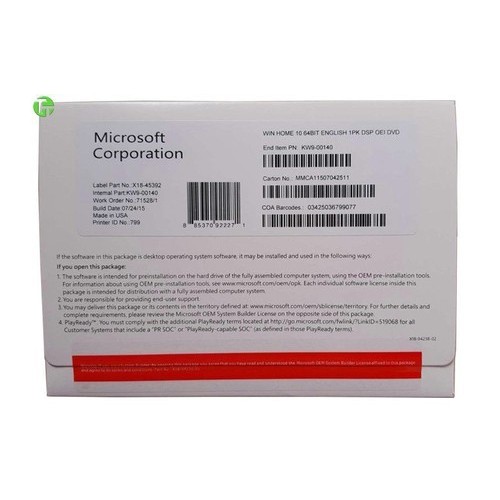
WINDOW%2010-500x500.jpg


If the shop provide this than you have the key.
However this is OEM key so not transferable/can be used on another PC.
Unless retail version which are not sold through shops but Microsoft themselves
than can be transferable.

You can check with PCthemes and they will say the same thing.
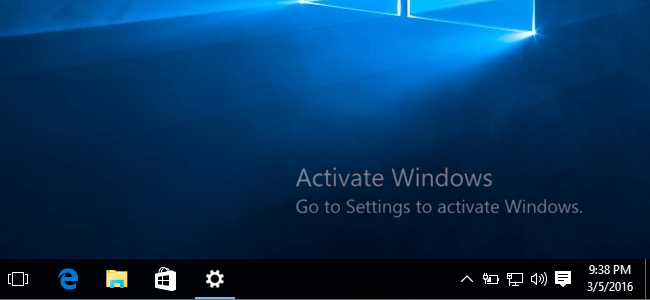
For new PC you will definitely need a new Windows license else you can use unactivated version.
But you will have this watermark on the desktop.

img_56dbc73391523.png
 

TeethOfMidas

Supremacy Member
Joined
Aug 24, 2016
Messages
5,185
Reaction score
3
No problem, it's a simple command line to get the data to show. Shops also sell OEM version of Windows, so could be either, the retail version costs a bit more.

Since you're familiar with PC Themes, you can always go back and ask Yilong to put together a suggested PC for your needs with your budget in mind. That's another option to consider
Oh, I wasn't aware they do suggested builds too, previously I went with a list on hand (sought help from here as well!) and only got them to help with parts purchase + assembly.

Will keep that option in mind!
 

TeethOfMidas

Supremacy Member
Joined
Aug 24, 2016
Messages
5,185
Reaction score
3
Don't see this as a good reason to change PC and there are users PC with similar specs still
able to use and game.
Wifi card usually is due to Windows driver issue especially Windows keep updating time to time.

Thus can haywire the Wifi driver which I have seen many times and ASUS Wifi adapter are reliable
so unlikely for the card to die.
Your PC is more than 6 years old, opt to try a clean install of Windows than try again.
If you don't know how to, you can bring to PCthemes let them do it for you.

What about the graphic card? If there is no graphic card, you can consider get a GTX 1650 4GB
to pair with this PC will be more than sufficient to run DOTA 2.
Unless you want to run more demanding games like Cyberpunk, COD Modern Warfare etc.
than you will need a better graphic card.
Understand what you mean.
My current PC also died (literally cannot even boot up) back in 2020, which took me lots of time and trial-and-errors to resolve as I'm unfamiliar with all the technical aspects.
That was quite an 'ordeal' for me back then, and now with the Wifi issue.. I'm just worried spending that much time and effort troubleshooting it now will only be a temporary one, until the next problem pops up somewhere else in the next 1-2 years.

Hence the thought to just start over with a new rig. But I'm also cognisant of the fact that most likely most of the parts are working fine still, so I'll probably try your suggestion of a clean install. If that works I'll leave my current rig for a family member to use instead!

As for graphics card; indeed my current setup doesn't have a dedicated card.
Haha I was relying on the onboard one while looking around for what's a good option.. but everything worked well even without one so I just left it as is and kinda forgot I didn't even have one 😂
 

TeethOfMidas

Supremacy Member
Joined
Aug 24, 2016
Messages
5,185
Reaction score
3
WINDOW%2010-500x500.jpg


If the shop provide this than you have the key.
However this is OEM key so not transferable/can be used on another PC.
Unless retail version which are not sold through shops but Microsoft themselves
than can be transferable.

You can check with PCthemes and they will say the same thing.
For new PC you will definitely need a new Windows license else you can use unactivated version.
But you will have this watermark on the desktop.

img_56dbc73391523.png
Will look through the boxes when I get the chance, believe I still have them somewhere..

I'll also go for an activated version as the watermark would really bug me haha.
 

86technie

High Supremacy Member
Joined
Jun 8, 2006
Messages
40,477
Reaction score
6,016
Understand what you mean.
My current PC also died (literally cannot even boot up) back in 2020, which took me lots of time and trial-and-errors to resolve as I'm unfamiliar with all the technical aspects.
That was quite an 'ordeal' for me back then, and now with the Wifi issue.. I'm just worried spending that much time and effort troubleshooting it now will only be a temporary one, until the next problem pops up somewhere else in the next 1-2 years.

Hence the thought to just start over with a new rig. But I'm also cognisant of the fact that most likely most of the parts are working fine still, so I'll probably try your suggestion of a clean install. If that works I'll leave my current rig for a family member to use instead!

As for graphics card; indeed my current setup doesn't have a dedicated card.
Haha I was relying on the onboard one while looking around for what's a good option.. but everything worked well even without one so I just left it as is and kinda forgot I didn't even have one 😂

If you don't know how to do a clean install of WIndows. (PS it is not factory reset).
Do bring to a shop let them troubleshoot for you.
That rig still can be used, if it is still workable than get a graphic card for it.
 

Dr.Vijay

Administrator
Administrator
Joined
Jan 1, 2000
Messages
28,162
Reaction score
3,132
Got it.
AS customer service told me the 3080TI is highly recommended for my usage, haha.
Seriously?
If you remember the name of the servicing agent, I can feedback to Aftershock; this advice is like hearing any mention of 'game' to recommend the best GFX card. I'm sure not all agents are this shallow.

In any case, the DC build is more than sufficient.

On a side note, you can get rigs from both brands for similar price points -- you just need to configure them right for your needs or have a good agent to walk you through the selection process.

Meanwhile, the above points shared by other members are quite useful if you want to just self-configure and tailor-make a system from any brand.
 
Important Forum Advisory Note
This forum is moderated by volunteer moderators who will react only to members' feedback on posts. Moderators are not employees or representatives of HWZ Forums. Forum members and moderators are responsible for their own posts. Please refer to our Community Guidelines and Standards and Terms and Conditions for more information.
Top