No Mobile Data For Physical Sim When Both Physical Sim And ESIM Enabled

leongws

Master Member
Joined
May 31, 2003
Messages
3,041
Reaction score
676
Hi all, I’m currently facing a perculiar issue.

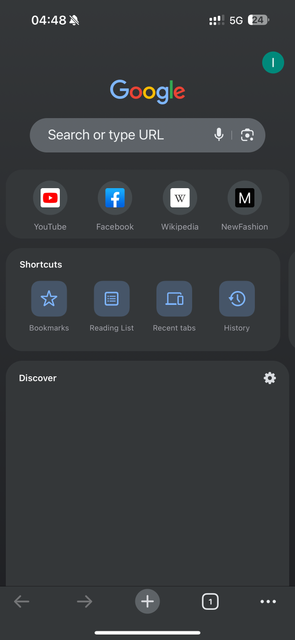
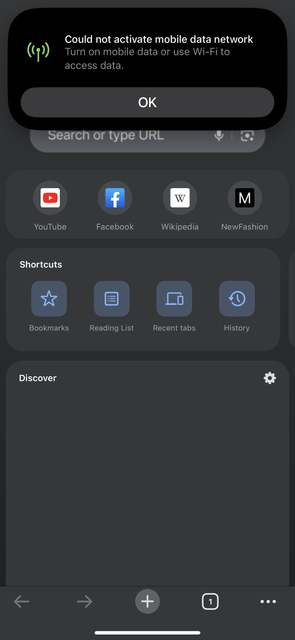
As per title, I have enabled physical sim and eSIM on my iPhone 15 pro max. The default mobile data and voice line are set to the physical sim. Allow mobile data switching is off.

However I frequently encounter I’m not able connect to mobile data even when it show full bar and 5G which my physical sim support. Only able to get mobile data back on if I switch mobile data to eSIM or turn off eSIM. Meaning to enable just the physical sim. A reboot of phone also solve the issue amid just a temporary fix as the issue still happens intermittently.

I have tried switching default mobile data to eSIM instead of physical sim to test out and seems no issue with data loading with it.

Physical sim is M1 and eSIM is eight mobile.


Last edited:

maxheadroom

Senior Member
Joined
Jan 1, 2000
Messages
1,633
Reaction score
37
For this could be your SIM card and could be the radio of the ip15 pro max issue.
ip15 pro max radio issue, you can just plug in to computer to see if there is an update. (Not the software update. It a diff update you able to know).

And by any chance that your IOS is on the beta? Cause there is a recent case that the connection will drop.
 

leongws

Master Member
Joined
May 31, 2003
Messages
3,041
Reaction score
676
For this could be your SIM card and could be the radio of the ip15 pro max issue.
ip15 pro max radio issue, you can just plug in to computer to see if there is an update. (Not the software update. It a diff update you able to know).

And by any chance that your IOS is on the beta? Cause there is a recent case that the connection will drop.
Im on latest non beta iOS. Funny thing is if I just use physical SIM card only, totally no issue. Only started to happen when I installed eSIM and both sims turned on.

Just wondering anyone encounter similar issue.
 

szeli

Arch-Supremacy Member
Joined
Mar 24, 2003
Messages
21,480
Reaction score
3,163
Im on latest non beta iOS. Funny thing is if I just use physical SIM card only, totally no issue. Only started to happen when I installed eSIM and both sims turned on.

Just wondering anyone encounter similar issue.
get it checked at the  store? or maybe test the same setup on another phone if you have access to that
 

leongws

Master Member
Joined
May 31, 2003
Messages
3,041
Reaction score
676
get it checked at the  store? or maybe test the same setup on another phone if you have access to that
May visit Apple Store but this issue happened randomly. Like now I can use the line with no issue even thought both P.sim and eSIM are enabled. So may be hard to replicate it there

Not able to test the setup on another phone as eSIM is not transferable(need new QR code to another phone).
 

reddevil0728

Great Supremacy Member
Joined
Dec 16, 2005
Messages
66,289
Reaction score
5,867
May visit Apple Store but this issue happened randomly. Like now I can use the line with no issue even thought both P.sim and eSIM are enabled. So may be hard to replicate it there

Not able to test the setup on another phone as eSIM is not transferable(need new QR code to another phone).
Usually if you go into Apple Store (strongly recommend to book appointment) they will just run a diagnostic, if everything good they will say is likely due to your telco n check with your telco, or worse still tell you to do a restore.

instead of going down, can call Apple support or do online chat, they can run the same diagnostic without you going down. Save you time and effort
 

leongws

Master Member
Joined
May 31, 2003
Messages
3,041
Reaction score
676
Usually if you go into Apple Store (strongly recommend to book appointment) they will just run a diagnostic, if everything good they will say is likely due to your telco n check with your telco, or worse still tell you to do a restore.

instead of going down, can call Apple support or do online chat, they can run the same diagnostic without you going down. Save you time and effort
Thanks for the suggestion of calling Apple support. May well do so as easier. Will give them a call when the issue come back.

Can I check if we backup phone to iCloud, do the eSIM profile be backup also? Meaning if I restore the phone or to another iPhone, eSIM profile will be available and usable?
 
Last edited:

reddevil0728

Great Supremacy Member
Joined
Dec 16, 2005
Messages
66,289
Reaction score
5,867
Thanks for the suggestion of calling Apple support. May well do so as easier. Will give them a call when the issue come back.
Actually don’t need to wait. Cause the diagnostic should be able to tell if any issue from the log.
Can I check if we backup phone to iCloud, do the eSIM profile be backup also? Meaning if I restore the phone or to another iPhone, eSIM profile will be available and usable?
From my recollection, when you erase n restore, I think they will ask you if you want to keep the eSIM

for same device only of course

https://discussions.apple.com/thread/253176559
 

leongws

Master Member
Joined
May 31, 2003
Messages
3,041
Reaction score
676
Update:

I called Apple support yesterday evening about what I’m facing. They did a diagnostic run for my phone and was told nothing was wrong based on the result.

I then asked what I need to do and was told to
1) contact my service provider(M1) and check with them any issue with the line and
2) swap my p.sim with another p.sim to see if issue still happens with psim and eSIM enabled.

For 1) I told her I will try to call M1 on this but I presumed M1 will say no issue with the line. I mean this is the standard template of replying by M1 cso, especially when I am able to get mobile network back after I turn off eSIM or restart phone.

As for 2) I told her that I can swap out my p.sim with another (in this case my wife psim) but what’s the point as the issue is not replicable.(sound familiar lol). Can’t expect me to use my wife line for 1 day on my phone to monitor right as the issue happens randomly. I also need to be contacted on my own number, as well as for my wife.

Since no conclusive solutions can be given, I told her that we will leave it as it is for now and will contact support again for call back immediately when this issue happen again so that they can do diagnostic test and also I can share screen with them again so they can see for themself.

Maybe I’m a difficult customer.
 

szeli

Arch-Supremacy Member
Joined
Mar 24, 2003
Messages
21,480
Reaction score
3,163
Update:

I called Apple support yesterday evening about what I’m facing. They did a diagnostic run for my phone and was told nothing was wrong based on the result.

I then asked what I need to do and was told to
1) contact my service provider(M1) and check with them any issue with the line and
2) swap my p.sim with another p.sim to see if issue still happens with psim and eSIM enabled.

For 1) I told her I will try to call M1 on this but I presumed M1 will say no issue with the line. I mean this is the standard template of replying by M1 cso, especially when I am able to get mobile network back after I turn off eSIM or restart phone.

As for 2) I told her that I can swap out my p.sim with another (in this case my wife psim) but what’s the point as the issue is not replicable.(sound familiar lol). Can’t expect me to use my wife line for 1 day on my phone to monitor right as the issue happens randomly. I also need to be contacted on my own number, as well as for my wife.

Since no conclusive solutions can be given, I told her that we will leave it as it is for now and will contact support again for call back immediately when this issue happen again so that they can do diagnostic test and also I can share screen with them again so they can see for themself.

Maybe I’m a difficult customer.
actually maybe issue is with M1 line? I used M1 for a long time then switch out a few years ago. always full bars but no data at certain places
 

leongws

Master Member
Joined
May 31, 2003
Messages
3,041
Reaction score
676
actually maybe issue is with M1 line? I used M1 for a long time then switch out a few years ago. always full bars but no data at certain places
But after I off eSIM, physical sim (M1) works. I didn’t even toggle airplane or off on psim
 

dotsavvy

Junior Member
Joined
Jul 31, 2010
Messages
5
Reaction score
0
I used to have M1maxx. Full bar but no data Intermittentply. Have to switch telco after two months.
 

leongws

Master Member
Joined
May 31, 2003
Messages
3,041
Reaction score
676
A few users commented that m1 frequently full bar and no data. May I know are u all using and enable both psim and eSIM?

My issue is it only happens after I added eSIM about 1.5 months ago and both psim and eSIM enabled. Before that using only psim(m1) and no issue. M1 line is 20 years old and the SIM card replaced with a 5G card since last year.

To emphasis again, M1 is the default for mobile data and voice.

Once I encounter psim no data loading, i turn off eSIM and straight away data loads.

Thanks to all who replied. So far my psim still have yet to encounter the issue since I rebooted my phone yesterday due to no network. Hopefully it remains as it is.
 
Last edited:
Important Forum Advisory Note
This forum is moderated by volunteer moderators who will react only to members' feedback on posts. Moderators are not employees or representatives of HWZ Forums. Forum members and moderators are responsible for their own posts. Please refer to our Community Guidelines and Standards and Terms and Conditions for more information.
Top