

NVME SSD - Random Read/Write - Benchmark against Advertised Speed

Yongkit

Supremacy Member
Joined
Oct 9, 2015
Messages
5,917
Reaction score
2,501
Just curious how much different would be the real world performance of the advertised speed:

my 1TB 980 pro is advertised with the following speed:

1678081290652.png

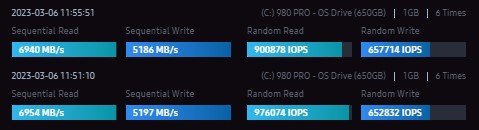
1) Ramdom (4KB,QD32) benchmarks show:


Normal windows load:

980Pro - 1TB - Memory Speed 3733CL16.jpg

Random Read/Write (4KB,QD32) : (R) 54% / (W) 40% against advertised speed


Clear Background windows load (close unnecessary services) :
980Pro - 1TB - Memory Speed 3733CL16-clear BG svc.jpg

Random Read/Write (4KB,QD32) : (R) 90% / (W) 65% against advertised speed

____________________________________________________________________________________________

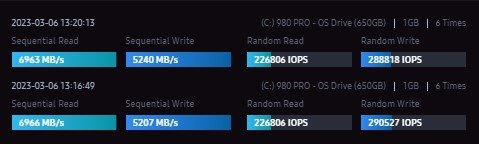
2) Ramdom (4KB,QD1) benchmarks show:


Normal windows load:
980Pro - 1TB - Memory Speed 3733CL16-QD1 Random-norm .jpg

Random Read/Write (4KB,QD1) : (R) 100% / (W) 48% against advertised speed


Clear Background windows load (close unnecessary services) :

980Pro - 1TB - Memory Speed 3733CL16-QD1 Random-clear BG svc.jpg


Random Read/Write (4KB,QD1) : (R) 100% / (W) 60% against advertised speed


I am curious whether Random "QD32" or "QD1" more critical for the selection of NVME drive ?

Also seems like windows on normal load will take tank the nvme performance significantly for the random write speed.
 

xonix

Arch-Supremacy Member
Joined
Mar 24, 2001
Messages
17,586
Reaction score
1,689
When they do benchmark testing for SSD, no one will do testing with Windows OS installed on it. It will be tested as a secondary where it will not be affected by other variables like you mentioned. I'm not a power user, will only look at 4K random RW speeds when considering which SSD to buy.
 

Yongkit

Supremacy Member
Joined
Oct 9, 2015
Messages
5,917
Reaction score
2,501
When they do benchmark testing for SSD, no one will do testing with Windows OS installed on it. It will be tested as a secondary where it will not be affected by other variables like you mentioned. I'm not a power user, will only look at 4K random RW speeds when considering which SSD to buy.
May I know what is your ideal or targeted 4K random RW speed for choosing ssd?
 

xonix

Arch-Supremacy Member
Joined
Mar 24, 2001
Messages
17,586
Reaction score
1,689
May I know what is your ideal or targeted 4K random RW speed for choosing ssd?
I am a price conscious buyer. So I find the SSD that has the best possible 4K random R/W with the lowest possible price per gb. If you see my setup, can see that I don't go for the top of the line models.
 

wwenze

Greater Supremacy Member
Joined
Dec 2, 2002
Messages
86,881
Reaction score
30,457
Use Crystaldiskmark. See whether your results match others. Done.

Then when you have time or have the ____ to give them can read what QD and T and blah blah mean.
 

elmariachi

Supremacy Member
Joined
May 30, 2005
Messages
6,355
Reaction score
1,508
Based on my Crystaldiskmark numbers, I am within 5% of advertised speed especially so on read. Write I am pretty much as what is advertised. Firecuda 530 Gen4 drive here. I have benched randomly within 4 months of my last Windows install and they are largely the same. Remember overheads like RGB lighting, Armoury Crate and software in the background affects the speeds you get on these benches. The same way your system latency increases with such software. So try to run it in diagnostics mode if you really want to see the true speed of your drive in your system.
 

Yongkit

Supremacy Member
Joined
Oct 9, 2015
Messages
5,917
Reaction score
2,501
Use Crystaldiskmark. See whether your results match others. Done.

Then when you have time or have the ____ to give them can read what QD and T and blah blah mean.
Many thanks I will try.

I often find this crytaldiskmark comparison confusing as there are many user using different setting and not mentioned in the test so it's quite hard to gauge the benchmark.
 
Last edited:

Yongkit

Supremacy Member
Joined
Oct 9, 2015
Messages
5,917
Reaction score
2,501
Based on my Crystaldiskmark numbers, I am within 5% of advertised speed especially so on read. Write I am pretty much as what is advertised. Firecuda 530 Gen4 drive here. I have benched randomly within 4 months of my last Windows install and they are largely the same. Remember overheads like RGB lighting, Armoury Crate and software in the background affects the speeds you get on these benches. The same way your system latency increases with such software. So try to run it in diagnostics mode if you really want to see the true speed of your drive in your system.
many thanks for sharing.

I believe my current benchmark is very close to all advertised speed once close all the backgroup except the challenges was the "random write speed" in general of 60% over advertised speed.

I will try as suggested.
 

Phen8210

High Supremacy Member
Joined
Jul 29, 2011
Messages
29,029
Reaction score
8,286
QD32 (queue depth 32) represents the number of commands that can be queued and processed by the SSD simultaneously. This is particularly important for high-end workloads such as video editing, data analytics, and gaming, where multiple large files are being accessed and modified simultaneously. In such scenarios, the QD32 speed is more important as it indicates how quickly the SSD can process numerous commands simultaneously.

QD1 (queue depth 1), on the other hand, represents the speed at which the SSD can process a single command at a time. This is particularly important for everyday computing tasks, such as booting up the operating system, opening programs, and accessing small files. In such scenarios, the QD1 speed is more important as it indicates how quickly the SSD can respond to individual requests.

In summary, if you are using your SSD for high-end workloads with large files and multiple commands, then QD32 speed is more important. But if you are using your SSD for everyday computing tasks, then QD1 speed is more important.
 

Yongkit

Supremacy Member
Joined
Oct 9, 2015
Messages
5,917
Reaction score
2,501
Use Crystaldiskmark. See whether your results match others. Done.

Then when you have time or have the ____ to give them can read what QD and T and blah blah mean.

I do a test and the following is the crystalmark Realworld test setting results:

1678091777439.png

Results:

1678091715142.png
 

Yongkit

Supremacy Member
Joined
Oct 9, 2015
Messages
5,917
Reaction score
2,501
QD32 (queue depth 32) represents the number of commands that can be queued and processed by the SSD simultaneously. This is particularly important for high-end workloads such as video editing, data analytics, and gaming, where multiple large files are being accessed and modified simultaneously. In such scenarios, the QD32 speed is more important as it indicates how quickly the SSD can process numerous commands simultaneously.

QD1 (queue depth 1), on the other hand, represents the speed at which the SSD can process a single command at a time. This is particularly important for everyday computing tasks, such as booting up the operating system, opening programs, and accessing small files. In such scenarios, the QD1 speed is more important as it indicates how quickly the SSD can respond to individual requests.

In summary, if you are using your SSD for high-end workloads with large files and multiple commands, then QD32 speed is more important. But if you are using your SSD for everyday computing tasks, then QD1 speed is more important.

Many thanks this really summarize alot (y)

I believe in real world usage there will be no issue to meet the sequential read/write speed for most ssd.

the real challenges was the random read/write when the ssd was plug into the system and start using.
 

Yongkit

Supremacy Member
Joined
Oct 9, 2015
Messages
5,917
Reaction score
2,501
I did some test for fun to see if the memory speed would affect the QD32 random read/write and my results show it does from base 3600CL16 to 3866CL16 about 3%~4% marginal improvement. just for reference only and no actual impact that would be significant.

1678094235398.png
 

wwenze

Greater Supremacy Member
Joined
Dec 2, 2002
Messages
86,881
Reaction score
30,457
Yea... Reviewers rarely do 70/30 so nothing to compare against.

Your 4k read is about there. 4k write is slower, however why is your C drive only 651GB? Not using the full drive at the same time will reduce your speed. In fact if we multiplied your result to 1TB then the speed roughly matches.
 

Yongkit

Supremacy Member
Joined
Oct 9, 2015
Messages
5,917
Reaction score
2,501
Yea... Reviewers rarely do 70/30 so nothing to compare against.

Your 4k read is about there. 4k write is slower, however why is your C drive only 651GB? Not using the full drive at the same time will reduce your speed. In fact if we multiplied your result to 1TB then the speed roughly matches.
Many thanks.

I got 30% over provision on my c drive now so the space lesser with 650gb.
 

uselessbum

High Supremacy Member
Joined
Aug 20, 2009
Messages
27,567
Reaction score
9,365
Don't forget to update your firmware as well. Depending on when it was made, it could have the bug that affects the lifespan of the ssd.

:(
 

Yongkit

Supremacy Member
Joined
Oct 9, 2015
Messages
5,917
Reaction score
2,501
Don't forget to update your firmware as well. Depending on when it was made, it could have the bug that affects the lifespan of the ssd.

:(
Many thanks I do have updated firmware.

based on the box i see was made on 19-Feb-2021.
 

tsteo77

Senior Member
Joined
Oct 28, 2011
Messages
1,543
Reaction score
216
Many thanks I do have updated firmware.

based on the box i see was made on 19-Feb-2021.
@Yongkit,
although i not interested in nvme ssd drive due to how it's build/design and still prefer to stick to sata ssd
even though it advertise insane speed over sata ssd. I think you should not trust those testing program too much.
You should judge the nvme ssd based on weather it's able to achieve instant game install and loading for titles that are about 5gb ? If it does not then i think the nvme ssd is not much better then my sata ssd.

I found some interesting nvme ssd drive you and everyone might be interested. :)
Do share any comments about these higher performance nvme ssd i discovered.

https://www.amazon.sg/Samsung-256GB...ds=nvme+ssd+for+server&qid=1678140446&sr=8-10

https://www.amazon.sg/Kingston-DC15...ds=nvme+ssd+for+server&qid=1678140446&sr=8-27
 
Important Forum Advisory Note
This forum is moderated by volunteer moderators who will react only to members' feedback on posts. Moderators are not employees or representatives of HWZ Forums. Forum members and moderators are responsible for their own posts. Please refer to our Community Guidelines and Standards and Terms and Conditions for more information.
Top