Onboard WiFi issue

JB_King

Junior Member
Joined
Jun 2, 2020
Messages
40
Reaction score
7
Mobo: Gigabye Z890 Aorus Elite WiFi 7 Plus

This new setup i having, its onboard wifi + BT sometime undetectable after a system reboot. When it become undetectable, only BT is available. I will need to power off PSU for 5 secs then switch on abale, the onboard wifi is available again. Ithe hardware is working fine for sure. Just that i not sure why this is hapeening on a newly setup with fresh OS installed. I have updated the BIOS and latest inetl wifi drivers but does not seem resolved.

I have also tried to disable fast startup in power options but does not work also.
 

zyang527

Junior Member
Joined
Mar 20, 2025
Messages
24
Reaction score
4
Can try a fresh window install.
I had similar issue before after an auto windows update.
No harm to try it. Hopefully its not your motherboard issue.
 

86technie

High Supremacy Member
Joined
Jun 8, 2006
Messages
39,916
Reaction score
5,678
1) Have you tried fresh install of Windows *Not reset delete/format the WIndows drive than install Windows
*Do offline without internet connected.
2) Install system drivers,
Chipset (Inf package) -> MEI Management Engine Software -> Serial -> GNA (Gaussian Neural Accelerator)
-> HID Event filter
*Motherboard driver have to install first than other components will work properly.
Realtek LAN Driver -> WIFI -> BT -> Audio -> Graphic card
That motherboard is using Intel WIFI should be stable.
If after a clean install of WIndows as well as installing all the drivers not just WIFI.
The WIFI still disppear than send to distro for checking.
They will also do the same make sure the Windows is installed properly as well as the drivers.
If the motherboard WIFI is faulty they will replace for you.
 

wwenze

Greater Supremacy Member
Joined
Dec 2, 2002
Messages
85,042
Reaction score
28,884
Mobo: Gigabye Z890 Aorus Elite WiFi 7 Plus

This new setup i having, its onboard wifi + BT sometime undetectable after a system reboot. When it become undetectable, only BT is available. I will need to power off PSU for 5 secs then switch on abale, the onboard wifi is available again. Ithe hardware is working fine for sure. Just that i not sure why this is hapeening on a newly setup with fresh OS installed. I have updated the BIOS and latest inetl wifi drivers but does not seem resolved.

I have also tried to disable fast startup in power options but does not work also.

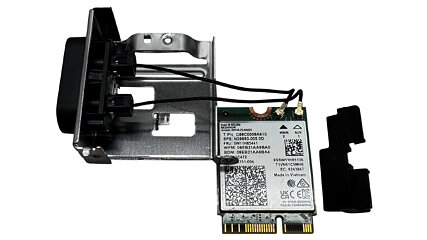
Unplug the M.2 card and plug it back in again.

components-10_small.jpg


If you don't want to go thru this hassle, then just live with your wifi hardware sometimes not detected during boot lor.
 

JB_King

Junior Member
Joined
Jun 2, 2020
Messages
40
Reaction score
7
at this point of time when the wifi card not detectedI will need to off the PC and the PSU as well.
 

86technie

High Supremacy Member
Joined
Jun 8, 2006
Messages
39,916
Reaction score
5,678
might void warranty if i remove the card.

For that model will be difficult to remove the WIFI card since you need to remove the shroud covering the card.
1_3bcc4fc7-a3e8-40cf-9b96-d2e94b653777.png


Is not like this.
Anyway since you suspect WIFI got issue send to CDL trading for checking.
They will ask you the same thing have you install the drivers.
 

peterchan75

Supremacy Member
Joined
Apr 26, 2003
Messages
6,719
Reaction score
529
Get a used TP-Link Wifi extender AC1750 or AC2600 for around $30~40 from Carousell. Connect via RJ45 and check if you have the same issue. If yes, then it's the router. AC2600 is pretty fast.
 

JB_King

Junior Member
Joined
Jun 2, 2020
Messages
40
Reaction score
7
after a shutdown with the PSU off, its detectable and useable without any issues, i suspected its not h/w related.
 

yukita

Supremacy Member
Joined
Jan 1, 2000
Messages
8,350
Reaction score
180
after a shutdown with the PSU off, its detectable and useable without any issues, i suspected its not h/w related.
imo its the opposite. if its software related, restart should fix it. no need to turn off the PSU. it should be hardware related.
 

JB_King

Junior Member
Joined
Jun 2, 2020
Messages
40
Reaction score
7
If your onboard Wi-Fi has suddenly disappeared from the network list or isn't initializing, performing a full power cycle will force the module to reset and reconnect upon the next bootup.Shut down your PC normally through the operating system.Turn off the power supply via the physical switch (usually on the back of the PC's PSU). If there is no switch, unplug the power cord directly from the wall outlet.Wait 10 to 30 seconds for all electrical components to discharge.Press and hold the computer's power button for 15-30 seconds. This drains any residual power lingering in the motherboard's capacitors.Turn the power supply switch back on (or plug the cable in) and boot up your PC. Check if the Wi-Fi icon is restored.
 

86technie

High Supremacy Member
Joined
Jun 8, 2006
Messages
39,916
Reaction score
5,678
If your onboard Wi-Fi has suddenly disappeared from the network list or isn't initializing, performing a full power cycle will force the module to reset and reconnect upon the next bootup.Shut down your PC normally through the operating system.Turn off the power supply via the physical switch (usually on the back of the PC's PSU). If there is no switch, unplug the power cord directly from the wall outlet.Wait 10 to 30 seconds for all electrical components to discharge.Press and hold the computer's power button for 15-30 seconds. This drains any residual power lingering in the motherboard's capacitors.Turn the power supply switch back on (or plug the cable in) and boot up your PC. Check if the Wi-Fi icon is restored.

I put it simple if like that means faulty hardware.
Unless you power cycle than it temporarily revive.
Send to CDL trading which they are Gigabyte service centre.
 
Important Forum Advisory Note
This forum is moderated by volunteer moderators who will react only to members' feedback on posts. Moderators are not employees or representatives of HWZ Forums. Forum members and moderators are responsible for their own posts. Please refer to our Community Guidelines and Standards and Terms and Conditions for more information.
Top