Pc fans

wkweewee

High Supremacy Member
Joined
Sep 25, 2013
Messages
26,900
Reaction score
14
my fan is a 3 pin fan plugged into a 4 pin connector on the mobo

3 pin doesn't allow you to do speed control, even when plugged into the 4 pin of your mobo. Therefore, the 3 pin fan will always run at the maximum speed. If your fan is getting slow, either it is going to spoil, or the fan header on your mobo is faulty. In order to control the fan speed of a 3 pin, you will have to manually assign a voltage to the fan controller.

 

FlyingNuggets

Senior Member
Joined
Jul 5, 2014
Messages
628
Reaction score
0
3 pin doesn't allow you to do speed control, even when plugged into the 4 pin of your mobo. Therefore, the 3 pin fan will always run at the maximum speed. If your fan is getting slow, either it is going to spoil, or the fan header on your mobo is faulty. In order to control the fan speed of a 3 pin, you will have to manually assign a voltage to the fan controller.

And how would you recommend to do that? my friend's mobo is z77 mobo from asus
 

blue00

Supremacy Member
Joined
Jul 22, 2009
Messages
9,174
Reaction score
2,422
i got some used coolermaster fan to let go at $3, pm me if keen
 

damienloh

Master Member
Joined
Jan 1, 2000
Messages
3,549
Reaction score
0
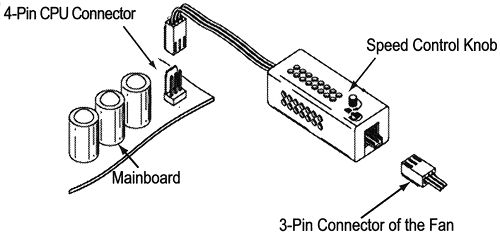
Any SLS shop sells simple fan speed controller?

fc-rpm01m-installation.gif
 
Important Forum Advisory Note
This forum is moderated by volunteer moderators who will react only to members' feedback on posts. Moderators are not employees or representatives of HWZ Forums. Forum members and moderators are responsible for their own posts. Please refer to our Community Guidelines and Standards and Terms and Conditions for more information.
Top