PC vs eGPU

Blackmel

Senior Member
Joined
Jun 3, 2008
Messages
1,181
Reaction score
0
Hey folks! Should I build a PC or an eGPU?

I am a life-long Mac and Playstation user. But with a reduction in exclusive titles and limited dGPU on the Mac, I'm looking at a Windows operated system for my gaming needs.

My objective is to run graphic intensive games smoothly at High/Ultra settings on a 1080p Dell UltraSharp U2414H display in Windows 8.1/10 for the next 3 years with minimal tinkering. I have limited time for gaming, hence only select titles. I have no other need for a PC or an eGPU.

The eGPU community while small, is very helpful. But eGPU are marred with stability issues and unknown future. Likewise my habit of upgrading every 2 years and the upcoming releases of Skylake and Thunderbolt 3, make me wonder if I should take the conventional PC approach.

It is really a toss up between footprint, cost, stability and longevity. The eGPU is smaller and cheaper, while I hope the PC is more stable and would last a good 5 years.

What do you folks think? Should I build a PC or an eGPU? How's the configuration for PC?

Do I need to overclock? With imminent release of DirectX12 and its better hyper threading compatibility, should I get an i7 processor? Should I wait for Broadwell release?

Please do note hesitate to provide any advice. Thank you and stay safe!

Configuration for eGPU: (~$1000)
Late 2013 15” MacBook Pro with Retina Display
Specs:
2.3Ghz Quad-Core Intel Core i7-4850HQ (Turbo Boost up to 3.5Ghz)
16GB 1600MHz RAM
512GB PCIe-based SSD
Nvidia GeForce GT 750M with 2GB GDDR5 VRAM

Akitio Thunder2 PCIe Box
Corsair RM650 Fully-Modular Power Supply Unit
Asus GeForce GTX 970 DC Mini
4-pin MOLEX to 12V DC 2.5mm x 5.5mm Barrel Adapter
ATX PSU Jumper
 
Last edited:

mib500

Master Member
Joined
Sep 16, 2010
Messages
3,309
Reaction score
9
Hey folks! Should I build a PC or an eGPU?

I am a life-long Mac and Playstation user. But with a reduction in exclusive titles and limited dGPU on the Mac, I'm looking at a Windows operated system for my gaming needs.

My objective is to run graphic intensive games smoothly at High/Ultra settings on a 1080p Dell UltraSharp U2414H display in Windows 8.1/10 for the next 3 years with minimal tinkering. I have limited time for gaming, hence only select titles. I have no other need for a PC or an eGPU.

The eGPU community while small, is very helpful. But eGPU are marred with stability issues and unknown future. Likewise my habit of upgrading every 2 years and the upcoming releases of Skylake and Thunderbolt 3, make me wonder if I should take the conventional PC approach.

It is really a toss up between footprint, cost, stability and longevity. The eGPU is smaller and cheaper, while I hope the PC is more stable and would last a good 5 years.

What do you folks think? Should I build a PC or an eGPU? How's the configuration for PC?

Do I need to overclock? With imminent release of DirectX12 and its better hyper threading compatibility, should I get an i7 processor? Should I wait for Broadwell release?

Please do note hesitate to provide any advice. Thank you and stay safe!

Configuration for eGPU:
Late 2013 15” MacBook Pro with Retina Display
Specs:
2.3Ghz Quad-Core Intel Core i7-4850HQ (Turbo Boost up to 3.5Ghz)
16GB 1600MHz RAM
512GB PCIe-based SSD
Nvidia GeForce GT 750M with 2GB GDDR5 VRAM

Akitio Thunder2 PCIe Box
Corsair RM650 Fully-Modular Power Supply Unit
Asus GeForce GTX 970 DC Mini
4-pin MOLEX to 12V DC 2.5mm x 5.5mm Barrel Adapter
ATX PSU Jumper

Configuration for PC:
Intel Core i5-4690K 3.5GHz Quad-Core Processor
Asus Z97-PRO(Wi-Fi ac) ATX LGA1150 Motherboard
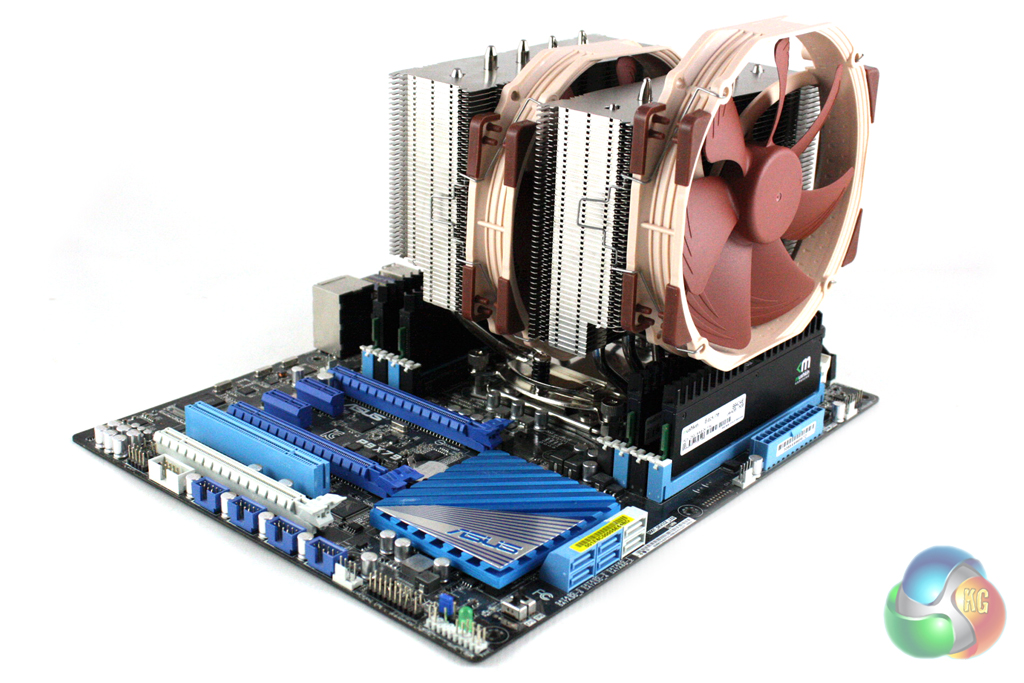
Noctua NH-D15 82.5 CFM CPU Cooler
Asus GeForce GTX 970 STRIX
Crucial Ballistix Sport 8GB (2 x 4GB) DDR3-1600 Memory (Low Profile)
Samsung 850 EVO-Series 500GB SSD
Seasonic X650 / Super Flower Leadex Gold 650W Fully-Modular ATX Power Supply
Fractal Design Define S ATX Mid Tower Case

whats your budget?
 

zenniz

Senior Member
Joined
Feb 23, 2008
Messages
1,189
Reaction score
0
If you are on budget

Do I need to overclock? - Overclock yield insignificant gaming improvement. It is a total waste of money.

With imminent release of DirectX12 and its better hyper threading compatibility, should I get an i7 processor? - The performance different between i7 and i5 is insignificant. I bet it will stay the same all the way.

Should I wait for Broadwell release? - Wait for Skylake.

Lastly, ignore all this if you got the $$$.
 

avsquare

Arch-Supremacy Member
Joined
Oct 27, 2011
Messages
11,314
Reaction score
42
Configuration for PC: (~$1700)
Intel Core i5-4690K 3.5GHz Quad-Core Processor
Asus Z97-PRO(Wi-Fi ac) ATX LGA1150 Motherboard
Noctua NH-D15 82.5 CFM CPU Cooler
Asus GeForce GTX 970 STRIX
Crucial Ballistix Sport 8GB (2 x 4GB) DDR3-1600 Memory (Low Profile)
Samsung 850 EVO-Series 500GB SSD
Seasonic X650 / Super Flower Leadex Gold 650W Fully-Modular ATX Power Supply
Fractal Design Define S ATX Mid Tower Case

If you just gonna play a few titles and things gonna get dormant then I don't think you need certain of the stuffs listed nor 500GB of disk space?

Maybe you can consider to get the basic i5-4460 chip instead
SSD you probably could have gotten the 250GB version
You could probably down the CPU cooler to a more "basic" one like CM Hyper 212X/EVO since CPU heat more or less won't be an issue and you ain't overclocking.

You could probably save some $250+ like this. If you need storage space you can use the money to buy a conventional HDD drive as storage, and if you are concerned about cooling on that mid tower, you can always add 1 more front intake fan and the top chassis supports additional 2 exhaust fans.
 

mib500

Master Member
Joined
Sep 16, 2010
Messages
3,309
Reaction score
9
If you just gonna play a few titles and things gonna get dormant then I don't think you need certain of the stuffs listed nor 500GB of disk space?

Maybe you can consider to get the basic i5-4460 chip instead
SSD you probably could have gotten the 250GB version
You could probably down the CPU cooler to a more "basic" one like CM Hyper 212X/EVO since CPU heat more or less won't be an issue and you ain't overclocking.

You could probably save some $250+ like this. If you need storage space you can use the money to buy a conventional HDD drive as storage, and if you are concerned about cooling on that mid tower, you can always add 1 more front intake fan and the top chassis supports additional 2 exhaust fans.

yeah hes right only the cpu maybe you can consider to change to either i5 4460 or maybe 4690 non k.... for gpu 970 yes its good enough....
 

kandinsky

Master Member
Joined
Jan 7, 2015
Messages
4,693
Reaction score
10
My objective is to run graphic intensive games smoothly at High/Ultra settings on a 1080p Dell UltraSharp U2414H display in Windows 8.1/10 for the next 3 years with minimal tinkering.

...while I hope the PC is more stable and would last a good 5 years.

If the PC will be used sporadically, eGPU sounds like a good route to take. Takes up less space, and you enjoy the GPU via your main system which you use everyday.

Based on your objectives, for a PC to last 3-5 years without upgrades would be hard I think. If you take recommended system requirements for the games you mentioned as a guideline, they suggest GTX 760-770. Cards from 2 years ago. You can probably budget to upgrade the GPU every 2-3 years if you wanna play AAA titles on high/ultra, since nobody knows the specs of the games 2-3 years from now :)
 

devilwahaha

Senior Member
Joined
Feb 25, 2010
Messages
2,366
Reaction score
0
The current configurations are between S$1000(eGPU) to S$1700(PC, USD convert). Budget is max at S$1700. Of course if I'm able to achieve similar performance for less, that'll be awesome.

I am trying to maximise my return on investment. This PC will only be used by myself, and only for limited gaming purposes. As of now, I am only interested in three titles, The Witcher 3, Metal Gear Solid V: Phantom Pain and Arkham Knight as a bonus with an Nvidia purchase.

The i5-4690K was listed only because there's a price reduction on Amazon. I understand GPU overclock is simpler and yields better result for gaming purposes. For Skylake and all other purposes, I will still go with a Mac. It is a definite scenario that this PC will be left dormant for an extensive period of time, until the next interesting title release.

How would you folks configure with such budget and purpose? Am I correct to insist on a GTX 970 believing it is currently the most value for money GPU?

Interesting stuff here :D

Your eGPU option is assuming you already own the late-2013 MBP right?

Is the eGPU solution capable of feeding the video back into the macbook's own display? If it's not capable of that then you will need an external monitor for either solution, in that scenario you will most likely get better performance and value for the dollar over time on the PC route if your planned lifespan is 5 years because you can drop in CPU/GPU upgrades easily.

But considering you're only going to use the PC solely to play those titles, you might wanna consider scrimping a little on the other parts on the PC(wont have to compromise performance) and allocating the extra budget on a GTX980 if you do take that route.

And yes GTX 970 is the current favourite for best balance of $/performance/heat.
 

Mikiberry

Supremacy Member
Joined
Jun 26, 2010
Messages
5,107
Reaction score
0
Thanks kandinsky & devilwahaha.

Yes the initial 3 years estimation was made with the eGPU setup in mind. With incoming Thunderbolt 3, my very likely Mac upgrade and the shelf life of GPU. Similarly for PC, I'm hoping most of its components work for the next 5 years besides the inevitable GPU upgrade.

Yes, I do have the MacBook Pro. Currently the community is working on ways for the eGPU to supply feed back to the MacBook internal display. Many MacBooks without dedicated GPU (dGPU) have successfully activated optimus to supply feed to both internal and external display. MacBooks with dGPU requires more tinkering. Hence you can see, plenty of trial and error. Possibly fun, yet frustrating.

I am definitely trying to reduce and match the cost of building the PC to the eGPU. What would your build consist of?

eGPU seems like a community owned project, in any circumstances will you be running tonnes of driver issues? Are you sure you will be able to resolve the issues should you hit the wall. I think convenience and the know-how is the major decision point whether you should go for it or not. Not so much on the budget and cost savings to be honest.
 

kandinsky

Master Member
Joined
Jan 7, 2015
Messages
4,693
Reaction score
10
Thanks kandinsky & devilwahaha.

Yes the initial 3 years estimation was made with the eGPU setup in mind. With incoming Thunderbolt 3, my very likely Mac upgrade and the shelf life of GPU. Similarly for PC, I'm hoping most of its components work for the next 5 years besides the inevitable GPU upgrade.

Ah, I see. Just had a thought: if you're prepared to go the eGPU route (does look quite tedious), ever considered a hackintosh build + bootcamp for them windows games? Might end up with a more versatile machine? Not as niche as eGPUs, think there's a larger community and better support.
 

trento

Great Supremacy Member
Joined
Sep 11, 2007
Messages
64,381
Reaction score
2,726
u may get a cheaper mobo. any reason for H97?

212x or evo will be good for overclocking. u may explore the liquid cooling option as it costs just a bit more for a single fan cooler. it's also a neater solution.

Asus n15 have some known issues. i personally gave up on pci adapters. now using usb. works as well.

550w will do for yr gpu. Fully modular for better cable management.

Fractal cases are high quality with good cable management.

Or if u frequently like to change things like i do, go for dual chamber cases like Air 240/540. no need use cable tie. just plug and chuck cables behind.

u can also consider Pentium G3258 as a stop gap if the new cpu interest u. do some overclocking on it and as it doesn't cost much, u can simply get the new skylake when its released.
 

avsquare

Arch-Supremacy Member
Joined
Oct 27, 2011
Messages
11,314
Reaction score
42
Thank you both and zenniz.

Yes, I think I'll go with either the 4590 or 4690.

What motherboard would you suggest? I'm leaning towards ASUS for its reputation and user-friendly BIOS page. I chose the Z97-Pro AC, only due to its built-in 802.11ac connectivity. The apartment run strictly on wireless AC. Should I get a H97 board and a wireless pcie adapter?

Definitely have the Hyper 212 EVO CPU cooler in my sights, but I'll continue to look at Noctua and its alternatives. For cooling, due to the lack of dust filters on the top, I'm looking at a linear airflow. With intake of 3 140mm fans in front, and exhaust with the supplied 140mm fan at the rear of the chassis.

Likewise, I think I'll go with a 250GB SSD. My concern stems from the recent news of GTAV 120GB setup requirement. Should I go with the conventional or M.2 form factor?

Any thoughts on the PSU choice? Should I go with Corsair RM650, Seasonic X650 or Super Flower Leadex Gold 650W?

Truly appreciate your guidance!

Take the Asus Z97 then. I'm not sure if you will make any savings at all with H97 + wireless card combo. In any case you will have to note that H97 does not support SLI. Sometimes, SLI is a good upgrade option over upgrading 1 generation of graphics card. Example: GTX780 => GTX 980 might not produce a significant benefit in graphical power. However, you may find a cheap GTX780 (since new generation cards pushes prev gen cards prices down) to pair with your existing one. Similarly if you have the GTX970 and if you want more power than the level of GTX980 but not to the level of Titan X (and of cos, the $$$), a GTX970 SLI is a plausible option instead.

Quick comparison of Z97 vs H97 chipset: https://www.pugetsystems.com/labs/articles/Z97-vs-H97-What-is-the-Difference-562/

When you choose your CPU cooler you have to take into account of its size relatively to your chassis. The Noctua NH-D15 is a huge a$$ dual tower radiator that can support up to 3 fans (default packaging is 2).

IMG_6876.jpg


With 2 fans alone it is already covering the entire width of your mobo. Don't end up having the entire Noctua almost touching the back exhaust fan on your left and the optical/HDD bays on the right. Leaving too little space/gap may impede airflow as well.

120GB is for pre-load. If not it is just 60GB.

https://www.reddit.com/r/pcmasterra...a_5for_those_that_the_unpacking_uses_all_the/

Again, you aren't a power user and you wanted savings, go with the conventional SATA III ones. You probably won't be able to fully justify the costs of better ones like M.2 or PCI-E SSDs like Intel 750 as a casual gamer/PC user.
 

avsquare

Arch-Supremacy Member
Joined
Oct 27, 2011
Messages
11,314
Reaction score
42
Good morning trento & avsquare!

I thought of the H97 because it seems cheaper than the Z97 (AC). Any suggestion for an even cheaper motherboard? Or a motherboard and AC-wireless solution?

As the Define S do not have dust filters on top, I feel limited to place the the radiator on either the front or rear of the chassis. Likewise, I'm unsure of small AIO coolers as quality air coolers bench just as well. Any idea? If I'm not overclocking, which air cooler should I look for price, performance and noise level ratio?

I doubt I'll go the SLI route anytime in the future as results seem to skew with game titles? Likewise more cables and might require a greater PSU.

Yes, I'm definitely looking out for height clearance on those Noctua air coolers. I guess I'm leaning towards Noctua for its mounting system which I'm told is the best in the business. But I'm definitely open to suggestion!

For the M.2 SSD, it'll run in SATA not PCIe, currently the same size/price ratio as the conventional 2.5". I asked about the M.2 form factor for its smaller footprint and absence of cables. As you can deduce by now with the WIFI-only, minimal tinkering and cabling, that I am a fan of tidiness.

I am truly thankful for the Puget's link citing the Z97's better compatibility. What would you folks build?

Oh one more thing, how much of a performance boost would it be to go from Haswell to Skylake? an i5 4590 to a reported i5 6500? It seem Skylake would require DDR4 RAM and a few added cost.

I can't advise you on AC solutions because I don't use that. My fibre terminal point is in my room and thus I am always on cable. But in any case I don't really want to stinge on mobo, that's my personal preference. First, most shops at SLS want to sell CPU and mobo as a combo. Buying them separate will almost come at a higher cost. Since you said that you are one who likes tidiness, I guess you aren't going to like the idea to buy a cheap board and end up playing LEGO and plugging extra things like USB3.1 card, wireless card and whatever later, introducing more things or wires into the rig don't you.

This is just my personal thoughts and also own experience. I used to tell myself nah I'm not going to be bothered with overclocking or SLI and what not and I got myself a basic mobo and ended up I changed my mind later. Paying for a better mobo later plus all the extra ley chey stuff like installing a new mobo (and of cos, re-installing OS) isn't really that fun. So I will want to get a mobo with good feature set even though I might not use them right now. But that's of course, you have the $ to spare and willing to spare. Your call.

You can always change the SSD, the GPU and what not easily later as and when you wish. But changing mobo is certainly the most annoying of all.

If you don't overclock, almost anything aftermarket works imo. CM Hyper 212X/212 EVO is pretty affordable and good. You can look at other single tower coolers like Deepcool Lucifer, or if you really liked Noctua, the NH-U14S.

You can get the M.2 if you hate cables I guess.

No one knows how Skylake will perform core to core in comparison right now. But Skylake will have both DDR3 and DDR4 RAM controllers. However Skylake is on LGA1151 socket. If you build a rig now then you can forget about Skylake because you will end up buying brand new mobo to go with Skylake.

IDK but I prob won't be bothered with Skylake that much if you need a rig now. Heck, a lot of dudes here are still running in ivy/sandy bridge chips and still playing current AA titles well.
 

Toby88

Senior Member
Joined
Jun 6, 2006
Messages
2,102
Reaction score
0
The more you gather knowledge, the more you start to do DIY or any form of tinkering, inadvertently you will start to get more into the PC world and eventually get better components.
 

trento

Great Supremacy Member
Joined
Sep 11, 2007
Messages
64,381
Reaction score
2,726
I can't advise you on AC solutions because I don't use that. My fibre terminal point is in my room and thus I am always on cable. But in any case I don't really want to stinge on mobo, that's my personal preference. First, most shops at SLS want to sell CPU and mobo as a combo. Buying them separate will almost come at a higher cost. Since you said that you are one who likes tidiness, I guess you aren't going to like the idea to buy a cheap board and end up playing LEGO and plugging extra things like USB3.1 card, wireless card and whatever later, introducing more things or wires into the rig don't you.

This is just my personal thoughts and also own experience. I used to tell myself nah I'm not going to be bothered with overclocking or SLI and what not and I got myself a basic mobo and ended up I changed my mind later. Paying for a better mobo later plus all the extra ley chey stuff like installing a new mobo (and of cos, re-installing OS) isn't really that fun. So I will want to get a mobo with good feature set even though I might not use them right now. But that's of course, you have the $ to spare and willing to spare. Your call.

You can always change the SSD, the GPU and what not easily later as and when you wish. But changing mobo is certainly the most annoying of all.

If you don't overclock, almost anything aftermarket works imo. CM Hyper 212X/212 EVO is pretty affordable and good. You can look at other single tower coolers like Deepcool Lucifer, or if you really liked Noctua, the NH-U14S.

You can get the M.2 if you hate cables I guess.

No one knows how Skylake will perform core to core in comparison right now. But Skylake will have both DDR3 and DDR4 RAM controllers. However Skylake is on LGA1151 socket. If you build a rig now then you can forget about Skylake because you will end up buying brand new mobo to go with Skylake.

IDK but I prob won't be bothered with Skylake that much if you need a rig now. Heck, a lot of dudes here are still running in ivy/sandy bridge chips and still playing current AA titles well.

i assembled my system on a H81m atx mobo in an Air 240 case. Cable management is alright. not exactly sure how mobo can help tidiness. maybe a good chassis does. Here's my H81. can be neater if i use sleeve cables and guess wat? folks been asking me how a matx can fit 2 bottom fans? well, this cheap board allow it!

ax0bie.jpg


i would not advise getting huge coolers like Lucifer or tat Noctua. firstly, they're just little bit cheaper than AIO 120s. and performance loses out a little. plus they're just chunky and it doesn't help a lot in terms of tidiness. may even restrict access to some ports. The cheapest AIO is around $70-80 and it's quite good actually.

as for Skylake, i tot some newly released mobos will be compatible with it? so tats y i suggested the G3258 cos one can get pretty decent performance, even for gaming if overclocked. and since it's cheap, just buy as a stop gap and change to Skylake later. or can even reuse on a htpc setup.
 
Last edited:

idjekyll

Senior Member
Joined
Apr 30, 2006
Messages
2,253
Reaction score
0
i assembled my system on a H81m atx mobo in an Air 240 case. Cable management is alright. not exactly sure how mobo can help tidiness. maybe a good chassis does. Here's my H81. can be neater if i use sleeve cables and guess wat? folks been asking me how a matx can fit 2 bottom fans? well, this cheap board allow it!

ax0bie.jpg


i would not advise getting huge coolers like Lucifer or tat Noctua. firstly, they're just little bit cheaper than AIO 120s. and performance loses out a little. plus they're just chunky and it doesn't help a lot in terms of tidiness. may even restrict access to some ports. The cheapest AIO is around $70-80 and it's quite good actually.

as for Skylake, i tot some newly released mobos will be compatible with it? so tats y i suggested the G3258 cos one can get pretty decent performance, even for gaming if overclocked. and since it's cheap, just buy as a stop gap and change to Skylake later. or can even reuse on a htpc setup.

may i know what's the exact model of that mobo? looks like a typical m-itx board with 2 dimms.
 

avsquare

Arch-Supremacy Member
Joined
Oct 27, 2011
Messages
11,314
Reaction score
42
i assembled my system on a H81m atx mobo in an Air 240 case. Cable management is alright. not exactly sure how mobo can help tidiness. maybe a good chassis does. Here's my H81. can be neater if i use sleeve cables and guess wat? folks been asking me how a matx can fit 2 bottom fans? well, this cheap board allow it!

ax0bie.jpg


i would not advise getting huge coolers like Lucifer or tat Noctua. firstly, they're just little bit cheaper than AIO 120s. and performance loses out a little. plus they're just chunky and it doesn't help a lot in terms of tidiness. may even restrict access to some ports. The cheapest AIO is around $70-80 and it's quite good actually.

as for Skylake, i tot some newly released mobos will be compatible with it? so tats y i suggested the G3258 cos one can get pretty decent performance, even for gaming if overclocked. and since it's cheap, just buy as a stop gap and change to Skylake later. or can even reuse on a htpc setup.

What I meant was if you buy a mobo say with things like USB3.1 already installed, then you don't need to plug a USB3.1 card to it. If the mobo already have Wireless then you don't need to plug a wireless card to it. Plug so many extras inside ugly sia :s13:

Which AIO so cheap? I tot even those single 120mm radiator CPU WC from CM already $1XX+ liao. I think some people just want to leave everything on air, it's up to him lo.

Anyways I think you can plug 2 bottom fans cos you don't have a PSU at the bottom tin tey :s13: I can only place one bottom fan because the other slot tio taken by the PSU already (NZXT Phantom 530)

Which existing mobo can support Skylake? Haven't heard of any or maybe I wasn't that well informed but given that current mobos are LGA1150 which will be 1 pin less from Skylake's LGA1151... Don't think can support leh.
 

idjekyll

Senior Member
Joined
Apr 30, 2006
Messages
2,253
Reaction score
0
Which AIO so cheap? I tot even those single 120mm radiator CPU WC from CM already $1XX+ liao. I think some people just want to leave everything on air, it's up to him lo.

CM Seidon 120V Plus 80 bucks only. How long you never check out AIO price? :s13::s13:
 

avsquare

Arch-Supremacy Member
Joined
Oct 27, 2011
Messages
11,314
Reaction score
42
CM Seidon 120V Plus 80 bucks only. How long you never check out AIO price? :s13::s13:

Very long :s13::s13:

I've almost been looking at everything except coolers :s22:

Cos a lot of my friends are still stewdents with limited budgets so all use stock coolers when I help them build/select parts :s13:

Maybe it's time for me to check out AIOs now and drop my CM 812 :s13:
 
Last edited:

avsquare

Arch-Supremacy Member
Joined
Oct 27, 2011
Messages
11,314
Reaction score
42
Hey folks, you're right indeed. The more I read, the more excited I am for a PC!

But I'll still stick to my objective to occasionally run select graphic intensive games smoothly at High/Ultra settings on a 1080p Dell UltraSharp U2414H display in Windows 8.1/10 for the next ?5 years.

Upon looking at early benchmarks and specs, Skylake might not be cost efficient for my limited gaming purpose. It seem apart from energy efficient variation of Skylake, most will require DDR4 RAM. Likewise, new mobo and such.

Yes, I'll weigh the difference between the integrated and external wireless-ac options. Also, I've read an opposite approach to the selection of motherboard. That future-proof is an overused word for consumers, and we tend to purchase more than we need. Avsquare has a point on the ease of upgrading other components versus the motherboard.

Regarding air coolers, I've only found out that the 212X is the upgraded version of the EVO. Damn you Amazon! Currently, it's between the 212X and the NH-U12S. Pondering if the quieter operation, superior mounting system and longer warranty justify the doubled price.

As for liquid coolers, I'll probably need to utilise a push-pull configuration on the front panel of the Define S, which no doubt would be more costly while causing internal chassis to yearn higher temperature.

How much RAM would you folks procure? Currently 8GB seem to fit well for titles such as The Witcher 3, Arkham Knight and possibly Metal Gear Solid V: Phantom Pain (derived from Ground Zeroes). Do you think gamers will require more than 8GB come 2016?

Your casing have top radiator slots. People mostly mount their CPU radiators to the top. It doesn't have to be push-pull config, you can just leave it as push with the fans on the bottom to push the air out.

RAM will never be an issue. You have 4 slots there. You can always start out with 2x4GB sticks and if you need more, buy 2 more 4GB sticks to make it 16GB.

I have 16GB RAM and I think it is an overkill even though I do use a fair chunk of them when I run Photoshop and Lightroom together. Maybe 12GB is enough for me, so if you don't run such apps then 8GB should be fine for now. A faster RAM (although the benefits isn't that big either) would have more benefit than plugging in 32GB RAM for you tho :s13:

My rig details are on my right, you can see what others have on their right of their posts too.
 
Important Forum Advisory Note
This forum is moderated by volunteer moderators who will react only to members' feedback on posts. Moderators are not employees or representatives of HWZ Forums. Forum members and moderators are responsible for their own posts. Please refer to our Community Guidelines and Standards and Terms and Conditions for more information.
Top