PC will not start

bundy

Master Member
Joined
Jan 1, 2000
Messages
2,518
Reaction score
16
Got a DIY PC. Just tdy the PC refuse to start when I press the start button on the casing. The USB port got power as its can charge the mobile phone. PC components are about 4 yes old. Any bro can advise whether its casing start button faulty or MB or the power supply. MB is gigabyte and power supply is cosair
 

jtjt00

Arch-Supremacy Member
Joined
Jan 1, 2000
Messages
17,706
Reaction score
528
TS, please list down the full spec of your rig here if those on the right is not the problem desktop.
 

lexxtox

Member
Joined
Jun 19, 2011
Messages
392
Reaction score
1
Got a DIY PC. Just tdy the PC refuse to start when I press the start button on the casing. The USB port got power as its can charge the mobile phone. PC components are about 4 yes old. Any bro can advise whether its casing start button faulty or MB or the power supply. MB is gigabyte and power supply is cosair

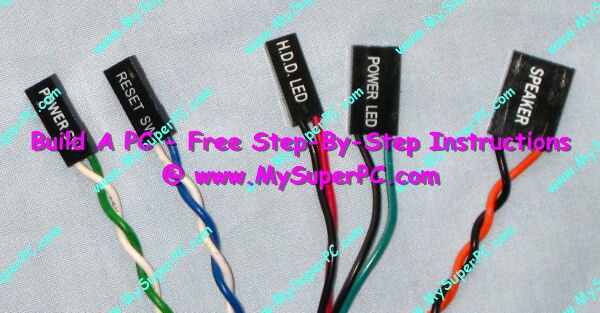
to troubleshoot the Case Power-On button

remove the Power SW from the front panel connector which is plunged to connecter indicated RED

Then use a test pen or any metal to short the 2 connector(RED) to jump start yr mobo. if the jump start fail....is not the Power on button Fault

15.jpg


pls check yr 24 pin and 4 or 8 pin power connector is no loose

antec_sonata_3_front_system_panel_connectors.jpg
15.jpg
 
Last edited:

bundy

Master Member
Joined
Jan 1, 2000
Messages
2,518
Reaction score
16
to troubleshoot the Case Power-On button

remove the Power SW from the front panel connector which is plunged to connecter indicated RED

Then use a test pen or any metal to short the 2 connector(RED) to jump start yr mobo. if the jump start fail....is not the Power on button Fault

15.jpg


pls check yr 24 pin and 4 or 8 pin power connector is no loose

antec_sonata_3_front_system_panel_connectors.jpg
15.jpg

just done with a test pen, mb fail to start ? does this indicate a MB failure ? But why there power from the USB port to charge my hp ?

My MB is gigabyte GA-P55-USB3

GIGABYTE - Motherboard - Socket 1156 - GA-P55-USB3 (rev. 2.0)
 

bundy

Master Member
Joined
Jan 1, 2000
Messages
2,518
Reaction score
16
Does it make sense to bring the mb to gigabyte service Centre to test?
 

lexxtox

Member
Joined
Jun 19, 2011
Messages
392
Reaction score
1
No....u back to square one..if mobo is tested working.....
most faulty mobo i tested so far.....will start but never post
as for faulty psu.... cannot power up the mobo...
so get a psu to test

u can loan from me if u stay near lakeside
 

peterchan75

Supremacy Member
Joined
Apr 26, 2003
Messages
6,757
Reaction score
533
Your tidying up might have caused some connection issue. Not sure your system has motherboard speaker, if yes then you should be hear the beep code. If you know how to reseat - RAM modules and graphic card, then do it.
 

bundy

Master Member
Joined
Jan 1, 2000
Messages
2,518
Reaction score
16
Another question, does a faulty graphic cards affect the booting up of the PC?
 
Important Forum Advisory Note
This forum is moderated by volunteer moderators who will react only to members' feedback on posts. Moderators are not employees or representatives of HWZ Forums. Forum members and moderators are responsible for their own posts. Please refer to our Community Guidelines and Standards and Terms and Conditions for more information.
Top