Please help me pick a computer for my parents

paper_box

Member
Joined
Nov 17, 2006
Messages
175
Reaction score
0
Hello all,

The 21" iMac I got for my parents some 5 years ago has seen it's end.

Hence I'm looking to get a new computer for my parents.

I'm quite disconnected with the tech scene so I am hoping you pros can advise on a replacement solution for me!

I'm happy to switch back to Windows and my other requirement is a large enough monitor (>23") for my aging parents. Budget <$1,000. Basic emailing and Facebooking only.

Should I take a walk down Sim Lim to grab a DIY desktop bundle and a monitor or should I opt for a branded all-in-one desktop, i.e. ASUS, SAMSUNG, HP or DELL?

The Dell 23" Inspiron AIO for $1,200 looks fantastic. Would you advise on a similar/cheaper model?

Any hot deals going around?

THANK YOU!
 
Last edited:

Ark Law

Arch-Supremacy Member
Joined
Jan 29, 2013
Messages
11,578
Reaction score
540
A NUC will do nicely. Will edit to include spec later

NUC: i3 34010WYK - $398 (Best Bargain)
RAM: Crucial 4GB DDR3-1600 1.35v sodimm - $50
SSD: Plextor M5M mSATA 128GB - $105
OS: Win7 HP 64bit OEM - $115

Total excl monitor: $668

Monitor w/ bleh speakers: AOC i2367FH - $225
Monitor w/ OK speakers: AOC i2473PWY - $415
Monitor w/ slimmest bezel: Dell U2414H - $340

Highest maximum incl monitor: $1089

optional:
Wifi: Intel 7260AC - $50 (Cybermind)
Wired KB&M: Logitech MK200 - $22
Wireless KB&M: Logitech MK270 - $38
Speakers: Edifier M1250 2.0 - $15 (Cybermind)

All parts sourced from Tradepac unless otherwise stated
 
Last edited:

paper_box

Member
Joined
Nov 17, 2006
Messages
175
Reaction score
0
Cheers Ark! Can you advise on a monitor screen too? I am thinking of build-in speakers to save space and hassles of plug and play. What do you think? Any suggestions?
 

Ark Law

Arch-Supremacy Member
Joined
Jan 29, 2013
Messages
11,578
Reaction score
540
Also how would you compare the NUCs against the Mac Minis @$788?

NUC carries a big price premium for its size, which is pretty much how PC stuff go by these days. The smaller, the more expensive. Can get royfrosty/alternativeX to recommend ITX build which are more cost-effective. But NUC is the way to go if you want maximum space saving. Keep in mind I've spec-ed the -WYK slimmer NUC instead of the -WYKH which allows you to use an mSATA SSD together with a 2.5" SATA SSD/HDD. This may be of important note if you need 1TB additional storage for your parents

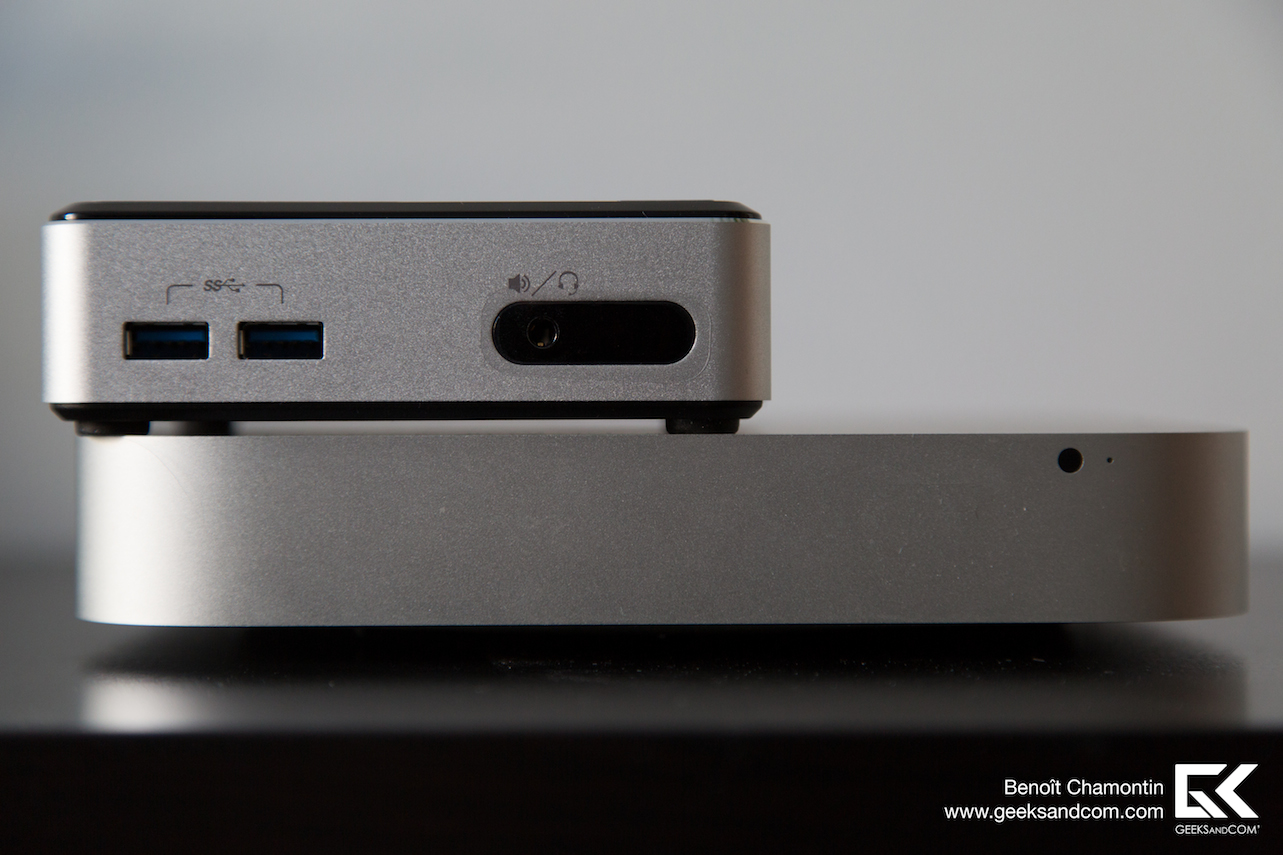
Versus Mac minis, Apple's chosen processor is faster, but lag an important part which affects UI experience massively (OS difference aside): an SSD. Plus NUC have a considerably smaller footprint. My own NUC in bottom 2 pictures for size demo

Intel-NUC-Kit-D54250WYK-vs-Mac-Mini-3-Test-Geeks-and-Com.jpg

Intel-NUC-Kit-D54250WYK-vs-Mac-Mini-4-Test-Geeks-and-Com.jpg

D31yRoj.jpg

DS1LVNq.jpg


-WYK vs -WYKH
intel-nuc-d54250wyk-en-d54250wykh.jpg
 

Alternative X

Senior Member
Joined
Jun 12, 2014
Messages
2,322
Reaction score
0
Also how would you compare the NUCs against the Mac Minis @$788?

Mac Mini specs:
$599 Variant
CPU: 2.5Ghz (to 3.1Ghz) dual core i5
HDD: 500GB 5400 RPM
RAM: 4GB (2 X 2GB) DDR3-1600

$799 Variant
CPU: 2.3Ghz (to 3.3Ghz) quad core i7
HDD: 1TB 5400 RPM
RAM: 4GB (2 X 2GB) DDR3-1600

Opinions:

Over priced pieces of junk (As usual with Apple) with the right specs in the wrong places and wrong specs in important places. You do not need a i5 or i7 to use email or Facebook. A SSD in the NUC with an i3 processor will easily be more responsive and faster than the Mac Mini (that 5400 RPM HDD will have a very adverse effect on the responsiveness of the system) and will be more suitable for your parents' needs.

A M-ATX build would be cheaper than an ITX build.
 
Last edited:

paper_box

Member
Joined
Nov 17, 2006
Messages
175
Reaction score
0
I am overwhelmed by the responses! Thank you for sharing your POVs. They're much appreciated! NUCs look really impressive!

BIG SHOUT OUT ESPECIALLY TO ARK LAW FOR THAT COMPREHENSIVE POST!

I hope to check back here soon after I investigate further on my own research and share with you guys on the outcome:s12:
 

IronMac

Supremacy Member
Joined
Mar 25, 2012
Messages
9,006
Reaction score
11
Do your parents really want to go over to Windows 8.1?

Frankly, just hang around the Certified Refurbished page on the Singapore Apple site and see how much their refurbished iMac 21 inchers go for. RRP is $1488 for a BNIB.
 

Kiwi8

Honorary Member
Deluxe Member
Joined
May 3, 2001
Messages
139,240
Reaction score
17,468
If u know how to DIY your computer, then can do it. At least if parts spoil u can just stick in a replacement and carry on. :o
 

Ark Law

Arch-Supremacy Member
Joined
Jan 29, 2013
Messages
11,578
Reaction score
540
I think Chromebook may be a good alternative for surfing web, Youtube and other web-based activities.

It is relatively cheap, portable and small sized. You can connect to external monitors via HDMI if you want a bigger screen.

Valid point. But if it's gonna be connected to external monitors long-term, it's gonna look stupid and take up real estate on the desk. If one is embedded with Google's ecosystem, it's a no brainer really. If one isn't, then it's how well they'll be able to learn and adapt to a wholly cloud based machine.

The NUC's pitfall is that the CPU is non-replaceable. But hey, at least there's the 3-yr onsite warranty.
 

CyberTron

Senior Member
Joined
Jan 1, 2000
Messages
1,278
Reaction score
0
Just stick to mac since ya parents are familiar with the mac. No need to consider future upgrade as ya current one last ya 5 years
 

paper_box

Member
Joined
Nov 17, 2006
Messages
175
Reaction score
0
Thank you for the replies. Valid points on sticking on with being on the Mac OS with their learnt behaviour. My mom still uses XP in the office and I've only recently set them up at home with that old iMac (used to be a DIY Windows desktop).

Chromebook looks really interesting. I did not consider that. It might have it's own restrictions but it seems like it serves it's purpose. Although there may be a slight learning curve to switch from Microsoft Word to Google Docs., it might be the way forward!
 
Important Forum Advisory Note
This forum is moderated by volunteer moderators who will react only to members' feedback on posts. Moderators are not employees or representatives of HWZ Forums. Forum members and moderators are responsible for their own posts. Please refer to our Community Guidelines and Standards and Terms and Conditions for more information.
Top