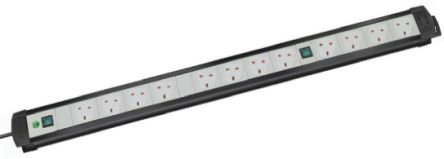
Powerload with HDB wall socket

Snakepit

Senior Member
Joined
Feb 28, 2005
Messages
641
Reaction score
0
Hello everyone,

Have a question in regards with how much electronic device that is connected with 1 main power point in the room.

Current setup

1 main wall outlet > 5 outlet plug

5 outlet plug
1 - PC : 600w
2 - Monitor : 65w
3 - Speaker : 40w
4 - Standinf fan : 80w

Upcoming setup

1 main wall outlet > 5 outlet plug > 5 outlet plug

5 outlet plug
1 - PC : 600w
2 - Monitor : 65w
3 - Speaker : 40w
4 - Standinf fan : 80w
5 - 5 outlet plug

5 outlet plug
1 - PC : 600w
2 - Monitor - 65w
3 - Speaker : 40w
4 - Laptop charger : 65w
5 - Phone fast charge - not sure but should be 45w

Anyone if this is ok? i read online somewhere that the max load would be 3000w, also PC will not be on 24/7

Thanks in advance
 

LiLAsN

Master Member
Joined
Dec 14, 2008
Messages
2,699
Reaction score
510
It should not be a problem. I have a PC, 2 monitors and an external DAC that is all connected to 1 power socket.

In any daily usage, I have a home automation device connected to that socket so I can turn on my entire setup with my 1 voice command.

A typical PC usage including with my PC monitor being on while I type this, I can check that I am consuming roughly 93.9W of power from the wall. So it's not an issue. Last time when I check that I am gaming with the 2080 Ti, the numbers are not that bad too.

But nothing close to 600W. That is like a scenario where you are maybe doing some intensive video encoding in the background where it is CPU hungry while you are gaming at 100% GPU load. This in itself is like a worst case scenario. Mostly when gaming, maybe the closest I've got is 300W?

I did downclock my PC monitor's refresh rate as I realized that at 165Hz (considered as overclock with my XB271HU), it was consuming a lot more power when I am doing this mundane task on my PC which is basically idling. So I disabled my monitor's Overclock in the monitor OSD settings and drop the refresh rate to 144Hz (maximum without overclock enabled) and I saved a lot of power this way. That's something to take note of as well.

On average, my PC uses less power than my TV + AVR with 7 speakers and 1 subwoofer. The TV + AVR consumes a lot more electricity than my PC. I measured them to be around 200W when I am watching a content while my PC that was used to show that video stays around 100+W while using the GPU to play that video. So don't worry so much about your PC components sharing 1 power socket.

As for your concern about the Ampere, because a typical domestic wall wiring is using 15 Amperes. 1 Ampere is 1000 milliampere. And guess what my entire PC setup is pulling from the wall? 512 mA. Way below the massive 15, 000 mA that the wall wiring is capable of.

Only something like our Airconditioners require a special 20 Ampere wall power socket with a lower gauge power cable to ensure the copper strands inside don't catch fire because they are too thin and heats up massively from the amount of power it is pulling from the wall. So again, no worries. Your PC performs on average below the maximum rated performance that it is capable of pulling from the wall.
 
Last edited:

Snakepit

Senior Member
Joined
Feb 28, 2005
Messages
641
Reaction score
0
Thanks everyone, always have the mentality where plugging so many multi adapter and etc could be a fire hazard potential but i guess you really have to overload by alot to cause a problem.
 

alamakazim

Supremacy Member
Joined
Feb 3, 2013
Messages
8,116
Reaction score
395
Normal pc... Not a problem at all

U might want to take note on ovens... Kettles those are the ones that usually trip your ** and burn your socket

So don't use cheapo multi plugs on anything that produce high temperature
 

ceestudent

Arch-Supremacy Member
Joined
Apr 13, 2010
Messages
19,003
Reaction score
3,650
LiLAsN:
How do you measure the wattage of your equipment? Can share where do you bought the device and how much. Thanks
 

wwenze

Greater Supremacy Member
Joined
Dec 2, 2002
Messages
86,435
Reaction score
30,112
Thanks everyone, always have the mentality where plugging so many multi adapter and etc could be a fire hazard potential but i guess you really have to overload by alot to cause a problem.

Ok, here's a thing

Notice why we always say it's the multi adapter and not the cabling that is the fire hazard potential?

Because it's the bad contact that causes fires. Voltage drop occurs biggest at the point of bad contact and hence heat. I even had bad C5 connector smoke in my face before. The load is a laptop adapter max 65W, so clearly power isn't the problem here.
(Of course in this case it is because the connection is really bad. Otherwise amount of heat is always dependent on amount of current drawn. So printers and amplifiers and etc are not going to draw too much power to overheat the connection. Normally, anyway.)

Multi adapters are prone to bad quality and getting loose, and due to weight and tension from the cables they may not sit well in the socket either. When you have many of them and when you chain them, the chance of failure goes up substantially.

The wiring themselves are seldom an issue since 13A at 230V can provide 2,990W assuming 100% power factor.
 
Last edited:

wwenze

Greater Supremacy Member
Joined
Dec 2, 2002
Messages
86,435
Reaction score
30,112
For those interested how to measure consumption easily

https://s.lazada.sg/s.J40w

Something similar... U got to find the correct model...

I've been looking for one with cable like the below but they have disappeared from the internet

meter.jpg


Direct plug ones no use because I can't see my plugs from where I sit...
 

ceestudent

Arch-Supremacy Member
Joined
Apr 13, 2010
Messages
19,003
Reaction score
3,650
For those interested how to measure consumption easily

https://s.lazada.sg/s.J40w

Something similar... U got to find the correct model...
I see. Thanks. Will compare price between lazada and shopee.
So the keyword to search is "power meter".

Usually for multi socket, i always bought the one with safety mark sticker. But the the universal one usually not certified, only the plug head is certified.
 
Last edited:

keenklee

Arch-Supremacy Member
Joined
Sep 9, 2000
Messages
19,387
Reaction score
6,775
Hello everyone,

Have a question in regards with how much electronic device that is connected with 1 main power point in the room.

Current setup

1 main wall outlet > 5 outlet plug

5 outlet plug
1 - PC : 600w
2 - Monitor : 65w
3 - Speaker : 40w
4 - Standinf fan : 80w

Upcoming setup

1 main wall outlet > 5 outlet plug > 5 outlet plug

5 outlet plug
1 - PC : 600w
2 - Monitor : 65w
3 - Speaker : 40w
4 - Standinf fan : 80w
5 - 5 outlet plug

5 outlet plug
1 - PC : 600w
2 - Monitor - 65w
3 - Speaker : 40w
4 - Laptop charger : 65w
5 - Phone fast charge - not sure but should be 45w

Anyone if this is ok? i read online somewhere that the max load would be 3000w, also PC will not be on 24/7

Thanks in advance

IMHO.
You power requirement seems ok.

Below are some suggestions.

Use extension sockets (bar) with safety mark.
Check the maximum power for the extension sockets.
Extension socket comes with different length of cable. Use the shortest possible and do not coil the cable.
Use extension sockets that have thicker cables.
Use extension sockets that have flat design so that plugs can be plugged in correctly and easily.
Use multiple plugs with safety mark.
 

win_man

Great Supremacy Member
Joined
Sep 21, 2000
Messages
62,558
Reaction score
2,446
Take P=IV and as long as dont exceed 2900w is OK

Nowadays all LCD, Laptops and LED lamps. Already much lower than what i did before with two desktops ,CRT, Halogen lamps all from same sockets
 
Last edited:

alamakazim

Supremacy Member
Joined
Feb 3, 2013
Messages
8,116
Reaction score
395
Like wwenze mention

We will never run into case where wire will melt and catch fire la

Long or short.. thin or thick.. not much of a problem for household equipment

Is the socket contact points that is problematic... Cut cost material... Wear and tear

Even those got brand like powerpac also cannot trust nowadays
 

wwenze

Greater Supremacy Member
Joined
Dec 2, 2002
Messages
86,435
Reaction score
30,112
Powerpac is SG brand

When's the last time u trusted an SG brand
 

coyote

Greater Supremacy Member
Joined
Sep 20, 2000
Messages
85,038
Reaction score
28,555
How can your pc be 600W, did you measure with a meter or you thought so because you are using a 600W psu?
 

Snakepit

Senior Member
Joined
Feb 28, 2005
Messages
641
Reaction score
0
How can your pc be 600W, did you measure with a meter or you thought so because you are using a 600W psu?

Yes that is based on the PSU and the rest of the measurement is based on what I seen on the power brick adapter
 

jasonwsc

Member
Joined
Jun 28, 2013
Messages
415
Reaction score
147
Hello everyone,

Have a question in regards with how much electronic device that is connected with 1 main power point in the room.

Current setup

1 main wall outlet > 5 outlet plug

5 outlet plug
1 - PC : 600w
2 - Monitor : 65w
3 - Speaker : 40w
4 - Standinf fan : 80w

Upcoming setup

1 main wall outlet > 5 outlet plug > 5 outlet plug

5 outlet plug
1 - PC : 600w
2 - Monitor : 65w
3 - Speaker : 40w
4 - Standinf fan : 80w
5 - 5 outlet plug

5 outlet plug
1 - PC : 600w
2 - Monitor - 65w
3 - Speaker : 40w
4 - Laptop charger : 65w
5 - Phone fast charge - not sure but should be 45w

Anyone if this is ok? i read online somewhere that the max load would be 3000w, also PC will not be on 24/7

Thanks in advance

I heard daisy chaining multiple extensions can be dangerous cos each plug in the extension has a lower max power. So high chance the fuse on the first extension might just melt. Not sure if it's true though.
 
Important Forum Advisory Note
This forum is moderated by volunteer moderators who will react only to members' feedback on posts. Moderators are not employees or representatives of HWZ Forums. Forum members and moderators are responsible for their own posts. Please refer to our Community Guidelines and Standards and Terms and Conditions for more information.
Top