Question about connecting 3 monitors

xiaomi123

Senior Member
Joined
Jul 31, 2014
Messages
2,262
Reaction score
0
Getting this Dell desktop which has NVIDIA® GeForce® GT 625 1GB GDDR3.

Inspiron 3000 Desktop Details | Dell Singapore

From what the sales person told me, it can connect maximum 2 monitors. If I need 3 monitor, can I buy another cheap graphic card to plug it in? Can the computer run with 3 graphic card? How much is a very cheap graphic card that satisfy this requirement

Let say I am interested to play FIFA 2015 and I wanted to get a better additional graphic card. How do the computer know which graphic card I want to run the game on?
 

Alternative X

Senior Member
Joined
Jun 12, 2014
Messages
2,322
Reaction score
0
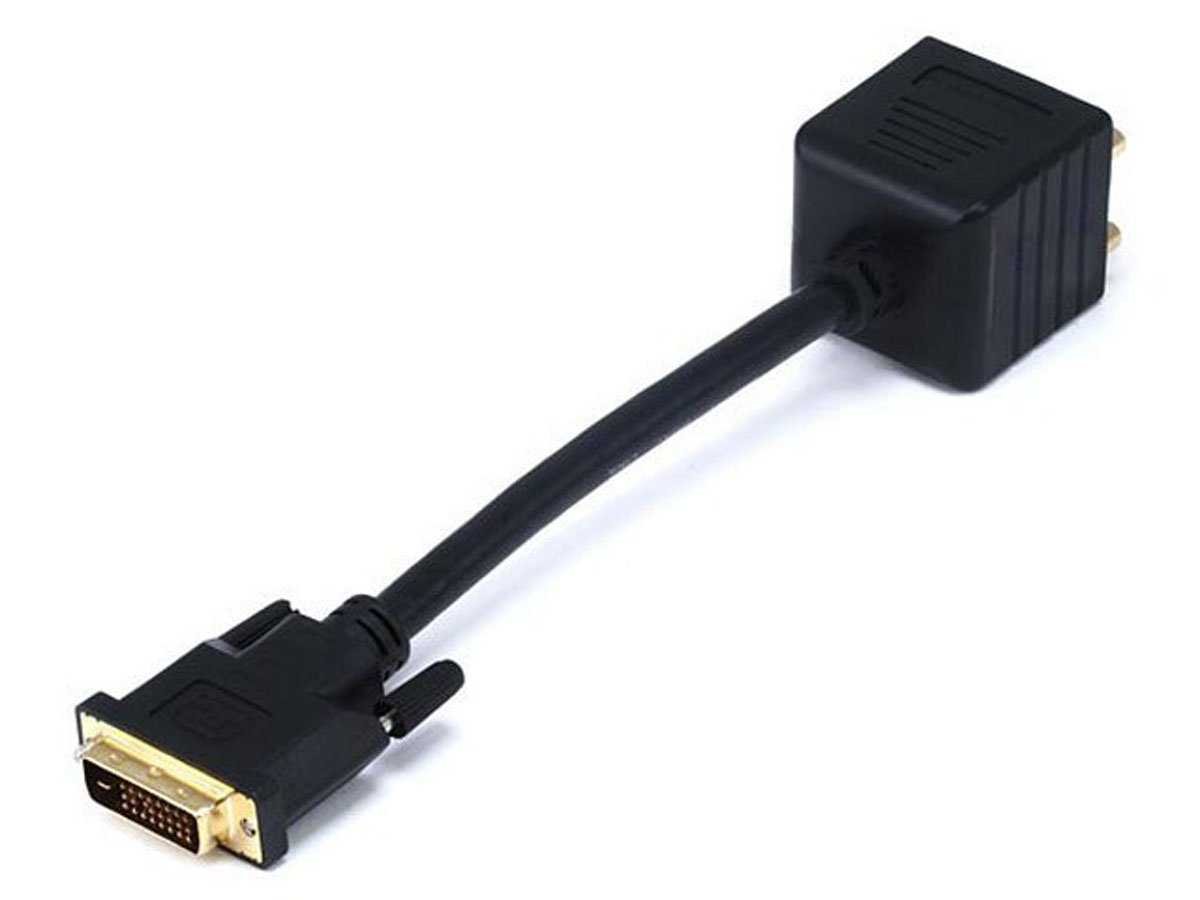
1) Erm, did you actually get a good look at the rear of the computer? If the GPU has 3 video output ports, then you can connect 3 monitors to it. Alternatively, you can use a video splitter like this:
25181.jpg

and use one video output port to connect to two monitors.

2) OEM motherboards generally only have 1 PCI-E X16 slot for GPUs, you can't install 2 GPUs on the same motherboard, it is not going to fit. (Unless the GPU uses a PCI-E X1 slot, but that kind of GPU is very rare.)

3) You want to play FIFA 2015? Remove the GT 625, buy and install a GTX 750 and enjoy the game at max settings. (You may need to buy a higher wattage PSU if you wish to get a more powerful GPU.)
 

xiaomi123

Senior Member
Joined
Jul 31, 2014
Messages
2,262
Reaction score
0
1) Erm, did you actually get a good look at the rear of the computer? If the GPU has 3 video output ports, then you can connect 3 monitors to it. Alternatively, you can use a video splitter like this:
25181.jpg

and use one video output port to connect to two monitors.

2) OEM motherboards generally only have 1 PCI-E X16 slot for GPUs, you can't install 2 GPUs on the same motherboard, it is not going to fit. (Unless the GPU uses a PCI-E X1 slot, but that kind of GPU is very rare.)

3) You want to play FIFA 2015? Remove the GT 625, buy and install a GTX 750 and enjoy the game at max settings. (You may need to buy a higher wattage PSU if you wish to get a more powerful GPU.)

thanks for the clarification. I will forget about FIFA 2015 for now as it is too troublesome.

As for the video splitter, does it duplicate the display output. Let say I have 3 monitors. I want monitor A to run IE, monitor B to run Office, monitor C to run WIndows media player. Does the video splitter make the 3 monitor running the same copy of the output?
 

xiaomi123

Senior Member
Joined
Jul 31, 2014
Messages
2,262
Reaction score
0
Now the salesman recommend me a computer with 705 geforce. It states it has 3 port, DVI, VGA and HDMI. So I can connect one monitor to DVI, one to VGA, and another to HDMI? The salesman seems unsure that why I ask the experts here before buying
 

Alternative X

Senior Member
Joined
Jun 12, 2014
Messages
2,322
Reaction score
0
Well, you can either do that or use a video splitter. Do note that you may be getting a slightly weaker GPU in the GT 705.
GeForce GT 705 vs 625

You may want to wait for further replies before buying anything as I am not very familiar with multi-monitor techonologies beyond Nvidia Surround and AMD Eyefinity, but I think it may be possible to setup multiple monitors to run one application in each monitor by fiddling around with the Control Panel.
 

MoneyFace =p

High Supremacy Member
Joined
Dec 17, 2010
Messages
35,380
Reaction score
402
Getting this Dell desktop which has NVIDIA® GeForce® GT 625 1GB GDDR3.

Inspiron 3000 Desktop Details | Dell Singapore

From what the sales person told me, it can connect maximum 2 monitors. If I need 3 monitor, can I buy another cheap graphic card to plug it in? Can the computer run with 3 graphic card? How much is a very cheap graphic card that satisfy this requirement

Let say I am interested to play FIFA 2015 and I wanted to get a better additional graphic card. How do the computer know which graphic card I want to run the game on?
Why do you want to get Core i7? What's your needs for using this PC?
 

MoneyFace =p

High Supremacy Member
Joined
Dec 17, 2010
Messages
35,380
Reaction score
402
Now the salesman recommend me a computer with 705 geforce. It states it has 3 port, DVI, VGA and HDMI. So I can connect one monitor to DVI, one to VGA, and another to HDMI? The salesman seems unsure that why I ask the experts here before buying
It won't work. All these OEM entry level cards do not support 3 monitors output.

Just slap in a GTX 750 1GB and you are good to go with both enough horsepower for FIFA 2015 and 3 monitors output.
 
Last edited:

xiaomi123

Senior Member
Joined
Jul 31, 2014
Messages
2,262
Reaction score
0
It won't work. All these OEM entry level cards do not support 3 monitors output.

Just slap in a GTX 750 1GB and you are good to go with both enough horsepower for FIFA 2015 and 3 monitors output.

wah you expert in TV. Saw you recommend the LG tv last time.

Now expert in computer also. Really a technology guy. Btw can I buy the below cheaper desktop with no GPU and install a graphic card that support 3 monitors.

Inspiron 3000 Desktop Details | Dell Singapore

I read something about people saying the GPU need enough wattage from PSU to support it. Since this desktop is super entry level, I worried it cannot support the mid-range GPU.

I using it for programming
 

MoneyFace =p

High Supremacy Member
Joined
Dec 17, 2010
Messages
35,380
Reaction score
402
wah you expert in TV. Saw you recommend the LG tv last time.

Now expert in computer also. Really a technology guy. Btw can I buy the below cheaper desktop with no GPU and install a graphic card that support 3 monitors.

Inspiron 3000 Desktop Details | Dell Singapore

I read something about people saying the GPU need enough wattage from PSU to support it. Since this desktop is super entry level, I worried it cannot support the mid-range GPU.

I using it for programming
Not an expert in TV at all actually but just having interest since i was getting one for myself... :o

Anyway, it is true that higher end range of graphics card will require more power from the PSU to support them. However, the one suiting to your essential needs, and the one we are recommending, i.e. GTX 750, sips little power that's within the limit the slot can offer. Even though at about 20-30W higher than the OEM GT 625 offered in your initial bundle, the PSU will still be capable of handling the entire system comfortably.

As long as your programming tasks limit to coding only, Core i3 will already be more than enough for that. Hyperthreading on Core i3 will also aid in significantly when it comes to code testing, especially in testing the efficiency of code threading (though i7 will does a greater help for more demanding applications).
 

MoneyFace =p

High Supremacy Member
Joined
Dec 17, 2010
Messages
35,380
Reaction score
402
Not 100% sure, but isn't that how you connect monitors to a single GPU for a multi-monitor setup?
1. All single GPU cards with 3 or more display output ports before 2009 only supports up to 2 monitors at once.

2. AMD first made it possible with Evergreen in 2009. However, requiring one of the output from the DisplayPort (DP) port. If no DP port on card means cannot still.

3. Certain post-Evergreen low end cards like Sapphire FleX series offers direct triple display outputs via HDMI/DVI/VGA without the need for DisplayPort since the these custom card do their own internal conversion.

4. Intel first made possible in 2012 beginning with their Ivy Bridge IGPs, but requiring 2 DP ports on the motherboards (where such motherboard don't even exist on consumer market). :s22:

5. Nvidia only follow suit with Kepler 2+ years back beginning with GTX 680. Prior to that, all triple monitors output must be done in either heterogeneous mode or SLI mode.

6. With Nvidia Maxwell, now DisplayPort port is no longer required for triple monitor output, where support is native. Intel Haswell now also support triple monitor output without need for 2 DP, just 1 as per Evergreen will do.
 
Last edited:

xiaomi123

Senior Member
Joined
Jul 31, 2014
Messages
2,262
Reaction score
0
I saw many of my colleague has 6 screen. :D:D But since they are oversea I find it hard to ask them
 

Alternative X

Senior Member
Joined
Jun 12, 2014
Messages
2,322
Reaction score
0
2. AMD first made it possible with Evergreen in 2009. However, requiring one of the output from the DisplayPort (DP) port. If no DP port on card means cannot still.

4. Intel first made possible in 2012 beginning with their Ivy Bridge IGPs, but requiring 2 DP ports on the motherboards (where such motherboard don't even exist on consumer market). :s22:

6. With Nvidia Maxwell, now DisplayPort port is no longer required for triple monitor output, where support is native. Intel Haswell now also support triple monitor output without need for 2 DP, just 1 as per Evergreen will do.
Interesting. So, if using AMD GPUs or Intel iGPUs on a mobo without any DP port on any of them, do I have to buy active DP adapters in order to set up a triple monitor setup?
 

MoneyFace =p

High Supremacy Member
Joined
Dec 17, 2010
Messages
35,380
Reaction score
402
I saw many of my colleague has 6 screen. :D:D But since they are oversea I find it hard to ask them
6 screens off 1 graphics card is doable with AMD high-end cards with Eyefinity 6. All of these cards will have plentiful of DP ports to achieve that.

Such as this:

show_img.asp
 

MoneyFace =p

High Supremacy Member
Joined
Dec 17, 2010
Messages
35,380
Reaction score
402
Interesting. So, if using AMD GPUs or Intel iGPUs on a mobo without any DP port on any of them, do I have to buy active DP adapters in order to set up a triple monitor setup?
Nope you will need the cards to offer DP port to achieve that. Active DP adapters are mainly used to convert to either HDMI/DVI/VGA for mainstream monitor usage.
 

xiaomi123

Senior Member
Joined
Jul 31, 2014
Messages
2,262
Reaction score
0
Sorry to double confirm, I am looking this 2 system, $599 and $699 respectively.

Inspiron 3000 Small Desktop Details | Dell Singapore

Inspiron 3000 Desktop Details | Dell Singapore

Will follow Moneyface advice to get GTX 750 to install in it (now these two systems use integrated graphic card).

But I look at the spec but there is no mention of any PCI-E slot, so can I assume they have one? If they have one, can I install the GTX 750 in it? Of course, if the $599 system has a PCI-E slot, I will buy the $599 system as it more compact
 

Alternative X

Senior Member
Joined
Jun 12, 2014
Messages
2,322
Reaction score
0
Sorry to double confirm, I am looking this 2 system, $599 and $699 respectively.

Inspiron 3000 Small Desktop Details | Dell Singapore

Inspiron 3000 Desktop Details | Dell Singapore

Will follow Moneyface advice to get GTX 750 to install in it (now these two systems use integrated graphic card).

But I look at the spec but there is no mention of any PCI-E slot, so can I assume they have one? If they have one, can I install the GTX 750 in it? Of course, if the $599 system has a PCI-E slot, I will buy the $599 system as it more compact
Most motherboards, even OEM ones, will usually come with a PCI-E X16 slot for GPUs. However, please buy the bigger one as the GTX 750 looks like this:
Leadtek_WinFast_GTX_750_OC_01.jpg


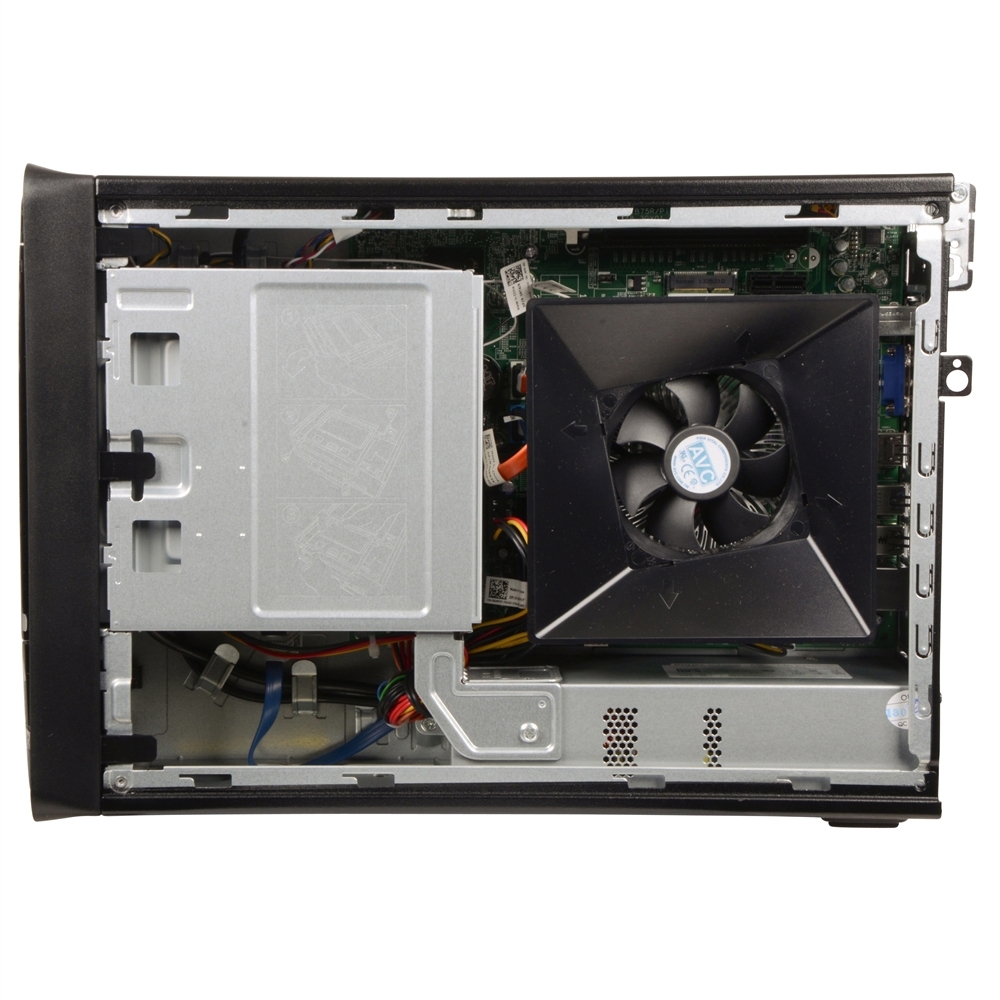
The insides of the compact one looks like this:
432957_239103_05_front_zoom.jpg

The PCI-E X16 slot is at the top of the rig. As the slot is located at the top of the chassis, there is no way the GTX 750 is going to fit in there without using elbow grease and some modifications and even if you somehow manage to fit it in, it is going to overheat from the lack of air circulation in the case.

Therefore, please buy the big one and save yourself from any sort of upgrading woes from getting a small chassis.
 
Important Forum Advisory Note
This forum is moderated by volunteer moderators who will react only to members' feedback on posts. Moderators are not employees or representatives of HWZ Forums. Forum members and moderators are responsible for their own posts. Please refer to our Community Guidelines and Standards and Terms and Conditions for more information.
Top