Quick primer to VLANs

1a2a3a

Senior Member
Joined
Sep 5, 2006
Messages
1,670
Reaction score
48
hi.. can anyone help me out here -

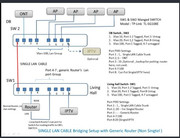
my parents has shifted house and somehow managed to ask SingTel to give onr with bridge mode. But I can’t get the vlan method to work anymore…

previously was SingTel ONT with the vlan method that I posted. At their new house, I kept all the setting of the 2 managed switch and IP the same and the same router. Onr bridge direct connect to router can work, but once I setup the switches for vlan, there’s no internet. Do I need to make any additional setting? Or the vlan simply doesn’t work with onr bridge?

i heard from xiaofan that vlan id10 is no longer required, so what configuration should i change to?


DB


Living
 

phayze

Supremacy Member
Joined
Aug 14, 2000
Messages
5,284
Reaction score
231
Hi,

If direct connect to router can work, you need vlan for?


hi.. can anyone help me out here -

my parents has shifted house and somehow managed to ask SingTel to give onr with bridge mode. But I can’t get the vlan method to work anymore…

previously was SingTel ONT with the vlan method that I posted. At their new house, I kept all the setting of the 2 managed switch and IP the same and the same router. Onr bridge direct connect to router can work, but once I setup the switches for vlan, there’s no internet. Do I need to make any additional setting? Or the vlan simply doesn’t work with onr bridge?

i heard from xiaofan that vlan id10 is no longer required, so what configuration should i change to?


DB


Living
 

xiaofan

High Supremacy Member
Joined
Sep 16, 2018
Messages
32,535
Reaction score
10,020

xiaofan

High Supremacy Member
Joined
Sep 16, 2018
Messages
32,535
Reaction score
10,020
The question comes from here:
https://forums.hardwarezone.com.sg/...nect-your-home-fiber-network.4173602/page-183

Originally he is using Singtel GPON ONT (need to set router VLAN IDs: 10 for Internet, 20 for Singtel TV). Now changed to Singtel bridged GPON ONR (no need to set VLAN ID as 10 for Internet for the router connected to the bridged port. If set VLAN ID 10, Internet will not work. Singtel TV not supported on the bridged port)

You can not. Only Singtel can do it.

You should check whether it is in ONT mode or bridged ONR mode or even unbridged mode.

Unbridged mode -- all LAN ports are working for Internet and Singtel TV box

Bridged mode -- single bridged LAN port is working for Internet, no VLAN ID required on your own router to go the internet. The other three ports are only for Singtel TV box

ONT mode -- single bridged LAN port is working for Internet and Singtel TV box once a proper router is connected, VLAN ID required on your own router to go the internet and get Singtel TV box to work. The other three ports are not functioning.
 

phayze

Supremacy Member
Joined
Aug 14, 2000
Messages
5,284
Reaction score
231
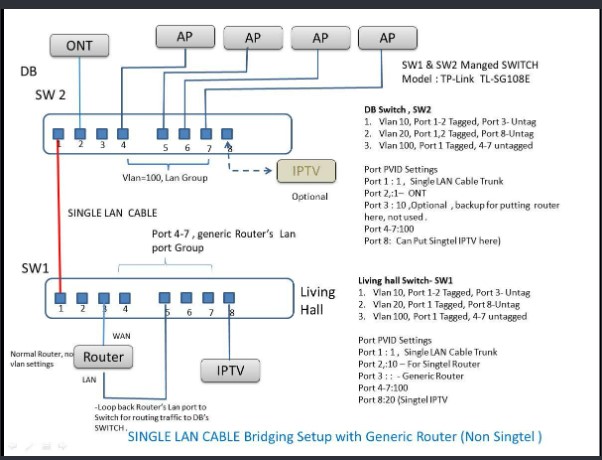
I think if like that, he can remove VLAN10 for port 1, 2 for both switch. This way, the router on SW1 can get an IP through SW2 using default VLAN1 which is not tag. Then connect router LAN port to SW1 port 5, will give the VLAN100 a DHCP server from router which is Tag with VLAN100 through SW1 port 1 to SW2 port 1. SW2 port 4 to 8 is untag with VLAN100 which is same VLAN as SW1 port 5. Not sure if my understanding is correct or not.


Single Ethernet cable between the ONT location (DB box) and living room (only one LAN port in the living room), but do not want to put the main wireless router in the DB box. So he has to use Two Managed Switch to be able to put the main wireless router in the living room.

So-called Option 2 in the following FAQ.
https://forums.hardwarezone.com.sg/...home-networking.6653421/page-3#post-149431568
 

xiaofan

High Supremacy Member
Joined
Sep 16, 2018
Messages
32,535
Reaction score
10,020
My idea: not to use VLAN ID 10 and 20 any more. It may confuse the router and the Singtel TV box

Singtel Bridged ONR --> two wires to SW2 (Port 2 and Port 3), SW2 Port 2 for Internet (ONR bridged port), SW2 Port 3 for Singtel TV (ONR unbridged port)

SW2 --> in DB Box
Port 1 --> Trunk port, VLAN ID 80,90, 100, tagged
Port 2 --> ONR bridged port, VLAN ID 80, tagged
Port 3 --> ONR unbridged port for Singtel TV, VLAN ID 90, tagged
Port 4/5/6/7--> Router LAN port, VLAN ID 100 untagged
Port 8 --> VLAN ID 90, untagged --> Singtel TV box (??)

SW1 --> in Living Room
Port 1 --> Trunk port, VLAN ID 80,90, 100, tagged
Port 2 --> VLAN ID 80, untagged --> backup port for another router (Singtel issued router can not be used)
Port 3 --> VLAN ID 80, untagged --> main router WAN port
Port 4/5/6/7--> VLAN ID 100, untagged, main router LAN port, VLAN ID 100 untagged
Port 8 --> VLAN ID 90, untagged --> Singtel TV box (??)

Both Switches --> enable IGMP Snooping

My doubts are mainly on Singtel TV box. Maybe VLAN ID 90 needs to change to VLAN ID 20.

standard.jpg
 

xiaofan

High Supremacy Member
Joined
Sep 16, 2018
Messages
32,535
Reaction score
10,020
thanks xiaofan for helping :) let hope theres a solution. also i think can ignore singtel iptv, they have cancelled it.

Then things may be simpler now.

You can try my simplified suggestion.

Singtel Bridged ONR briged port --> SW2 Port 2 for Internet

SW2 --> in DB Box
Port 1 --> Trunk port, VLAN ID 80,100, tagged
Port 2 --> ONR bridged port, VLAN ID 80, tagged
Port 3/4/5/6/7/8 --> Router LAN port, VLAN ID 100 untagged

SW1 --> in Living Room
Port 1 --> Trunk port, VLAN ID 80,100, tagged
Port 2 --> VLAN ID 80, untagged --> backup port for another router (Singtel issued router can not be used)
Port 3 --> VLAN ID 80, untagged --> main router WAN port
Port 4/5/6/7/8--> VLAN ID 100, untagged, main router LAN port, VLAN ID 100 untagged

Both Switches --> enable IGMP Snooping
 

Mach3.2

Great Supremacy Member
Joined
Apr 8, 2011
Messages
72,405
Reaction score
2,466
trunk port - accepts and switches tagged vlan frames
access port - accepts untagged frames and tag the frames. VLAN tagging is transparent to the end device.

you basically set different VLAN IDs for different logical layer 2 domain, in this case your ONR bridged WAN is the first layer 2 domain (vlan 80?) and your LAN network the 2nd layer 2 domain (vlan 100?)

these don't need to be tagged because your switch will transparently tag the Ethernet frames for you, provided you put the ports into access mode.

the trunk port will trunk all the tagged frames to the other switch, and will only accept correctly tagged traffic.
 

1a2a3a

Senior Member
Joined
Sep 5, 2006
Messages
1,670
Reaction score
48
trunk port - accepts and switches tagged vlan frames
access port - accepts untagged frames and tag the frames. VLAN tagging is transparent to the end device.

you basically set different VLAN IDs for different logical layer 2 domain, in this case your ONR bridged WAN is the first layer 2 domain (vlan 80?) and your LAN network the 2nd layer 2 domain (vlan 100?)

these don't need to be tagged because your switch will transparently tag the Ethernet frames for you, provided you put the ports into access mode.

the trunk port will trunk all the tagged frames to the other switch, and will only accept correctly tagged traffic.
Thanks for this. But how do I apply this into the configuration?
 

TanKianW

Supremacy Member
Joined
Apr 21, 2005
Messages
6,718
Reaction score
3,364
Thanks for this. But how do I apply this into the configuration?

I think @Mach3.2 is just providing you with a general overview on how vlans work.

You probably need to start testing out, playing around on your own on how to setup vlans using the managed switch you are using, and also familiarise with how vlans work. You can easily do that on a computer/laptop with an ethernet cable connected to your network. First thing first, understand how vlans settings work on your managed switches. Tplink, netgear, openswitch, mikrotik, cisco, unifi, ruckus, aruba may all work differently on their settings. The newer switches mainly using “bridges”.

I dun think you will get much hand holding except with a online config picture (provided by @xiaofan earlier, done up by some forumer), or your own setting chart/table, then maybe ask for advice after some failed attempts.​
 
Last edited:

1a2a3a

Senior Member
Joined
Sep 5, 2006
Messages
1,670
Reaction score
48

I think @Mach3.2 is just providing you with a general overview on how vlans work.

You probably need to start testing out, playing around on your own on how to setup vlans using the managed switch you are using, and also familiarise with how vlans work. You can easily do that on a computer/laptop with an ethernet cable connected to your network. First thing first, understand how vlans settings work on your managed switches. Tplink, netgear, openswitch, mikrotik, cisco, unifi, ruckus, aruba may all work differently on their settings. The newer switches mainly using “bridges”.

I dun think you will get much hand holding except with a online config picture (provided by @xiaofan earlier, done up by some forumer), or your own setting chart/table, then maybe ask for advice after some failed attempts.​
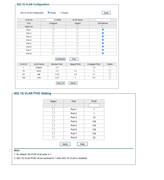
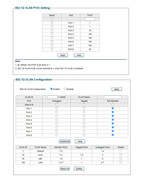
The config table is my own current configuration…
 

TanKianW

Supremacy Member
Joined
Apr 21, 2005
Messages
6,718
Reaction score
3,364
The config table is my own current configuration…

Take a look at what @firesong bro has presented for his vlan setting table (best suits your tplink switch config) on the 1st page of the thread. That will provide a much better overview.

Just a suggestion, you could also learn to post pictures which could be opened directly on the forum page itself and not have to click the icon leading to the host links. Helps for quick referrence (back and forth) by forumers when troubleshooting your config without opening multiple tabs.​
 
Last edited:

TanKianW

Supremacy Member
Joined
Apr 21, 2005
Messages
6,718
Reaction score
3,364
Rule of thumb for tplink managed switches (very similar to Netgear’s), making it easier to understand for most lay person (I hope):​
  1. If your end devices can manage vlan on their own (eg, NAS, server, enterprise APs, might even be ISP tv box, etc) you can go ahead and tag it. PVID can set to default 1 or the desired PVID. It should still work, except for some fussy end devices.​
  2. If your end devices cannot (or not intend to) manage vlan (eg. mobile devices, laptop/desktop PC, unmanaged switches, android tvbox, etc) you will have to manage vlan on your switch. You can untag that vlanID you desire, set your PVID to that vlanID. With the condition that upstream trunk port has been tagged with that vlanID. You should only untag using one vlanID, not multiple (default vlanID not included)​
  3. Trunk port is the port connecting (or passing down) vlan tags from your upstream devices which could be another managed switch or router. You will surely tag your trunk port with the vlanID you want it to “flow down”. PVID will usually set at default.​
  4. If my memory still serve me well, Tplink has a member and un-member setting too. Advice to un-member that vlanID if your ports are not needing it​
  5. Go ahead and turn on IGMP snooping or even set the storm rate at 50-80%. Turn on loop protection too if there is one.​
 
Last edited:

lightstal

Junior Member
Joined
Jun 21, 2016
Messages
37
Reaction score
25
Hi all!

I would like some advice from you guys before committing to buying another switch.

Currently I am on the Singtel 10G ONR plan which I have since requested and managed to get bridged (Port 5). Which means that I would need to use the unbridged port of the ONR for my IPTV. The problem is that from my ONR to my living room where the Singtel TV is, I only have 1 ethernet run and not feasible at all to add another due to the false ceilings etc.

I was wondering if its possible to add a managed switch say the USW-Flex-SG(Ubiquiti's 10G switch) to connect my port 5 and one of the unbridged ports and use the 1 ethernet run to the living room where it terminated to a UCG-Fiber and tag one of the ports on the UCG fiber as the port for the singtel TV

Thanks!
 
Important Forum Advisory Note
This forum is moderated by volunteer moderators who will react only to members' feedback on posts. Moderators are not employees or representatives of HWZ. Forum members and moderators are responsible for their own posts.

Please refer to our Community Guidelines and Standards, Terms of Service and Member T&Cs for more information.
Top