Raspberry Pi - Learning by Making

abyzab

Senior Member
Joined
Aug 13, 2018
Messages
1,162
Reaction score
338
I was tracking the developments of micro controllers (mcu) from Arduino( initially very cumbersome to interface with computer but nevertheless it's relatively cheap and a whole host of ecosystems of hardware and software developed around it ).

Interesting but too primitive and too much trouble.

My interest is to wait for an mcu that can at least support Linux.
Then Raspberry Pi (RPI) started. They get more and more powerful. In fact by the time RPI4 came around, it was almost there. It's used for big displays( nowadays, they are everywhere since they've gotten so cheap! Cheaper than big static graphics signages that need lots of artistic customisation ) , smart vending machines ( electronics payments w cctv, no worries about getting broken into for the cash), smart lockers,...
Finally smart IoTs are here.
It got so popular that scalpers jumped in to grab all the stocks and raised prices.

However, from the specs of the A72 CPU which I had in my Xiaomi smartphone, it's still barely powerful enough for Linux. I was waiting for the RPI5 which they announced would not come out till 2024 which normally would be mid-year. They could just coast along on the high demands for RPI4. That's being lazy.

Then I was surprised when RPI5 was announced on Sept 23. But I could understand why. Intel N100 CPU is getting so cheap and with the small form factor, they could overtake RPI bc there's so much software that's developed for x86-64.

If RPI5 comes out in mid 2024, they would need time to develop. It took years for RPI4 to develop a decent ecosystem.
If RPI5 also need so much time to develop, then cheap N100 mini computers would be far ahead by then.
RPI Foundation has to act early in order not to be overtaken like the way RPI overtook the Arduino.

Sure enough, when the RPI5 was released, the new Bookworm based OS has issues bc of Wayland replacing the X11( the root privilege etc.. is dangerous) graphics.

There's instant hot demand for RPI5. I looked at the specs, the A76 CPU is powerful enough for Linux and YouTube. It can be a daily desktop driver.
I immediately jumped in to order 2 ( 1 from each of 2 suppliers, for backing up in case of "no stock" ). I got one in November and the other in December.

The accessories like casing, hs-fan took longer to arrive. I'm still waiting for the official 5V/5A power supply. It's a rushed introduction still with teething supply issues ( RPI4 had the same teething problems before). But RPI has already developed a matured ecosystem that forum advices and workarounds are plenty. I bought a cheap 3A power supply, cheap 66cts micro-HDMI to HDMI adaptors, cheap FHD 15.6in display...and I'm up and running Linux.

At the back of my mind, I was thinking...why not build a portable computer...

...to be continued
 
Last edited:

abyzab

Senior Member
Joined
Aug 13, 2018
Messages
1,162
Reaction score
338


I needed a powerbank. But there are so many dubious and fake cheap powerbanks online.
All those inflated capacities yet mostly good reviews and few bad reviews...hmm

Finally I decided on genuine Xiaomi power bank as it's cheap and seemed to be the standard. But beware there are plenty of fake Xiaomi power bank sellers around.
When it's on offer from the official site, I bought one for ~$19.
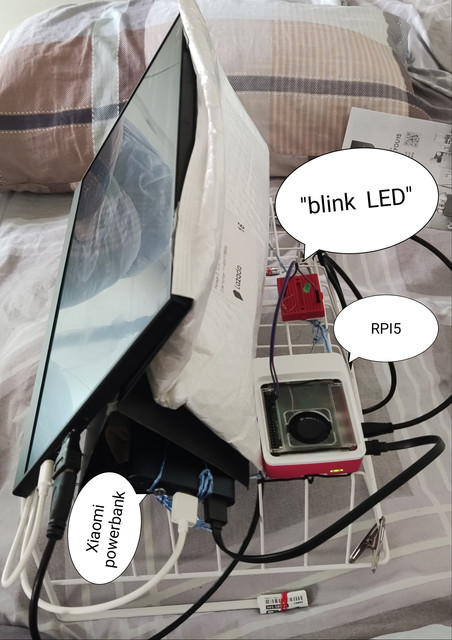
I was pleasantly surprised that it can power the RPI5 as well as the 15.6in display( that alone needed 2.5A )

First I tried to hide the RPI5 and the power supply inside the back fold of the display. But access to the RPI5 for cablings and the gpio is difficult.
I looked around my hoard of nick nacks and found this wired basket. It's not as neat but raised the display for easier viewing, it's also much more sturdy to carry around.

For about ~ $300( RPI5 ~$125, 15.6in display ~$125, wireless kb+mouse + 64GB USD card ~ $6 + cabling+ Xiaomi power bank~$19... All in ~ $50 ), I made a portable computer.

The RPI5 OS is not as slick or smooth as win10 for sure. But it's good enough for media and YouTube.

But most of all, it's an open learning platform. Linux is powerful but I won't want to run it on my win10 PC that I don't want to mess with tinkering. However, on the RPI5 I can tweak it anyway I want.

I was initially sceptical about the 64GB uSD card since it's all known that they are mostly fake. I tried my luck and bought one to test. It passed the H2testw. RPI OS seemed to run well on it.

Since I want to try so many different OSs I bought another cheap 128GB uSD card. That turned out to be fake. The tests showed it's only 32GB. I was furious for falling for this scam. How could Lazada allow this type of scam? But I drew a deep breathe to plan my recovery actions.

I didn't acknowledge the uSD card was received so I feedback that it's fake with a pic of the test screen.
The customer service took time to review my complain. Then activated my return process. Surprisingly, it was so easy bc the item is so small. I only need to use the QR code to put it in the the smart locker at the other end of my block. I didn't even notice that there's such a smart locker just downstairs before!
They immediately acknowledged that I've started the return process. In about 1 month, I got my money back. It's not a lot but I'm testing the whole online shopping for convenience and maturity. It's good.

Since it's so easy to return the fakes, I ordered another 2x 64GB uSD cards. Seemed like 64GB is the mass market cheap uSD card so they don't need to cheat. Both passed the tests.

With 3 uSD cards, I keep one for the desktop steady use. One for portable RPI5.

One for all sorts of wild tests like unstable multi OS Pinn, erase then test Ubuntu, erase then test gaming emulation, erase then test home automations...
Since its so cheap, I'm thinking of buying another 64GB uSD card instead of erasing.

It's like back to the old days of playing with computers before they closed up the box and it became a closed box appliance, use but don't look inside. PCs are now too expensive to play around with.
PCIe are supposed to be for general expansion but nobody does that anymore, maybe only graphics cards. It's too fast and too big for hardware interface so it's expensive to do so.
The obligatory "blink LED" of hardware ( the equivalent of "hello world" of software) is the standard test of own hardware. I couldn't figure out how to do that using PCIe or even USB interfacing. On the RPI5, it's so easy.

That's the beauty of mcu meeting the ease of use of graphical desktop interface development. They used to be proprietary and very expensive from Honeywell or special suppliers.

The N100s are more powerful and the desktop software supports are enormous. But RPI5 are not just for competing with desktop usage; it's more than adequate for desktop use. It's more for playing with hardware and learning.

It's when companies like Lattepanda start developing the hardware gpio with N100s that worry RPI Foundation. Previous attempts were too expensive to threaten RPI. But now they are much cheaper, smaller and use less power bc of N100 that can threaten RPI.

Take my portable RPI5 computer for example. The cheap Xiaomi power bank would not likely be able to supply the 12V or the current A for an Intel mini PC. The mini PC may seem small but it's huge compared to a RPI5, it will be difficult to integrate into an industrial control box.

But nothing is impossible. If RPI Foundation slackened, support for N100 will surely grow since it's already built upon the vast ecosystem of PCs. Hence RPI Foundation is so anxious to keep the community happy when they could raise prices when in demand and short supply.

Meanwhile, I've so many things to explore on RPI5.
Hope to grow the RPI community here to exchange views and help each other to learn by Making; not just blink expensive pre-made gaming PC ( it's the money that talks not what technical insights you've learnt ).
 
Last edited:

philips107

Senior Member
Joined
Nov 17, 2002
Messages
1,048
Reaction score
693
https://ibb.co/4WdB5N3
https://ibb.co/6rb3pLt

I needed a powerbank. But there are so many dubious and fake cheap powerbanks online.
All those inflated capacities yet mostly good reviews and few bad reviews...hmm

Finally I decided on genuine Xiaomi power bank as it's cheap and seemed to be the standard. But beware there are plenty of fake Xiaomi power bank sellers around.
When it's on offer from the official site, I bought one for ~$19.
I was pleasantly surprised that it can power the RPI5 as well as the 15.6in display( that alone needed 2.5A )

First I tried to hide the RPI5 and the power supply inside the back fold of the display. But access to the RPI5 for cablings and the gpio is difficult.
I looked around my hoard of nick nacks and found this wired basket. It's not as neat but raised the display for easier viewing, it's also much more sturdy to carry around.

For about ~ $300( RPI5 ~$125, 15.6in display ~$125, wireless kb+mouse + 64GB USD card ~ $6 + cabling+ Xiaomi power bank~$19... All in ~ $50 ), I made a portable computer.

The RPI5 OS is not as slick or smooth as win10 for sure. But it's good enough for media and YouTube.

But most of all, it's an open learning platform. Linux is powerful but I won't want to run it on my win10 PC that I don't want to mess with tinkering. However, on the RPI5 I can tweak it anyway I want.

I was initially sceptical about the 64GB uSD card since it's all known that they are mostly fake. I tried my luck and bought one to test. It passed the H2testw. RPI OS seemed to run well on it.

Since I want to try so many different OSs I bought another cheap 128GB uSD card. That turned out to be fake. The tests showed it's only 32GB. I was furious for falling for this scam. How could Lazada allow this type of scam? But I drew a deep breathe to plan my recovery actions.

I didn't acknowledge the uSD card was received so I feedback that it's fake with a pic of the test screen.
The customer service took time to review my complain. Then activated my return process. Surprisingly, it was so easy bc the item is so small. I only need to use the QR code to put it in the the smart locker at the other end of my block. I didn't even notice that there's such a smart locker just downstairs before!
They immediately acknowledged that I've started the return process. In about 1 month, I got my money back. It's not a lot but I'm testing the whole online shopping for convenience and maturity. It's good.

Since it's so easy to return the fakes, I ordered another 2x 64GB uSD cards. Seemed like 64GB is the mass market cheap uSD card so they don't need to cheat. Both passed the tests.

With 3 uSD cards, I keep one for the desktop steady use. One for portable RPI5.

One for all sorts of wild tests like unstable multi OS Pinn, erase then test Ubuntu, erase then test gaming emulation, erase then test home automations...
Since its so cheap, I'm thinking of buying another 64GB uSD card instead of erasing.

It's like back to the old days of playing with computers before they closed up the box and it became a closed box appliance, use but don't look inside. PCs are now too expensive to play around with.
PCIe are supposed to be for general expansion but nobody does that anymore, maybe only graphics cards. It's too fast and too big for hardware interface so it's expensive to do so.
The obligatory "blink LED" of hardware ( the equivalent of "hello world" of software) is the standard test of own hardware. I couldn't figure out how to do that using PCIe or even USB interfacing. On the RPI5, it's so easy.

That's the beauty of mcu meeting the ease of use of graphical desktop interface development. They used to be proprietary and very expensive from Honeywell or special suppliers.

The N100s are more powerful and the desktop software supports are enormous. But RPI5 are not just for competing with desktop usage; it's more than adequate for desktop use. It's more for playing with hardware and learning.

It's when companies like Lattepanda start developing the hardware gpio with N100s that worry RPI Foundation. Previous attempts were too expensive to threaten RPI. But now they are much cheaper, smaller and use less power bc of N100 that can threaten RPI.

Take my portable RPI5 computer for example. The cheap Xiaomi power bank would not likely be able to supply the 12V or the current A for an Intel mini PC. The mini PC may seem small but it's huge compared to a RPI5, it will be difficult to integrate into an industrial control box.

But nothing is impossible. If RPI Foundation slackened, support for N100 will surely grow since it's already built upon the vast ecosystem of PCs. Hence RPI Foundation is so anxious to keep the community happy when they could raise prices when in demand and short supply.

Meanwhile, I've so many things to explore on RPI5.
Hope to grow the RPI community here to exchange views and help each other to learn by Making; not just blink expensive pre-made gaming PC ( it's the money that talks not what technical insights you've learnt ).
I am amazed and wowed that a power bank can be used to power a computer + screen.

For the learning experience, it is unparalleled. U have opened up my eyes on the possibilities of a DIY portable computer.

For practical usage of a portable computer however, I think I would prefer to buy a used lenovo thinkpad for about $300. Just carry 1 piece of equipment, flip open the screen and use.

Cos the DIY setup has many distinct pieces that needs to be remembered to be carried with you and plugged into prior to use.

Again, I am amazed by this DIY portable computer, it really opened my eyes to what is possible. Kudos to u!
 

blasterlord2

Supremacy Member
Joined
Nov 7, 2016
Messages
7,519
Reaction score
1,308
The prices of RP are ridiculous nowadays. It's supposed to be a cheap computer but now it's no longer cheap.
 

abyzab

Senior Member
Joined
Aug 13, 2018
Messages
1,162
Reaction score
338
The prices of RP are ridiculous nowadays. It's supposed to be a cheap computer but now it's no longer cheap.
I don't know if you are referring to the official prices or the scalper prices?
The official price for RPI5/8GB w tax is ~ S$125. Yeah, I do see some scalpers selling for more than s$200 on Lazada or Shopee, that's almost the price of an N100 mini PC!

That goes to show the intrinsic value of RPI5 that's why it's so coveted that it's hard to find and scalpers go for the kill. However, recently the supply is easing from the official suppliers at the official prices. I kiasu ordered 2 just in case at least get one, I got both 2. More than I needed.

Locally the official supplier is Cytron Technology. I also ordered from Element14. I got both at official price of ~s$125.

For ~s$125 you get a tiny computer that's FULL FUNCTION; wifi, BT, usb, hdmi,....
plus GPIOs fully supported for industrial controls and comms by matured application libraries. It's these vast libraries that make the RPIs more useful than a plain PC or tablet.
 

abyzab

Senior Member
Joined
Aug 13, 2018
Messages
1,162
Reaction score
338
I am amazed and wowed that a power bank can be used to power a computer + screen.

For the learning experience, it is unparalleled. U have opened up my eyes on the possibilities of a DIY portable computer.

For practical usage of a portable computer however, I think I would prefer to buy a used lenovo thinkpad for about $300. Just carry 1 piece of equipment, flip open the screen and use.

Cos the DIY setup has many distinct pieces that needs to be remembered to be carried with you and plugged into prior to use.

Again, I am amazed by this DIY portable computer, it really opened my eyes to what is possible. Kudos to u!
Yes, you won't know till you read the reviews and then try. That's maker.
However RPIs are cheap enough to try just for learning.

For ~s$125 you get a tiny computer that's FULL FUNCTION; wifi, BT, usb, hdmi,....
plus GPIOs fully supported for industrial controls and comms by matured application libraries. It's these vast libraries that make the RPIs more useful than a plain PC or tablet.

The Xiaomi Pad6 Max is ~ S$800 for 14in display. I was tracking it but decided it's not worth the price. I think I can make a 15.6in portable for much less and so I tried. It's not as portable as a tablet but I integrated everything in one basket that I can carry around in ONE piece and it included the KB, mouse, battery bank, breadboard... it's literally a portable computer lab. It's much much more versatile than a closed appliance tablet.
 
Last edited:

blasterlord2

Supremacy Member
Joined
Nov 7, 2016
Messages
7,519
Reaction score
1,308
I don't know if you are referring to the official prices or the scalper prices?
The official price for RPI5/8GB w tax is ~ S$125. Yeah, I do see some scalpers selling for more than s$200 on Lazada or Shopee, that's almost the price of an N100 mini PC!

That goes to show the intrinsic value of RPI5 that's why it's so coveted that it's hard to find and scalpers go for the kill. However, recently the supply is easing from the official suppliers at the official prices. I kiasu ordered 2 just in case at least get one, I got both 2. More than I needed.

Locally the official supplier is Cytron Technology. I also ordered from Element14. I got both at official price of ~s$125.

For ~s$125 you get a tiny computer that's FULL FUNCTION; wifi, BT, usb, hdmi,....
plus GPIOs fully supported for industrial controls and comms by matured application libraries. It's these vast libraries that make the RPIs more useful than a plain PC or tablet.
Ok, if you can buy it at $125 then it's not so expensive. But I thought usually Element14 dun sell things that cheaply? Used to buy their things for the company but find the prices marked up by a lot.
 

abyzab

Senior Member
Joined
Aug 13, 2018
Messages
1,162
Reaction score
338
Ok, if you can buy it at $125 then it's not so expensive. But I thought usually Element14 dun sell things that cheaply? Used to buy their things for the company but find the prices marked up by a lot.
Element14 is more like a wholesaler. Unlike those fly-by-night china suppliers, they provide good support and services. Hence higher prices unless you buy in bulk like manufacturers do.

However, as official appointed RPI supplier, they have to follow the published official prices unlike those sleazy scalpers.
 

Phen8210

High Supremacy Member
Joined
Jul 29, 2011
Messages
29,028
Reaction score
8,284
Nice essay, but it seems like you do not find a real use case for it so feel free to donate to me after you are done with your 'learning' :LOL:
 

abyzab

Senior Member
Joined
Aug 13, 2018
Messages
1,162
Reaction score
338
Nice essay, but it seems like you do not find a real use case for it so feel free to donate to me after you are done with your 'learning' :LOL:
Don't under_value "Learning"

Computers tech should not be the sole monopolies of big companies. Apple wants to simplify everything and users don't have to worry their pretty little brains to know what's inside the box. In fact, they try to lock up everything and make it "un-upgradeable" and un-repairable too.

That's fine with majority ordinary consumers. But for the rest of us small minorities, we want to know and learn the fine details of computers and not everything depend on the big companies. They want to monetize as much as possible from monopolies.

In fact, in the 60s-70s, Unix was openly taught in the universities with the source codes.
But when Bell Labs wanted to monetize Unix, they banned the universities from using their source codes.
Then the Unix wars started to monopolise Unix and close it up. But finally open source Linux won and we can learn as much about computers as we want to.
It's a hard fought victory that opened up computer technologies so that we can have a whole spectrum of computers and not just be dictated by big computers how they want us to use computers.
 

Phen8210

High Supremacy Member
Joined
Jul 29, 2011
Messages
29,028
Reaction score
8,284
Don't under_value "Learning"

Computers tech should not be the sole monopolies of big companies. Apple wants to simplify everything and users don't have to worry their pretty little brains to know what's inside the box. In fact, they try to lock up everything and make it "un-upgradeable" and un-repairable too.

Ya.. zoomers these days don't know anything about tech.. some don't even know how to use a computer.
 

liewhl

Senior Member
Joined
Mar 23, 2012
Messages
1,605
Reaction score
60
i always wonder will RP still be valueable when second hand high end android phone such as snapdragon 855 and 865 is getting more and more affordable in china.
 

Phen8210

High Supremacy Member
Joined
Jul 29, 2011
Messages
29,028
Reaction score
8,284
i always wonder will RP still be valueable when second hand high end android phone such as snapdragon 855 and 865 is getting more and more affordable in china.

Raspberry uses a 64-bit processor, and Snapdragon uses an ARM processor.

For people who have real use case, they need a 64-bit processor.
 

liewhl

Senior Member
Joined
Mar 23, 2012
Messages
1,605
Reaction score
60
Raspberry uses a 64-bit processor, and Snapdragon uses an ARM processor.

For people who have real use case, they need a 64-bit processor.
yeah, true. maybe my use case for a spare mobile phone and rp is the same. using it as a retro game station and a mobile endpoint for surfing net and usb C out to a monitor.
 

TanKianW

Supremacy Member
Joined
Apr 21, 2005
Messages
6,895
Reaction score
3,599
Raspberry uses a 64-bit processor, and Snapdragon uses an ARM processor.

For people who have real use case, they need a 64-bit processor.​

The Broadcom (BCM) CPU on Raspi 3, 4, 5 is also an ARM processor. In fact both BCM and Snapdragon are 64 bit ARM processor. Both can run Android.

The more common use case for Raspi is mainly for running "Pi" specific OS and applications (or servers) under low powered conditions. Eg. IOTs, automations like Home assistant, DNS sinkhole, OctoPrint, media box, PiKVM, PIVPN, RetroArch, etc​
 
Last edited:

abyzab

Senior Member
Joined
Aug 13, 2018
Messages
1,162
Reaction score
338
i always wonder will RP still be valueable when second hand high end android phone such as snapdragon 855 and 865 is getting more and more affordable in china.
Most Second hand high end android phones will not be supported w updates.
RPI5 is equivalent to snapdragon 855.

yeah, true. maybe my use case for a spare mobile phone and rp is the same. using it as a retro game station and a mobile endpoint for surfing net and usb C out to a monitor.
Far as I know, very few phones have usb C out to monitor
;( I'm only aware of Samsung and Hwawei high end ones.)
much less the 2nd hand old phones

Like TanKianW said,
The more common use case for Raspi is mainly for running "Pi' specific OS and applications (or servers) under low powered requirements. Eg. IOTs, automations like Home assistant, DNS sinkhole, OctoPrint, media box, etc

However playing Android games on a 15.6in monitor is much more immersive than a puny 6.7in phone.
Being an SD855 equiv , the RPI5 performance emulating games is very good from YouTube reviews.
 

TanKianW

Supremacy Member
Joined
Apr 21, 2005
Messages
6,895
Reaction score
3,599
I was tracking the developments of micro controllers (mcu) from Arduino( initially very cumbersome to interface with computer but nevertheless it's relatively cheap and a whole host of ecosystems of hardware and software developed around it ).

Interesting but too primitive and too much trouble.

My interest is to wait for an mcu that can at least support Linux.
Then Raspberry Pi (RPI) started. They get more and more powerful. In fact by the time RPI4 came around, it was almost there. It's used for big displays( nowadays, they are everywhere since they've gotten so cheap! Cheaper than big static graphics signages that need lots of artistic customisation ) , smart vending machines ( electronics payments w cctv, no worries about getting broken into for the cash), smart lockers,...
Finally smart IoTs are here.
It got so popular that scalpers jumped in to grab all the stocks and raised prices.

However, from the specs of the A72 CPU which I had in my Xiaomi smartphone, it's still barely powerful enough for Linux. I was waiting for the RPI5 which they announced would not come out till 2024 which normally would be mid-year. They could just coast along on the high demands for RPI4. That's being lazy.

Then I was surprised when RPI5 was announced on Sept 23. But I could understand why. Intel N100 CPU is getting so cheap and with the small form factor, they could overtake RPI bc there's so much software that's developed for x86-64.

If RPI5 comes out in mid 2024, they would need time to develop. It took years for RPI4 to develop a decent ecosystem.
If RPI5 also need so much time to develop, then cheap N100 mini computers would be far ahead by then.
RPI Foundation has to act early in order not to be overtaken like the way RPI overtook the Arduino.

Sure enough, when the RPI5 was released, the new Bookworm based OS has issues bc of Wayland replacing the X11( the root privilege etc.. is dangerous) graphics.

There's instant hot demand for RPI5. I looked at the specs, the A76 CPU is powerful enough for Linux and YouTube. It can be a daily desktop driver.
I immediately jumped in to order 2 ( 1 from each of 2 suppliers, for backing up in case of "no stock" ). I got one in November and the other in December.

The accessories like casing, hs-fan took longer to arrive. I'm still waiting for the official 5V/5A power supply. It's a rushed introduction still with teething supply issues ( RPI4 had the same teething problems before). But RPI has already developed a matured ecosystem that forum advices and workarounds are plenty. I bought a cheap 3A power supply, cheap 66cts micro-HDMI to HDMI adaptors, cheap FHD 15.6in display...and I'm up and running Linux.

At the back of my mind, I was thinking...why not build a portable computer...

...to be continued

There are many more applications and use cases (specific) for RasPi. Running it as a desktop is only one of the many use cases out there. I use it extensively for teaching my kids, leisure, homelab and work. Encourage you to learn and try out more "Pi" projects. (y)

Examples of some home/work projects and applications could be (not exhaustive):
OctoPrint: You can run RasPi as your remote 3d print server with a touchscreen dashboard and a webcam for failure detection.​
zu0VsoP.jpg

dHwQIjJ.png


Home assistant: integrating all your smart home appliances and devices into an AIO dashboard for home automation:
8LWzAFO.png

cusSlgx.jpg


PiKVM for remote controlling your network appliances and servers without IPMI. You can also use it to run OpenWRT as a router.​
AVHvmEP.jpg

2ob2PyH.jpg


Run AOSP like LineageOS and convert old monitors to Android (TV) media player:
c70IHw8.jpg

RDPSMh3.jpg
 
Last edited:

abyzab

Senior Member
Joined
Aug 13, 2018
Messages
1,162
Reaction score
338
There are many more applications and use cases (specific) for RasPi. Running it as a desktop is only one of the many use cases out there. I use it extensively for teaching my kids, leisure, homelab and work. Encourage you to learn and try out more "Pi" projects. (y)

Examples of some home/work projects and applications could be (not exhaustive):
OctoPrint: You can run RasPi as your remote 3d print server with a touchscreen dashboard and a webcam for failure detection.​
zu0VsoP.jpg

dHwQIjJ.png


Home assistant: integrating all your smart home appliances and devices into an AIO dashboard for home automation:
8LWzAFO.png

cusSlgx.jpg


PiKVM for remote controlling your network appliances and servers without IPMI. You can also use it to run OpenWRT as a router.​
AVHvmEP.jpg

2ob2PyH.jpg


Run AOSP like LineageOS and convert old monitors to Android (TV) media player:
c70IHw8.jpg

RDPSMh3.jpg
Haha, finally a RPI expert steps in.

I'm not a hardcore maker; I'll wait for things to mature enough before I join in; not to waste time trouble shooting multiplied by immaturity bugs. That's why I'm tracking RPI developments and only waited till RPI5 before I jumped in.

Before that I'm more of an electronics breadboard hobbyist. Furthest project I've used Rpi Pico for an oscilloscope.

Things can get expensive and complicated. I'm hoping there'll be a community where we can share resources like 3D printer, laser engraving, home automaton appliances ( I link to your smart appliances to test my home assistant), bulk purchasing for savings, borrow tools etc

Sharing is community bonding.
 

TanKianW

Supremacy Member
Joined
Apr 21, 2005
Messages
6,895
Reaction score
3,599
Haha, finally a RPI expert steps in.

I'm not a hardcore maker; I'll wait for things to mature enough before I join in; not to waste time trouble shooting multiplied by immaturity bugs. That's why I'm tracking RPI developments and only waited till RPI5 before I jumped in.

Before that I'm more of an electronics breadboard hobbyist. Furthest project I've used Rpi Pico for an oscilloscope.

Things can get expensive and complicated. I'm hoping there'll be a community where we can share resources like 3D printer, laser engraving, home automaton appliances ( I link to your smart appliances to test my home assistant), bulk purchasing for savings, borrow tools etc

Sharing is community bonding.

Not an expert. Just someone who loves learning and trying out new stuff by making mistakes. :cool:

Maybe networking and DIY homelab stuff could be of interest to you too. Feel free to drop by the internet and networking section to check around with some of the Laojiao bros there.​

Can also check out my Home Assistant thread here:
https://forums.hardwarezone.com.sg/threads/starting-home-assistant-ha-for-new-users.6751695/
 
Last edited:
Important Forum Advisory Note
This forum is moderated by volunteer moderators who will react only to members' feedback on posts. Moderators are not employees or representatives of HWZ Forums. Forum members and moderators are responsible for their own posts. Please refer to our Community Guidelines and Standards and Terms and Conditions for more information.
Top