Recommend UPS for NAS

vagus1978

Senior Member
Joined
Aug 29, 2004
Messages
677
Reaction score
0
Hi! Will like some recommendation for UPS for NAS. My primary focus is to protect the NAS but since I am at it I might as well cover the rest of my essential equipments.

My equipment list as well as manufacturer's max wattage rating:

Synology 1511+ Max Wattage: 68W
HP Procurve 1410-16G Max Wattage: 12W
iMac 27" Max Wattage: 365W


the rest of the equipments (non-essential or dispensible): Linksys WRT610N, MFC Brother printer, starhub MOL modem.

One particular feature I really want is USB communication with 1511+ to shutdown when a power failure occurs.

Is this model a good choice for my requirement?:
APC Back-UPS 800VA, 230V
FF038A41-5056-9170-D373D26A56D1802F_pr.jpg

C224CAC4-5056-9170-D3E6362F28DA009E_pr.jpg


*can't seem to find the USB port location from the pictures though...:s11:
 

Kegler

Supremacy Member
Joined
Jun 27, 2000
Messages
5,987
Reaction score
307
i just bought my ups few months ago....i had the same question as u

i realise that this type of ups is more like a regulator, incase of power trip...your equipments will still be running and you can shut it down safely yourself

i think the BR series comes with personal edition software, which means it allows you to setup the shut down sequence for one equipment

i bought SC series which is the same as SURT or SUA series, it comes with business edition software which allows me to shut down a few pc
im running VMs which is why i need to shut down a few machines incase of power failure

SC1000 is capable of holding a 60w PC for about an hour+ just a rough estimation for you
 

vagus1978

Senior Member
Joined
Aug 29, 2004
Messages
677
Reaction score
0
i just bought my ups few months ago....i had the same question as u

i realise that this type of ups is more like a regulator, incase of power trip...your equipments will still be running and you can shut it down safely yourself

i think the BR series comes with personal edition software, which means it allows you to setup the shut down sequence for one equipment

i bought SC series which is the same as SURT or SUA series, it comes with business edition software which allows me to shut down a few pc
im running VMs which is why i need to shut down a few machines incase of power failure

SC1000 is capable of holding a 60w PC for about an hour+ just a rough estimation for you

Come to think about it, there are 3 categories to consider in the power protection consideration here:

1) Equipments that you will be running 24-7 unattended + risk of DATA loss/corruption during sudden power outage. eg. NAS server

2) Equipments that will only be powered on when you are at home. eg. PC/ Desktop

3) Equipments that you will be running 24-7 unattended + without risk of DATA loss/corruption during sudden power outage. eg. Modem, routers, switches, network printers/faxes

For all three categories, surge protection is required.

For category (1), you will need a backup power source that will either last the entire power outage period or the UPS capable of signalling and allowing the equipment to auto-shutdown for data protection. The period of power outage is dependent on many factors: if a household electrical appliance tripped your unit's main while you are overseas, no UPS can help you one day later upon your return. If the power outage is due to the PUB side....you just have to pray that the service crew can get the power back on before your UPS dies.

For category (2), since I will be around, I only need the power from UPS to last as long as I have time to save my work and shut down my PC properly.

For category (3), since no data is lost when the power is cut suddenly, I just have to make sure there is surge protection to prevent these equipments from frying.


The BR series you mentioned seem like quite an appropriate fit for my needs, being able to communicate with my NAS to shutdown in times of power outage. Where can I find those? Bizgram pricelist do not list them...any other retailers carrying the full range of the APCs?

Thanks!
 

WhiteFox

Supremacy Member
Joined
Jul 27, 2002
Messages
9,778
Reaction score
0
KIV this thread. I looking for UPS for my pc as well. Got a rough idea for my NAS but my PC requires more power
 

krazykid

Junior Member
Joined
Jan 24, 2001
Messages
29
Reaction score
0
The RJ11 thingy port that says "Data Port" is what you are looking for in terms of connectivity. Included with the UPS is a customized cable that ends with a type A USB connector that you plug into your computer or NAS.
 

vagus1978

Senior Member
Joined
Aug 29, 2004
Messages
677
Reaction score
0
The RJ11 thingy port that says "Data Port" is what you are looking for in terms of connectivity. Included with the UPS is a customized cable that ends with a type A USB connector that you plug into your computer or NAS.


Hey, thanks!

So it is a RJ11-USB cable connection=:p
 

vagus1978

Senior Member
Joined
Aug 29, 2004
Messages
677
Reaction score
0
SC1000I
APC Smart-UPS SC 1000VA 230V - 2U Rackmount/Tower


302E257A-5056-9170-D354E96B48C5E9A7_pr.jpg

3A1B5DF9-5056-9170-D3966BC84A053685_pr.jpg


Output Power Capacity
600 Watts / 1000 VA

Audible noise at 1 meter from surface of unit
45.00 dBA

Maximum Height
89.00 mm
Maximum Width
432.00 mm
Maximum Depth
463.00 mm
Rack Height
2U
Net Weight
16.36 KG

this model is huge and heavy...maybe overkill for my home network. 45dBA seem a tad loud in home environment though.
 

Kegler

Supremacy Member
Joined
Jun 27, 2000
Messages
5,987
Reaction score
307
SC1000I
APC Smart-UPS SC 1000VA 230V - 2U Rackmount/Tower


302E257A-5056-9170-D354E96B48C5E9A7_pr.jpg

3A1B5DF9-5056-9170-D3966BC84A053685_pr.jpg


Output Power Capacity
600 Watts / 1000 VA

Audible noise at 1 meter from surface of unit
45.00 dBA

Maximum Height
89.00 mm
Maximum Width
432.00 mm
Maximum Depth
463.00 mm
Rack Height
2U
Net Weight
16.36 KG

this model is huge and heavy...maybe overkill for my home network. 45dBA seem a tad loud in home environment though.

45dba is probably when battery at stress....mine has zero noise....i can hear anything even i put my ear next to the box....its a bit heavy....size wise quite compact depend on how to place it.....stand upright is definitely slimmer

anyway im running it in my bedroom.....and my aircon is the noisest or all ....hahah
 

vagus1978

Senior Member
Joined
Aug 29, 2004
Messages
677
Reaction score
0
BR900GI
APC Power-Saving Back-UPS Pro 900, 230V


APC%20BR900GI%2028102010.jpeg

APC_GC_115621_BR900GI_Particolari_BIG.jpg

Output Power Capacity
540 Watts / 900 VA

Audible noise at 1 meter from surface of unit
45.00 dBA

Maximum Height
250.00 mm
Maximum Width
100.00 mm
Maximum Depth
382.00 mm
Net Weight
10.72 KG

Not that much quieter but weight and form factor more home and cabinet friendly.
This model seem to have more protection ports (4 surge+power backup and 4 surge only)
 

vagus1978

Senior Member
Joined
Aug 29, 2004
Messages
677
Reaction score
0
45dba is probably when battery at stress....mine has zero noise....i can hear anything even i put my ear next to the box....its a bit heavy....size wise quite compact depend on how to place it.....stand upright is definitely slimmer

anyway im running it in my bedroom.....and my aircon is the noisest or all ....hahah

I believe you are right, zero noise when idling which is 99% of the time and 45dBA when the power backup kicks in with the exhaust fan running full speed.

I'm trying to fit the unit in my suspended cabinet that is already housing my 12x2 cat6 patch panel, Hp procurve 16port gigabit switch, wrt610n, MOL modem, DS1511+.....and future fibre termination box and apparatus....:s22:

hope my carpenter did a good reinforcement of the cabinetry suspension work...:s7:
 

spoon

Senior Member
Joined
Oct 2, 2001
Messages
1,880
Reaction score
0
BR900GI
APC Power-Saving Back-UPS Pro 900, 230V


APC%20BR900GI%2028102010.jpeg

APC_GC_115621_BR900GI_Particolari_BIG.jpg

Output Power Capacity
540 Watts / 900 VA

Audible noise at 1 meter from surface of unit
45.00 dBA

Maximum Height
250.00 mm
Maximum Width
100.00 mm
Maximum Depth
382.00 mm
Net Weight
10.72 KG

Not that much quieter but weight and form factor more home and cabinet friendly.
This model seem to have more protection ports (4 surge+power backup and 4 surge only)

hi anyone here use APC Back UPS RS LCD 550 Master Control - BR550GI
? how long can it last on battery if I connect it to a Imac 27" 2011 with one wireless modem? has anyone buy from this website before ?
http://shoponline.com.sg/index.php?main_page=product_info&cPath=53_207&products_id=6454

couldn't find this model on the pricelist from sim ling nad most of the model out of stock.
 

wongkc

Arch-Supremacy Member
Joined
Sep 18, 2001
Messages
21,817
Reaction score
9,669
hi anyone here use APC Back UPS RS LCD 550 Master Control - BR550GI
? how long can it last on battery if I connect it to a Imac 27" 2011 with one wireless modem? has anyone buy from this website before ?
http://shoponline.com.sg/index.php?main_page=product_info&cPath=53_207&products_id=6454

couldn't find this model on the pricelist from sim ling nad most of the model out of stock.

I have the BR550GI at my office. Connected with my Desktop + Monitor + Qnap NAS can last for 17mins+. I suppose with a 27" imac should be able to last 15min or so...
 

weap0nx

Master Member
Joined
Sep 13, 2000
Messages
4,400
Reaction score
4
Some UPS come with network port, they can issue a safe shutdown signal to all devices that has compatible software installed.
For PC you can install the APC Powerchute software, for NAS you can install apcupsd if you know your way around linux.
Or else if you do not want to install the software on all devices, just get 1 PC to receive the command and trigger the other devices to shut down. (easier and can use USB models)
 

a562140

Supremacy Member
Joined
Mar 12, 2004
Messages
6,412
Reaction score
3
whats the smallest one available for a NAS just to issue a command to shut down?

also when power comes back up... is there an auto startup signal/sensor so that the NAS can re-start itself :s8:
 

tane0019

Junior Member
Joined
Nov 23, 2009
Messages
58
Reaction score
0
Do all UPS with USB port able to 'issue" auto shutdown instruction to NAS (i.e. Synology NAS)??


I have a UPS "Prolink PRO700SFCU" that have a USB port behind.

When I plug it to a USB port on Synology DS212+, it doesn't seem to be able to recognize the USB prolink UPS. (i.e. only have option to choose from "Synology UPS Server" or "SNMP UPS" - without the "Local UPS" option :( )

Question: Does all APC UPS with USB port able to be recognized by Synology NAS??
 

batniss

Arch-Supremacy Member
Joined
Nov 23, 2015
Messages
16,609
Reaction score
577
Do all UPS with USB port able to 'issue" auto shutdown instruction to NAS (i.e. Synology NAS)??


I have a UPS "Prolink PRO700SFCU" that have a USB port behind.

When I plug it to a USB port on Synology DS212+, it doesn't seem to be able to recognize the USB prolink UPS. (i.e. only have option to choose from "Synology UPS Server" or "SNMP UPS" - without the "Local UPS" option :( )

Question: Does all APC UPS with USB port able to be recognized by Synology NAS??

Nope. Not all.

I have this previously. It wouldnt work
 

batniss

Arch-Supremacy Member
Joined
Nov 23, 2015
Messages
16,609
Reaction score
577
Mine. Cheapest one that i could find and don't look as ugly as my first apc ups nas. You can replace battery when its up.

Like to share my experience for those looking for a cheaper alternative UPS

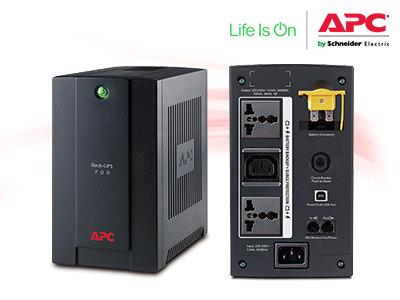
APC-Back-UPS-700VA

For those who is looking for "not a white elephant battery" and cheaper alternative compared to what was discussed before. CS650. This is approximately <SGD$130, only 3 outlet (you can use a multiplug) and only 390W.

Product Technical Info
APC%20Back-UPS%20700VA.jpg

Link to buy from: APC-Back-UPS-700VA (Note: Type-A USB not included)


Connected to Synology with UPS PowerChute port (Type-A USB)
ybuCdvt.jpg
 
Important Forum Advisory Note
This forum is moderated by volunteer moderators who will react only to members' feedback on posts. Moderators are not employees or representatives of HWZ Forums. Forum members and moderators are responsible for their own posts. Please refer to our Community Guidelines and Standards and Terms and Conditions for more information.
Top