Recommendation for a Displayport KVM switch

jokerk

Master Member
Joined
Oct 23, 2006
Messages
3,540
Reaction score
66
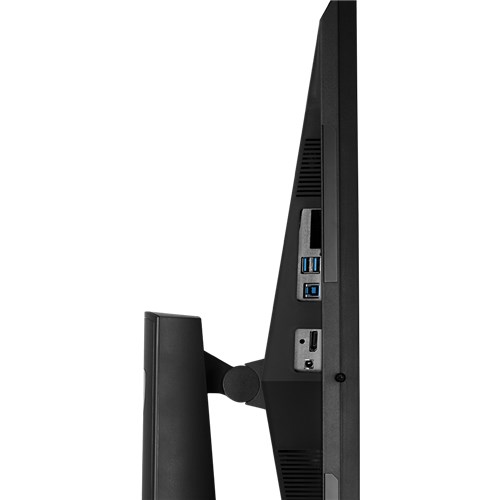
I have a PG278Q which for some reason only has one DP input.

I need to easily switch between my work and personal PC.

For now I keep on plugging and unplugging.

I also need to know if this switch can maintain 144hz at 1440p.
 

hafiz116

Senior Member
Joined
Sep 27, 2008
Messages
1,151
Reaction score
0
Does any of your devices support hdmi? If so I would recommend hooking up one of your devices to that. Once done you can install dell software to switch between the displays using shortcuts. I setup mine to press CTRL + ALT + 1 or 2 to switch between devices. Pressing CTRL + ALT + 2 again gets to my 3rd device. You will also need to connect up the controlling PC to the upstream USB port on the monitor.

I typically run devices off every port so for me I use USB-C, Display Port & HDMI.

Hope this helps :)
 

jokerk

Master Member
Joined
Oct 23, 2006
Messages
3,540
Reaction score
66
This monitor only has Display port.

2 sources 1 Display port input
 

kandinsky

Master Member
Joined
Jan 7, 2015
Messages
4,693
Reaction score
10

kandinsky

Master Member
Joined
Jan 7, 2015
Messages
4,693
Reaction score
10
I looked it up and saw it’s suppose to have 1 hdmi and 1 display port unless the model number is not correct.

I looked it up also, seems correct?

I have a PG278Q which for some reason only has one DP input.

https://www.asus.com/sg/Monitors/ROG_SWIFT_PG278Q/specifications/

I/O Ports
Signal Input : DisplayPort 1.2
USB Port(s) : 3.0x2

AdSijBBoFSfK9jiG_setting_000_1_90_end_500.png
 

hafiz116

Senior Member
Joined
Sep 27, 2008
Messages
1,151
Reaction score
0
Wow ok then the only way is the KVM switch then,.. never seen a monitor with just 1 display port on it before.
 

jokerk

Master Member
Joined
Oct 23, 2006
Messages
3,540
Reaction score
66


Thanks I'll try the China brand. Yeah the monitor is great but annoying too
 
Important Forum Advisory Note
This forum is moderated by volunteer moderators who will react only to members' feedback on posts. Moderators are not employees or representatives of HWZ Forums. Forum members and moderators are responsible for their own posts. Please refer to our Community Guidelines and Standards and Terms and Conditions for more information.
Top