
You are using an out of date browser. It may not display this or other websites correctly.
You should upgrade or use an alternative browser.
You should upgrade or use an alternative browser.
recommendation for build
- Thread starter zjlim86
- Start date
More options
Who Replied?

FroztSpectre
Arch-Supremacy Member
- Joined
- Dec 7, 2007
- Messages
- 15,275
- Reaction score
- 197
Ryzen 2200G and 8gb ram is enough to play L4D2 at 60fps if you looking to push for budget.
Ryzen 2200G and 8gb ram is enough to play L4D2 at 60fps if you looking to push for budget.
using on board graphic? can recommend the full build?
small form casing with 2 ssd and 1 hdd. Thanks

joshuaho
Senior Member
- Joined
- Jan 3, 2015
- Messages
- 830
- Reaction score
- 0
Ryzen 2400g, 16 GB RAM (2X8)
Go for the processor and ram as stated by one of the bros here. Mobo can consider the ASRock AB350M, although I don’t really like the brand, this mobo is pretty popular. Casing would see what’s your preferred size and price point. Do make sure it fits your motherboard size, in the recommended ASRock mobo, it’s m-ATX so can consider tecware nexus M since it is able to fit 2 SSD and 1 3.5” Hdd as per your requirement. It’s quite a Budget case and likely will have exposed cables near the front of the case just behind the fans
Ryzen 2200G and 8gb ram is enough to play L4D2 at 60fps if you looking to push for budget.
For the 2200G have not personally touched it yet so I’m not sure if it can handle 60FPS for L4D2, but ofc if tweak to a lower setting i think it’s capable so TS can also consider it

FroztSpectre
Arch-Supremacy Member
- Joined
- Dec 7, 2007
- Messages
- 15,275
- Reaction score
- 197
using on board graphic? can recommend the full build?
small form casing with 2 ssd and 1 hdd. Thanks
Yes Ryzen 2200G with onboard graphics, Vega 8, is more than enough to play L4D2 at 60fps. Even CS:GO, you can run it at Ultra High settings @ 1080p, and easily get >60fps.
But do note that if you're also going for games like Overwatch, then you'll only get like 40-50fps at 1080p medium settings. Dota 2 will only give u roughly 40fps average at 1080p best looking settings.
If you're looking to play games like pubg or fortnite, then u must be prepared to play at 720p at low and medium settings, for like 45-55fps range.
This is assuming you're going for as budget as possible, you won't be getting the best parts available.
and assuming you're using LAN Cable for internet connectivity.
Asrock AB350M + Ryzen 2200G: $278
[Or topup $18 for Gigabyte GA AB350M-HD3]
[Or topup $17 for, Asrock AB350M Pro4]
RAM: Corsair Vengeance LPX 2666MHz (4gb x 2): $159
PSU: FSP Hyper K 500W: $69
[or topup $10 for EVGA BV Series 500W Bronze]
Casing: Tecware Nexus M Micro T-Glass: $59 or $55 from Qoo10 Techdeals Pte Ltd, store pickup.
Total: $565~
If you need WiFi, either:
1) Toup $67 to upgrade to Gigabyte AB350M-Gaming WiFi, with all the blink blink LEDs lol.
2) Topup $59 for Asus PCI-E 300mbps WiFi Card.
[Gigabyte's WiFi Mobo: The onboard 802.11ac WIFI module from Intel® supports up to 433 Mbps, ..... and also support BLUETOOTH 4.2.]
[ASUS PCI-E 300mbps: 802.11 b/g/n : downlink up to 300 Mbps, uplink up to 300 Mbps (20/40MHz)]
If you need Monitor:
Dell SE2417HG from Lazada: $139
Edited:
L4D2! Lol I did tried that game on 2200G. Smashes the fps* rate lah. The 2200G can maintain over 110fps lol on 1080p medium and some high settings.
Tbh with you, I would recommend the 2200G instead. Cause the pricing and the overall adoption rate for a 2200G and b350 board is cheap. Want it to be cheaper? Pair it with a320 board. The pricing becomes $2xx range.
If you intend to game some other titles that it is slightly more demanding, then the 2400G will help by a bit.
The 2400G is more for content creations on a budget rather than "gaming" in general. The help of iGPU inside could help.
Some other benchmarks (but with 3200MHz Ram):


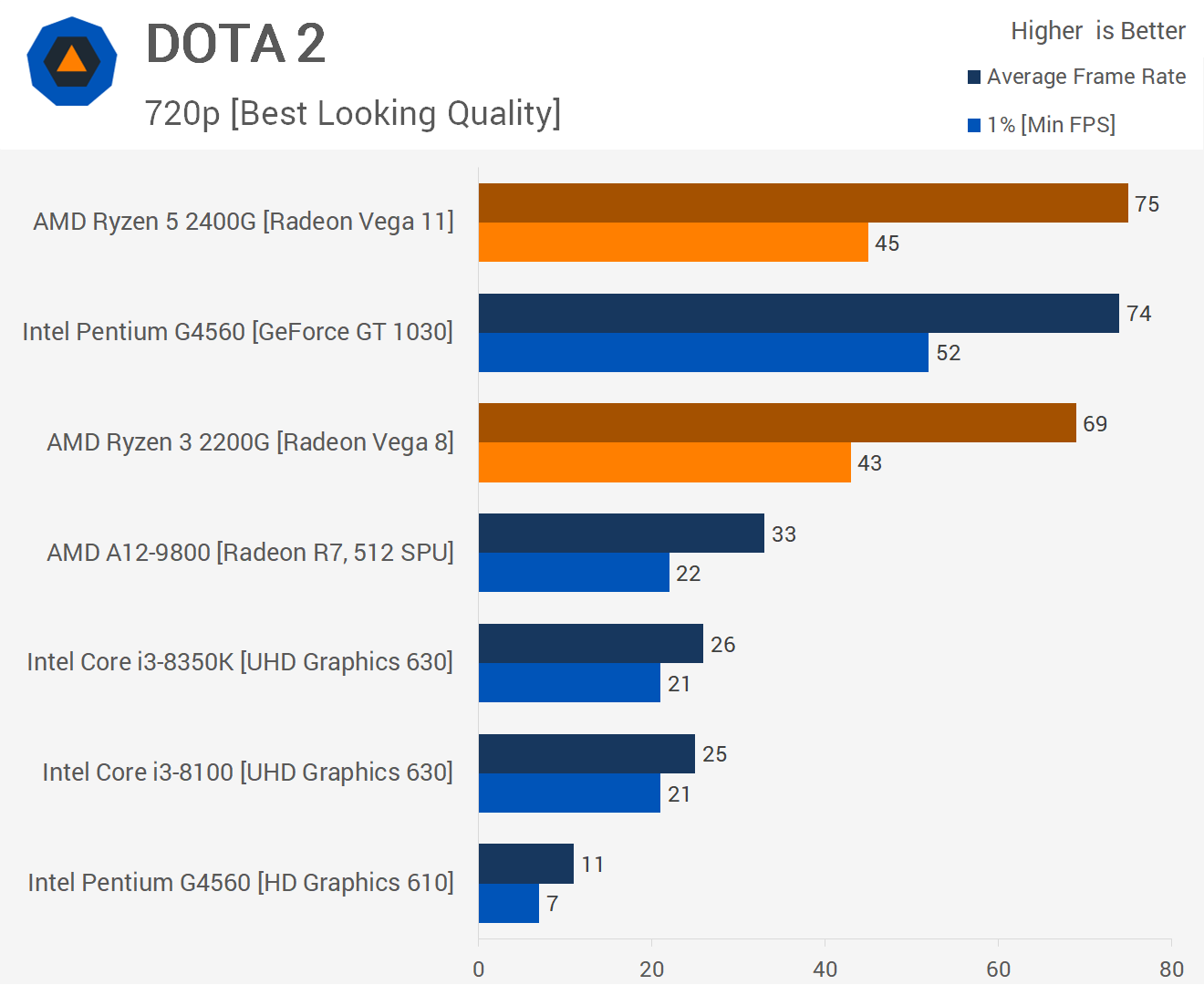
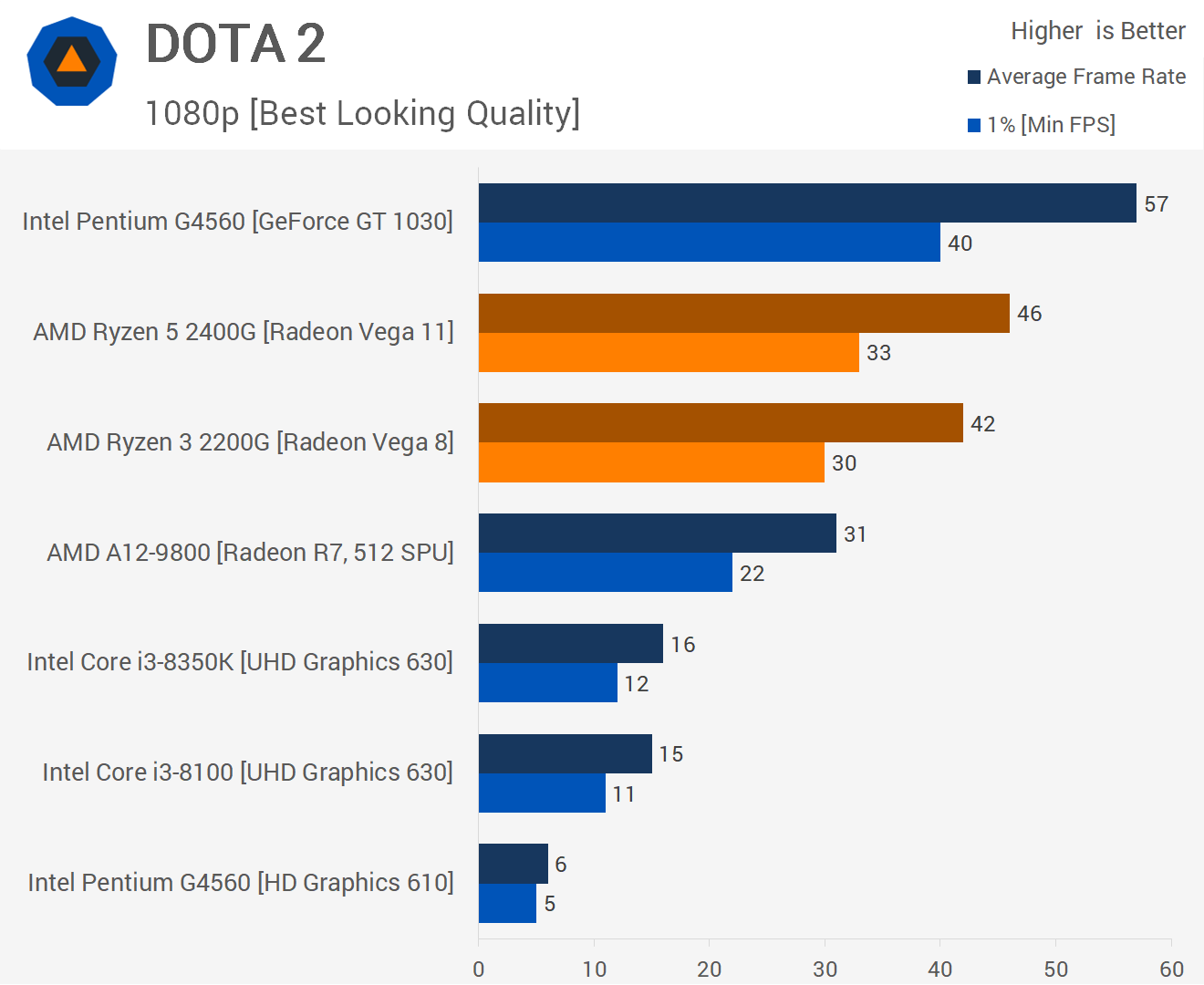
Edited2:
Make sure when u buy ur Mobo, the BIOS is updated to support ur Ryzen 2200G. Or get someone to help u update ur BIOS.
Last edited:
Yes Ryzen 2200G with onboard graphics, Vega 8, is more than enough to play L4D2 at 60fps. Even CS:GO, you can run it at Ultra High settings @ 1080p, and easily get >60fps.
But do note that if you're also going for games like Overwatch, then you'll only get like 40-50fps at 1080p medium settings. Dota 2 will only give u roughly 40fps average at 1080p best looking settings.
If you're looking to play games like pubg or fortnite, then u must be prepared to play at 720p at low and medium settings, for like 45-55fps range.
This is assuming you're going for as budget as possible, you won't be getting the best parts available.
and assuming you're using LAN Cable for internet connectivity.
Asrock AB350M + Ryzen 2200G: $278
[Or topup $18 for Gigabyte GA AB350M-HD3]
[Or topup $17 for, Asrock AB350M Pro4]
RAM: Corsair Vengeance LPX 2666MHz (4gb x 2): $159
PSU: FSP Hyper K 500W: $69
[or topup $10 for EVGA BV Series 500W Bronze]
Casing: Tecware Nexus M Micro T-Glass: $59 or $55 from Qoo10 Techdeals Pte Ltd, store pickup.
Total: $565~
If you need WiFi, either:
1) Toup $67 to upgrade to Gigabyte AB350M-Gaming WiFi, with all the blink blink LEDs lol.
2) Topup $59 for Asus PCI-E 300mbps WiFi Card.
[Gigabyte's WiFi Mobo: The onboard 802.11ac WIFI module from Intel® supports up to 433 Mbps, ..... and also support BLUETOOTH 4.2.]
[ASUS PCI-E 300mbps: 802.11 b/g/n : downlink up to 300 Mbps, uplink up to 300 Mbps (20/40MHz)]
If you need Monitor:
Dell SE2417HG from Lazada: $139
Edited:
Some other benchmarks (but with 3200MHz Ram):
Edited2:
Make sure when u buy ur Mobo, the BIOS is updated to support ur Ryzen 2200G. Or get someone to help u update ur BIOS.
Woot..thank alot for the quote...and thank you very much.will the ram running at 2666 be sufficient for L4D2 and diablo 3? i read in the thread that need to OC the ram?
PS. I need someone to help me build..haha
joshuaho
Senior Member
- Joined
- Jan 3, 2015
- Messages
- 830
- Reaction score
- 0
If buying from shop can get them to build.. though there may be certain charges if not a full system build. Since you’re on a Budget, ownself build la you can save on some costs or use the money to upgrade another component instead.
Woot..thank alot for the quote...and thank you very much.will the ram running at 2666 be sufficient for L4D2 and diablo 3? i read in the thread that need to OC the ram?
PS. I need someone to help me build..haha
-Synchronicity-
Senior Member
- Joined
- Apr 29, 2012
- Messages
- 2,463
- Reaction score
- 198
If ryzen, although u on budget, would recommend you to get 1 stick of 8gb 3000mhz ram first. Can consider klevv bolt 3000mhz at 129 from dynacore. Can always add another piece later when you have the cash to the now recommended capacity of 16gb rams.
FroztSpectre
Arch-Supremacy Member
- Joined
- Dec 7, 2007
- Messages
- 15,275
- Reaction score
- 197
Woot..thank alot for the quote...and thank you very much.will the ram running at 2666 be sufficient for L4D2 and diablo 3? i read in the thread that need to OC the ram?
PS. I need someone to help me build..haha
If you're purely playing for D3 and L4D2, and really pushing for a budget build.
Then honestly 2666MHz (2x 4gb dual channel rams) is good enough for you.
Easily >60 fps for L4D2,
while D3 you should be getting average of 45-55 fps for 1080p Mid-high settings. (Shadows at med). Want better fps than just drop Shadows to low.
Btw, do note that, comparing single channel and dual channel.
Dual Channel may give more fps than Single Channel.
Eg 1x8gb 2666MHz less fps than 2x4gb 2666MHz rams.
And also another video showing.
I personally cant find any 2x4gb 3000MHz or 3200MHz rams, that's why i only recommended 2666MHz lol.

Last edited:

michael_thm
Arch-Supremacy Member
- Joined
- Jan 1, 2000
- Messages
- 22,028
- Reaction score
- 2,719
Unless you are the sort who need to open 50 chrome tabs and can run other stuffs at the same time... there is absolutely no need for 16GB. You can comfortably watch a movie, keep a speadsheet open, have 20 chrome tabs open and you still won't have 100% utilisation of the 8GB ram.
I know what I am saying simply because I have a system with only 8GB and another with 32GB.
I know what I am saying simply because I have a system with only 8GB and another with 32GB.
Important Forum Advisory Note
This forum is moderated by volunteer moderators who will react only to members' feedback on posts. Moderators are not employees or representatives of HWZ Forums. Forum members and moderators are responsible for their own posts.
Please refer to our Community Guidelines and Standards and Terms and Conditions for more information.

