Recommendation for ISP

galapogos

Moderator
Moderator
Joined
Aug 30, 2000
Messages
30,098
Reaction score
41
Hi guys,
My M1 1Gbps fibre broadband is up for recontract, and the deal they're giving me isn't that great. I get the same price for another 24 months, with 3 months free, and no new router.

I stay in a 2-floor maisonette, with the 2nd floor being a study where all the PCs/laptops are, and where my wife and I WFH. I'm currently using the Asus RT-AC2600 as the main router in the living room, and a Linksys EA8100 on the 2nd floor as a wireless AP. Both are AC devices.

I've not much complains with the routers nor M1 currently, though I thought I should get a new WiFi 6 router since I'm recontracting. Any recommendations for any deals for other ISPs that have decent WiFi 6 routers bundled in? I don't think I really need mesh. Would be good if activation and installation fees could be waived too.

Thanks!
 

xiaofan

High Supremacy Member
Joined
Sep 16, 2018
Messages
34,764
Reaction score
11,532
Hi guys,
My M1 1Gbps fibre broadband is up for recontract, and the deal they're giving me isn't that great. I get the same price for another 24 months, with 3 months free, and no new router.

I stay in a 2-floor maisonette, with the 2nd floor being a study where all the PCs/laptops are, and where my wife and I WFH. I'm currently using the Asus RT-AC2600 as the main router in the living room, and a Linksys EA8100 on the 2nd floor as a wireless AP. Both are AC devices.

I've not much complains with the routers nor M1 currently, though I thought I should get a new WiFi 6 router since I'm recontracting. Any recommendations for any deals for other ISPs that have decent WiFi 6 routers bundled in? I don't think I really need mesh. Would be good if activation and installation fees could be waived too.

Thanks!

Just stick with M1.

And then top up S$13 per month for the excellent top-of-the-line Asus ROG GT-AX6000. which is a very good deal.
Ref: https://www.m1.com.sg/home-broadband/devices/asus-rog-rapture-gt-ax6000
 

galapogos

Moderator
Moderator
Joined
Aug 30, 2000
Messages
30,098
Reaction score
41
After factoring in the activation/installation fees required from other ISPs, it seems that it's cheaper to stick with M1. However, let's say I get a new WiFi 6 router. Should I use it as the main router in the living room, or should I use it as an AP upstairs (where all my PCs/laptops are and I need the fastest performance)?
 

loganrunning

Master Member
Joined
May 12, 2017
Messages
3,744
Reaction score
2,285
After factoring in the activation/installation fees required from other ISPs, it seems that it's cheaper to stick with M1. However, let's say I get a new WiFi 6 router. Should I use it as the main router in the living room, or should I use it as an AP upstairs (where all my PCs/laptops are and I need the fastest performance)?

put the wifi6 router where the majority of the wifi devices are, assuming that the connection between the 2 routers is via cable. note that if your wifi devices are wifi5, you may not see a significant increase in speed.

to get better client wifi speed, you will need to upgrade your wifi cilents to wifi6.
 

firesong

Supremacy Member
Deluxe Member
Joined
Jan 17, 2001
Messages
8,802
Reaction score
4,821
Note that if you also have any Wifi 5 or lower devices on your network, you will not benefit from OFMDA, which significantly increases efficiency for wifi6 devices. It's more than speed, but increased efficiency in bandwidth allocation that improves overall network quality.

If there are older wireless devices on your network, this bandwidth slicing will not work, which makes the upgrade a placebo effect and redundant.

https://www.techtarget.com/searchnetworking/answer/Wi-Fi-6-How-does-OFDMA-work
Enter OFDMA, a multiuser variant of OFDM technology that enables a Wi-Fi 6 access point (AP) to connect with many devices at once. OFDMA partitions each radio channel into smaller resource units that it strategically allocates across clients.


In contrast, a legacy AP can communicate with only one user per channel at a time and must hold the line open until a given transmission concludes -- even if there's a delay on the client's end. As a result, wireless performance often suffers in high-density environments like stadiums, conference centers and classrooms, regardless of network speeds.
 

galapogos

Moderator
Moderator
Joined
Aug 30, 2000
Messages
30,098
Reaction score
41
Note that if you also have any Wifi 5 or lower devices on your network, you will not benefit from OFMDA, which significantly increases efficiency for wifi6 devices. It's more than speed, but increased efficiency in bandwidth allocation that improves overall network quality.

If there are older wireless devices on your network, this bandwidth slicing will not work, which makes the upgrade a placebo effect and redundant.

https://www.techtarget.com/searchnetworking/answer/Wi-Fi-6-How-does-OFDMA-work
Do you mean that as long there there is 1 device that doesn't support WiFi 6 connecting to the WiFi 6 router, I won't be able to get OFMDA for all devices connected to that router?

put the wifi6 router where the majority of the wifi devices are, assuming that the connection between the 2 routers is via cable. note that if your wifi devices are wifi5, you may not see a significant increase in speed.

to get better client wifi speed, you will need to upgrade your wifi cilents to wifi6.
OK. The 2 routers are connected via Cat 6 cable. So there's no disadvantage of having the faster/newer router as an AP rather than the main router?
 

firesong

Supremacy Member
Deluxe Member
Joined
Jan 17, 2001
Messages
8,802
Reaction score
4,821
Do you mean that as long there there is 1 device that doesn't support WiFi 6 connecting to the WiFi 6 router, I won't be able to get OFMDA for all devices connected to that router?
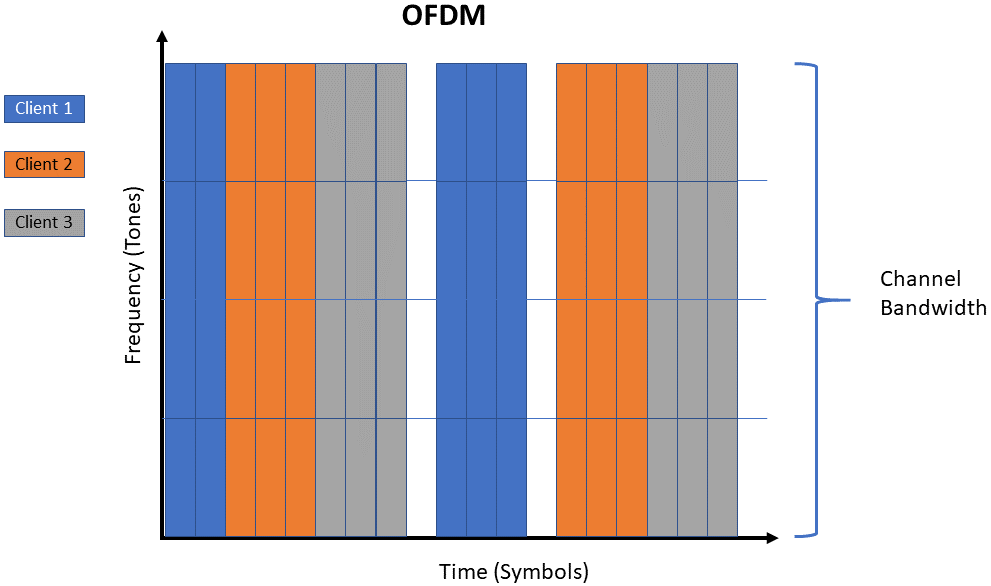
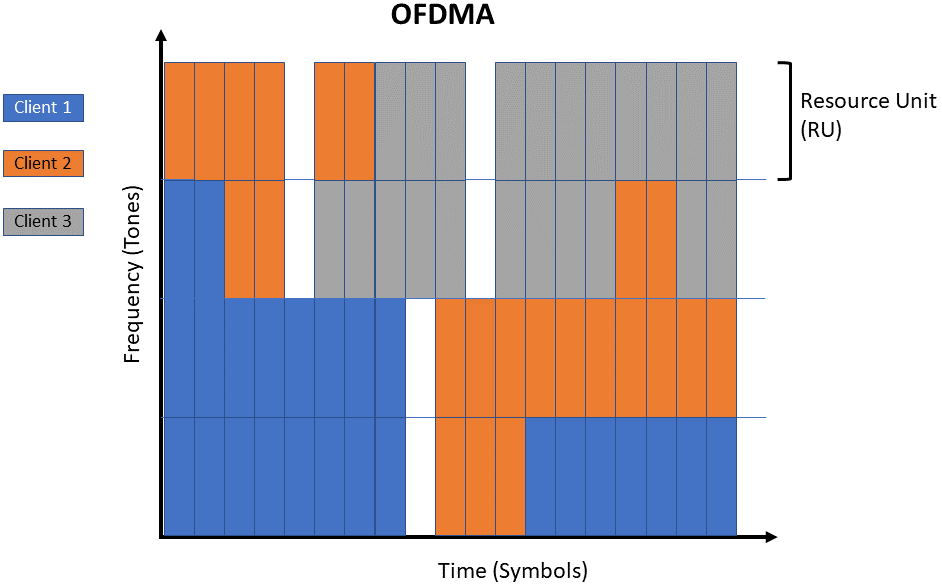
Essentially yes, because that one device does not understand how OFDMA works, so it falls back to a "lowest common denominator" which is OFDM (without multiple-access, ie "time slicing"), so to speak. Of course there may be moments that one device is silent so other devices will be able to be on OFMDA. But as long as that one device remains active on the network, it will force it down to OFDM cos that's a common standard everyone can agree on.

In lay speak, that one device will be screaming "Eh I don't understand what's going on with this gibberish" and essentially force everyone down.

https://www.5gtechnologyworld.com/ofdma-improves-spectrum-use-in-wi-fi-6/
The diagrams are quite clear.
Witte_ODFMA_fig2.png


Witte_ODFMA_fig3.png


To further elaborate, this is a diagram illustrating just a "pure" network environment without interference. For most of us who live in apartments (HDB, Condo), there's a lot of neighbour traffic. All those devices are using the same frequencies, so the "sharing" includes times to wait for your turn" because your neighbours' devices are all sharing the same wireless channels. This is what a heavily congested network can be. That's why it's a great practise to keep your wifi power to a minimum (just enough to cover the area needed and handover to the next AP effectively without loss of wireless coverage) and use a wired backhaul, rather than to boost at max or over the limits and be a "noisy neighbour" affecting everyone else. The wireless backhauls require some form of boosted power so that you can have strong signals for the interleaving APs.


That's why I find this push to go with AX mesh systems and all very premature. When you consider that the 802.11ax standard includes the 6Ghz specification (ie, WiFi6E), then it's pretty messed up that everyone is just wasting money buying equipment without much of the truly meaningful gains to be had imo. As long as their are legacy devices and all, it'll be quite messed up. Those who know about these segregate their wireless and network topologies with VLANs to maximise capability and minimise penalties. IoT devices and slow devices like wifi cameras are left on a separate network for good reason. Am waiting for IMDA to open up the 6Ghz spectrum properly for Wifi, and for the proliferation of Wifi 7 devices. The devices on the 6Ghz band are going to be OFMDA compatible since that band is part of the new standard. Kind of like how 802.11ac benefited more from the move to 5Ghz (even though 802.11n was on the 5Ghz band).


Of course, most users won't understand or care - and just throw everything into a single basket, thus negating all the benefits but bragging because Windows reports the MCS spec as some fantastic high number (which may not necessarily be the actual speeds you're communicating at).

OK. The 2 routers are connected via Cat 6 cable. So there's no disadvantage of having the faster/newer router as an AP rather than the main router?
In terms of wireless performance, probably negligible. However, in terms of processing power, the newer router could have a better/more capable CPU and chipset. You'll need to investigate to be certain. This is one of the things about consumer "all-in-one" routers that can be a bit confusing. An older "router" could have a more capable processor.

With the more advanced networking systems around today (eg Unifi, Omada, Aruba, Ruckus), a router is a router, an access point does AP duties, a Switch just does its switch duties. It is not the same CPU being tasked to do multiple tasks and more unnecessary things (Antivirus? File storage? Other totally unnecessary funny functions? ).


PS: To be clear, I'm not saying don't get it. I'm simply saying know what you're getting into, but don't expect AX to be very much of an improvement over AC - it's not. The improvements will come only when you move to the 6Ghz band with Wifi 6E or more likely Wifi 7, only because you can know for sure all devices on that band support all the improvements. From a practical perspective, I'm more in favour of getting equipment that gives good 300-400Mbps coverage all over the house with the 5Ghz band.

 
Last edited:

loganrunning

Master Member
Joined
May 12, 2017
Messages
3,744
Reaction score
2,285
OK. The 2 routers are connected via Cat 6 cable. So there's no disadvantage of having the faster/newer router as an AP rather than the main router?

@firesong gave a good reply. i'll just add, it depends on what you are using/running on your network and router.

if you are just surfing and playing games ie not running additional extensions/apps on your router, but need a good coverage away from the primary router, then yes, put the lower spec router (which probably has a comparatively lower wifi performance) as the gateway device to do the routing, and have the device with better wifi capabilities as the AP. (keeping your wired connection between the 2 devices).

of course, with "all in one" devices properly called wireless-router-access-points, the better model will also have a better processor - the potential will be wasted.


but if you intend to load apps and run them on the router, use the better model as the gateway device.
note that in this use case, an older wifi5 model with a good CPU and RAM, will be better at being the router, than a newer Wifi6 model with a piddling CPU and low RAM. if you are into this, might be worth considering separate components per @firesong's recommendation.
 

xiaofan

High Supremacy Member
Joined
Sep 16, 2018
Messages
34,764
Reaction score
11,532
Do you mean that as long there there is 1 device that doesn't support WiFi 6 connecting to the WiFi 6 router, I won't be able to get OFMDA for all devices connected to that router?

Based on the reviews, OFDMA may not be as good as it claimes to be.

That being said, for average users with average Wifi 5 or Wifi 6 routers, you will see very significant performance improvement with the wifi 6 routers (even the lower end Sub S$100 ones) with simple upgrade on your Desktop/laptop using no-brand Intel AX200 based wireless adapters.

There is no point to wait for Wifi 6E, I think Wifi 6E is a dead technology since China does not approve it and it seems China will wait for Wifi 7 (new chipsets have already been released). Singapore will most likely follow suit and not approve 6GHz band for Wifi 6 usgae any time soon.
 

firesong

Supremacy Member
Deluxe Member
Joined
Jan 17, 2001
Messages
8,802
Reaction score
4,821
Based on the reviews, OFDMA may not be as good as it claimes to be.

That being said, for average users with average Wifi 5 or Wifi 6 routers, you will see very significant performance improvement with the wifi 6 routers (even the lower end Sub S$100 ones) with simple upgrade on your Desktop/laptop using no-brand Intel AX200 based wireless adapters.

There is no point to wait for Wifi 6E, I think Wifi 6E is a dead technology since China does not approve it and it seems China will wait for Wifi 7 (new chipsets have already been released). Singapore will most likely follow suit and not approve 6GHz band for Wifi 6 usgae any time soon.
This is political. The 6Ghz frequency band conflicts with China's push for 5G. Given the surveillance state policies China has in place, it is more important for them to push 5G (because it allows fine tracking of individuals since everyone must have a mobile phone) over 6Ghz wifi. Frequency bands are limited, and they prioritise as they will.

China also does not care for wifi much. They are trying to push for mobile networks rather than to run networking infrastructure to rural areas and having to maintain it. They are a large country so it is in their interests not to have to deploy hardware, More pertinently, when users cannot configure the hardware and all traffic is forced to go through their Mobile providers, they can more easily maintain the great firewall and information control of the populace.

Wifi 7 also uses the 6Ghz frequency band, so the move does not make any sense.

Singapore on the other hand is urban dense and properly networked up. It is in Singapore's interest to push for wifi over maintaining 5G towers. In addition to the costs of deployment, the electrical costs of running 5G are extremely high - and we have no natural ways of generating electricity unlike China. In fact, we've already had to buy Electricity from Indochina. It is in our national interests to push 6Ghz wifi over 5G tbh.

https://kr-asia.com/5g-towers-are-c...om-is-putting-some-of-them-to-sleep-overnight
https://www.ema.gov.sg/media_release.aspx?news_sid=20220623UjiFDR2aZUxy
 

xiaofan

High Supremacy Member
Joined
Sep 16, 2018
Messages
34,764
Reaction score
11,532
I do not want to discuss politics here. I trust the IMDA to be smart and see when is the best time to approve 6GHz for Wifi usage.

In any case, to TS, no point waiting for Wifi 6E or Wifi 7.

The current batch of Wifi 6E routers are expensive, offer basically no improvements of performance to Wifi 6 routers.
 

firesong

Supremacy Member
Deluxe Member
Joined
Jan 17, 2001
Messages
8,802
Reaction score
4,821
I do not want to discuss politics here. I trust the IMDA to be smart and see when is the best time to approve 6GHz for Wifi usage.

In any case, to TS, no point waiting for Wifi 6E or Wifi 7.

The current batch of Wifi 6E routers are expensive, offer basically no improvements of performance to Wifi 6 routers.
Just pointing it out, since you were the one who started it by citing China and projecting Singapore to adopt Chinese policies blindly.

I was stating the circumstance were different, so it is not right to assume that Singapore will do likewise. Our geographical, energy, and whole-country network deployment levels, these situations are very different.

It's because of this difference that we cannot simply write it off. We have to wait for the regulatory bodies to decide how the allocation of bands will be. As pointed out, the improvements are to be had on the 6Ghz frequencies where things will be much faster.
 

lobukong

Member
Joined
Jun 16, 2011
Messages
365
Reaction score
200
Urban dense, so 5g energy cost per user for Singapore will be much lower than China or US. I assume Singapore can afford? The mobile bill is like at least 50sgd per month already.

So, push for wifi over 5G. Is there any plan to cover Singapore with WIFI? For energy saving?
 

firesong

Supremacy Member
Deluxe Member
Joined
Jan 17, 2001
Messages
8,802
Reaction score
4,821
Urban dense, so 5g energy cost per user for Singapore will be much lower than China or US. I assume Singapore can afford? The mobile bill is like at least 50sgd per month already.

So, push for wifi over 5G. Is there any plan to cover Singapore with WIFI? For energy saving?
Not necessarily significantly lower. Urban density also means we need to support more handsets in the same area, and that could keep power costs high. The fact remains that we need to import energy to maintain current consumption rates. It's already proven that 5G towers cost more energy to run over time than LTE towers. Keeping power consumptions low is not a dreadful thing since that has a knock-on effect on costs overall.

To quote, "Exact estimates differ by source, but MTN says the industry consensus is that 5G will double to triple energy consumption for mobile operators, once networks scale."

https://www.fiercewireless.com/tech...ot-more-energy-than-4g-base-stations-says-mtn
As for wifi coverage, you install it in your homes and offices - in fixed locations. You can choose not to install it if you were so inclined - customer choice remains here. WiFi was never designed to blanket cover large areas, so that is merely matching the tools to the solution properly. They have different strokes. I regularly work with a hundred or more gigabits of data a day while on my home and work networks, but I don't do the same on my mobile phone. They aren't used the same way,

$50 is not a lot these days considering the rising median income the government likes to tote. Also, you cannot assume that your $50 goes 100% to maintaining the networks. In Singapore, you also have mobile equipment subsidies (where an estimated $20-25 of that goes to, the excess merely becomes profit if users choose not to go with flagship-cost phones), shareholder dividends, director fees, marketing, and other incidental costs on top of operational (including staff bonuses). As for $50 being a lot, the reality is that it is now merely the new floor - it's expected to rise once more people are on board the 5G bandwagon and have no other option to take. Past 2G-3G, and 3G-4G trends support this, along with the recent rise in subscription costs beginning from about 2 years before the Covid-19 pandemic period. The pandemic merely put a stop to the cost increments, but that's expected to change. We already see that happening in food and other daily costs.

PS: I know you have said your parents are in China, but it is a fact that China is a surveillance state and uses technology to achieve that end. Am merely stating a known fact here, and that it is a strong reason for them to be pushing 5G over Wifi to support and reinforce that position.
https://www.nytimes.com/2022/06/21/world/asia/china-surveillance-investigation.html
Even China Telecom demonstrates in their own advertorials that 5G enables and enhances State Surveillance.
https://telecoms.com/501785/china-telecom-celebrates-the-state-surveillance-potential-of-5g/
 
Last edited:

lobukong

Member
Joined
Jun 16, 2011
Messages
365
Reaction score
200
Well, to me, tech is tech. Different people will have different opinion on whether it's evil or not.

Youtube will recommend videos based on phone's mic 24/7. Google will show captcha if you use VPN. Google Photo used to be free and all the photos were used to train AI. Github co-pilot used AI trained from open-source code to auto-complete functions, now it's a paid service without paying original code author.
Then look at what happen to Assange and Snowden, surveillance is already unavoidable all over the world. Yet we are still using the Internet right? I wouldn't mention Assange and Snowden every time someone talk about the Internet.
But people will have their own opinions, so I'm not trying to change anything, just talking about tech to understand it better.
 

galapogos

Moderator
Moderator
Joined
Aug 30, 2000
Messages
30,098
Reaction score
41
@firesong gave a good reply. i'll just add, it depends on what you are using/running on your network and router.

if you are just surfing and playing games ie not running additional extensions/apps on your router, but need a good coverage away from the primary router, then yes, put the lower spec router (which probably has a comparatively lower wifi performance) as the gateway device to do the routing, and have the device with better wifi capabilities as the AP. (keeping your wired connection between the 2 devices).

of course, with "all in one" devices properly called wireless-router-access-points, the better model will also have a better processor - the potential will be wasted.


but if you intend to load apps and run them on the router, use the better model as the gateway device.
note that in this use case, an older wifi5 model with a good CPU and RAM, will be better at being the router, than a newer Wifi6 model with a piddling CPU and low RAM. if you are into this, might be worth considering separate components per @firesong's recommendation.
Thanks. As of now I'm just using basic functions. Not even playing games, but the usual WFH video conferencing, basic Internet usage, video streaming, etc. I guess using my existing Asus RT-AC2600 as the main router and a new WiFi 6 router as the AP.

What kind of apps are you referring to?
 

loganrunning

Master Member
Joined
May 12, 2017
Messages
3,744
Reaction score
2,285
Thanks. As of now I'm just using basic functions. Not even playing games, but the usual WFH video conferencing, basic Internet usage, video streaming, etc. I guess using my existing Asus RT-AC2600 as the main router and a new WiFi 6 router as the AP.

What kind of apps are you referring to?

dns blockers, vpn, etc.
 

bert64

Senior Member
Joined
Jan 20, 2020
Messages
1,027
Reaction score
539
Well, to me, tech is tech. Different people will have different opinion on whether it's evil or not.

Youtube will recommend videos based on phone's mic 24/7. Google will show captcha if you use VPN. Google Photo used to be free and all the photos were used to train AI. Github co-pilot used AI trained from open-source code to auto-complete functions, now it's a paid service without paying original code author.
Then look at what happen to Assange and Snowden, surveillance is already unavoidable all over the world. Yet we are still using the Internet right? I wouldn't mention Assange and Snowden every time someone talk about the Internet.
But people will have their own opinions, so I'm not trying to change anything, just talking about tech to understand it better.
Google captcha is not due to VPN per se, it's when you have lots of users originating from the same IP address (common for commercial VPN providers) so it can't differentiate between a large number of users forced through a single NAT gateway or a single user making lots of automated requests.

You won't get the captcha if you use a VPN that is exclusively yours or which gives you dedicated addressing instead of shared NAT, but you will see it often if you're using a local ISP that uses CGNAT etc. It's a common hassle somewhere like Myanmar where all the ISPs use CGNAT and most of them haven't deployed IPv6.
 

lobukong

Member
Joined
Jun 16, 2011
Messages
365
Reaction score
200
Google captcha is not due to VPN per se, it's when you have lots of users originating from the same IP address (common for commercial VPN providers) so it can't differentiate between a large number of users forced through a single NAT gateway or a single user making lots of automated requests.

You won't get the captcha if you use a VPN that is exclusively yours or which gives you dedicated addressing instead of shared NAT, but you will see it often if you're using a local ISP that uses CGNAT etc. It's a common hassle somewhere like Myanmar where all the ISPs use CGNAT and most of them haven't deployed IPv6.
Yes, I'm aware of that explanation. Just that I'm not sure is it really for DDOS prevention or is it because VPN hurts google's tracking & advertisement.
My current thinking is as follows: Google search seems free, but what google need in return is to know more info about "you". Then google can make money out of that info. Using Google without leaking any info to google is like treating google like a real free service, which is not.
 
Last edited:

Mach3.2

Great Supremacy Member
Joined
Apr 8, 2011
Messages
72,499
Reaction score
2,478
Yes, I'm aware of that explanation. Just that I'm not sure is it really for DDOS prevention or is it because VPN hurts google's tracking & advertisement.
My current thinking is as follows: Google search seems free, but what google need in return is to know more info about "you". Then google can make money out of that info. Using Google without leaking any info to google is like treating google like a real free service, which is not.
I honestly believe it is just to protect their systems from bots, most people still leak plenty of personal identifier markers even when they use VPN because they don't know what they are doing.
 
Last edited:
Important Forum Advisory Note
This forum is moderated by volunteer moderators who will react only to members' feedback on posts. Moderators are not employees or representatives of HWZ Forums. Forum members and moderators are responsible for their own posts. Please refer to our Community Guidelines and Standards and Terms and Conditions for more information.
Top