

You are using an out of date browser. It may not display this or other websites correctly.
You should upgrade or use an alternative browser.
You should upgrade or use an alternative browser.
Recommended Mechanical Keyboard
- Thread starter meandexx
- Start date
More options
Who Replied?


tigerwoods
Arch-Supremacy Member
- Joined
- Oct 7, 2005
- Messages
- 11,396
- Reaction score
- 2,622
Hi guys, what is the recommended mechanical keyboard and where to go that have many choices to choose from? thanks!

hawthorne
Arch-Supremacy Member
- Joined
- May 9, 2006
- Messages
- 11,714
- Reaction score
- 210

TrueBeliever_jh
Honorary Member
- Joined
- Jun 8, 2006
- Messages
- 112,649
- Reaction score
- 4,415
actually you should go SLS and try all the switches. and see which one you like.
typist or gamer. each switch feels and sounds different. and very subjective.
typist or gamer. each switch feels and sounds different. and very subjective.
Hi guys, what is the recommended mechanical keyboard and where to go that have many choices to choose from? thanks!
like others said, its best to go have a feel yourself @ challenger or SLS.
Here's a quick cheat sheet on your mechanical key switches:
Cherry-MX
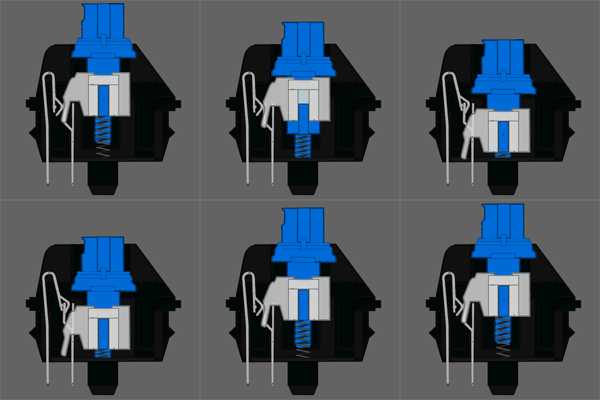
Blue - Sound(clicky) + tactile feedback(clicky); more for typist but some prefer this for gaming. The click sound and feel tells you when the key is activated.
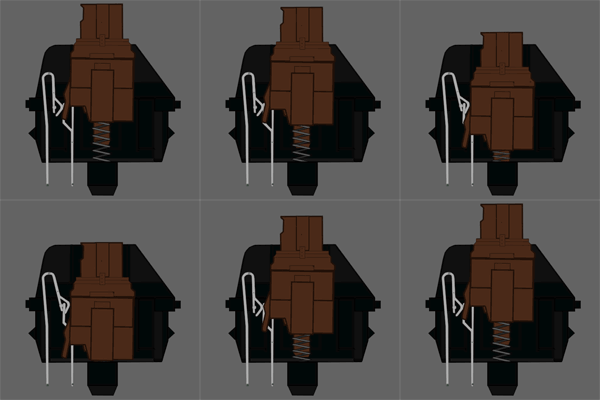
Brown - No sound apart from bottoming out the keys,Bump feedback; all rounded for general use. The bump tells you when the key is activated.
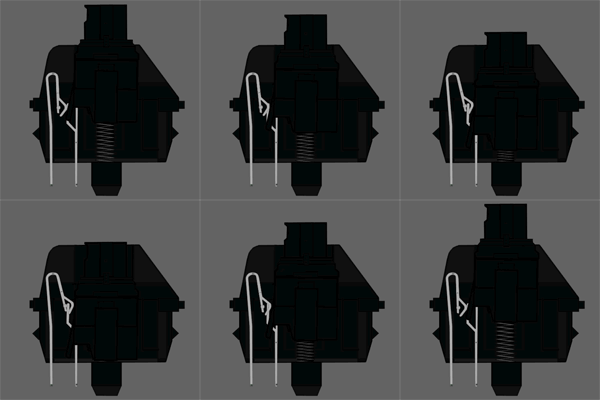
Black - No sound apart from bottoming out, no bump feedback; this marketed for gaming because there's less force to activate the keys. Some players prefer this as it has a linear feel.
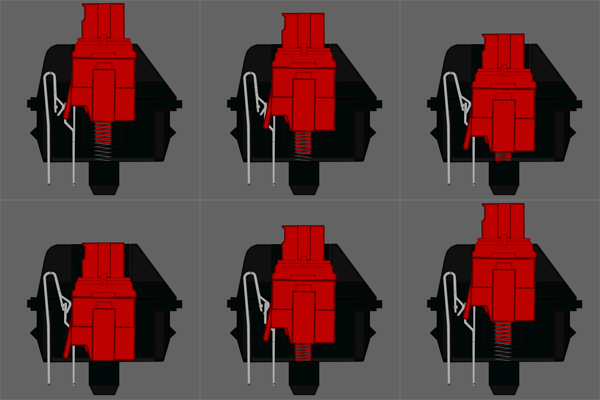
Red - Exactly the same as blacks but shorter travel to activate/bottoming out the keys.
There are other switches as well:
Razer Green are very similar to Cherry-MX's Blue
Razer Orange are very similar to Cherry-MX's Brown
Razer Yellow are very similar to Cherry-MX's Red/Black

Razer also has this Mecha-membrane keys; which are a combination of membrane(your common keyboards) and mechanical keys.

Logitech Romer-G are very different and a lot stiffer compared to general Mechanical keys. They are considered similar to Cherry-MX's Brown
Last edited:

Illusionist_85
Banned
- Joined
- Oct 3, 2002
- Messages
- 129,954
- Reaction score
- 7,233
think coolermaster or some brand got pink n purple switch

stan216
Senior Member
- Joined
- Jul 8, 2012
- Messages
- 1,034
- Reaction score
- 34
Hey, you didn't state what is your budget. But if you're looking for a mechanical keyboard, you should be expecting to fork out a little more money.
I am using a Kingston FPS Alloy (MX Blue) right now. I initially considered the Cooler Master Masterkeys Pro L White LED. Both of which you should be able to get for $150 or maybe less, if you can bargain. I'm a first time user of mechanical keyboards, $150-ish I think is ok for me. Also, do note that these 2 keyboards are the "bare minimal". So no fanciful macro functions and stuff.
If you choose to get the kingston keyboard, do take note that it should also come with
I got mine as a de-bundled set without the 8 extra gaming keycaps. I paid less for that of course, but I take issue with the way I was sold (felt cheated). But then I also don't deny that I was too eager to make my purchase, so I missed quite a lot of warning signs (obvious one at that too!) about what I should have gotten. It's a long story, but anyway, lesson learnt for me.
Where to go that have many choices to choose from? You might want to consider X-treme Solution at Sim Lim #02-21. I didn't get my keyboard from them, but I'd consider that shop in the future.
I am using a Kingston FPS Alloy (MX Blue) right now. I initially considered the Cooler Master Masterkeys Pro L White LED. Both of which you should be able to get for $150 or maybe less, if you can bargain. I'm a first time user of mechanical keyboards, $150-ish I think is ok for me. Also, do note that these 2 keyboards are the "bare minimal". So no fanciful macro functions and stuff.
If you choose to get the kingston keyboard, do take note that it should also come with
- A USB Y-Cable. The cable is a braided cable.
- 8 extra gaming keycaps (1234WASD)
- keycap removal tool
- travel pouch.
- quick start guide.
I got mine as a de-bundled set without the 8 extra gaming keycaps. I paid less for that of course, but I take issue with the way I was sold (felt cheated). But then I also don't deny that I was too eager to make my purchase, so I missed quite a lot of warning signs (obvious one at that too!) about what I should have gotten. It's a long story, but anyway, lesson learnt for me.
Where to go that have many choices to choose from? You might want to consider X-treme Solution at Sim Lim #02-21. I didn't get my keyboard from them, but I'd consider that shop in the future.
Important Forum Advisory Note
This forum is moderated by volunteer moderators who will react only to members' feedback on posts. Moderators are not employees or representatives of HWZ Forums. Forum members and moderators are responsible for their own posts.
Please refer to our Community Guidelines and Standards and Terms and Conditions for more information.
