Reformat problem.

Icy.Waffles

Member
Joined
Dec 30, 2011
Messages
433
Reaction score
4
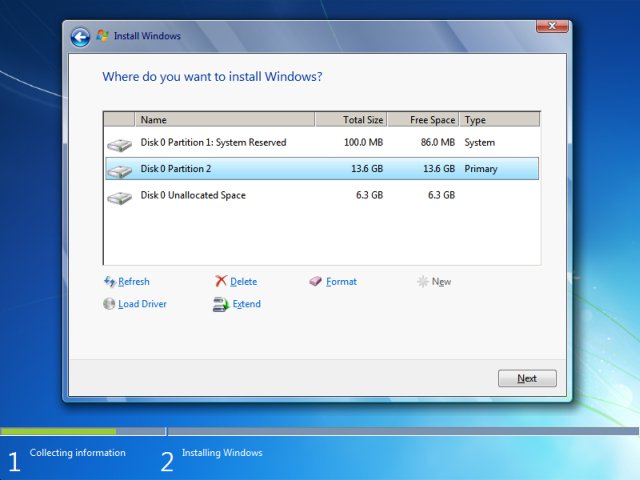
Hi guys recently I wanted to reformat my computer with my window 7 cd. However, as I boot from my cd, my computer took me straight into the part of installing a fresh new window 7 instead of going into the Blue screen that I can delete partition.

However, I ignore it and continue to install a new window without deleting the old partition. In the end, my computer still has some old files inside.

Can I ask you guys how can I go inside the blue screen that can allow me to delete away my partition?
 

ZrE0_Cha0s

Arch-Supremacy Member
Joined
Jun 21, 2011
Messages
16,703
Reaction score
26
Well there is 2 way to go, 1) is control panel and u find disk management and 2) is cmd, key in diskpart to delete it.

Anyway u can Google to see the actual step and besides that YouTube also have those steps.
 

Icy.Waffles

Member
Joined
Dec 30, 2011
Messages
433
Reaction score
4
Well there is 2 way to go, 1) is control panel and u find disk management and 2) is cmd, key in diskpart to delete it.

Anyway u can Google to see the actual step and besides that YouTube also have those steps.

Hi thanks for your advice. After deleting those, my computer will be "reformated"?
 

commach

Great Supremacy Member
Joined
Apr 11, 2001
Messages
53,997
Reaction score
18
Well there is 2 way to go, 1) is control panel and u find disk management and 2) is cmd, key in diskpart to delete it.

Are you sure you can delete the root drive and the system partition within Windows disk management?

Anyway u can Google to see the actual step and besides that YouTube also have those steps.

Google and youtube will probably tells you no such information.
 

Icy.Waffles

Member
Joined
Dec 30, 2011
Messages
433
Reaction score
4
Are you sure you can delete the root drive and the system partition within Windows disk management?


Google and youtube will probably tells you no such information.

Hi, do you have any solution to my problem that I am facing now ? Thanks in advance
 

ZrE0_Cha0s

Arch-Supremacy Member
Joined
Jun 21, 2011
Messages
16,703
Reaction score
26
No. Its gonna be like a non readable partition or call it a RAW format, not like your NTFS and FAT system.
 

commach

Great Supremacy Member
Joined
Apr 11, 2001
Messages
53,997
Reaction score
18
Hi guys recently I wanted to reformat my computer with my window 7 cd. However, as I boot from my cd, my computer took me straight into the part of installing a fresh new window 7 instead of going into the Blue screen that I can delete partition.

Are you using a Windows/System Recovery Disc from the manufacturer or OEM/Retail Windows7 DVD?
 

Icy.Waffles

Member
Joined
Dec 30, 2011
Messages
433
Reaction score
4
Are you using a Windows/System Recovery Disc from the manufacturer or OEM/Retail Windows7 DVD?

Yes I am using window 7 cd. Actually I have been reformation my com a few time. Just that this time is slightly weird as I can't get into the Blue screen where I can delete away my partition
 

ZrE0_Cha0s

Arch-Supremacy Member
Joined
Jun 21, 2011
Messages
16,703
Reaction score
26
But then again is the OS reusing that old part of the HDD that was on the previous system to be overwritten by the new fresh system? If no they probably created another partition. If yes, den yes there is no way to delete it away.
 

ZrE0_Cha0s

Arch-Supremacy Member
Joined
Jun 21, 2011
Messages
16,703
Reaction score
26
TS if u can go screenshot your HDD partition from disk management and show us how many partition u have right now.
 

commach

Great Supremacy Member
Joined
Apr 11, 2001
Messages
53,997
Reaction score
18
Yes I am using window 7 cd. Actually I have been reformation my com a few time. Just that this time is slightly weird as I can't get into the Blue screen where I can delete away my partition

Go to the BIOS and set the first boot option to CD/DVD. Some motherboard will not boot Windows DVD in a way you described if the first boot option is not set as CD/DVD.

If problem persist, try to spam F8 during initial boot and select Repair My Computer at the Advanced Boot Option then use diskpart to delete the root/system partition.
 

commach

Great Supremacy Member
Joined
Apr 11, 2001
Messages
53,997
Reaction score
18
But then again is the OS reusing that old part of the HDD that was on the previous system to be overwritten by the new fresh system? If no they probably created another partition. If yes, den yes there is no way to delete it away.

You're avoiding the question on how TS able to see his/her files in Windows if the root/system partition is RAW.

I'd noticed a couple of time you are giving out terribly wrong information to fellow member and lead them to a wild geese chase.

Another wrong, there are ways to remove/delete the system partition and your "no way to delete it away is wrong on so many levels.
 

peterchan75

Supremacy Member
Joined
Apr 26, 2003
Messages
6,756
Reaction score
533
@TS,
If you have a USB to SATA adapter, connect your drive to it and do a quick format. It will clean up all the old files. I am assuming you have a laptop or another PC to do the formatting.
 

Icy.Waffles

Member
Joined
Dec 30, 2011
Messages
433
Reaction score
4
Go to the BIOS and set the first boot option to CD/DVD. Some motherboard will not boot Windows DVD in a way you described if the first boot option is not set as CD/DVD.

If problem persist, try to spam F8 during initial boot and select Repair My Computer at the Advanced Boot Option then use diskpart to delete the root/system partition.

Hi I have set boot from cd as my prority
20160827_201923.jpg
 
Last edited:

jtjt00

Arch-Supremacy Member
Joined
Jan 1, 2000
Messages
17,693
Reaction score
525
Hi. Yes I did ! However after that I realise some files were still left on my computer

You should select one by one and delete them till the drive is raw with one partition. Then you start to install OS.
 
Important Forum Advisory Note
This forum is moderated by volunteer moderators who will react only to members' feedback on posts. Moderators are not employees or representatives of HWZ Forums. Forum members and moderators are responsible for their own posts. Please refer to our Community Guidelines and Standards and Terms and Conditions for more information.
Top