Remote access back to home network

d3adc3II

Senior Member
Joined
Nov 27, 2006
Messages
700
Reaction score
64
Just host something like Cloudflare tunnel , its easy to do with Pangolin , or you can just diy each module. ( newt/ wireguard vpn , traefik for reserved proxy , top up with Authentik for nice SSO / Its possible to do "Passwordless" style like Entra ID too , secured iit wiith a nice WAF )

dreamy.mp4

Best thing is you still can utilize fantastic Cloudflare firewall ... i mean WAF, just like use Cloudflare tunnel itself. ( Cloudflare is generous enough to let us do that )

Put a simple rule in Cloudflare ( block all countries but Singapore) , proxy ur domain, put Crowdsec or BunkerWeb if ur vps good enough.

I have a few docker hosts , 2 at home ,2 in office , 1 on VPS so that I stay connected without the need to running vpn on Pc/ phone.
Migrating/ Transfer between each site are pretty fast as well ( 10G internet helps or maybe 2 x 10G, 80sgd for 2 wan is pretty affordable imo) , normally i just dump whole vm and send over scp . 30GB take like 15 mins or something.

Or within same site , its almost instant thanks to Ceph. Ceph is distributed storage backed by alot small ssds together, i put all docker data on Ceph , andi it replicates across 3 nodes so uptime is guaranteed. ( tbh , i keep thinking about upgrade my network to 100G next year just to keep my Ceph happy)

And yea, no more concern over privacy, shift all concerns to monthly PUB enough sad already.
 
Last edited:

kevinlaikf

Arch-Supremacy Member
Joined
Jul 19, 2000
Messages
12,612
Reaction score
2,699
I was with starhub 10G using EB810v, and ever since I port forward a unique port to my RDP service on my hopping board, I keep receiving the few same external IP ranges attacking my node.
Now my BitDefender security suite was blocking these threats.. EB810V dont seems to have any firewall blocking incoming traffic from defined IP range.

Can someone recommend me a dual-10Gbps ports router with good firewall, or compatible with OpenWRT.
 
Last edited:

xiaofan

High Supremacy Member
Joined
Sep 16, 2018
Messages
36,053
Reaction score
12,143
I was with starhub 10G using EB810v, and ever since I port forward a unique port to my RDP service on my hopping board, I keep receiving the few same external IP ranges attacking my node.
Now my BitDefender security suite was blocking these threats.. EB810V dont seems to have any firewall blocking incoming traffic from defined IP range.

Can someone recommend me a dual-10Gbps router with good firewall, or compatible with OpenWRT.

Dual 10Gbps plan and dual-10G-WAN? That may need some help from expert users like @TanKianW.

But if you need dual 10G ports, then yes you can use things like Ubiquiti UCG Fibre, one of the most popular Unifi Gateways recently. You can check the forum.
https://forums.hardwarezone.com.sg/threads/new-ubiquiti-setup-still-a-work-in-progress.5680023/

You can of couse DIY as well as well, using OpenWRT or pfSense or OPNsense. Intel N305 or better CPU based mini PC should be more than enough. I use Intel N100 CPU based mini PC with virtual OpenWRT and no issue with 5Gbps plan. But then for 10Gbps, something better is probably desired in case you want to do more stuff along the way. You can check out this thread.
https://forums.hardwarezone.com.sg/threads/starting-pfsense-for-new-users.6390714/

You can use EB810v as an WiFi 7 AP after the main router.
 
Last edited:

hwzlite

Master Member
Joined
Jan 27, 2007
Messages
3,071
Reaction score
3,215
I was with starhub 10G using EB810v, and ever since I port forward a unique port to my RDP service on my hopping board, I keep receiving the few same external IP ranges attacking my node.
Now my BitDefender security suite was blocking these threats.. EB810V dont seems to have any firewall blocking incoming traffic from defined IP range.

Security through obscurity via unique port is a flawed cybersecurity principle that attempts to secure systems by hiding their vulnerabilities and internal mechanisms from attackers...

Port forwarding directly exposing services to the internet is expected to invite scans, brute force and god-know-when-be-the-next-vulnerabilities on services such as RDP and not to mention those security suites sw are always passively lagging behind tackling those zero-day exploits... :s22:


Here you go, one of the many free solutions:
 

xiaofan

High Supremacy Member
Joined
Sep 16, 2018
Messages
36,053
Reaction score
12,143
Tailscale speed between two nodes (one with 5Gbps uplink and the other with 1Gbps uplink)

Acer Laptop (192.168.50.x, Tailscale node 100.101.214.21, wireless connection to Internet, normally >1Gbps to internet) -- tailscale network over the internet -- Virtual OpenWRT 192.168.38.1 on PvE9 (1Gbps connection to internet, Tailscale node 100.116.181.96, Tailscale subnet router) --> LxC container 192.168.38.39 (not a Tailscale node)

LibreSpeed server and OpenSpeedTest server on the LxC container
Acer Laptop as the speedtest client.

Bash:
PS C:\work> tracert.exe 192.168.38.39

Tracing route to 192.168.38.39 over a maximum of 30 hops

  1    15 ms     5 ms     3 ms  100.116.181.96
  2     7 ms     5 ms     5 ms  192.168.38.39

Trace complete.

g3uJIH0.png


kLUXkrN.png
 

xiaofan

High Supremacy Member
Joined
Sep 16, 2018
Messages
36,053
Reaction score
12,143
Using Wireguard VPN server running on the OpenWRT router.

Acer Laptop (192.168.50.x, wireless connection to Internet, normally >1Gbps to internet), exit from Tailscale network, Wireguard VPN peer -- Internet -- Virtual OpenWRT 192.168.38.1 on PvE9 (1Gbps connection to internet,running Wireguard VPN server ) --> LxC container 192.168.38.39

DVD3Se3.png


AsBnQ4l.png
 

hwzlite

Master Member
Joined
Jan 27, 2007
Messages
3,071
Reaction score
3,215
Tailscale speed between two nodes (one with 5Gbps uplink and the other with 1Gbps uplink)

Acer Laptop (192.168.50.x, Tailscale node 100.101.214.21, wireless connection to Internet, normally >1Gbps to internet) -- tailscale network over the internet -- Virtual OpenWRT 192.168.38.1 on PvE9 (1Gbps connection to internet, Tailscale node 100.116.181.96, Tailscale subnet router) --> LxC container 192.168.38.39 (not a Tailscale node)
...

Hmmm.... verification:
- What is your "tailscale status" command? How can I tell if my devices are using a relay?
- Applied Linux optimizations for subnet routers and exit nodes on OpenWrt?
 

xiaofan

High Supremacy Member
Joined
Sep 16, 2018
Messages
36,053
Reaction score
12,143
Last edited:

hwzlite

Master Member
Joined
Jan 27, 2007
Messages
3,071
Reaction score
3,215
...
2) It does not seem to work for virtual network adapter (Proxmox VE Linux Bridge). I tried two times before and gave up in the end.

Maybe due to Unprivileged LXC containers ?


...
What is the speed you can get?

Don't have the luxury of a second gigabit uplink to test out. ☺️
Instead, here are the quick test results testing Tailscale nodes internally:

Win11:Tailscale:192.168.1.220 <> OpenWrt (Xiaomi AX3600):Tailscale subnet router:192.168.1.1 <> Win11:Non-Tailscale:192.168.1.7

Code:
E:\>tailscale ping 192.168.1.7
pong from openwrt (100.96.xxx.xxx) via 192.168.1.1:41641 in 1ms

-----------------------------

E:\_Download\iperf-3.19.1-win64>iperf3 -V -c 192.168.1.7
iperf 3.19.1
CYGWIN_NT-10.0-22631 DUDEZ-E485CL 3.6.4-1.x86_64 2025-07-15 07:55 UTC x86_64
Control connection MSS 1240
Time: Thu, 04 Sep 2025 02:15:43 GMT
Connecting to host 192.168.1.7, port 5201
      Cookie: wm6lo3bslpbbsx7exoqwbu4btqojm7ieytov
      TCP MSS: 1240 (default)
[  5] local 100.80.xxx.xxx port 54859 connected to 192.168.1.7 port 5201
Starting Test: protocol: TCP, 1 streams, 131072 byte blocks, omitting 0 seconds, 10 second test, tos 0
[ ID] Interval           Transfer     Bitrate
[  5]   0.00-1.00   sec  26.2 MBytes   219 Mbits/sec
[  5]   1.00-2.02   sec  25.6 MBytes   213 Mbits/sec
[  5]   2.02-3.01   sec  25.0 MBytes   211 Mbits/sec
[  5]   3.01-4.00   sec  25.5 MBytes   216 Mbits/sec
[  5]   4.00-5.01   sec  24.8 MBytes   205 Mbits/sec
[  5]   5.01-6.02   sec  20.4 MBytes   171 Mbits/sec
[  5]   6.02-7.01   sec  25.0 MBytes   211 Mbits/sec
[  5]   7.01-8.01   sec  28.6 MBytes   240 Mbits/sec
[  5]   8.01-9.01   sec  23.5 MBytes   196 Mbits/sec
[  5]   9.01-10.00  sec  24.2 MBytes   205 Mbits/sec
- - - - - - - - - - - - - - - - - - - - - - - - -
Test Complete. Summary Results:
[ ID] Interval           Transfer     Bitrate
[  5]   0.00-10.00  sec   249 MBytes   209 Mbits/sec                  sender
[  5]   0.00-10.01  sec   249 MBytes   209 Mbits/sec                  receiver
CPU Utilization: local/sender 0.8% (0.1%u/0.6%s), remote/receiver 5.3% (2.0%u/3.3%s)

iperf Done.

------------------------------------------------------------------

E:\_Download\iperf-3.19.1-win64>iperf3 -V -c 192.168.1.7 -R
iperf 3.19.1
CYGWIN_NT-10.0-22631 DUDEZ-E485CL 3.6.4-1.x86_64 2025-07-15 07:55 UTC x86_64
Control connection MSS 1240
Time: Thu, 04 Sep 2025 02:16:04 GMT
Connecting to host 192.168.1.7, port 5201
Reverse mode, remote host 192.168.1.7 is sending
      Cookie: xh2isoekjtr3feyytxqqkfryxcu3k4i7x4er
      TCP MSS: 1240 (default)
[  5] local 100.80.xxx.xxx port 50294 connected to 192.168.1.7 port 5201
Starting Test: protocol: TCP, 1 streams, 131072 byte blocks, omitting 0 seconds, 10 second test, tos 0
[ ID] Interval           Transfer     Bitrate
[  5]   0.00-1.01   sec  15.5 MBytes   129 Mbits/sec
[  5]   1.01-2.01   sec  17.1 MBytes   143 Mbits/sec
[  5]   2.01-3.01   sec  16.5 MBytes   139 Mbits/sec
[  5]   3.01-4.01   sec  18.2 MBytes   153 Mbits/sec
[  5]   4.01-5.00   sec  15.9 MBytes   134 Mbits/sec
[  5]   5.00-6.00   sec  17.2 MBytes   145 Mbits/sec
[  5]   6.00-7.01   sec  17.4 MBytes   144 Mbits/sec
[  5]   7.01-8.02   sec  17.1 MBytes   144 Mbits/sec
[  5]   8.02-9.02   sec  15.0 MBytes   126 Mbits/sec
[  5]   9.02-10.01  sec  16.6 MBytes   141 Mbits/sec
- - - - - - - - - - - - - - - - - - - - - - - - -
Test Complete. Summary Results:
[ ID] Interval           Transfer     Bitrate
[  5]   0.00-10.02  sec   169 MBytes   141 Mbits/sec                  sender
[  5]   0.00-10.01  sec   167 MBytes   140 Mbits/sec                  receiver
iperf Done.


And ofcos not forgetting Crusader Network Tester Plot! :
test-2025-09-04-10-21-39.png


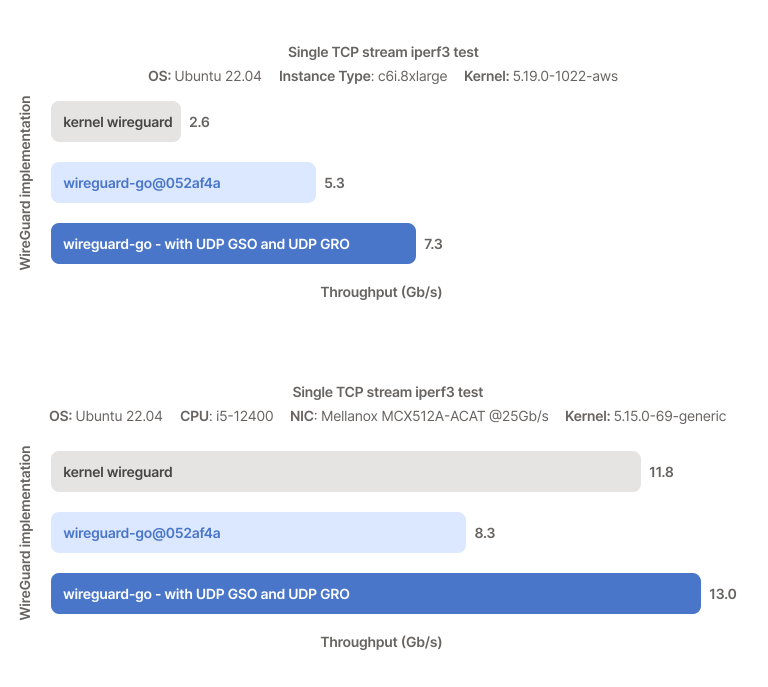
Both TCP speed tests above can't go higher cos already cpu limited (observed from htop) on stressed Xiaomi AX3600 liao 🤣


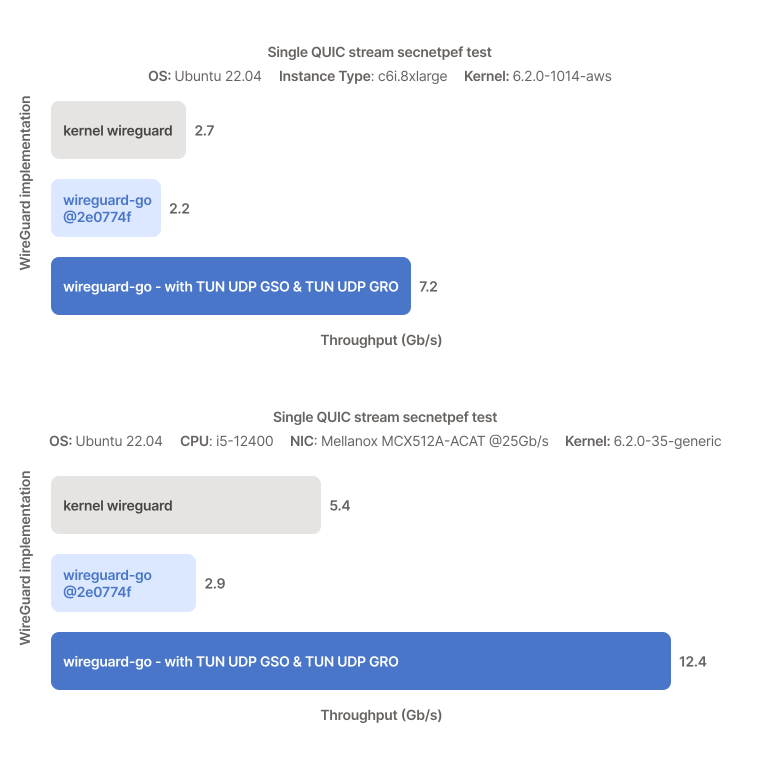
Will revisit again for UDP speed test once iperf3 Add UDP GSO/GRO support to see how much it can squeeze.

Refs:
UDP - Increasing QUIC and UDP throughput :
d8b085c70e6a2b80da27b7c5ae45aad264cb5481-768x762.svg


TCP - Surpassing 10Gb/s over Tailscale :
d61a8567049c417bd63f8dace9ebe9c357b0dc6b-768x687.svg
 
Last edited:

xiaofan

High Supremacy Member
Joined
Sep 16, 2018
Messages
36,053
Reaction score
12,143
1. Another Tailscale Speedtest -- this time the speed is very fast, comparable to Wireguard, but there is a dip during the test.

Acer Windows 11 laptop (not joining Tailscale network) -- Wireless (>=1.3Gbps download, about 850Mbps upload) --> Asus TUF-BE6500 AP --> OpenWRT 1 (192.168.50.1, Tailscale 100.123.191.48, 5Gbps uplink) --> Internet --> OpenWRT 2 (192.168.38.1, Tailscale 100.116.181.96, Subnet router, 1Gbps uplink) --> Alpine Linux LxC container (192.168.38.160)

OpenSpeedTest server on top of Apache 2 on the Alpine Linux container.
Clinet --> Acer Windows 11 laptop

Bash:
PS C:\work> tracert.exe 192.168.38.160

Tracing route to 192.168.38.160 over a maximum of 30 hops

  1     2 ms     2 ms     2 ms  192.168.50.1
  2     3 ms     4 ms     3 ms  100.116.181.96
  3     4 ms     4 ms     4 ms  192.168.38.160

Trace complete.

f7Q1Up0.png


2) Using Wireguard VPN server on OpenWRT 2 (192.168.38.1), Acer Laptop is the Wireguard VPN peer.

Bash:
PS C:\work> tracert.exe 192.168.38.160

Tracing route to alpinect2.mypfddns.duckdns.org [192.168.38.160]
over a maximum of 30 hops:

  1     5 ms     4 ms     4 ms  10.0.5.1
  2     5 ms     5 ms     7 ms  192.168.38.160

Trace complete.

Xp6JkyL.png
 
Last edited:

xiaofan

High Supremacy Member
Joined
Sep 16, 2018
Messages
36,053
Reaction score
12,143
Crusader Latency Test, using another Alpine LxC container.

You may need to ignore the Bidirection Test since the two OpenWRT VMs actually share the same Fibre Internet Link (special Singtel thingy -- possibility to split into two independent networks).

Acer Windows 11 laptop (not joining Tailscale network) -- Wireless (>=1.3Gbps download, about 850Mbps upload) --> Asus TUF-BE6500 AP --> OpenWRT 1 (192.168.50.1, Tailscale 100.123.191.48, 5Gbps uplink) --> Internet --> OpenWRT 2 (192.168.38.1, Tailscale 100.116.181.96, Subnet router, 1Gbps uplink) --> Alpine Linux LxC container (192.168.38.112)

Crusader server on the Alpine Linux container.
Crusader Clinet --> Acer Windows 11 laptop

Bash:
PS C:\work\networking\crusader_bin\v0.3.2> tracert.exe 192.168.38.112

Tracing route to 192.168.38.112 over a maximum of 30 hops

  1     3 ms     2 ms     1 ms  192.168.50.1
  2     4 ms     4 ms     3 ms  100.116.181.96
  3     4 ms     3 ms     3 ms  192.168.38.112

Trace complete.

PS C:\work\networking\crusader_bin\v0.3.2> .\crusader.exe test --load-duration 60 --streams 8 --stream-stagger 4 192.168.38.112
[2025-09-06 09:30:34] Client version 0.3.2 running
[2025-09-06 09:30:34] Connected to server 192.168.38.112:35481
[2025-09-06 09:30:36] Idle latency to server 4.04 ms
[2025-09-06 09:30:38] Testing download...
[2025-09-06 09:32:08] Testing upload...
[2025-09-06 09:33:43] Testing both download and upload...
[2025-09-06 09:35:19] Warning: Load termination timed out. There may be residual untracked traffic in the background.

-- Download test --
          Throughput: 865.65 Mbps
             Latency: 28.4 ms (23.3 ms down, 5.0 ms up)
         Packet loss: 0.01% down, 0% up

-- Upload test --
          Throughput: 694.73 Mbps
             Latency: 123.4 ms (17.5 ms down, 105.9 ms up)
         Packet loss: 0%

-- Bidirectional test --
          Throughput: 846.02 Mbps (355.21 Mbps down, 490.81 Mbps up)
             Latency: 131.7 ms (22.0 ms down, 109.7 ms up)
         Packet loss: 1.07% down, 0.05% up

[2025-09-06 09:35:19] Writing data...
[2025-09-06 09:35:19] Saved raw data as crusader-results\test 2025-09-06 09.35.19.crr
[2025-09-06 09:35:19] Saved plot as crusader-results\test 2025-09-06 09.35.19.png

bnQ9eWC.png
 
Last edited:

hwzlite

Master Member
Joined
Jan 27, 2007
Messages
3,071
Reaction score
3,215
Nothing to do with the LxC container, in my tests, the LxC container is not running Tailscale at all.

Take note I am running the Taiscale Subnet Router on the OpenWRT VM (192.168.38.1).

Ahh my bad.

BTW, came to remember I got some parameter error when trying to apply the recommended setting from the OpenWrt article on Throughput improvements via transport layer offloading in OpenWrt 24.10 :

ethtool -K rx-gro-list off eth1
ethtool -K rx-udp-gro-forwarding on eth1

Instead, no issue applied from the Tailscale article on Linux optimizations for subnet routers and exit nodes :
NETDEV=$(ip -o route get 8.8.8.8 | cut -f 5 -d " ")
sudo ethtool -K $NETDEV rx-udp-gro-forwarding on rx-gro-list off


Example for my case on Xiaomi AX3600 , its WAN interface is "wan" :

root@OpenWrt:~# ethtool -K rx-gro-list off wan
Cannot get device feature names: No such device

root@OpenWrt:~# ethtool -K rx-udp-gro-forwarding on wan
Device name longer than 15 characters
ethtool: bad command line argument(s)
For more information run ethtool -h

root@OpenWrt:~# ethtool -K wan rx-udp-gro-forwarding on rx-gro-list off
root@OpenWrt:~# ethtool -k wan |egrep 'rx-udp-gro-forwarding|rx-gro-list'
rx-gro-list: off
rx-udp-gro-forwarding: on


And then just simply lazy put in "Local Startup" without further meddling :giggle:

Screenshot-2025-09-06-114256.png
 
Last edited:

xiaofan

High Supremacy Member
Joined
Sep 16, 2018
Messages
36,053
Reaction score
12,143
Ahh my bad.

BTW, came to remember I got some parameter error when trying to apply the recommended setting from the OpenWrt article on Throughput improvements via transport layer offloading in OpenWrt 24.10 :

Instead, no issue applied from the Tailscale article on Linux optimizations for subnet routers and exit nodes :

Yes, I noticed that the instructions from OpenWRT site does not work with regard to the `ethtool` command, but the instructions from Tailscale website works. So I was following the guide from Tailscale website in terms of the execution of `ethtool` command. But the other instructions of OpenWRT Tailscale website is okay.

However, I do no see performance differences in my case for TCP/UDP throughput, judging from the iperf3 performance. Maybe it does not help for virtual network card (PVE 9 Linux bridge).

BTW, my previous OpenSpeedTest/librespeed testing may be using tcp so the settings do not matter.

1. Test setup: no more wireless so that wireless speed does not matter any more.

Ubuntu 24.04 Linux LxC container (192.168.50.22) -- wired -- OpenWRT 1 (192.168.50.1, Tailscale 100.123.191.48, 5Gbps uplink) --> Internet --> OpenWRT 2 (192.168.38.1, Tailscale 100.116.181.96, Subnet router, 1Gbps uplink) --> Ubuntu 24.04 Linux LxC container (192.168.38.11)

iperf3 server --> Ubuntu 24.04 Linux LxC container (192.168.38.11)
iperf3 Clinet --> Ubuntu 24.04 Linux LxC container (192.168.50.22)

2. Default settings OpenWRT router 192.168.38.1
Bash:
root@openwrt38:~# echo $NETDEV
eth1
root@openwrt38:~# ethtool -K $NETDEV rx-udp-gro-forwarding off rx-gro-list on

iperf3 performance, testing from the client -- tcp and udp
Bash:
root@ubuntu2404ct2caddy:~# iperf3 -c 192.168.38.11
Connecting to host 192.168.38.11, port 5201
[  5] local 192.168.50.22 port 35666 connected to 192.168.38.11 port 5201
[ ID] Interval           Transfer     Bitrate         Retr  Cwnd
[  5]   0.00-1.00   sec   104 MBytes   872 Mbits/sec    1   1.75 MBytes
[  5]   1.00-2.00   sec   105 MBytes   884 Mbits/sec    0   1.78 MBytes
[  5]   2.00-3.00   sec   103 MBytes   865 Mbits/sec    0   1.82 MBytes
[  5]   3.00-4.00   sec   103 MBytes   862 Mbits/sec    0   1.86 MBytes
[  5]   4.00-5.00   sec   103 MBytes   867 Mbits/sec    0   1.89 MBytes
[  5]   5.00-6.00   sec   103 MBytes   866 Mbits/sec    0   1.92 MBytes
[  5]   6.00-7.00   sec   105 MBytes   880 Mbits/sec    0   1.96 MBytes
[  5]   7.00-8.00   sec   105 MBytes   878 Mbits/sec    0   1.99 MBytes
[  5]   8.00-9.00   sec   104 MBytes   873 Mbits/sec    0   2.02 MBytes
[  5]   9.00-10.00  sec   105 MBytes   877 Mbits/sec    0   2.14 MBytes
- - - - - - - - - - - - - - - - - - - - - - - - -
[ ID] Interval           Transfer     Bitrate         Retr
[  5]   0.00-10.00  sec  1.02 GBytes   872 Mbits/sec    1             sender
[  5]   0.00-10.02  sec  1.01 GBytes   870 Mbits/sec                  receiver

iperf Done.

root@ubuntu2404ct2caddy:~# iperf3 -c 192.168.38.11 -u -b 1G -l 1400 -t 10
warning: UDP block size 1400 exceeds TCP MSS 1228, may result in fragmentation / drops
Connecting to host 192.168.38.11, port 5201
[  5] local 192.168.50.22 port 41346 connected to 192.168.38.11 port 5201
[ ID] Interval           Transfer     Bitrate         Total Datagrams
[  5]   0.00-1.00   sec   101 MBytes   849 Mbits/sec  75781
[  5]   1.00-2.00   sec  99.9 MBytes   838 Mbits/sec  74839
[  5]   2.00-3.00   sec   100 MBytes   840 Mbits/sec  75035
[  5]   3.00-4.00   sec   100 MBytes   842 Mbits/sec  75180
[  5]   4.00-5.00   sec   100 MBytes   838 Mbits/sec  74865
[  5]   5.00-6.00   sec   100 MBytes   840 Mbits/sec  75038
[  5]   6.00-7.00   sec   100 MBytes   840 Mbits/sec  74970
[  5]   7.00-8.00   sec   100 MBytes   842 Mbits/sec  75163
[  5]   8.00-9.00   sec   101 MBytes   843 Mbits/sec  75323
[  5]   9.00-10.00  sec  99.8 MBytes   838 Mbits/sec  74756
- - - - - - - - - - - - - - - - - - - - - - - - -
[ ID] Interval           Transfer     Bitrate         Jitter    Lost/Total Datagrams
[  5]   0.00-10.00  sec  1003 MBytes   841 Mbits/sec  0.000 ms  0/750950 (0%)  sender
[  5]   0.00-10.21  sec   211 MBytes   174 Mbits/sec  0.086 ms  592540/750947 (79%)  receiver

iperf Done.

root@ubuntu2404ct2caddy:~# iperf3 -c 192.168.38.11 -u -b 1G -l 1228 -t 10
Connecting to host 192.168.38.11, port 5201
[  5] local 192.168.50.22 port 36214 connected to 192.168.38.11 port 5201
[ ID] Interval           Transfer     Bitrate         Total Datagrams
[  5]   0.00-1.00   sec   119 MBytes  1000 Mbits/sec  101794
[  5]   1.00-2.00   sec   119 MBytes   999 Mbits/sec  101711
[  5]   2.00-3.00   sec   119 MBytes  1000 Mbits/sec  101786
[  5]   3.00-4.00   sec   119 MBytes  1.00 Gbits/sec  101799
[  5]   4.00-5.00   sec   119 MBytes  1000 Mbits/sec  101774
[  5]   5.00-6.00   sec   119 MBytes  1000 Mbits/sec  101769
[  5]   6.00-7.00   sec   119 MBytes  1.00 Gbits/sec  101810
[  5]   7.00-8.00   sec   119 MBytes  1.00 Gbits/sec  101841
[  5]   8.00-9.00   sec   119 MBytes  1.00 Gbits/sec  101844
[  5]   9.00-10.00  sec   119 MBytes  1000 Mbits/sec  101772
- - - - - - - - - - - - - - - - - - - - - - - - -
[ ID] Interval           Transfer     Bitrate         Jitter    Lost/Total Datagrams
[  5]   0.00-10.00  sec  1.16 GBytes  1000 Mbits/sec  0.000 ms  0/1017900 (0%)  sender
[  5]   0.00-10.21  sec   415 MBytes   341 Mbits/sec  0.022 ms  663780/1017892 (65%)  receiver

iperf Done.

3. So-called "improved" settings on OpenWRT router 192.168.38.1
This is supposed to enable UDP throughput improvements using transport layer offloads.
Bash:
 root@openwrt38:~# ethtool -K $NETDEV rx-udp-gro-forwarding on rx-gro-list off

iperf3 performance, testing from the client -- tcp and udp.

Bash:
root@ubuntu2404ct2caddy:~# iperf3 -c 192.168.38.11
Connecting to host 192.168.38.11, port 5201
[  5] local 192.168.50.22 port 38054 connected to 192.168.38.11 port 5201
[ ID] Interval           Transfer     Bitrate         Retr  Cwnd
[  5]   0.00-1.00   sec   102 MBytes   858 Mbits/sec    9    626 KBytes
[  5]   1.00-2.00   sec   105 MBytes   879 Mbits/sec    0    727 KBytes
[  5]   2.00-3.00   sec   104 MBytes   872 Mbits/sec    0    815 KBytes
[  5]   3.00-4.00   sec   106 MBytes   885 Mbits/sec    0    895 KBytes
[  5]   4.00-5.00   sec   105 MBytes   881 Mbits/sec    0    969 KBytes
[  5]   5.00-6.00   sec   105 MBytes   884 Mbits/sec    0   1.01 MBytes
[  5]   6.00-7.00   sec   104 MBytes   869 Mbits/sec    0   1.08 MBytes
[  5]   7.00-8.00   sec   106 MBytes   885 Mbits/sec    0   1.13 MBytes
[  5]   8.00-9.00   sec   104 MBytes   877 Mbits/sec    0   1.19 MBytes
[  5]   9.00-10.00  sec   105 MBytes   877 Mbits/sec    0   1.24 MBytes
- - - - - - - - - - - - - - - - - - - - - - - - -
[ ID] Interval           Transfer     Bitrate         Retr
[  5]   0.00-10.00  sec  1.02 GBytes   877 Mbits/sec    9             sender
[  5]   0.00-10.01  sec  1.02 GBytes   874 Mbits/sec                  receiver

iperf Done.

root@ubuntu2404ct2caddy:~# iperf3 -c 192.168.38.11 -u -b 1G -l 1400 -t 10
warning: UDP block size 1400 exceeds TCP MSS 1228, may result in fragmentation / drops
Connecting to host 192.168.38.11, port 5201
[  5] local 192.168.50.22 port 36357 connected to 192.168.38.11 port 5201
[ ID] Interval           Transfer     Bitrate         Total Datagrams
[  5]   0.00-1.00   sec  99.8 MBytes   837 Mbits/sec  74739
[  5]   1.00-2.00   sec  99.3 MBytes   833 Mbits/sec  74370
[  5]   2.00-3.00   sec   100 MBytes   842 Mbits/sec  75181
[  5]   3.00-4.00   sec  99.7 MBytes   836 Mbits/sec  74662
[  5]   4.00-5.00   sec  99.8 MBytes   837 Mbits/sec  74772
[  5]   5.00-6.00   sec  98.2 MBytes   824 Mbits/sec  73534
[  5]   6.00-7.00   sec  99.9 MBytes   838 Mbits/sec  74813
[  5]   7.00-8.00   sec   100 MBytes   839 Mbits/sec  74940
[  5]   8.00-9.00   sec  98.9 MBytes   830 Mbits/sec  74071
[  5]   9.00-10.00  sec  99.4 MBytes   834 Mbits/sec  74451
- - - - - - - - - - - - - - - - - - - - - - - - -
[ ID] Interval           Transfer     Bitrate         Jitter    Lost/Total Datagrams
[  5]   0.00-10.00  sec   995 MBytes   835 Mbits/sec  0.000 ms  0/745533 (0%)  sender
[  5]   0.00-10.21  sec   209 MBytes   172 Mbits/sec  0.195 ms  588745/745530 (79%)  receiver

iperf Done.

root@ubuntu2404ct2caddy:~# iperf3 -c 192.168.38.11 -u -b 1G -l 1228 -t 10
Connecting to host 192.168.38.11, port 5201
[  5] local 192.168.50.22 port 39183 connected to 192.168.38.11 port 5201
[ ID] Interval           Transfer     Bitrate         Total Datagrams
[  5]   0.00-1.00   sec   119 MBytes  1000 Mbits/sec  101794
[  5]   1.00-2.00   sec   119 MBytes   998 Mbits/sec  101856
[  5]   2.00-3.00   sec   119 MBytes  1.00 Gbits/sec  101673
[  5]   3.00-4.00   sec   119 MBytes  1.00 Gbits/sec  101836
[  5]   4.00-5.00   sec   119 MBytes   997 Mbits/sec  101620
[  5]   5.00-6.00   sec   119 MBytes  1.00 Gbits/sec  101877
[  5]   6.00-7.00   sec   119 MBytes  1.00 Gbits/sec  101838
[  5]   7.00-8.00   sec   119 MBytes   999 Mbits/sec  101711
[  5]   8.00-9.00   sec   119 MBytes  1.00 Gbits/sec  101892
[  5]   9.00-10.00  sec   119 MBytes   999 Mbits/sec  101733
- - - - - - - - - - - - - - - - - - - - - - - - -
[ ID] Interval           Transfer     Bitrate         Jitter    Lost/Total Datagrams
[  5]   0.00-10.00  sec  1.16 GBytes  1000 Mbits/sec  0.000 ms  0/1017830 (0%)  sender
[  5]   0.00-10.02  sec   406 MBytes   340 Mbits/sec  0.113 ms  671099/1017448 (66%)  receiver

iperf Done.
 
Last edited:

xiaofan

High Supremacy Member
Joined
Sep 16, 2018
Messages
36,053
Reaction score
12,143
4. The throughput between the two OpenWRT router nodes using Tailscale, for reference

iperf3 server --> OpenWRT router (192.168.38.1)
iperf3 Client --> OpenWRT router (192.168.50.1)

Bash:
root@openwrt18:~# iperf3 -c 192.168.38.1
Connecting to host 192.168.38.1, port 5201
[  5] local 100.123.191.48 port 44098 connected to 192.168.38.1 port 5201
[ ID] Interval           Transfer     Bitrate         Retr  Cwnd
[  5]   0.00-1.00   sec   107 MBytes   895 Mbits/sec  229   2.21 MBytes
[  5]   1.00-2.00   sec   103 MBytes   864 Mbits/sec    0   2.40 MBytes
[  5]   2.00-3.00   sec   104 MBytes   877 Mbits/sec    0   2.55 MBytes
[  5]   3.00-4.00   sec   105 MBytes   884 Mbits/sec    0   2.68 MBytes
[  5]   4.00-5.00   sec   104 MBytes   872 Mbits/sec  165   1.96 MBytes
[  5]   5.00-6.00   sec   104 MBytes   874 Mbits/sec    0   2.07 MBytes
[  5]   6.00-7.00   sec   104 MBytes   876 Mbits/sec    0   2.16 MBytes
[  5]   7.00-8.00   sec   104 MBytes   873 Mbits/sec    0   2.23 MBytes
[  5]   8.00-9.00   sec   105 MBytes   883 Mbits/sec    0   2.28 MBytes
[  5]   9.00-10.00  sec   104 MBytes   875 Mbits/sec    0   2.31 MBytes
- - - - - - - - - - - - - - - - - - - - - - - - -
[ ID] Interval           Transfer     Bitrate         Retr
[  5]   0.00-10.00  sec  1.02 GBytes   877 Mbits/sec  394             sender
[  5]   0.00-10.02  sec  1.02 GBytes   875 Mbits/sec                  receiver

iperf Done.

root@openwrt18:~# iperf3 -c 192.168.38.1 -R
Connecting to host 192.168.38.1, port 5201
Reverse mode, remote host 192.168.38.1 is sending
[  5] local 100.123.191.48 port 39272 connected to 192.168.38.1 port 5201
[ ID] Interval           Transfer     Bitrate
[  5]   0.00-1.00   sec   102 MBytes   855 Mbits/sec
[  5]   1.00-2.00   sec   105 MBytes   878 Mbits/sec
[  5]   2.00-3.00   sec   105 MBytes   879 Mbits/sec
[  5]   3.00-4.00   sec   104 MBytes   875 Mbits/sec
[  5]   4.00-5.00   sec   105 MBytes   878 Mbits/sec
[  5]   5.00-6.00   sec   105 MBytes   879 Mbits/sec
[  5]   6.00-7.00   sec   105 MBytes   878 Mbits/sec
[  5]   7.00-8.00   sec   104 MBytes   876 Mbits/sec
[  5]   8.00-9.00   sec   105 MBytes   878 Mbits/sec
[  5]   9.00-10.00  sec   105 MBytes   879 Mbits/sec
- - - - - - - - - - - - - - - - - - - - - - - - -
[ ID] Interval           Transfer     Bitrate         Retr
[  5]   0.00-10.00  sec  1.02 GBytes   878 Mbits/sec    5             sender
[  5]   0.00-10.00  sec  1.02 GBytes   876 Mbits/sec                  receiver

iperf Done.
 

xiaofan

High Supremacy Member
Joined
Sep 16, 2018
Messages
36,053
Reaction score
12,143
Since I do not see the benefits but I also do not see the cons, I still follow the changes mentioned in OpenWRT Tailscale Website, for both OpenWRT routers.

Bash:
root@openwrt38:~# touch /etc/config/ethtool
htool.eth1.rx_gro_list='off'
uci set ethtool.ethroot@openwrt38:~# uci set ethtool.eth1=device
root@openwrt38:~# uci set ethtool.eth1.rx_gro_list='off'
root@openwrt38:~# uci set ethtool.eth1.rx_udp_gro_forwarding='on'
root@openwrt38:~# uci commit
root@openwrt38:~# nano /etc/hotplug.d/iface/90-ethtool
root@openwrt38:~# echo '/etc/hotplug.d/iface/90-ethtool' >> /etc/sysupgrade.conf
root@openwrt38:~# reboot
root@openwrt38:~# Connection to 192.168.38.1 closed by remote host.
Connection to 192.168.38.1 closed.

PS C:\work> ssh root@192.168.38.1
root@192.168.38.1's password:


BusyBox v1.36.1 (2025-06-23 20:40:36 UTC) built-in shell (ash)

  _______                     ________        __
 |       |.-----.-----.-----.|  |  |  |.----.|  |_
 |   -   ||  _  |  -__|     ||  |  |  ||   _||   _|
 |_______||   __|_____|__|__||________||__|  |____|
          |__| W I R E L E S S   F R E E D O M
 -----------------------------------------------------
 OpenWrt 24.10.2, r28739-d9340319c6
 -----------------------------------------------------

root@openwrt38:~# ethtool --show-features eth1 | grep gro
rx-gro-hw: on
rx-gro-list: off
rx-udp-gro-forwarding: on
root@openwrt38:~#

Same for OpenWRT18.
Bash:
root@openwrt18:~# touch /etc/config/ethtool
t ethtool.eth1=device
uci set ethtool.eth1.rx_gro_list='off'
uci set ethtool.ethroot@openwrt18:~# uci set ethtool.eth1=device
root@openwrt18:~# uci set ethtool.eth1.rx_gro_list='off'
root@openwrt18:~# uci set ethtool.eth1.rx_udp_gro_forwarding='on'
root@openwrt18:~# uci commit
root@openwrt18:~# nano /etc/hotplug.d/iface/90-ethtool
root@openwrt18:~# echo '/etc/hotplug.d/iface/90-ethtool' >> /etc/sysupgrade.conf
root@openwrt18:~# reboot
root@openwrt18:~# Connection to 192.168.50.1 closed by remote host.
Connection to 192.168.50.1 closed.
PS C:\work> ssh root@192.168.50.1
root@192.168.50.1's password:


BusyBox v1.36.1 (2025-06-23 20:40:36 UTC) built-in shell (ash)

  _______                     ________        __
 |       |.-----.-----.-----.|  |  |  |.----.|  |_
 |   -   ||  _  |  -__|     ||  |  |  ||   _||   _|
 |_______||   __|_____|__|__||________||__|  |____|
          |__| W I R E L E S S   F R E E D O M
 -----------------------------------------------------
 OpenWrt 24.10.2, r28739-d9340319c6
 -----------------------------------------------------

root@openwrt18:~# ethtool --show-features eth1 | grep gro
rx-gro-hw: on
rx-gro-list: off
rx-udp-gro-forwarding: on
 
Last edited:

party.sta

Member
Joined
Sep 16, 2010
Messages
373
Reaction score
144
Security through obscurity via unique port is a flawed cybersecurity principle that attempts to secure systems by hiding their vulnerabilities and internal mechanisms from attackers...

Port forwarding directly exposing services to the internet is expected to invite scans, brute force and god-know-when-be-the-next-vulnerabilities on services such as RDP and not to mention those security suites sw are always passively lagging behind tackling those zero-day exploits... :s22:


Here you go, one of the many free solutions:


does that mean that those remote desktop software like anydesk is not secured also?
 

bert64

Senior Member
Joined
Jan 20, 2020
Messages
1,027
Reaction score
539
does that mean that those remote desktop software like anydesk is not secured also?
Those services relay your traffic through a third party service, so you are beholden to that third party and lose some level of control yourself, plus you lose access entirely if the service is down.

You're usually better off with services that you directly control, as you can understand and control the level of risk. Once you involve a third party you get a lot of unknowns, and unless you're a bit customer of theirs you can't really demand to see their audit reports. Basically you're putting it in someone else's hands, and hoping they don't screw up.

But if you're opening up services directly yourself there's lots of factors to consider with opening up RDP:

  1. RDP is a complex service with significant attack surface exposed pre-auth, unless you enforce the use of NLA. This increases the chance of vulnerabilities.
  2. Users typically don't have proper certificates for their RDP services, making them more susceptible to MITM.
  3. Older versions of RDP (which may still be enabled both on client and/or server for backwards compatibility purposes) used a static key and are extremely susceptible to mitm.
  4. Password based authentication is subject to brute force attacks, even if you use strong passwords that cause the attacks to fail they can still consume your resources from the attempts.
  5. Exposure on the default port is more likely to be found, but in practice it makes little difference.
  6. Exposure via legacy IP will very quickly result in the discovery of the device by bots and the commencement of brute force attacks. This is far less likely to occur with IPv6.
  7. Reactive blocking systems can be used to block connections after several attempts, but these can also result in false positives especially where telcos are using CGNAT.

You can take measures to reduce each of these risk factors, depending on how concerned you are.

Generally if you're going to expose services publicly, consider the following:
  1. Unless you're travelling abroad, just whitelist the address range of your mobile provider so you can access things from outside. You can open things up temporarily when you're travelling further afield.
  2. Use services with strong authentication both of users and hosts (SSH, HTTPS, VPN with cert based auth etc).
  3. ALWAYS ensure that your clients are strongly configured - the client is more important than the server because many client applications have backwards compatibility which can be exploited to downgrade to lesser protocol versions.
  4. Use the latest versions and protocols wherever possible (TLSv1.3, IPv6, HTTP3, SMBv3 etc), and prevent downgrades.
  5. Operate a tiered network with DMZ for externally facing services, LAN for clients, hardened area with more restrictive access for sensitive devices etc.

I have a bunch of services intentionally public, both for my own personal use and use by friends. I have separate areas for dev boxes (eg i collaborate on a few development projects with friends/colleagues, and have dev/test servers) as well as storage devices for shared files, home automation controller, cctv etc.

A lot of places use a VPN to provide a layer of authentication in front of services which are highly insecure on their own. But a VPN itself could also be exploited (there have been numerous attacks against various commercial VPN implementations in the last few years). Nowadays there's a better approach - zero trust. That is the services exposed are themselves strongly configured so that:
  1. Each service can stand on its own.
  2. A perimeter breach doesn't expose tons of insecure services that are subsequently trivially exploitable, so one service being exploitable is contained to that one service/host and doesn't make it any easier to attack other things.
You also see this approach with cloud services - for instance many companies are moving from on-prem active directory to cloud hosted entra. The on-prem AD is typically horrendously insecure and only survives by hiding behind a perimeter firewall. If you gain even the tiniest toehold inside that network (eg you phish a single user and gain access to their workstation etc) then its trivially easy to compromise everything. By contrast, Entra is inherently public and anyone can hit the login page, but its protected by stronger multi factor authentication and stronger configuration/management/monitoring of the backend servers.
 
Last edited:

xiaofan

High Supremacy Member
Joined
Sep 16, 2018
Messages
36,053
Reaction score
12,143
does that mean that those remote desktop software like anydesk is not secured also?
Those services relay your traffic through a third party service, so you are beholden to that third party and lose some level of control yourself, plus you lose access entirely if the service is down.

There's lots of factors to consider with opening up RDP:

Hmm, I think you use the word "RDP" a bit loose here.

Usually RDP (Remote Desktop Protocol) means the proprietary protocol developed by Microsoft.

I do not think AnyDesk uses RDP protocol. Same for Teamviewer and Rustdesk.
 
Important Forum Advisory Note
This forum is moderated by volunteer moderators who will react only to members' feedback on posts. Moderators are not employees or representatives of HWZ Forums. Forum members and moderators are responsible for their own posts. Please refer to our Community Guidelines and Standards and Terms and Conditions for more information.
Top