
You are using an out of date browser. It may not display this or other websites correctly.
You should upgrade or use an alternative browser.
You should upgrade or use an alternative browser.
Remote PC without network, any way to do it?
- Thread starter Phen8210
- Start date
More options
Who Replied?
wwenze
Greater Supremacy Member
- Joined
- Dec 2, 2002
- Messages
- 87,222
- Reaction score
- 30,778
There are special USB cables that you can plug between two PCs which creates a LAN between them
You can also find USB to Ethernet dongle
And finally you can typically use a mouse and keyboard and a USB monitor.
You can also find USB to Ethernet dongle
And finally you can typically use a mouse and keyboard and a USB monitor.


Phen8210
High Supremacy Member
- Joined
- Jul 29, 2011
- Messages
- 29,060
- Reaction score
- 8,305
There are special USB cables that you can plug between two PCs which creates a LAN between them
You can also find USB to Ethernet dongle
And finally you can typically use a mouse and keyboard and a USB monitor.
Any further details?
Problem is I have to use both machine simultaneously and I only got 1 monitor. By simultaneously I mean I cannot afford to keep switching input on the monitor.
My other machine is connected to another network through VPN as well, that's why I came up with this thread.
Any further details?
Problem is I have to use both machine simultaneously and I only got 1 monitor. By simultaneously I mean I cannot afford to keep switching input on the monitor.
My other machine is connected to another network through VPN as well, that's why I came up with this thread.
server hardware maintenance
I'm not sure if this could work, but if both computers are connected to each other via LAN. That should allow you to configure them. Just set the ip to manual for both.
For both computer put them in the same IP range. and you should be able to connect. If your LAN port is being used, you may consider buying a LAN card for each computer, and set them in their own IP range so there is no conflict in IPs. This should allow you to connect.
Say PC1: 192.168.69.25
PC2: 192.168.69.24
Set the mask as 255.255.255.0
And it should be good to go.

blade81
Supremacy Member
- Joined
- Jul 14, 2003
- Messages
- 7,248
- Reaction score
- 251
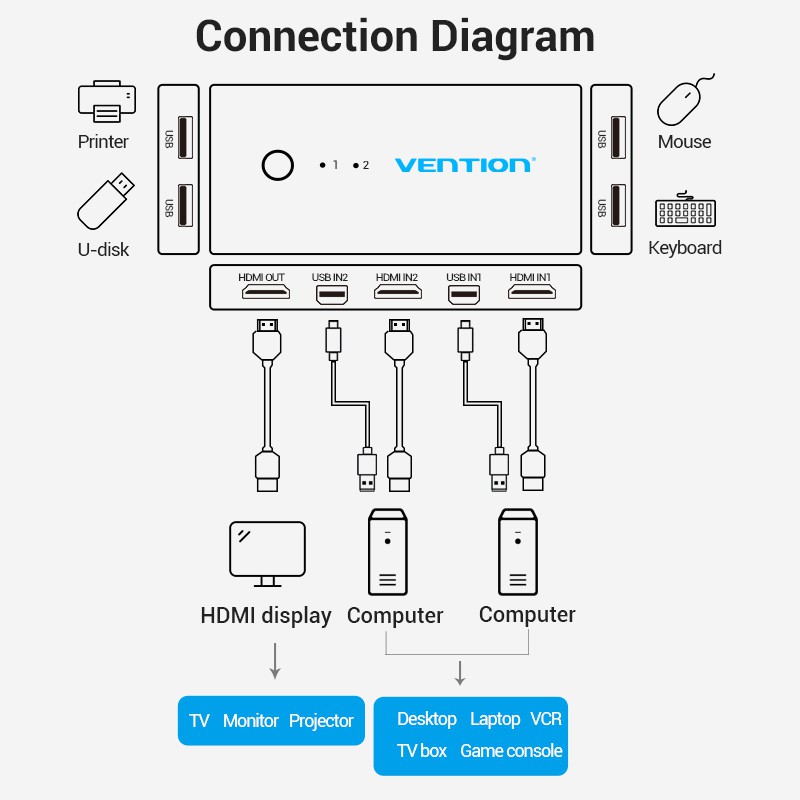
from what i understand, basically what you need is a KVM switch to toggle your monitor/keyboard mouse between 2 pc(s)
using remote access between 2 pc on two 2 different network simultaneously. and the proposed solution is to the bridge the two network together doesn't make much sense at all
using remote access between 2 pc on two 2 different network simultaneously. and the proposed solution is to the bridge the two network together doesn't make much sense at all

Apex
Master Member
- Joined
- Jan 1, 2000
- Messages
- 2,509
- Reaction score
- 250
Yah sound like u just need a KVM and switch between Pc1 and Pc2 screen.
https://shopee.sg/Vention-HDMI-KVM-...her-4K-TV-KVM-Spliiter-i.95236751.6446683740?
https://shopee.sg/Vention-HDMI-KVM-...her-4K-TV-KVM-Spliiter-i.95236751.6446683740?


Illusionist_85
Banned
- Joined
- Oct 3, 2002
- Messages
- 129,916
- Reaction score
- 7,222
without network or internet?
Phen8210
High Supremacy Member
- Joined
- Jul 29, 2011
- Messages
- 29,060
- Reaction score
- 8,305
Yah sound like u just need a KVM and switch between Pc1 and Pc2 screen.
https://shopee.sg/Vention-HDMI-KVM-...her-4K-TV-KVM-Spliiter-i.95236751.6446683740?
I thought of this but problem is the computer I want to control is a laptop and screen too small + I don't have place to put it on my desk.. don't have another monitor for it too.
without network or internet?
Without network
buy wifi dongle for the other home pc. rdp in.
RDP connection (LAN) to the computer I want to connect is blocked by the computer, tried TeamViewer (LAN Method) and it wouldn't work too. Not sure if using another network adapter will bypass this problem?
The only method that works is through using TeamViewer (WAN), but it's very laggy because the computer I want to connect sometimes has to connect to a VPN to access other network resource.
Don't ask me why its blocked through LAN and not WAN, not set by me
I'm not sure if this could work, but if both computers are connected to each other via LAN. That should allow you to configure them. Just set the ip to manual for both.
For both computer put them in the same IP range. and you should be able to connect. If your LAN port is being used, you may consider buying a LAN card for each computer, and set them in their own IP range so there is no conflict in IPs. This should allow you to connect.
Say PC1: 192.168.69.25
PC2: 192.168.69.24
Set the mask as 255.255.255.0
And it should be good to go.
Will try this too if all else fails, my concern for this solution is same as above reply
Lastwishes
Senior Member
- Joined
- Jun 12, 2005
- Messages
- 724
- Reaction score
- 209
If you can install software, maybe RealVNC?

hwzlite
Master Member
- Joined
- Jan 27, 2007
- Messages
- 3,071
- Reaction score
- 3,215
My other machine is connected to another network through VPN as well, that's why I came up with this thread.
The only method that works is through using TeamViewer (WAN), but it's very laggy because the computer I want to connect sometimes has to connect to a VPN to access other network resource.
Try Split tunneling if your VPN client supports it.
That's the purpose of using a KVM. You share one Keyboard, Video (monitor), Mouse, with two systems. Only one display is required.I thought of this but problem is the computer I want to control is a laptop and screen too small + I don't have place to put it on my desk.. don't have another monitor for it too.
Quite common now for ppl to use this when WFH to toggle between 2 systems, e.g., office laptop and personal PC.
Phen8210
High Supremacy Member
- Joined
- Jul 29, 2011
- Messages
- 29,060
- Reaction score
- 8,305
not feasible as I have to use both simultaneously and cannot afford to keep switching inputThat's the purpose of using a KVM. You share one Keyboard, Video (monitor), Mouse, with two systems. Only one display is required.
Quite common now for ppl to use this when WFH to toggle between 2 systems, e.g., office laptop and personal PC.
not feasible as I have to use both simultaneously and cannot afford to keep switching input
IMHO.
Would it be acceptable if only switch inputs of keyboard and mouse only ?
loupgarou2
Member
- Joined
- Mar 23, 2004
- Messages
- 356
- Reaction score
- 13
a) check your firewall configuration.
b) check you enabled remote desktop connection
suggest you run the powershell commands on both pcs.
https://pureinfotech.com/enable-remote-desktop-powershell-windows-10/
c) get the lan ip for the destination pc. you should be on the same lan and obtaining ip address via dhcp so there should be no reason they can't talk to each other. so ping each other (unless you happen to block icmp). then try to rdp into the other.
(eg: I have no issues to rdp into my notebook vhile its on wifi. (however at the moment of connection you may need to renable the wifi . sometimes windows is silly
b) check you enabled remote desktop connection
suggest you run the powershell commands on both pcs.
https://pureinfotech.com/enable-remote-desktop-powershell-windows-10/
c) get the lan ip for the destination pc. you should be on the same lan and obtaining ip address via dhcp so there should be no reason they can't talk to each other. so ping each other (unless you happen to block icmp). then try to rdp into the other.
(eg: I have no issues to rdp into my notebook vhile its on wifi. (however at the moment of connection you may need to renable the wifi . sometimes windows is silly
Important Forum Advisory Note
This forum is moderated by volunteer moderators who will react only to members' feedback on posts. Moderators are not employees or representatives of HWZ Forums. Forum members and moderators are responsible for their own posts.
Please refer to our Community Guidelines and Standards and Terms and Conditions for more information.
