Fancy RGB lightings and endless customization with custom keycaps started as a trend that only the mechanical keyboard users get to enjoy. With the expiry of Cherry MX switch patent (US 4467160A), more and more users get to enjoy cheaper mechanical keyboard alternatives with imitation switches such as Kailh, Gateron, Outemu, etc has sprung up like mushrooms after the rain but not all these lower cost alternative are able to deliver a smooth transition on its LED lighting.
We have the MasterKeys Lite L here today, Cooler Master's latest keyboard and mouse combo in the MasterKeys lineup. Unlike the Pro model in the MasterKeys lineup, the MasterKeys Lite isn't actually a mechanical keyboard but rather, a "memchanical" keyboard just like the Devastator II with a twist RGB goodness.
Packaging

The Cooler Master MasterKeys Lite L ships in a stylish black minimalist packaging that shouts "premium" on this keyboard mouse combo from Cooler Master.
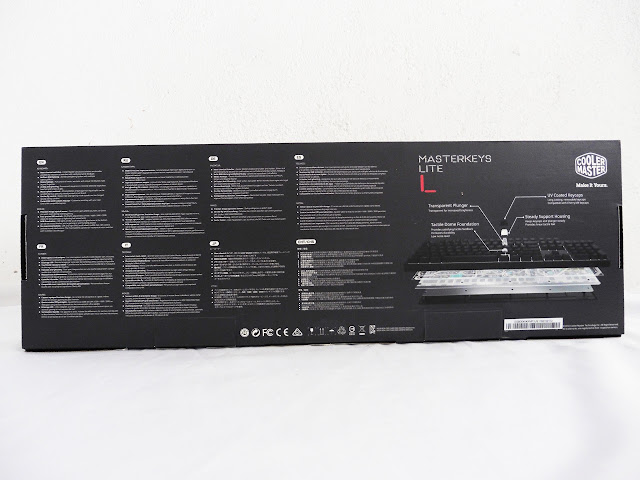
At the back of the box, you'll find a labelled diagram depicting Cooler Master's exclusive "mem-chanical" switch along with multilingual description on its prominent features.

Inside the box, you'll find this quick start guide, the only extras that comes together with the keyboard and mouse combo.
MasterKeys Lite L: Keyboard
Keyboard Specifications:
The Keyboard
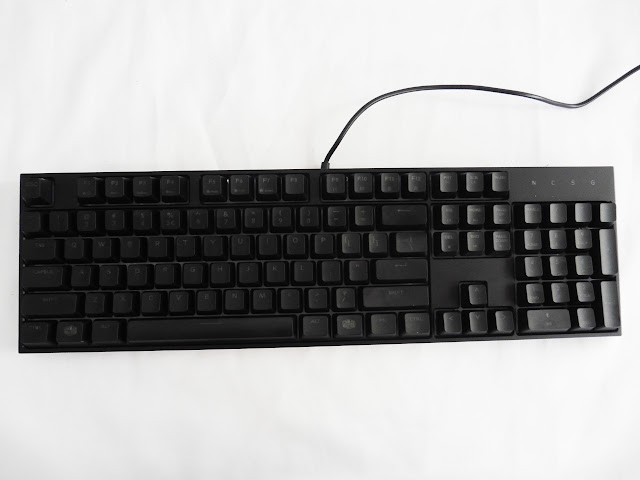
At first glance, we can see that the MasterKeys Lite L keyboard are kept simple and clean to maintain that minimalism wow factor throughout the MasterKeys lineup - no more exaggerated design for good!


The cable used rather soft compared to all previous MasterKeys keyboard we've come across and the USB connector isn't the gold plated ones that we usually see on a gaming keyboard. However, it's good to see that Cooler Master decided to attach a ferrite core to the cable to eliminate any potential noise and interference that could affect your overall experience with the keyboard.

The favorable ergonomic curve that's been a standard for most gaming keyboard nowadays.
We have the MasterKeys Lite L here today, Cooler Master's latest keyboard and mouse combo in the MasterKeys lineup. Unlike the Pro model in the MasterKeys lineup, the MasterKeys Lite isn't actually a mechanical keyboard but rather, a "memchanical" keyboard just like the Devastator II with a twist RGB goodness.
Packaging
The Cooler Master MasterKeys Lite L ships in a stylish black minimalist packaging that shouts "premium" on this keyboard mouse combo from Cooler Master.
At the back of the box, you'll find a labelled diagram depicting Cooler Master's exclusive "mem-chanical" switch along with multilingual description on its prominent features.
Inside the box, you'll find this quick start guide, the only extras that comes together with the keyboard and mouse combo.
MasterKeys Lite L: Keyboard
Keyboard Specifications:
- Switch Type: Cooler Master Mem-chanical
- Color: Black
- LED Color: RGB
- Polling Rate: 125 Hz
- Repeat Rate: Normal 1x / Turbo 8x
- On-the-fly system: Lighting / Multimedia / Win LK
- Cable: Non-Detachable Rubber Cable
- Connector Cable: USB 2.0
- Cable Length: 1.8 Meters
- Dimensions: 439*129*41mm
- Product Weight (without cable): 967g
- Warranty: 2 years
The Keyboard
At first glance, we can see that the MasterKeys Lite L keyboard are kept simple and clean to maintain that minimalism wow factor throughout the MasterKeys lineup - no more exaggerated design for good!
The cable used rather soft compared to all previous MasterKeys keyboard we've come across and the USB connector isn't the gold plated ones that we usually see on a gaming keyboard. However, it's good to see that Cooler Master decided to attach a ferrite core to the cable to eliminate any potential noise and interference that could affect your overall experience with the keyboard.
The favorable ergonomic curve that's been a standard for most gaming keyboard nowadays.
Last edited: