Samsung Smart Phone Help Needed

whitesand

Member
Joined
Dec 1, 2001
Messages
392
Reaction score
10
Hi,

I new to Samsung smart phones and I would like to ask the following questions, hope that some kind soul is willing to enlighten me:

1. Do Samsung have a desktop companion for its calendar/contacts/Memo function? I mean if I have information, can I update it on my PC and syn to Samsung phone? I have a lot of records on all these and manually keying into the smart phone is going to kill me...

2. I understand that (if I am not wrong) it can pull data from Google calendar, where I can update Google calendar by my PC. Question: when later I am on the move and update my calendar in smart phone, will later syn in PC make the changes to Google calendar accordingly?

3. I also understand that (if I am not wrong), it can pull data from Outlook. But I don't use and don't like outlook. Is there other alternative? Please recommend me the software that has desktop companion (not just "there are tons of apps!"). Thanks.

4. If I will to keep all your data in Samsung native calendar/contacts/Memo function, what happen when I later change phone? Will all the data be transferred to the new smart phone? Or I lost all data once I move over? Or I will only past part (which part?) of the data?

5. For those who has been using Samsung smart phone for a long time, typically how long does a smart phone last you? I ask this in relation to point 4 above, in case I have to redo my data manually all over again...

I am a dinosaur and I appreciate all you patience and helps. Thanks in advance.
 

JAson1980

High Supremacy Member
Joined
Feb 27, 2006
Messages
43,410
Reaction score
3,120
I assume that your samsung smart phone is running android.
if it is, just log in with a google account and sync everything with it.
When you change to another android phone, log into your google account and you can get them back.
 

whitesand

Member
Joined
Dec 1, 2001
Messages
392
Reaction score
10
Thanks for reply.

Yes, I am referring to Android. But I am not using any smart phone now; I am still using the old Nokia and PDA. So I have a lot of questions, before I switch over and do the data conversion.

When you said "log in to Google account", do you mean Google calendar? What about contacts and memo? Do Google calendar has these, with desktop companion so that I can access them on PC?

I assume that your samsung smart phone is running android.
if it is, just log in with a google account and sync everything with it.
When you change to another android phone, log into your google account and you can get them back.
 

seller4

Arch-Supremacy Member
Joined
Sep 1, 2004
Messages
15,756
Reaction score
41
Thanks for reply.

Yes, I am referring to Android. But I am not using any smart phone now; I am still using the old Nokia and PDA. So I have a lot of questions, before I switch over and do the data conversion.

When you said "log in to Google account", do you mean Google calendar? What about contacts and memo? Do Google calendar has these, with desktop companion so that I can access them on PC?

When you setup your Android phone for the first time or after a reset, you should see this screen.

touchwiz040.jpg


The email address you entered is is your Google account login. This is also the email to use to login to all your Google service online using a web browser on your PC.

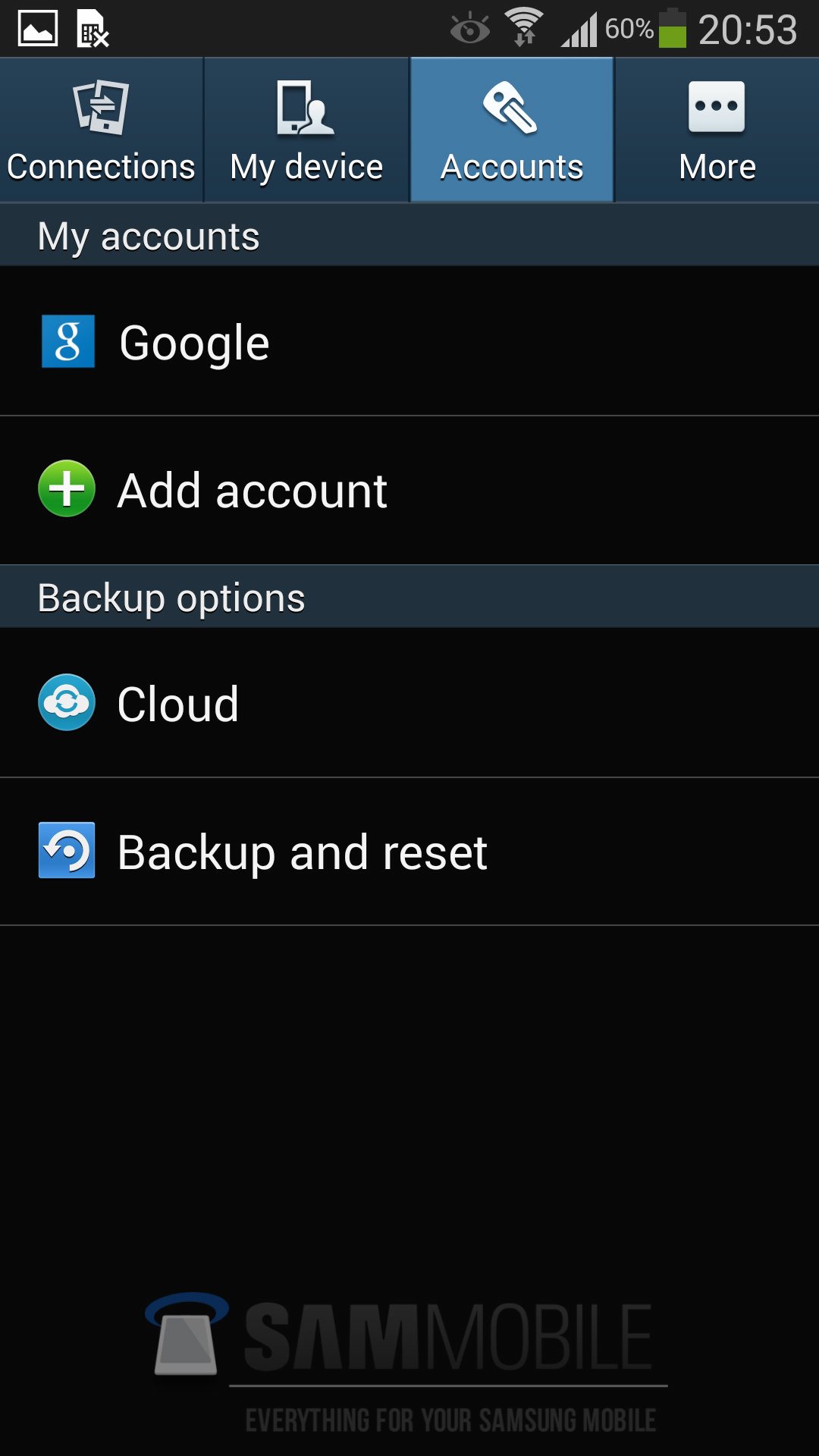
If you cannot remember the email address, you can go to Settings | Accounts and click on Google on your phone to check.

Screenshot_2013-09-30-20-53-59.jpg


All Google services are online. You can just go online to http://www.google.com with this Google account of your in your web browser on your PC to access them.

new-tab-app-launcher.jpg


Contacts are store in your Gmail account.

If you change to another android phone or reset your current phone, all you need is to set it up with the same Google account and everything will be restored.
 
Last edited:

sgmem88

Senior Member
Joined
Jan 6, 2007
Messages
2,386
Reaction score
930
Thanks for reply.

Yes, I am referring to Android. But I am not using any smart phone now; I am still using the old Nokia and PDA. So I have a lot of questions, before I switch over and do the data conversion.

When you said "log in to Google account", do you mean Google calendar? What about contacts and memo? Do Google calendar has these, with desktop companion so that I can access them on PC?

if you are using an old non smartphone Nokia, likely the best way to transfer contacts is using sim card.
As most new smartphone are using micro sim, so likely you need a micro to normal sim card adapter to save the contacts from Nokia to new micro sim card...

As for rest of stuff in PDA, not sure what PDA is that...may have problem login into google to sync your calendar and memo...you may need to find a tool/apps that can run in your PDA to do the migration...

by the way, my old samsung smartphone lasts me almost 4yrs...:D
 

dlrowehtleah

Senior Member
Joined
Aug 11, 2008
Messages
1,278
Reaction score
0
2. I understand that (if I am not wrong) it can pull data from Google calendar, where I can update Google calendar by my PC. Question: when later I am on the move and update my calendar in smart phone, will later syn in PC make the changes to Google calendar accordingly?
yes, the synchronizing is (almost) seamless. but of cos, ur mobile must have data connection for this to happen. right?

4. If I will to keep all your data in Samsung native calendar/contacts/Memo function, what happen when I later change phone? Will all the data be transferred to the new smart phone? Or I lost all data once I move over? Or I will only past part (which part?) of the data?

i'm using Samsung Mega n i'm not using any Samsung native apps. for me, app portability is the #01 concern. n ur concern is therefore valid. there r quite a lot of (free n paid) apps which can sync to cloud (Colornote, Expense, GTask, mSecure) or even cross platform (Evernote). so u wont miss a thing even if u don't use their native apps.
 

whitesand

Member
Joined
Dec 1, 2001
Messages
392
Reaction score
10
Thanks all for reply. It has been very helpful.

One more question: since many apps etc do use cloud storage, I was wondering what do you all think about the security issue.

I mean do you trust the cloud & its encryption, storage and protocol, to the extend that you can store you credit card nos, bank account nos, sensitive personal/work info? I has alway this phobia that if I will to put these sensitive info in the open, I run a higher risk of exposure then keeping it in a "close environment" of PC-PDA, no external access.

(PS: I am treating my PDA like my wallet, keeping it real close. I don't lend it anyone else just like I am willing to lend my hand phone to my friend. And on the desktop, there is always physical locks of the room/house.)
 
Important Forum Advisory Note
This forum is moderated by volunteer moderators who will react only to members' feedback on posts. Moderators are not employees or representatives of HWZ Forums. Forum members and moderators are responsible for their own posts. Please refer to our Community Guidelines and Standards and Terms and Conditions for more information.
Top