Setting up ATMOS on my rig

Tuakong

Arch-Supremacy Member
Joined
Jan 1, 2000
Messages
22,274
Reaction score
209
Need help from gurus here....

I have win10 pc with a Gigabyte 34inch curve monitor and I m planning to get a Atmos Soundbar to watch atmos movies on it.

Installing Dolby Access on windows is easy however I m confused with the hardware setup.
Atmos soundbars come either HDMI Arc connection but pc monitors do not hv any. My monitor is currently connected via Displayport.

Without replacing the monitor with a TV, how do I get proper Atmos setup on my existing configuration by just adding an atmos soundbar?

Can I connect the Atmos SB to the PC via HDMI and the monitor via the displayport? Will this work?

Thanks
 

86technie

High Supremacy Member
Joined
Jun 8, 2006
Messages
40,356
Reaction score
5,943
You have to connect the soundbar to the graphic card than select the supported Dolby surround
that it can support.
Do take note only if you are playing contents with ATMOS soundtrack than the soundbar
will play in ATMOS.
Youtube and any regular videos would be either Stereo or normal Dolby Digital.
 

Tuakong

Arch-Supremacy Member
Joined
Jan 1, 2000
Messages
22,274
Reaction score
209
You have to connect the soundbar to the graphic card than select the supported Dolby surround
that it can support.
Do take note only if you are playing contents with ATMOS soundtrack than the soundbar
will play in ATMOS.
Youtube and any regular videos would be either Stereo or normal Dolby Digital.
Thank you!!! Yes, the SB will connect to the Graphic card and the monitor will also connect to the Displayport on the graphics card. With this connection I will be able to have Atmos sound playimg Atmos contents, right?
YT and non-Atmos will be just normal stereo/DD
 

86technie

High Supremacy Member
Joined
Jun 8, 2006
Messages
40,356
Reaction score
5,943
Thank you!!! Yes, the SB will connect to the Graphic card and the monitor will also connect to the Displayport on the graphics card. With this connection I will be able to have Atmos sound playimg Atmos contents, right?
YT and non-Atmos will be just normal stereo/DD

Yes, if any issue you have to check under the HDMI audio output setting.
 

Tuakong

Arch-Supremacy Member
Joined
Jan 1, 2000
Messages
22,274
Reaction score
209
Strange ...when I tried to connect the SB to the HDMI port of the VGA and the Monitor to the VGA's DP, I get a blank screen. But when I unplug the hdmi cable, the screen came back to the Windows desktop screencn

On the SB, i connected the HDMI cable to HDMI 1 instead of HDMI-ARC as I am using a monitor instead of TV
The PC cannot detect the SB instead it displayed another windows screen which my mouse/keyboard cannot control
 
Last edited:

Ah Ken

Senior Member
Joined
Sep 26, 2013
Messages
519
Reaction score
30
Strange ...when I tried to connect the SB to the HDMI port of the VGA and the Monitor to the VGA's DP, I get a blank screen. But when I unplug the hdmi cable, the screen came back to the Windows desktop screencn

On the SB, i connected the HDMI cable to HDMI 1 instead of HDMI-ARC as I am using a monitor instead of TV
The PC cannot detect the SB instead it displayed another windows screen which my mouse/keyboard cannot control
Do check your Primary video display settings and also your projection settings "windows key + P" whether extended display or duplicate.

The HDMI output may have defaulted to Primary Output on the GPU settings
 

Alphas

High Supremacy Member
Joined
Oct 6, 2004
Messages
41,167
Reaction score
5,611
Connect a Atmos av receiver to the hdmi port of the graphics card and the monitor to the receiver.
 

Tuakong

Arch-Supremacy Member
Joined
Jan 1, 2000
Messages
22,274
Reaction score
209
Do check your Primary video display settings and also your projection settings "windows key + P" whether extended display or duplicate.
I have checked and its single display
The HDMI output may have defaulted to Primary Output on the GPU settings
When I check NVIDIA settings, the output is defaulted to the Monitor speakers (which is using DP)
I am trying to change the audio settings on the GPU but not successful so far
 

Tuakong

Arch-Supremacy Member
Joined
Jan 1, 2000
Messages
22,274
Reaction score
209

86technie

High Supremacy Member
Joined
Jun 8, 2006
Messages
40,356
Reaction score
5,943
Strange ...when I tried to connect the SB to the HDMI port of the VGA and the Monitor to the VGA's DP, I get a blank screen. But when I unplug the hdmi cable, the screen came back to the Windows desktop screencn

On the SB, i connected the HDMI cable to HDMI 1 instead of HDMI-ARC as I am using a monitor instead of TV
The PC cannot detect the SB instead it displayed another windows screen which my mouse/keyboard cannot control
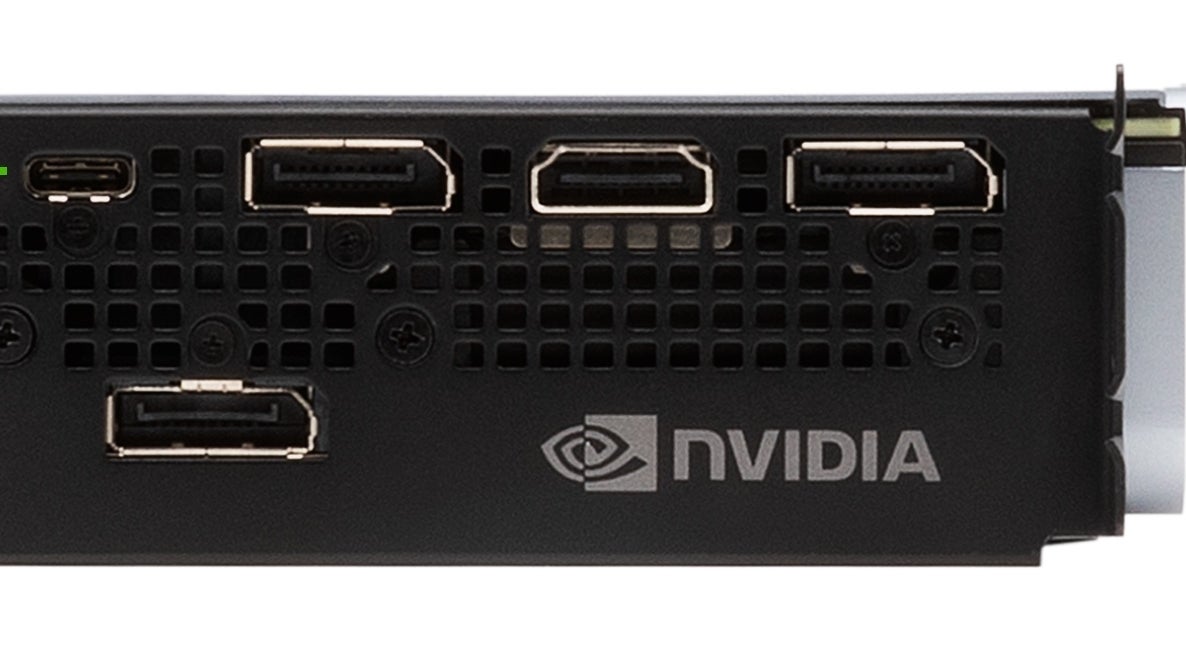
psa-the-usb-c-port-on-rtx-graphics-cards-isnt-just-for-vr-1551450984234.jpg


So both the monitor and soundbar is connected to the graphic card/VGA of the PC?
By connecting this way, the display will be in dual monitor mode.
So you have to connect:

PC -> Soundbar -> Monitor (VIA HDMI ARC port)

All PC monitor doesn't have HDMI ARC function so it will only output video so no audio passthrough.
To fully use the soundbar you will have to change to a TV.
 

Tuakong

Arch-Supremacy Member
Joined
Jan 1, 2000
Messages
22,274
Reaction score
209
Thanks everyone for the help. Finally got it resolved after I changed the display to DUPLICATE screen via Windows+P and viola, it worked!!
I guess it has to be Duplicate Screen setting as both DP and HDM1 ports are connected to the same GPU and the system assumed the config has dual monitors.

Tested ATMOS movies and the SB was able to display DOLBY ATMOS
 

Tuakong

Arch-Supremacy Member
Joined
Jan 1, 2000
Messages
22,274
Reaction score
209
psa-the-usb-c-port-on-rtx-graphics-cards-isnt-just-for-vr-1551450984234.jpg


So both the monitor and soundbar is connected to the graphic card/VGA of the PC?
By connecting this way, the display will be in dual monitor mode.
So you have to connect:

PC -> Soundbar -> Monitor (VIA HDMI ARC port)

All PC monitor doesn't have HDMI ARC function so it will only output video so no audio passthrough.
To fully use the soundbar you will have to change to a TV.
Yes, I was on the verge of getting a TV ...lol
 

Ah Ken

Senior Member
Joined
Sep 26, 2013
Messages
519
Reaction score
30
Thanks everyone for the help. Finally got it resolved after I changed the display to DUPLICATE screen via Windows+P and viola, it worked!!
I guess it has to be Duplicate Screen setting as both DP and HDM1 ports are connected to the same GPU and the system assumed the config has dual monitors.

Tested ATMOS movies and the SB was able to display DOLBY ATMOS
Glad it works! Enjoy!
 

Ah Ken

Senior Member
Joined
Sep 26, 2013
Messages
519
Reaction score
30
Thanks everyone for the help. Finally got it resolved after I changed the display to DUPLICATE screen via Windows+P and viola, it worked!!
I guess it has to be Duplicate Screen setting as both DP and HDM1 ports are connected to the same GPU and the system assumed the config has dual monitors.

Tested ATMOS movies and the SB was able to display DOLBY ATMOS
I forget to mention to activate the signal through both different ports, you must at least select "duplicate" or "extend" depending on your preference. Just take note that if any on-screen display aka OSD for your soundbar or even Home Receiver, it will know output via that HDMI output. Hence, a 2nd display may be required should there be a need.
 
Important Forum Advisory Note
This forum is moderated by volunteer moderators who will react only to members' feedback on posts. Moderators are not employees or representatives of HWZ Forums. Forum members and moderators are responsible for their own posts. Please refer to our Community Guidelines and Standards and Terms and Conditions for more information.
Top