SIMBA Telecom discussion thread

runningman.snsd

Supremacy Member
Joined
Nov 6, 2011
Messages
9,074
Reaction score
752
Notice this is non contract. Can I port my Singtel number after contract ends. If simba not up to my standard then port back Singtel again after a month with simba?
 

kelvinti

Arch-Supremacy Member
Joined
Jan 5, 2009
Messages
23,254
Reaction score
2,428
Notice this is non contract. Can I port my Singtel number after contract ends. If simba not up to my standard then port back Singtel again after a month with simba?
Don't waste time! :D

SingTel network is surely much much better than SIMBA!

Save your trouble to port back to SingTel later again lol.. :D
 

kelvinti

Arch-Supremacy Member
Joined
Jan 5, 2009
Messages
23,254
Reaction score
2,428
In before Ang Ang everywhere
SIMBA is not ang ku kueh bah... :whistle:

Nevertheless, SIMBA is good enough as the delicious peanut pancake as it offers data roaming to so many countries that no other telco can beat or even offer! :whistle: (y)
 

falcon_sg

Junior Member
Joined
Jun 14, 2010
Messages
7
Reaction score
0
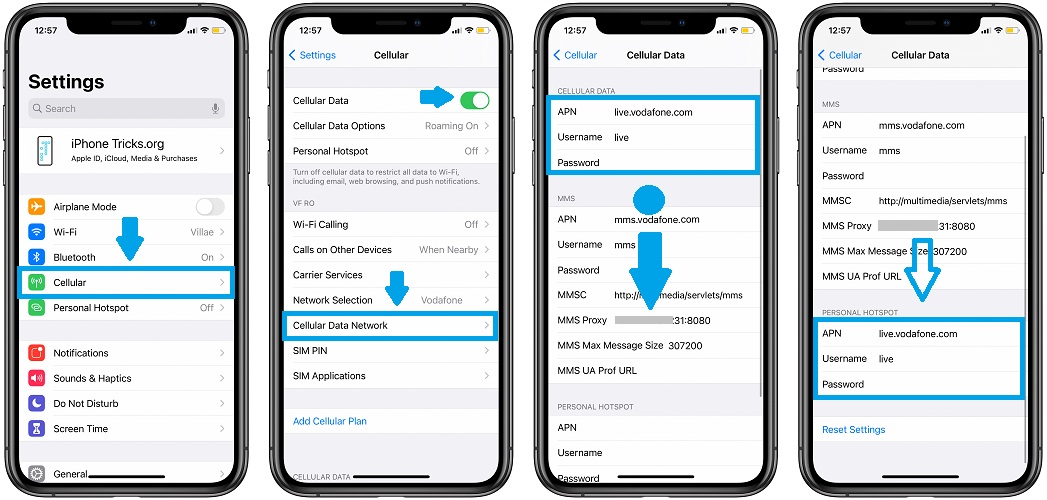
Yes can hotspot for iphone please put TPG in Personal hotspot APN

how-to-fix-personal-hotspot-not-showing-up.jpg


Example above is for another telco. (refer to 4th pix)
thanks @magix .. this works like magic!.. was trying to find out why the missing "Personal Hotspot" for a few days until I search and found this post of yours!
 

DynamiteZerg

Arch-Supremacy Member
Joined
Dec 16, 2007
Messages
10,184
Reaction score
4,441
Anyone having issues with some of their 4G cells? I am seeing the network connections drop from 4G+ to 4G and then the 4G data don't work. Happens at the bus stop at Bedok Mall facing the MRT and also at Bedok MRT EW5 station. Also discovered the same issue at Ikea Tampines.
Ok, I have found the issue. It is due to the dual SIM setup!

A recent update seems to have changed something in the phone. If I have both SIM1 and SIM2 on LTE/3G/2G or SIM1 on 5G/LTE/3G/2G and SIM2 on LTE/3G/2G, I will encounter internet connection loss whenever SIM1 (set to be used as the Mobile Data under Dual SIM mode) switches from 4G+ to 4G. Whether I enable or disable Auto data switching does not change the outcome. Even disabling Data Roaming does not affect the outcome.

However, if turn off SIM2, the problem goes away. Alternatively, if I want to keep SIM2 alive, I need switch it to 3G/2G and the issue does not occur.

Pretty weird... it did not have such an issue previously before the recent updates in Google Play.

 
Last edited:

kelvinti

Arch-Supremacy Member
Joined
Jan 5, 2009
Messages
23,254
Reaction score
2,428
Ok, I have found the issue. It is due to the dual SIM setup!

A recent update seems to have changed something in the phone. If I have both SIM1 and SIM2 on LTE/3G/2G or SIM1 on 5G/LTE/3G/2G and SIM2 on LTE/3G/2G, I will encounter internet connection loss whenever SIM1 (set to be used as the Mobile Data under Dual SIM mode) switches from 4G+ to 4G. Whether I enable or disable Auto data switching does not change the outcome. Even disabling Data Roaming does not affect the outcome.

However, if turn off SIM2, the problem goes away. Alternatively, if I want to keep SIM2 alive, I need switch it to 3G/2G and the issue does not occur.

Pretty weird... it did not have such an issue previously before the recent updates in Google Play.

What model of phone is it? :unsure:
 

Jurong640

High Supremacy Member
Joined
Mar 22, 2011
Messages
43,756
Reaction score
17,779
Just confirmed 2GB free roaming ending end of Aug..
yep. can confirm that a few days ago I went to JB, as I check my data usage, the 1GB roaming gauge did not go down. Instead, i check the roaming usage via *1218#, it utilises the extra 2GB promo
 

ekardo

Arch-Supremacy Member
Joined
Jan 1, 2000
Messages
20,798
Reaction score
1,013
yep. can confirm that a few days ago I went to JB, as I check my data usage, the 1GB roaming gauge did not go down. Instead, i check the roaming usage via *1218#, it utilises the extra 2GB promo
surprisingly the 2GB used quite fast...share by 3 person 1 day 0.75GB...
 

Jurong640

High Supremacy Member
Joined
Mar 22, 2011
Messages
43,756
Reaction score
17,779
surprisingly the 2GB used quite fast...share by 3 person 1 day 0.75GB...
Remember to disable auto update of apps when connected to wifi. Most people would enable auto update apps when connected to wifi.

So when you are using hotspot, the phones that are connecting to your hotspot via wifi will think it's a normal wifi and do auto updates of software or apps updates and sync items automatically. Hence that is why data may deplete alot.

Many years ago, my friend bought a few GB data plan while visiting Australia, turned on hotspot to share with uncle, within hours, all data used up, due to his iphone actively sync and update.
 

Habrosus

High Supremacy Member
Joined
Jul 23, 2005
Messages
28,926
Reaction score
13,043
Remember to disable auto update of apps when connected to wifi. Most people would enable auto update apps when connected to wifi.

So when you are using hotspot, the phones that are connecting to your hotspot via wifi will think it's a normal wifi and do auto updates of software or apps updates and sync items automatically. Hence that is why data may deplete alot.

Many years ago, my friend bought a few GB data plan while visiting Australia, turned on hotspot to share with uncle, within hours, all data used up, due to his iphone actively sync and update.
Good point!(y)

Many times when we share Hotspot to friends and relatives, we tend not to think about how their phone settings might affect the amount of data being used. Something I should take note too. Thanks! :)
 

Jurong640

High Supremacy Member
Joined
Mar 22, 2011
Messages
43,756
Reaction score
17,779
Good point!(y)

Many times when we share Hotspot to friends and relatives, we tend not to think about how their phone settings might affect the amount of data being used. Something I should take note too. Thanks! :)
Welcome. Also note to disable auto update of firmware when connected to wifi. Firmware (android or iOS update) may take at least 500MB in size. Normally, I'll just update my apps manually. This is to prevent over using data when connecting to a limited data hotspot.
 

Habrosus

High Supremacy Member
Joined
Jul 23, 2005
Messages
28,926
Reaction score
13,043
Welcome. Also note to disable auto update of firmware when connected to wifi. Firmware (android or iOS update) may take at least 500MB in size. Normally, I'll just update my apps manually. This is to prevent over using data when connecting to a limited data hotspot.
I disable auto-update of firmware and apps as well, but know of a couple of friends who don't, so this reminder's really useful.
 

ekardo

Arch-Supremacy Member
Joined
Jan 1, 2000
Messages
20,798
Reaction score
1,013
Remember to disable auto update of apps when connected to wifi. Most people would enable auto update apps when connected to wifi.

So when you are using hotspot, the phones that are connecting to your hotspot via wifi will think it's a normal wifi and do auto updates of software or apps updates and sync items automatically. Hence that is why data may deplete alot.

Many years ago, my friend bought a few GB data plan while visiting Australia, turned on hotspot to share with uncle, within hours, all data used up, due to his iphone actively sync and update.
Possible. Esp when sharing with many people, hard to control.
 

Jurong640

High Supremacy Member
Joined
Mar 22, 2011
Messages
43,756
Reaction score
17,779
Possible. Esp when sharing with many people, hard to control.
yup. that is why, if the devices and those people connecting to your hotspot while roaming, seek their assistance to switch off auto sync, auto apps update and firmware update.
 

kelvinti

Arch-Supremacy Member
Joined
Jan 5, 2009
Messages
23,254
Reaction score
2,428
2GB of Roam data is not that much actually if you share hotspot and utilize apps / games that require significant amount data connections and if frequently cross the border.

That's why at the end of the day. I opted to pay $7 extra for the Super Roam plan.

$7 extra....Just cut down one McDonald's meal per month....;):p
 
Last edited:
Important Forum Advisory Note
This forum is moderated by volunteer moderators who will react only to members' feedback on posts. Moderators are not employees or representatives of HWZ Forums. Forum members and moderators are responsible for their own posts. Please refer to our Community Guidelines and Standards and Terms and Conditions for more information.
Top