SSD not detected by Bios

Takumi82

Junior Member
Joined
Feb 13, 2002
Messages
40
Reaction score
0
I am trying to upgrade my laptop from HDD to SSD.

When i plug in the SSD, it cant be detected by the Bios. I tried to plug into another PC, it can be detected.

Initially I thought my Sata cable is faulty, but I tried plugging back the old HDD, there are no problem.

Does anyone know what is wrong?
 

jtjt00

Arch-Supremacy Member
Joined
Jan 1, 2000
Messages
17,660
Reaction score
510
Maybe try update your laptop BIOS? I have this issue with a client laptop too.
 

5star_pundit

Banned
Joined
Aug 11, 2015
Messages
26,740
Reaction score
6
I am trying to upgrade my laptop from HDD to SSD.

When i plug in the SSD, it cant be detected by the Bios. I tried to plug into another PC, it can be detected.

Initially I thought my Sata cable is faulty, but I tried plugging back the old HDD, there are no problem.

Does anyone know what is wrong?

are you installing a M.2 ssd or 6Gbps SATA SSD on a notebook ?
 
Last edited:

xonix

Arch-Supremacy Member
Joined
Mar 24, 2001
Messages
17,587
Reaction score
1,689
I am trying to upgrade my laptop from HDD to SSD.

When i plug in the SSD, it cant be detected by the Bios. I tried to plug into another PC, it can be detected.

Initially I thought my Sata cable is faulty, but I tried plugging back the old HDD, there are no problem.

Does anyone know what is wrong?

Laptop Model = ?
Type of Slot = SATA or M.2 ?
SSD Model = ?
 

5star_pundit

Banned
Joined
Aug 11, 2015
Messages
26,740
Reaction score
6
he did mention abt sata cable... :s22:

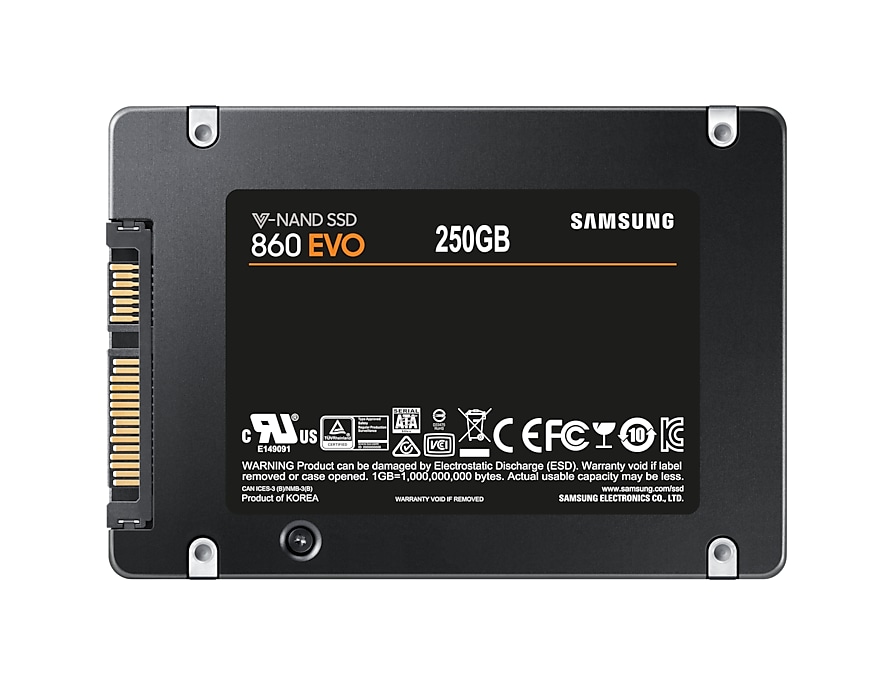
very strange it is impossible to plug this ssd into a notebook using sata cable

uk-860-evo-sata-3-2-5-ssd-mz-76e250b-eu-backblack-89335744
 

Shutterbox

Greater Supremacy Member
Joined
Nov 23, 2008
Messages
82,874
Reaction score
21,325
Notebook got use sata cable? Then power cable how?
I really suaku i never see before this kind of cabling in laptop :(
 

Shutterbox

Greater Supremacy Member
Joined
Nov 23, 2008
Messages
82,874
Reaction score
21,325
sounded like he was talking about the internal cabling
Inside laptop, connection to ssd/sata, got cables? I only know got sata connectors to slot the disk into, but no cabling.

Outside laptop, ya maybe eSATA or sata to USB.
 

eric3743

Supremacy Member
Joined
Jun 26, 2016
Messages
6,089
Reaction score
1
Inside laptop, connection to ssd/sata, got cables? I only know got sata connectors to slot the disk into, but no cabling.

Outside laptop, ya maybe eSATA or sata to USB.

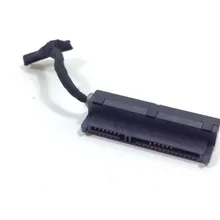
Yes inside laptop the SATA drive is connected to SATA connector by slotting in nicely.

This SATA connector is a special cable (not the same type as desktop type) where one end is the SATA connector (fitted into the compartment) while the other end is like a module to insert on to the motherboard.

This SATA connector could be damaged and so have to replace the same specification, but usually seldom spoiled unless remove/reinsert too frequently.

Example, each brand/models may differ.
NEW-Laptop-HDD-cable-Hard-Drive-Connector-for-SAMSUNG-RV511-RV520-RV411-RV420-RV415-N145-N148.jpg_220x220xz.jpg
 
Important Forum Advisory Note
This forum is moderated by volunteer moderators who will react only to members' feedback on posts. Moderators are not employees or representatives of HWZ Forums. Forum members and moderators are responsible for their own posts. Please refer to our Community Guidelines and Standards and Terms and Conditions for more information.
Top