StarHub <-> Cloudflare issues?

xiaofan

High Supremacy Member
Joined
Sep 16, 2018
Messages
34,833
Reaction score
11,559
ya, i tried quad9 with ECS as well, I still get better results with Google. Best is still ISP's DNS

Interesting. From what I read, the general recommendation for Starhub users is NOT TO USE Starhub DNS ...

And my first thing to set up the router for Starhub is to change to use Cloudflare (1.1.1.2, Malware blocking) and Quad9 DNS (9.9.9.9).

Guess this is a temporary issue.
 

gundamkitten

Member
Joined
May 18, 2024
Messages
181
Reaction score
122
I have used both Cloudflare and Quad9 with no discernible issues, but I do not do any gaming.

The worse problem I encountered with Starhub 5Gbps and ONR usage has been my install of Bitdefender, which took me a while to isolate the problem. Now I totally wiped all Bitdefender products from my systems; Kaspersky is working okay with no throttling.

My current DNS settings are to Quad9, which I set in browsers settings, wifi adapter properties and router setting.
 

TanKianW

Supremacy Member
Joined
Apr 21, 2005
Messages
6,824
Reaction score
3,515
You either use an external third party dns seever, a self-caching dns seevee (and both), or host your own dns server. If you using a third party dns server, understand your risk appetite, and the way your edge devices connect to it (encrypted/not encrypted).

Which ever you choose, understand your use case (Eg. WAN monitor). Whether you want security (filtering), privacy, speed or high availability.

At the same time, understand what a dns can do and what a dns cannot do.​
 
Last edited:

hwzlite

Master Member
Joined
Jan 27, 2007
Messages
3,065
Reaction score
3,204
Tips: use https://www.dnscheck.tools/ to verify whether ECS (hover over ECS word) and others features is working as expected :

Screenshot-2024-06-21-103709.png
 

windwaver

High Supremacy Member
Joined
Apr 28, 2000
Messages
34,226
Reaction score
2,737
wow, that's nice...

meanwhile i sent an e-mail to SH about this issue and specifically informing them to forward this to their NOC/Network team, but they want me to call them instead:spin:...
Did they get back to you?
 

sglandscape

Supremacy Member
Joined
Jan 30, 2023
Messages
5,968
Reaction score
2,874
For me when I bounced my SH connection and got a new IP (27.x.x.x, previous 116.x.x.x) it was back to normal. I think that 116.x.x.x IPv4 netblock has asymmetric routing and the return traffic, even though it should be local, is going back via another path, adding latency/packetloss. IPv6 was also okay, so it wasn't the interconnect - definitely seems just bad routing for that netblock.

If anyone has bad latency/throughput to Cloudflare, check your IP and see if its similar. https://speed.cloudflare.com
Can confirm I have issue routing between SH subnets from the 116.x.x.x to 27.x.x.x. The routing table from 116.x.x.x traffic out basically stops at the hop to 183.90.60.1. Restarting the ONT and forcing it to get a 27.x.x.x IP on both devices would work fine again.

Quite a rookie error the NOC likely has made, BGP misconfiguration?
 
Last edited:

sglandscape

Supremacy Member
Joined
Jan 30, 2023
Messages
5,968
Reaction score
2,874
Can confirm I have issue routing between SH subnets from the 116.x.x.x to 27.x.x.x. The routing table from 116.x.x.x traffic out basically stops at the hop to 183.90.60.1. Restarting the ONT and forcing it to get a 27.x.x.x IP on both devices would work fine again.

Quite a rookie error the NOC likely has made, BGP misconfiguration?
Emailed the starhub cs in the last week of Dec 2024, chased them once but no reply. However it seems to be working fine as of 13 Jan 3am!

Traffic from 116.x.x.x now goes out to 183.90.44.21 then out to the 203.x.x.x SH network. Can confirm they did change something at the 183.90.x.x subnet and the path is working perfectly fine now.

edited to provide more details on the trace route
 
Last edited:

soreloser

Senior Member
Joined
Feb 26, 2024
Messages
635
Reaction score
248
Cloudflare anycast shouldn't be this bad, they'd have a SG presence for sure...

Code:
x (192.168.0.9) -> 1.1.1.1 (1.1.1.1)                                 2024-06-13T22:29:10+0800
Keys:  Help   Display mode   Restart statistics   Order of fields   quit
                                                           Packets               Pings
 Host                                                    Loss%   Snt   Last   Avg  Best  Wrst StDev
 1. 192.168.0.1                                           0.0%   202    0.8   0.7   0.6   0.9   0.1
 2. x.starhub.net.sg                                      0.0%   201    4.3   4.0   3.3   9.5   0.8
 3. 183.90.44.189                                         0.0%   201    3.2   6.6   3.1  67.9   9.4
 4. 203.118.7.73                                          0.0%   201    4.0   4.3   3.7  25.4   1.6
 5. 203.118.6.86                                          0.0%   201   24.9  12.5   3.5 108.0  17.1
 6. 162.158.160.230                                      13.4%   201  236.4 389.7 205.0 529.2  85.1
 7. 162.158.160.153                                       8.0%   201  215.0 232.2 192.7 365.6  35.4
 8. one.one.one.one                                       0.0%   201  172.6 172.2 171.6 182.5   1.1
refreshing this thread... recently starting getting issues from 162.158.160.230... going from 3 ping to 80 ping
 

soreloser

Senior Member
Joined
Feb 26, 2024
Messages
635
Reaction score
248
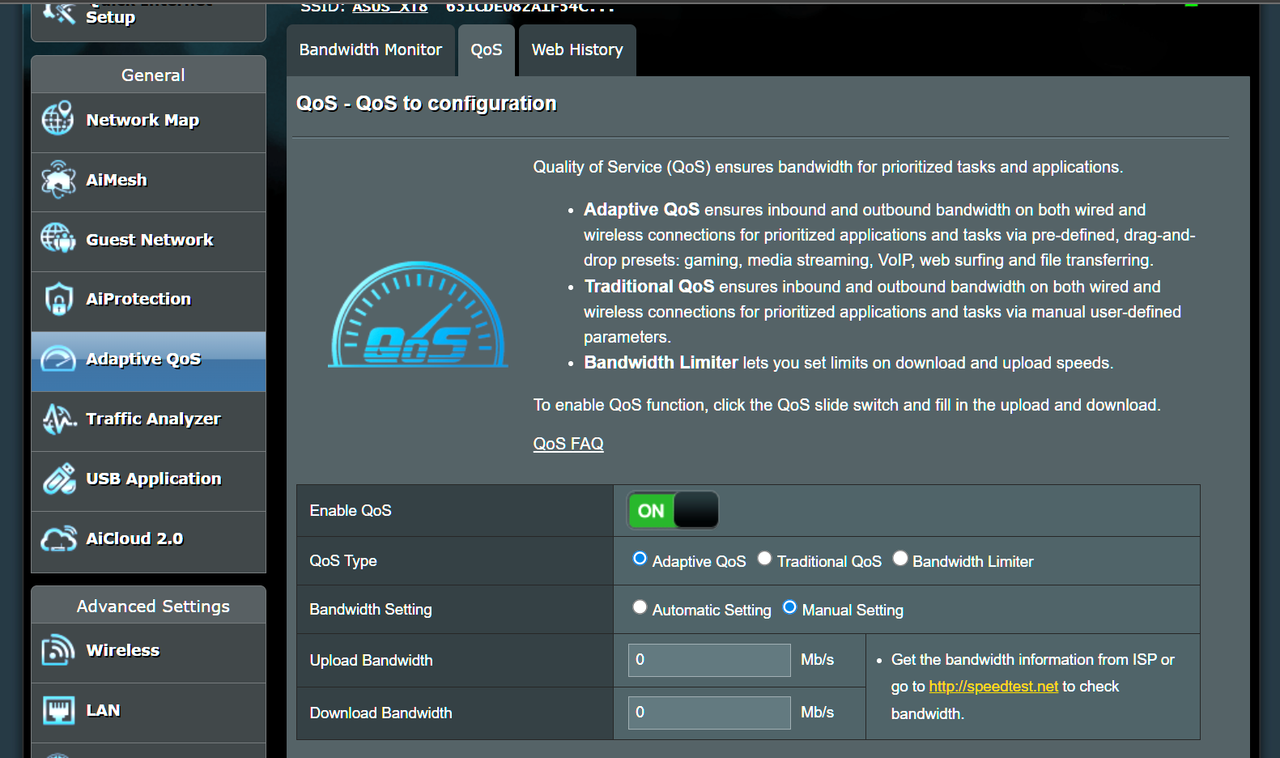
I realised that on my Asus router, Adaptive QOS ON was causing high ping with this exact symptoms as described in the thread. Turned it off and have not seen the ping issues I've been experiencing for the past 3 days.
 

xiaofan

High Supremacy Member
Joined
Sep 16, 2018
Messages
34,833
Reaction score
11,559
I realised that on my Asus router, Adaptive QOS ON was causing high ping with this exact symptoms as described in the thread. Turned it off and have not seen the ping issues I've been experiencing for the past 3 days.

Nice update, thanks for the report.

Generally speaking, Asus router Adaptive QoS function should be turned off anyway in Singapore, as it will severely reduce the speed of 3Gbps/5Gbps/10Gbps plans, due to the weakness of the router CPU.
 

firesong

Supremacy Member
Deluxe Member
Joined
Jan 17, 2001
Messages
8,811
Reaction score
4,828
I realised that on my Asus router, Adaptive QOS ON was causing high ping with this exact symptoms as described in the thread. Turned it off and have not seen the ping issues I've been experiencing for the past 3 days.
So it's Asus's network management algorithms causing your network lag issues, not Cloudflare.
 

soreloser

Senior Member
Joined
Feb 26, 2024
Messages
635
Reaction score
248
So it's Asus's network management algorithms causing your network lag issues, not Cloudflare.
yeah thats why i mentioned it, could be a router setting for other users experiencing a similar problem. Didn't expect QOS to cause ping spikes at all, usually at 8-11pm i would get 80-110 ping randomly but no packet loss. Hopefully it is fixed, past 3 days didn't see any spikes and remained stable at 3 ping..

With how QOS is marketed and displayed in the router settings page, I assumed it was better to have it turned on..
 

hwzlite

Master Member
Joined
Jan 27, 2007
Messages
3,065
Reaction score
3,204
yeah thats why i mentioned it, could be a router setting for other users experiencing a similar problem. Didn't expect QOS to cause ping spikes at all, usually at 8-11pm i would get 80-110 ping randomly but no packet loss. Hopefully it is fixed, past 3 days didn't see any spikes and remained stable at 3 ping..
...

Hmmm....that's interesting.

Maybe its "smart" algorithms somehow gone hey wired on peak hours/congested routes?

Does manually set Adaptive QoS > Bandwidth Setting to Manual Setting ( test&trial experimentally set limits about 5-20% below your advertised speed) make any diff. ?

Screenshot-2025-11-11-152018.png
 

deathblade82

Senior Member
Joined
Oct 25, 2002
Messages
1,566
Reaction score
25
Adguard public DNS is quite slow here in Singapore, better avoid using this.
On Simba, quite fast for me.

C:\Users\death>ping 94.140.14.14 -n 9

Pinging 94.140.14.14 with 32 bytes of data:
Reply from 94.140.14.14: bytes=32 time=4ms TTL=247

Ping statistics for 94.140.14.14:
Packets: Sent = 9, Received = 9, Lost = 0 (0% loss),
Approximate round trip times in milli-seconds:
Minimum = 4ms, Maximum = 4ms, Average = 4ms
 

soreloser

Senior Member
Joined
Feb 26, 2024
Messages
635
Reaction score
248
Hmmm....that's interesting.

Maybe its "smart" algorithms somehow gone hey wired on peak hours/congested routes?

Does manually set Adaptive QoS > Bandwidth Setting to Manual Setting ( test&trial experimentally set limits about 5-20% below your advertised speed) make any diff. ?

Screenshot-2025-11-11-152018.png
Yeah mine doesnt have manual setting there, its just adaptive qos on, then theres a bunch of icons to be put in order, like gaming, browsing etc. There's traditional qos and bandwidth limiter, but i just turned it all of like xiaofan suggested, now seems to be stable.
Nice update, thanks for the report.

Generally speaking, Asus router Adaptive QoS function should be turned off anyway in Singapore, as it will severely reduce the speed of 3Gbps/5Gbps/10Gbps plans, due to the weakness of the router CPU.
also, is there any other settings i need to be aware of or is recommended?
 

bert64

Senior Member
Joined
Jan 20, 2020
Messages
1,027
Reaction score
539
Can confirm I have issue routing between SH subnets from the 116.x.x.x to 27.x.x.x. The routing table from 116.x.x.x traffic out basically stops at the hop to 183.90.60.1. Restarting the ONT and forcing it to get a 27.x.x.x IP on both devices would work fine again.

Quite a rookie error the NOC likely has made, BGP misconfiguration?
This happens quite a lot due to fragmentation of legacy IP. See that Starhub are announcing quite a lot of prefixes:

https://bgp.he.net/AS4657#_prefixes
https://bgp.he.net/AS55430#_prefixes

Some BGP peers will have prefix limits because a larger number of prefixes consumes more resources, once you hit the limit either the session is dropped entirely or the surplus prefixes will be ignored.

Also because of the large number of advertised prefixes in the global BGP table, some equipment can't handle the number of routes and will drop small prefixes or send them via a default route.

With v6 this is far less likely to happen because they have an aggregate prefix as well as the more specific ones, rather than the completely random mess they have with legacy IP. If the specific prefixes are lost, traffic will fall back to the aggregate. In some cases peers will auto aggregate to save resources.
 
Important Forum Advisory Note
This forum is moderated by volunteer moderators who will react only to members' feedback on posts. Moderators are not employees or representatives of HWZ Forums. Forum members and moderators are responsible for their own posts. Please refer to our Community Guidelines and Standards and Terms and Conditions for more information.
Top