Starting pfsense for New Users

jackycar

Master Member
Joined
Aug 20, 2014
Messages
4,897
Reaction score
129
@TanKianW following this thread now!

Based on the below quote, i'm most interested in hitting above 1G for combined usage yes! Is Load Balancing possible when both ISP is different speeds? 1gbps + 500mbps?

Also looking at the setup options, wah i quite blur sia... hahahaha. Can anyone recommend? These are what i want:

1) I currently have an i7 Intel NUC, would like at least same/better processing power from these for Emby/Plex server I want to run
2) Enough WAN/LAN throughput to support 1Gbps + 500mbps but also future proofing for 10gbps
3) Processor/RAM enough to support heavy torrenting as I run a seedbox

"Set" at 10k. You no need to hit 10k in order to achieve your max DL speed.

I am not sure with VQ. I managed to get load balancing set up on M1+MR (static IP) and ST+MR (static IP).

You will hit >1G from "running tests/benchmarks". Realistically, you will only hit >1G on combined usage. (Eg. My kids using M1 for netflix streaming, I'm using VQ for DLing). I have never hit >1G (max~850Mbps) on a single P2P box (unless doing 2 different tasks/connections at a single time). But with two P2P devices, I will hit a combined usage of >1G. Take note that your bottleneck will also be at your devices side, if it is only at 1G.

I believe your Cisco router is using 1G for downstream LAN, thus can't go >1G on client (receiving) side.

You can build your own pfSense box (mini pc) OR check out Page 1 of my pfSense thread on the other Options.
 
Last edited:

jasonho

Senior Member
Joined
Jan 1, 2000
Messages
1,257
Reaction score
297
@TanKianW following this thread now!

Based on the below quote, i'm most interested in hitting above 1G for combined usage yes! Is Load Balancing possible when both ISP is different speeds? 1gbps + 500mbps?

Also looking at the setup options, wah i quite blur sia... hahahaha. Can anyone recommend? These are what i want:

1) I currently have an i7 Intel NUC, would like at least same/better processing power from these for Emby/Plex server I want to run
2) Enough WAN/LAN throughput to support 1Gbps + 500mbps but also future proofing for 10gbps
3) Processor/RAM enough to support heavy torrenting as I run a seedbox

Try this if you are adventurous enough :p


bert64

Senior Member
Joined
Jan 20, 2020
Messages
1,027
Reaction score
539
@TanKianW following this thread now!

Based on the below quote, i'm most interested in hitting above 1G for combined usage yes! Is Load Balancing possible when both ISP is different speeds? 1gbps + 500mbps?

Also looking at the setup options, wah i quite blur sia... hahahaha. Can anyone recommend? These are what i want:

1) I currently have an i7 Intel NUC, would like at least same/better processing power from these for Emby/Plex server I want to run
2) Enough WAN/LAN throughput to support 1Gbps + 500mbps but also future proofing for 10gbps
3) Processor/RAM enough to support heavy torrenting as I run a seedbox
You can load balance two different connections, you can weight it so more traffic goes down the faster one.

Torrent seeding won't really make use of the two connections because it will only announce one address to the tracker for inbound connections. To get around that you can actually run 2 seeding instances with on on each line, connected to a shared backend pool of data.

For outbound connections, the firewall might load balance the two connections *BUT* the peers might reject the connection if they come from a different address than what the tracker has. Outbound connections won't work if the remote peer is unable to receive inbound connections (many users like this due to widespread NAT/CGNAT).

NAT causes problems with p2p protocols like bittorrent - not just for you (eg your client must be aware of the external address to announce it to the tracker, and you have to forward a port back), but also for your remote peers (the other peers might not have the capability to forward ports etc)...
It's beneficial to use IPv6 as there are MANY users out there who are only able to receive inbound connections via IPv6. Lots of users have CGNAT IPv4 and full routed IPv6 so proper p2p will only function over IPv6 for such users.

Torrenting also creates a lot of simultaneous connections, this causes a lot of strain on a NAT gateway and will overload some lower end routers. With a pfsense firewall on relatively modern equipment you shouldn't have much trouble.

If you want 10gbps, practically you'll need a device with PCIe slots. If you want more than 1gbps on a single firewall you can either bond multiple ports or use 2.5gbps ethernet for the inside interface. Having 10gbps interfaces is a significant price increase so while it's obviously preferable to have, the cost might not be worth it.

You can continue using your NUC alongside a separate firewall btw - no need to replace it, for instance i have a couple of NUC-like devices and a separate dedicated firewall. The firewall itself is quite low powered has a small SSD and not much RAM, perfectly adequate for a firewall but i'd not run a plex server or torrent seed on it.
 

jasonho

Senior Member
Joined
Jan 1, 2000
Messages
1,257
Reaction score
297
The M720q/M920qs aren't cheap, even the 8th gen i5s cost a bomb... :spin:

What provider are you subscribed to?
M720q bare bone systems aren't that expensive, but you are right that the CPU does add on quite a bit of $$. For 4x1Gbe PFsense setup like @milanmania2004 mentioned, you don't really need a high powered CPU. But if you want to install ESXI + other homelab projects, then its recommended to get a i5 at least.

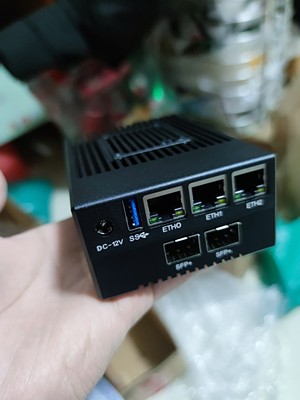
I originally wanted this dual SFP+ setup for SI 10Gbps signup but later give up due various reasons.

edit : currently on VQ
 
Last edited:

hwzlite

Master Member
Joined
Jan 27, 2007
Messages
3,040
Reaction score
3,166
New poi$on for you guys :grin:

@ Add 10GbE to your system with an M.2 2280 module


It’s now possible to add 10GbE through an M.2 socket thanks to Innodisk EGPL-T101 M.2 2280 module based on Marvell AQtion Ethernet controller offering support for 10Gbps, 5Gbps, 2.5Gbps, 1000M, and 100M/10M LAN speeds.

The solution is comprised of three parts with the M.2 module equipped with a heatsink to cool the Ethernet controller, a flexible high-speed cable, and a daughter board with an RJ45 connector and two threads for mounting to a chassis.

EGPL-T101-10GbE-M2-module-768x448.jpg
 

jackycar

Master Member
Joined
Aug 20, 2014
Messages
4,897
Reaction score
129
i wonder here if anyone is willing to help a noob out, obviously i'd pay you for your time/service.. but basically to recommend/help configure a PFsense setup...

1) recommend or help pre-build a build according to requirements
2) i can setup myself but might need advise from time to time

so basically. i ahve a intel NUC and a synology torrent seedbox. run an emby server. and also stream high def through Kodi.

I want to:
1) Be able to leverage/use my VQ 1gbps + M1 500mbps as much as possible over multi user scenario. currently with my cisco rv940, because the WAN/LAN throughput capped at 933mbps, when my VQ is saturated, my M1 offers no upside also other than redundancy

2) be able to handle 10K BT connections if possible? My current Cisco crumbles if i set 5000 BT connections on one of the seedbox, and both my Intel NUC and Synology NAS act as diff seedbox + emby server.
 

bert64

Senior Member
Joined
Jan 20, 2020
Messages
1,027
Reaction score
539
i wonder here if anyone is willing to help a noob out, obviously i'd pay you for your time/service.. but basically to recommend/help configure a PFsense setup...

1) recommend or help pre-build a build according to requirements
2) i can setup myself but might need advise from time to time

so basically. i ahve a intel NUC and a synology torrent seedbox. run an emby server. and also stream high def through Kodi.

I want to:
1) Be able to leverage/use my VQ 1gbps + M1 500mbps as much as possible over multi user scenario. currently with my cisco rv940, because the WAN/LAN throughput capped at 933mbps, when my VQ is saturated, my M1 offers no upside also other than redundancy

2) be able to handle 10K BT connections if possible? My current Cisco crumbles if i set 5000 BT connections on one of the seedbox, and both my Intel NUC and Synology NAS act as diff seedbox + emby server.

To get more than 1gbps throughput you will need 2 physical WAN interfaces, and a 2.5gbps or faster LAN interface. You could try bonding multiple 1gbps interfaces, assuming you have a suitable switch.

The connection limit you're seeing is based on the number of states the device can track and perform NAT against. Typical pfsense hardware will be more powerful than a lowend router and handle more.

A single torrent seed is not going to work very well with a load balanced line, as it will only announce one address to the tracker and that's what the other peers are going to try connecting to. On the other hand if you have two devices you could seed the same torrents from both of them, and use shared storage to ensure both have access to the data files.

For IPv6 you can also do away with NAT and state tracking entirely so the number of active connections would be irrelevant - even a lowend router should handle many thousands of stateless non-nat IPv6 connections because they care about packet flow not connections. Pfsense also lets you turn off state tracking for specific rules, so i suggest you do that for your torrent traffic. The only limits would be the bandwidth available and the seedbox itself.

In terms of local streaming with kodi, that's not going to touch the firewall as the traffic will remain on your local switch.
 

Elijahonli

High Supremacy Member
Joined
Oct 27, 2008
Messages
25,839
Reaction score
159
Hi guys, need some help here...

Im trying to send files (900gb worth) to my friend via torrent.

I created the torrent via mktorrent started seeding it and sent the torrent file to my friend. however it seems that on my friend side, it shows as stalled although the tracker is showing as connected. I am not sure if there is something i need to set on pfsense side to allow the download
 

bert64

Senior Member
Joined
Jan 20, 2020
Messages
1,027
Reaction score
539
Hi guys, need some help here...

Im trying to send files (900gb worth) to my friend via torrent.

I created the torrent via mktorrent started seeding it and sent the torrent file to my friend. however it seems that on my friend side, it shows as stalled although the tracker is showing as connected. I am not sure if there is something i need to set on pfsense side to allow the download
Probably both of you are behind NAT, so you can't connect to each other.
At least one of you needs to allow inbound connections on the port used by the torrent client, and ensure your client is also sending the correct address to the tracker (some will send your internal address).

This is why NAT sucks and is gradually strangling p2p protocols. The proper solution is IPv6.

P2P protocols like bittorrent rely on the users being able to connect to each other, NAT breaks that. If some peers aren't connectable then all the data ends up flowing through those that are which massively reduces the efficiency of the protocol, and if none of the users are connectable it breaks entirely as you've found out. As more and more ISPs implement CGNAT, P2P will gradually become totally unusable without IPv6.
 
Last edited:

TanKianW

Supremacy Member
Joined
Apr 21, 2005
Messages
6,681
Reaction score
3,325
Hi guys, need some help here...

Im trying to send files (900gb worth) to my friend via torrent.

I created the torrent via mktorrent started seeding it and sent the torrent file to my friend. however it seems that on my friend side, it shows as stalled although the tracker is showing as connected. I am not sure if there is something i need to set on pfsense side to allow the download

Port forwarding??


bert64

Senior Member
Joined
Jan 20, 2020
Messages
1,027
Reaction score
539
Port forwarding??


For IPv6:
add an allow rule for the host/port which runs the torrent client

For IPv4:
add a NAT port forwarding rule from the wan address of the firewall to the same port on the internal torrent box (ports must be the same otherwise the announcement to the tracker will contain the internal port not the external one)
add an allow rule that matches the port forwarding rule (might be done automatically as part of the above if you have the linked rule option enabled)
ensure your torrent client knows the firewall's external address, and sends that to the tracker instead of its own internal address - client specific (could be set manually, could require UPNP, could require interaction with an external service etc)

If you're using an ISP with CGNAT then you can't forward ports at all, so it won't work whatever changes you make on your own firewall.
 

Elijahonli

High Supremacy Member
Joined
Oct 27, 2008
Messages
25,839
Reaction score
159
I am currently on m1, and i already did the port forwarding on pfsense already.

I have forwarded port 6883 to my torrent box as that is the listening port for my torrent box. 6889 which is hosting my private tracker /announce endpoint is also forwarded. My torrent tracker url is already http://<public_ip>:6889/announce. I am able to access the http://<public_ip>:6889/announce endpoint via my mobile phone over 4g, just showing invalid request kind of error. My friend is able to connect to me and download just 400mb of data before the torrent returns to being stalled again. So i am kinda clueless as to what is wrong with my setup.

I also notice that i am unable to access/test my tracker endpoint (http://<public_ip>:6889/announce) via a device within the same network, as a result my seedbox/server is showing the tracker url not working, i have to add my local IP before it starts working. I have already enabled NAT reflection (pure) but it doesnt seem to help :(
 
Important Forum Advisory Note
This forum is moderated by volunteer moderators who will react only to members' feedback on posts. Moderators are not employees or representatives of HWZ. Forum members and moderators are responsible for their own posts.

Please refer to our Community Guidelines and Standards, Terms of Service and Member T&Cs for more information.
Top