
Storage Upgrading...

12122012

Senior Member
Joined
Oct 5, 2009
Messages
952
Reaction score
28
moving away from hdd for my main pc...

25p4f15.png


planning to get M.2 PCI-E adapter card use it on slot no.4 of the mb. (slot 1 use by RX480)
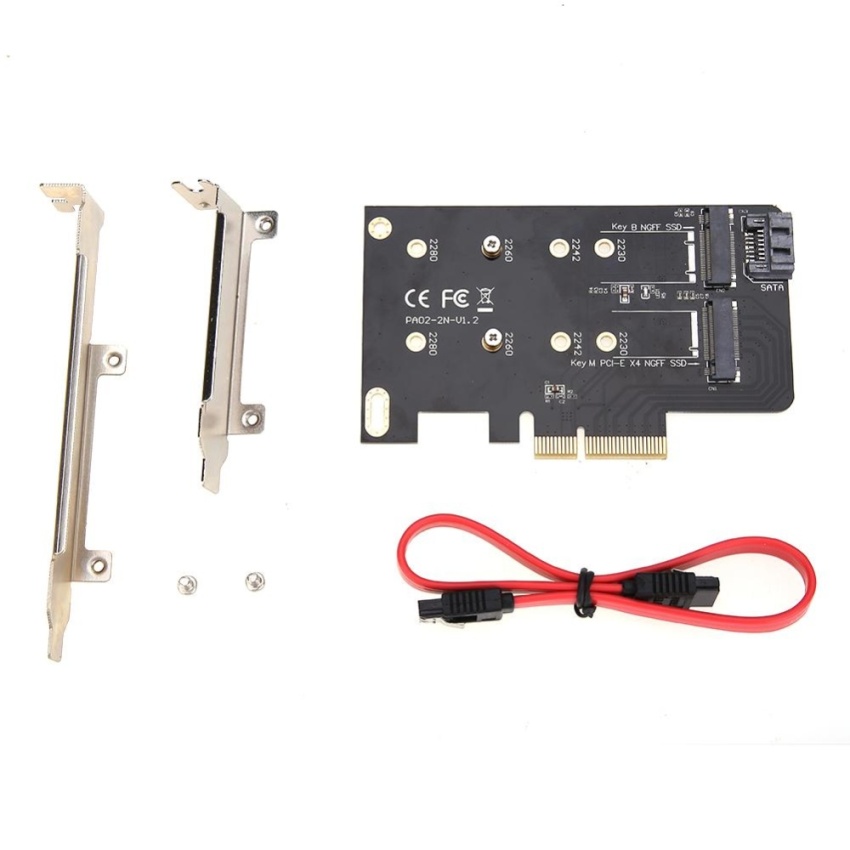
2-slots-adapter-card-of-m-key-pci-ex4-and-b-key-for-m2-ngff-ssd-intl-1501535360-75238764-0cdf0e5953a23f57277a184cce1974ae-zoom.jpg


will be installing Plextor M8PeG M.2 256GB NVMe + WD Blue 500Gb M.2 SSD. will there be any issue or recommendation?

Thanks :)
 

12122012

Senior Member
Joined
Oct 5, 2009
Messages
952
Reaction score
28
must check first. might be you cannot boot windows with nvme disk
if can then can
ok if i play safe, i skip the nvme disk. can WD Blue 500Gb M.2 SSD be use on either slots (Key B NGFF SSD or Key M PCI-E X4 NGFF SSD) on the M.2 PCI-E adapter card?
 

riotpatriot

Member
Joined
Jun 17, 2012
Messages
376
Reaction score
0
actually nonid to skip. if you install windows on the SATA one then should be can.
if you finding sata m.2 ssd to plug to the pcie ssd socket then need to check if the adapter itself can support SATA on the NVMe slot. because nvme is directly PCIe. SATA need controller in between to plug to PCIe
 

12122012

Senior Member
Joined
Oct 5, 2009
Messages
952
Reaction score
28
actually nonid to skip. if you install windows on the SATA one then should be can.
if you finding sata m.2 ssd to plug to the pcie ssd socket then need to check if the adapter itself can support SATA on the NVMe slot. because nvme is directly PCIe. SATA need controller in between to plug to PCIe

Thanks riotpatriot, very helpful info. :)
 
Important Forum Advisory Note
This forum is moderated by volunteer moderators who will react only to members' feedback on posts. Moderators are not employees or representatives of HWZ Forums. Forum members and moderators are responsible for their own posts. Please refer to our Community Guidelines and Standards and Terms and Conditions for more information.
Top