Storing videos using HDD with RAID 0 - Need help

Apparatus

Great Supremacy Member
Joined
May 27, 2005
Messages
58,333
Reaction score
13,859
Ok, just confirmed my numbers

According to Samsung NEO QLED 8K TV QN900A manual below
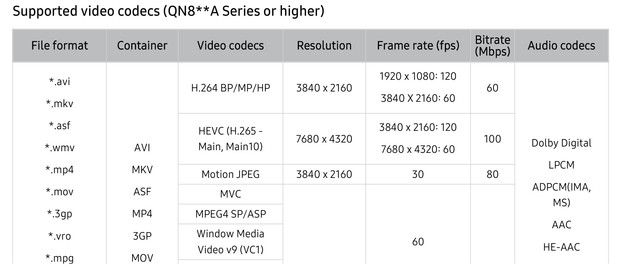


Bitrate required is 100Mbps for playing 8K@60fps MP4 video encoded in HEVC H.265

The HDDs with TB3 I mentioned has a RW speed of 250MBps(1000Mbps) which is more than enough to play smooth 8K@60fps video via HDMI 2.1 without stuttering

TB3 transfer rate is 40Gb/s(5GB/s)

HDMI 2.1 cable can take up to 48Gb/s(6GB/s)

In addition, there's NO need to set up RAID. Will use the HDDs as per normal will do.

:D
 
Last edited:

Phen8210

High Supremacy Member
Joined
Jul 29, 2011
Messages
29,048
Reaction score
8,292
I won't be doing editing. Only record in 8K@60fps using CANON RAW LITE CRM format.

Then convert into TV-playble MP4 format and store them on external HDD. And play from there with high-end PC connected via HDMI 2.1 to my 8K TV for viewing.

I'm not sure what is the 8K@60fps file size is after the conversion to MP4. I'll need to check with CANON on this because this determines my storage space need

Then just use google drive unlimited cloud to playback the files directly from there.

I use VLC to playback video files directly from the cloud, with no buffering when playing back and seeking usually is an instant load or at most 2 seconds.

My drive setting is set to file in cloud-only and confirmed the file is not on local.

The system has 970 Evo SSD.

I checked my file bitrate peak around 120mbps and did not encounter any buffering, if you want I can test your files for you.
 
Last edited:

Phen8210

High Supremacy Member
Joined
Jul 29, 2011
Messages
29,048
Reaction score
8,292
Ok, just confirmed my numbers

According to Samsung NEO QLED 8K TV QN900A manual below


Bitrate required is 100Mbps for playing 8K@60fps MP4 video encoded in HEVC H.265

The HDDs with TB3 I mentioned has a RW speed of 250MBps(1000Mbps) which is more than enough to play smooth 8K@60fps video via HDMI 2.1 without stuttering

TB3 transfer rate is 40Gb/s(5GB/s)

HDMI 2.1 cable can take up to 48Gb/s(6GB/s)

In addition, there's NO need to set up RAID. Will use the HDDs as per normal will do.

:D

You assume your HDD can output 150Mbps all the way? I mean you can try.
 

Apparatus

Great Supremacy Member
Joined
May 27, 2005
Messages
58,333
Reaction score
13,859
Then just use google drive unlimited cloud to playback the files directly from there.

I use VLC to playback video files directly from the cloud, with no buffering when playing back and seeking usually is an instant load or at most 2 seconds.

My drive setting is set to file in cloud-only and confirmed the file is not on local.

The system has 970 Evo SSD.

I checked my file bitrate peak around 120mbps and did not encounter any buffering, if you want I can test your files for you.
I just downloaded a CANON RAW LIGHT crm file of 6.1GB. Going to convert to MP4 tonight and try running from a USB thumb drive plug directly to the TV. USB 3.0 speed of 5Gbps(625MBps) should not give any stuttering
 
Last edited:

wwenze

Greater Supremacy Member
Joined
Dec 2, 2002
Messages
86,938
Reaction score
30,553
USB3: 5Gbps

Thumb drive: 15MB/s

Btw welcome to the world of encoding. Where you will spend more time encoding and rewatching the encode than watching the video.

There will be lots of things to experiment and try, some simple enough to not worth mentioning, yet complicated enough until everyone has his own style. And also find weird cases where things don't work.

Like for example the first thing you will learn is that .MP4 is just a container format and the video inside can use different compressions like MP4 (SP), ASP, AVC or HEVC of different levels. Some people like AVC, some like HEVC, we are now at that awkward transition period, just as it used to be for SP vs ASP, and ASP vs AVC.

Encoding used to be an art and skill until the social media age where processing power and space / bandwidth got so plenty that anybody can do anything and it still works. But with 8k60 material, we are now back to having severe hardware limitations.
 

wwenze

Greater Supremacy Member
Joined
Dec 2, 2002
Messages
86,938
Reaction score
30,553
According to Samsung NEO QLED 8K TV QN900A manual below

Bitrate required is 100Mbps for playing 8K@60fps MP4 video encoded in HEVC H.265


Oh, specs presented in such a way usually means the TV can only handle max 100Mbps. It doesn't mean your video has to be 100Mbps, it can be a much smaller number like 20Mbps if you want. Of course you can always try a higher bitrate anyway and see what happens.

100Mbps / 8 = 12.5MB/s so thumbdrive probably works.

Who knows, maybe you will find this bitrate gives sufficient quality. Then you can save a lot of disk space.
 

Apparatus

Great Supremacy Member
Joined
May 27, 2005
Messages
58,333
Reaction score
13,859
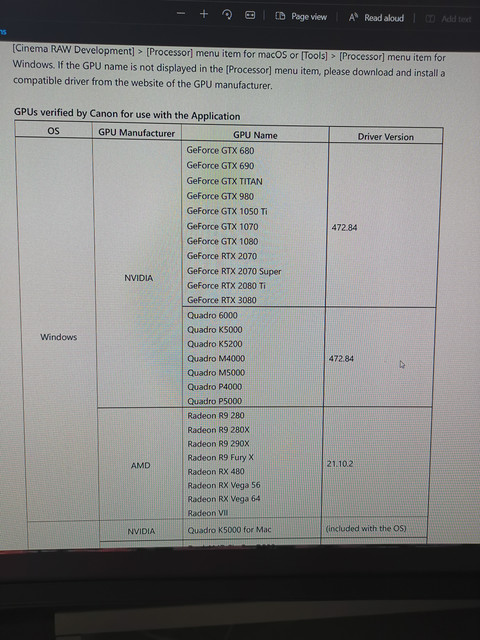
My laptop not powerful to run CANON Cinema Raw Development software. See attached for GPU requirements. My laptop uses Intel Iris onboard GPU. Means I'll have to wait for my high-end PC.

IMG-20220614-190330.jpg


IMG-20220614-190845.jpg
 
Last edited:
Important Forum Advisory Note
This forum is moderated by volunteer moderators who will react only to members' feedback on posts. Moderators are not employees or representatives of HWZ Forums. Forum members and moderators are responsible for their own posts. Please refer to our Community Guidelines and Standards and Terms and Conditions for more information.
Top