Strange PC Powering up problem.

socrates

Senior Member
Joined
Jan 1, 2000
Messages
2,240
Reaction score
80
Strange problem tonight with my PC. Turn on the wall socket and then tried to power on the PC but nothing happen. No light , sound, no fan , no power. Left it connected with wall socket, prayed for help, already thinking of carrying down to Sim Lim then after about an hour, it can power on again ! What could possibly be the problem ? PSU? This has never happened before.
 

tsteo77

Senior Member
Joined
Oct 28, 2011
Messages
1,542
Reaction score
216
Strange problem tonight with my PC. Turn on the wall socket and then tried to power on the PC but nothing happen. No light , sound, no fan , no power. Left it connected with wall socket, prayed for help, already thinking of carrying down to Sim Lim then after about an hour, it can power on again ! What could possibly be the problem ? PSU? This has never happened before.
List the model/spec/age of your hardwares so members here able to help you better. First to suspect would be
psu if it's old.
 

uncle_josh

Master Member
Joined
Jun 16, 2018
Messages
3,105
Reaction score
758
Strange problem tonight with my PC. Turn on the wall socket and then tried to power on the PC but nothing happen. No light , sound, no fan , no power. Left it connected with wall socket, prayed for help, already thinking of carrying down to Sim Lim then after about an hour, it can power on again ! What could possibly be the problem ? PSU? This has never happened before.
Sometimes could be faulty power button.
Just use a test pen to short the power switch pins (google Linux Tech video for how to do that)
If still don't boot up, it could be psu, mobo or dead cpu. You will need to bring to repair shop for further diagnostic.
 

socrates

Senior Member
Joined
Jan 1, 2000
Messages
2,240
Reaction score
80
I have strong suspicions that it is my silver flower 650 W PSU which I bough 8 yrs ago but never used it until Dec 2020 when I DIY my own system. Every other component the ryzen 3600, Asus B550, Crucial Ballistix 3200 MHz DDR4 DRAM 16GB, NVME 1TB was bought and installed in Dec 2020.

I notice something strange that if I power off the PC and then turn off the wall socket, when I next want to turn on the PC, I would have turn on the wall socket and wait maybe about 20 mins or so before I can power up the PC. I also notice that after it booted up, I will have to adjust the PC time as well. So is it a CMOS battery problem?

However If I just power off the PC but leave the wall socket on, the next time I boot up I can do it immediatetly. Once boot up everything works normally, with no crashes etc

Not sure if to buy a new PSU and replace it on my own which may solve the probelm if it is indeed a PSU problem or bring down to SIm Lim for somebody to diagnose what is the real problem.

Meanwhile I think better backup all my important stuff.

Thanks for advice.
 
Last edited:

Phen8210

High Supremacy Member
Joined
Jul 29, 2011
Messages
29,030
Reaction score
8,284
I have strong suspicions that it is my silver flower 650 W PSU which I bough 8 yrs ago but never used it until Dec 2020 when I DIY my own system. Every other component the ryzen 3600, Asus B550, Crucial Ballistix 3200 MHz DDR4 DRAM 16GB, NVME 1TB was bought and installed in Dec 2020.

I notice something strange that if I power off the PC and then turn off the wall socket, when I next want to turn on the PC, I would have turn on the wall socket and wait maybe about 20 mins or so before I can power up the PC. I also notice that after it booted up, I will have to adjust the PC time as well. So is it a CMOS battery problem?

However If I just power off the PC but leave the wall socket on, the next time I boot up I can do it immediatetly. Once boot up everything works normally, with no crashes etc

Not sure if to buy a new PSU and replace it on my own which may solve the probelm if it is indeed a PSU problem or bring down to SIm Lim for somebody to diagnose what is the real problem.

Meanwhile I think better backup all my important stuff.

Thanks for advice.

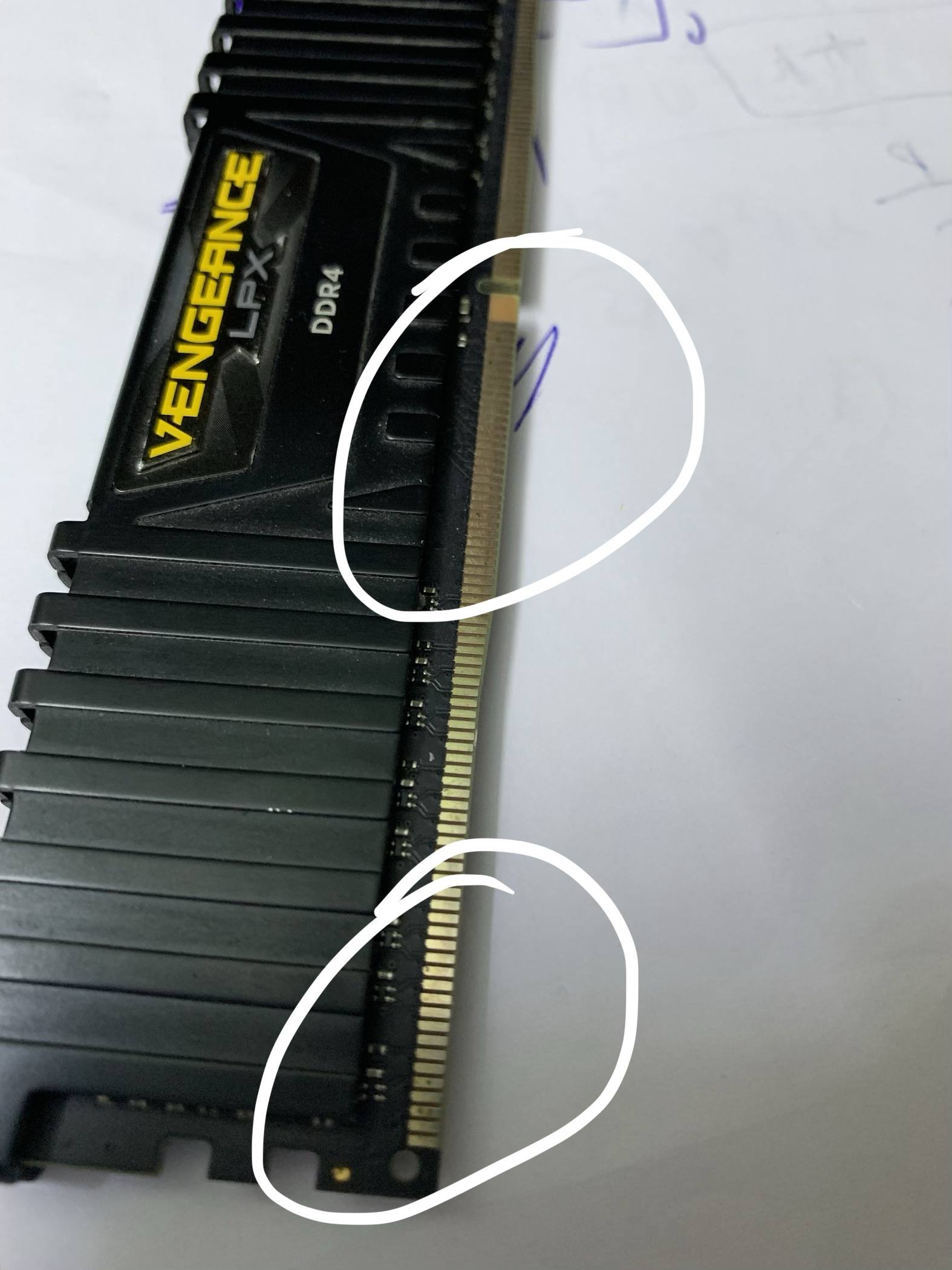
Your ram is installed in which slots? Counting from left to the right, it should be 2nd and 4th. You take out your ram, and see if there is some corrosion on the gold contacts.

This one is extreme case, but if you see any 'darker' spots under light then there is corrosion forming. Usually, these can form from 6 months onwards and cause such issues you face.
IMG_4147.jpg.6acea28134361ce5ef3ef453acad322d.jpg

if you want to remove the stain, use an eraser to rub thoroughly, then follow up with a small tooth brush and then a duster or air-blower to remove the remaining dust. Do not put any dust back in the ram slot or it will make things worse.


Also, even if CMOS is out of battery, memory training shouldn't take 20 minutes. You can replace it just in case.

Also, next time when your PC boot up, check your HWmonitor or HWinfo voltage readings for PSU too.
 

socrates

Senior Member
Joined
Jan 1, 2000
Messages
2,240
Reaction score
80
Yup Ram is on the 2nd and 4th slot and they are in good condition.

Now I can boot up but it goes Automatic repair mode but cannot repair. it cannot detect my Windows which is in my NVME drive detects instead my SATA harddisk. I then go into Bios, reboot about 3 times and then NVME detected and can get into windows.

Thanks
 

socrates

Senior Member
Joined
Jan 1, 2000
Messages
2,240
Reaction score
80
How do I check check my HWmonitor or HWinfo voltage readings for PSU?
 

86technie

High Supremacy Member
Joined
Jun 8, 2006
Messages
40,351
Reaction score
5,939
How do I check check my HWmonitor or HWinfo voltage readings for PSU?

Is not accurate, to determine whether your PSU is faulty.

1) Turn off the main and unplug the power supply power cable.
2) Flip the switch five times to reset the PSU.
3) Try turn on, if it doesn't turn on than have to send for RMA.

For the date and time could be CMOS battery but check the PSU first.
 

86technie

High Supremacy Member
Joined
Jun 8, 2006
Messages
40,351
Reaction score
5,939
Yup Ram is on the 2nd and 4th slot and they are in good condition.

Now I can boot up but it goes Automatic repair mode but cannot repair. it cannot detect my Windows which is in my NVME drive detects instead my SATA harddisk. I then go into Bios, reboot about 3 times and then NVME detected and can get into windows.

Thanks

If you have clone the Windows from SATA onto the NVME drive, this will happened since
the original installation was on the SATA where the boot loader was created.
To permanently resolve this, you have to do a clean install of Windows on the NVME drive. (Not reset).

Erase/format that SSD which still has Windows on it and convert it into a data drive.
 

socrates

Senior Member
Joined
Jan 1, 2000
Messages
2,240
Reaction score
80
Now I have no problem powering up the PC. Did as what technie 86 suggested of
1) Turn off the main and unplug the power supply power cable.
2) Flip the switch five times to reset the PSU.
3) Try turn on, if it doesn't turn on than have to send for RMA.
Also changed the CMOS battery.

Now upon powering up it often goes automatic repair mode unable to detect my windows in the NVME, only after reboot 3 times then able to detect. I did do a clean install of Win on NVME in 2020 when I first setup the system.

COuld somebody pls check that my BIOS boot setup is correct. Maybe the problem lies there..
TfsQZaX.jpg


ozeD46Z.jpg


PGJLugc.jpg


6NTEDrZ.jpg


ClFr7Mx.jpg
 

86technie

High Supremacy Member
Joined
Jun 8, 2006
Messages
40,351
Reaction score
5,939
Now I have no problem powering up the PC. Did as what technie 86 suggested of
1) Turn off the main and unplug the power supply power cable.
2) Flip the switch five times to reset the PSU.
3) Try turn on, if it doesn't turn on than have to send for RMA.
Also changed the CMOS battery.

Now upon powering up it often goes automatic repair mode unable to detect my windows in the NVME, only after reboot 3 times then able to detect. I did do a clean install of Win on NVME in 2020 when I first setup the system.

COuld somebody pls check that my BIOS boot setup is correct. Maybe the problem lies there..
TfsQZaX.jpg


ozeD46Z.jpg


PGJLugc.jpg


6NTEDrZ.jpg


ClFr7Mx.jpg

Since you did a install of Windows way back than suggest backup whatever data you have
on the NVME drive than do a clean install.
FYI a proper Windows installation with fast boot up please set the following during clean install.

- Disable CSM (CSM is to enable legacy boot for older graphic cards like Geforce GTX 600 series
and before which doesn't have UEFI ROM. )
As well as install Windows 7 since Win 7 need CSM to boot.
If you are not installing Windows 7 but Win 10 disable this option.

- Enable secure boot
Under Boot -> Security enable secure boot

This are two required settings for both Win 10 and 11 as well as modern hardware.
I know some install Windows with CSM mode on but that is if you are installing older
OS on older hardware than you will need to enable it.

Newer graphic card than Geforce GTX 700 onwards have UEFI support so enable
it for quicker boot time.
There's nothing wrong with the setting just that the boot loader need to be install
on the NVME since I assume it was clone over from the SATA SSD.
 
Last edited:

socrates

Senior Member
Joined
Jan 1, 2000
Messages
2,240
Reaction score
80
I unplucked my other storage devices. Converted the NVME to GPT drive and UEFI. Did a clean install of win 10. Disable CSM. Tried a few times, even installed win 11 but each time after shut down, I need to reboot twice to get the Windows on the NVME to launch. Not sure what else can be done. PLs suggest...thanks
 

86technie

High Supremacy Member
Joined
Jun 8, 2006
Messages
40,351
Reaction score
5,939
I unplucked my other storage devices. Converted the NVME to GPT drive and UEFI. Did a clean install of win 10. Disable CSM. Tried a few times, even installed win 11 but each time after shut down, I need to reboot twice to get the Windows on the NVME to launch. Not sure what else can be done. PLs suggest...thanks

Think you did it wrongly, correct way is:

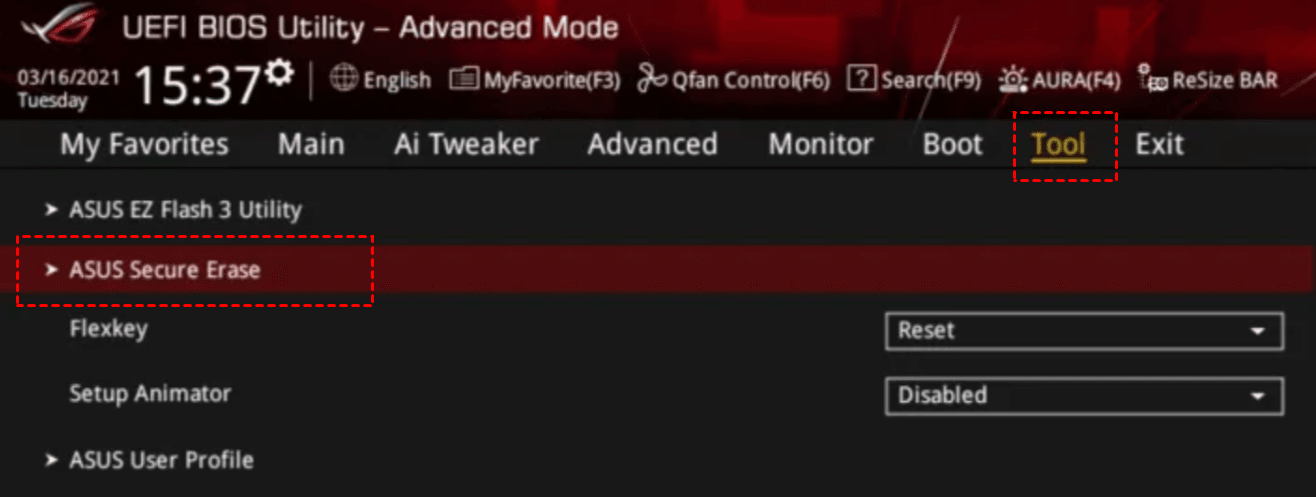
1) Do a secure erase on the NVME using ASUS secure erase tool.

asus-secure-erase.png


2) After the SSD is wipe, unplug other storage device. Press F5 to restore motherboard first
before installing Windows.
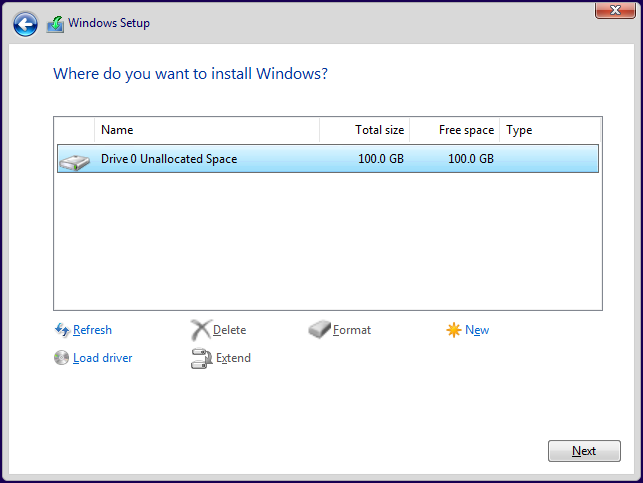
3) Boot the USB Windows 10 from USB, select the drive

install-windows-10-12.png


A empty disk with no existing partiions will be like this. Select this empty drive and let it install.

It should create the UEFI boot loader, you need not convert the drive to GPT etc.
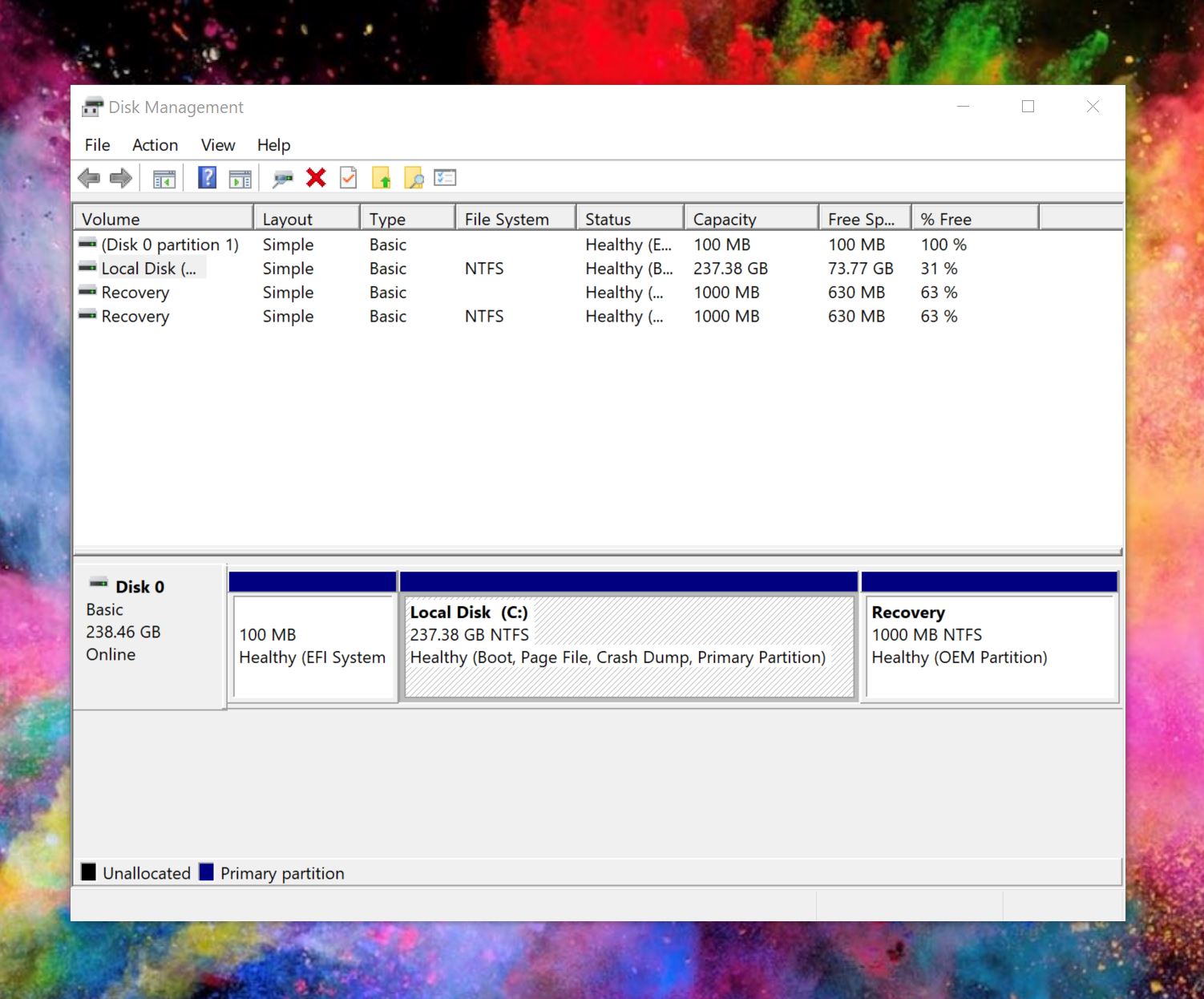
Let the Windows installation handle everything as it will create the following:

Windows-10-Disk-Management.jpg


If you see this under Disk management means the Windows is properly installed and can boot properly.
Notice the first partition that the EFI partition which is require for Windows UEFI boot.
 

socrates

Senior Member
Joined
Jan 1, 2000
Messages
2,240
Reaction score
80
86technie appreciate all your help.

I did what exactly you suggested. shut down and power on able to get a very fast boot up to Windows.
Shut down, power off from the wall socket and without turning off the power socket for about 15 times. About 4 occasions, same problem arise with the windows on NVME not detected and had to reboot 3 times for it to detect. On other 10 occasions of testting the shut down and powerup, no problem, very fast bootup to windows. I have yet to connect my other SATA hard disk and SSD and also not installed any app. Only did windows update. Very strange problem even after BIOS clean erase. Strangely my old wallpaper is still appearing on windows after clean erase.

Not too sure what to do next. To live with this intermittent problem and start reinstalling all the apps or further test shut down and boot up or install windows into my slower and smaller capacity SSD and try from there .

Open to all suggestions.
 

Phen8210

High Supremacy Member
Joined
Jul 29, 2011
Messages
29,030
Reaction score
8,284
Yup Ram is on the 2nd and 4th slot and they are in good condition.

Now I can boot up but it goes Automatic repair mode but cannot repair. it cannot detect my Windows which is in my NVME drive detects instead my SATA harddisk. I then go into Bios, reboot about 3 times and then NVME detected and can get into windows.

Thanks
When the bios cannot boot from one drive, it will boot from the other drives.

This means that high chance that the SSD is faulty already.

With only that OS NVME Drive only plugged in, boot into it and run CrystalDiskMark or Atto Disk Benchmark a few times, and see if it crashes.

Check if the speeds r normal too.

Check your SSD health reading with CrystalDiskInfo

How do I check check my HWmonitor or HWinfo voltage readings for PSU?
Check the rails with the voltage stated, it should be close to what it states.

See this as example
https://linustechtips.com/topic/1276177-low-12v-problem-solved/?do=findComment&comment=142650001675398853157.png

You say you need to flip many switches for the PC to power on, that's not normal. Better check your readings.

Obviously your cannot power on issue is a seperate problem frm ur ssd issue.
 
Last edited:

86technie

High Supremacy Member
Joined
Jun 8, 2006
Messages
40,351
Reaction score
5,939
86technie appreciate all your help.

I did what exactly you suggested. shut down and power on able to get a very fast boot up to Windows.
Shut down, power off from the wall socket and without turning off the power socket for about 15 times. About 4 occasions, same problem arise with the windows on NVME not detected and had to reboot 3 times for it to detect. On other 10 occasions of testting the shut down and powerup, no problem, very fast bootup to windows. I have yet to connect my other SATA hard disk and SSD and also not installed any app. Only did windows update. Very strange problem even after BIOS clean erase. Strangely my old wallpaper is still appearing on windows after clean erase.

Not too sure what to do next. To live with this intermittent problem and start reinstalling all the apps or further test shut down and boot up or install windows into my slower and smaller capacity SSD and try from there .

Open to all suggestions.

There are two issues with this PC:

1) Faulty power supply.
2) Faulty SSD
For both please check if got warranty else need to buy a new one.
 

socrates

Senior Member
Joined
Jan 1, 2000
Messages
2,240
Reaction score
80
Thanks for all the advice and suggestions 86technie and Phen. Last night I did yet another clean install this time with win 11. Today shut down and power up about 8 times and only on 1 time when powering unable to detect windows in the NVME. I think for now I will just live with the problem as once everything goes into the windows, everything I run is smooth and no problems at all with the NVME drive, apps etc. Maybe when I have more time I will investigate further or eventually bring down to SLS for it to be checked out.

Thanks guys.
 

Phen8210

High Supremacy Member
Joined
Jul 29, 2011
Messages
29,030
Reaction score
8,284
Thanks for all the advice and suggestions 86technie and Phen. Last night I did yet another clean install this time with win 11. Today shut down and power up about 8 times and only on 1 time when powering unable to detect windows in the NVME. I think for now I will just live with the problem as once everything goes into the windows, everything I run is smooth and no problems at all with the NVME drive, apps etc. Maybe when I have more time I will investigate further or eventually bring down to SLS for it to be checked out.

Thanks guys.

For the SSD issue, it will worsen until cannot detect at all, then you will lose all your work & data.

I suggest performing the tests and diagnosis I mentioned to confirm the issue.

No point dragging it out, to be honest.
 
Important Forum Advisory Note
This forum is moderated by volunteer moderators who will react only to members' feedback on posts. Moderators are not employees or representatives of HWZ Forums. Forum members and moderators are responsible for their own posts. Please refer to our Community Guidelines and Standards and Terms and Conditions for more information.
Top