
You are using an out of date browser. It may not display this or other websites correctly.
You should upgrade or use an alternative browser.
You should upgrade or use an alternative browser.
Strange PC Powering up problem.
- Thread starter socrates
- Start date
More options
Who Replied?

Yongkit
Supremacy Member
- Joined
- Oct 9, 2015
- Messages
- 5,919
- Reaction score
- 2,501
Many thanks, can you please click on the sensor button above and share the section which show the motherboard name?
Yongkit
Supremacy Member
- Joined
- Oct 9, 2015
- Messages
- 5,919
- Reaction score
- 2,501
Yes enough and this show your motherboard do have sufficient power to the system should be alright.hwinfor for motherboard.Is this sufficient information?

May I check what fan do you plug into the cpu_opt header as this should normally same rpm as the CPU rpm but it run at different speed per your sensor show.

socrates
Senior Member
- Joined
- Jan 1, 2000
- Messages
- 2,245
- Reaction score
- 81
Sorry I may not quite understand your question butI just use the stock fam that came with the AMD 3600 CPU.Yes enough and this show your motherboard do have sufficient power to the system should be alright.
May I check what fan do you plug into the cpu_opt header as this should normally same rpm as the CPU rpm but it run at different speed per your sensor show.
Can you have a look at my CrystalDiskMark for my NVME I posted earlier. Is that okay?
Thanks YongKit for your help.
Yongkit
Supremacy Member
- Joined
- Oct 9, 2015
- Messages
- 5,919
- Reaction score
- 2,501
May I know which specify nvme you are using now for the OS?Sorry I may not quite understand your question butI just use the stock fam that came with the AMD 3600 CPU.
Can you have a look at my CrystalDiskMark for my NVME I posted earlier. Is that okay?
Thanks YongKit for your help.
As for the CPU fan if you only have amd stock cooler with only one stock fan connection then only CPU fan will have reading, however now it show you have other fan plug into the CPU_OPT header which show it also run at high speed. I am guessing this could sometime result is unsuccessful boot not entirely sure but I would not exclude this possibility especially if you have other app previously to control fan profile.
Can you please check which fan is connected to you CPU_OPT header now? Or which specify CPU cooler you are using now?
I also would assume your PSU 12v and eps is securely connected to the motherboard now without leaving any "gap" in between as I have seem some system power issue if those connector is not firmly plug in.
socrates
Senior Member
- Joined
- Jan 1, 2000
- Messages
- 2,245
- Reaction score
- 81
Thanks Yong Kit for your advice.
My OS is in Western Digital Blue WDS100T2B0C SN550 PCIe NVNE M.2 2280 Internal Solid State Drive, Blue, 1TB bought and installed in Dec 2020. It has never given me any problem when in use.
I looked into my casing and tracked where CPU OPT is connected to and if I am not wrong it is connected to the front fan of the casing.
I have check my PSU 12 V and they are securely connected.
In the morning, I connected back my SATA hard disk and also my other SSD. After which when shut down and powering up again, the old problem of having to reboot two or 3 times to detect the windows in the NVME came up again. Did this about 3 times and same thing happened. Once into windows everything runs fine, no crashes, able to detect hard disks, SSD etc.
Then shut down left PC alone and had lunch. After lunch at 2 pm, power up and into windows with ease. 2 times successful. At 5 pm power up and into windows with no problem. Tried 4 times and successful.
My OS is in Western Digital Blue WDS100T2B0C SN550 PCIe NVNE M.2 2280 Internal Solid State Drive, Blue, 1TB bought and installed in Dec 2020. It has never given me any problem when in use.
I looked into my casing and tracked where CPU OPT is connected to and if I am not wrong it is connected to the front fan of the casing.
I have check my PSU 12 V and they are securely connected.
In the morning, I connected back my SATA hard disk and also my other SSD. After which when shut down and powering up again, the old problem of having to reboot two or 3 times to detect the windows in the NVME came up again. Did this about 3 times and same thing happened. Once into windows everything runs fine, no crashes, able to detect hard disks, SSD etc.
Then shut down left PC alone and had lunch. After lunch at 2 pm, power up and into windows with ease. 2 times successful. At 5 pm power up and into windows with no problem. Tried 4 times and successful.
I ran CrystalDiskMark for my NVME. This is the result. The NVME has not crashed when using it before this problem or even currently

Is difficult to tell, suggest bring to a shop like Fuwell, PCThemes let them check for you.
Yongkit
Supremacy Member
- Joined
- Oct 9, 2015
- Messages
- 5,919
- Reaction score
- 2,501
Many thanks for the update.Thanks Yong Kit for your advice.
My OS is in Western Digital Blue WDS100T2B0C SN550 PCIe NVNE M.2 2280 Internal Solid State Drive, Blue, 1TB bought and installed in Dec 2020. It has never given me any problem when in use.
I looked into my casing and tracked where CPU OPT is connected to and if I am not wrong it is connected to the front fan of the casing.
I have check my PSU 12 V and they are securely connected.
In the morning, I connected back my SATA hard disk and also my other SSD. After which when shut down and powering up again, the old problem of having to reboot two or 3 times to detect the windows in the NVME came up again. Did this about 3 times and same thing happened. Once into windows everything runs fine, no crashes, able to detect hard disks, SSD etc.
Then shut down left PC alone and had lunch. After lunch at 2 pm, power up and into windows with ease. 2 times successful. At 5 pm power up and into windows with no problem. Tried 4 times and successful.
If the system is alright for now then just continue to monitor the system and use it as usual.
your nvme drive reading based on the product specification is up to speed no worry.
If future power issue happen again I suggest to look into the PC fan setup.

Phen8210
High Supremacy Member
- Joined
- Jul 29, 2011
- Messages
- 29,032
- Reaction score
- 8,286
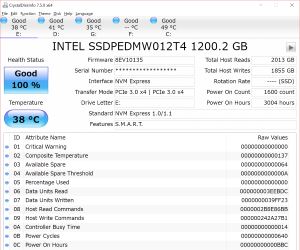
check crystaldiskinfo alsoI ran CrystalDiskMark for my NVME. This is the result. The NVME has not crashed when using it before this problem or even currently
peterchan75
Supremacy Member
- Joined
- Apr 26, 2003
- Messages
- 6,757
- Reaction score
- 533
Crystaldiskinfo will give the health status.
Yongkit
Supremacy Member
- Joined
- Oct 9, 2015
- Messages
- 5,919
- Reaction score
- 2,501
https://www.tomshardware.com/how-to/check-ssd-health-windows-10-11
Some info how to check SSD health.
Some info how to check SSD health.
socrates
Senior Member
- Joined
- Jan 1, 2000
- Messages
- 2,245
- Reaction score
- 81
After 1 week of usage where I boot up about once a day, glad to report that all seems fine with my PC. Boot up to Win 11 is fast and no more boot up and unable to find windows on the NVME problem. Again thanks to Thanks Yongkit, Phen and technie for your help.
Important Forum Advisory Note
This forum is moderated by volunteer moderators who will react only to members' feedback on posts. Moderators are not employees or representatives of HWZ Forums. Forum members and moderators are responsible for their own posts.
Please refer to our Community Guidelines and Standards and Terms and Conditions for more information.
