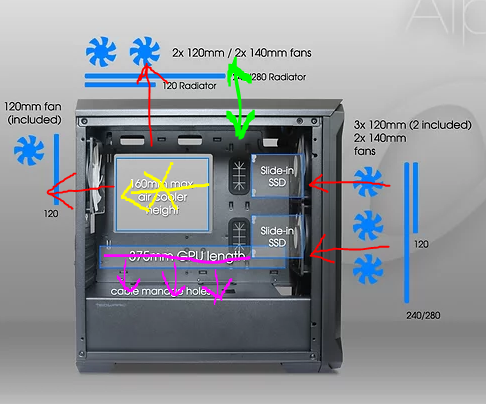
[Tecware Alpha M] Best Fan Configuration

Crayon Shinchan

Senior Member
Joined
Mar 22, 2020
Messages
2,020
Reaction score
284
Hello would like to have advise on the best configuration for my case

Capture.PNG.77bec4943630e08b8f2a04eda5e0af49.PNG

Red --> Fan direction

Yellow --> CPU position and exhuasting

Green --> front top fan unsure should be exhaust or intake.

Pink --> GPU and fan facing downwards

Fans: 2x 140mm intake, 3x 120mm exhaust (1 for rear, 1 for top left, 1 for top right)

Most concern is top right fan.unsure should be exhaust or intake?

link to case: https://www.tecware.co/alpham

Thank you
 

hg2

Supremacy Member
Joined
Jan 1, 2000
Messages
7,949
Reaction score
803
Using a Alpha M white,

3x120mm front intake. (bottom one to cool the PSU)
1x120mm rear exhaust.
2x120mm radiator exhaust.

Balanced in/out, not fantastic
 

Crayon Shinchan

Senior Member
Joined
Mar 22, 2020
Messages
2,020
Reaction score
284
Using a Alpha M white,

3x120mm front intake. (bottom one to cool the PSU)
1x120mm rear exhaust.
2x120mm radiator exhaust.

Balanced in/out, not fantastic
Oh thanks.
Just to enquire is your clearance between gpu and case very narrow?

My seems to be quite narrow. Thats why looking to increase intake for air flow to aid cooling.

Sent from
东汉末年至三国时期(刘备→刘禅) using GAGT
 

SEvsNK

Arch-Supremacy Member
Joined
Mar 31, 2004
Messages
22,599
Reaction score
517
Front - Intake.
Top (hot air rises) and back - Exhaust.

For graphics card - Not much u can do since the clearance is only so much
 

Crayon Shinchan

Senior Member
Joined
Mar 22, 2020
Messages
2,020
Reaction score
284
Front - Intake.
Top (hot air rises) and back - Exhaust.

For graphics card - Not much u can do since the clearance is only so much
Understand. Top left definetly exhaust. How about top right?

Sent from
东汉末年至三国时期(刘备→刘禅) using GAGT
 

hlots123

Supremacy Member
Joined
Apr 5, 2006
Messages
5,207
Reaction score
11
try remove pci slot covers at rear, see if it helps gpu temps...
 

SEvsNK

Arch-Supremacy Member
Joined
Mar 31, 2004
Messages
22,599
Reaction score
517
ZhugeLiang 諸葛亮;129193416 said:
Understand. Top left definetly exhaust. How about top right?

Sent from
东汉末年至三国时期(刘备→刘禅) using GAGT
Also exhaust, else u will be recycling the hot air it was exhausted from the other fan on top
 

ragnarok95

Senior Moderator
Senior Moderator
Joined
Mar 9, 2004
Messages
125,182
Reaction score
6,412
Front in, back out.

Top left and right, you try with both exhaust and both intake and see which one give you better results.
 

hg2

Supremacy Member
Joined
Jan 1, 2000
Messages
7,949
Reaction score
803
ZhugeLiang 諸葛亮;129192500 said:
Oh thanks.
Just to enquire is your clearance between gpu and case very narrow?

My seems to be quite narrow. Thats why looking to increase intake for air flow to aid cooling.

Sent from
东汉末年至三国时期(刘备→刘禅) using GAGT

40-50mm clearance, add a fan underneath and side of GPU, no difference in temp... guess 3 in/3out is optimal, so removed.

The inlet usually very very dusty after a short while, that's why i keep to 3 max and the front only for easier maintanence..
 
Last edited:

Lil_d3viLz

Supremacy Member
Joined
Sep 16, 2008
Messages
5,486
Reaction score
40
Hijack thread. What if my case doesn't have back/front airflow?
Top Btm Side only.
360mm each side.
 

KarmaKarma

Member
Joined
Aug 6, 2011
Messages
154
Reaction score
0
I'm using Lian li 011d xl, layout almost same as you. Tried different setup, best one for me is
side intake x3
Top exhaust x3 (aio rad)
Bottom intake x3

Sent from Asus ROG_PhoneII using GAGT
 
Last edited:

ItsmeagainhK

Supremacy Member
Joined
Feb 23, 2008
Messages
5,544
Reaction score
52
I’m using meshify c.
Top 240mm rad Intake, front 280mm rad intake. Only exhaust is the back 120mm. Reason for this config is because when I set top to exhaust, my cpu aio cooling capacity is drop because it recycles the already warm air from the gpu aio which is in front.
 

KleoZy

Supremacy Member
Joined
Jan 1, 2000
Messages
5,798
Reaction score
1,078
Hi TS,

no one can actually suggest what's right for you. you will need to test it out yourself which is what
ragnarok95 mentioned. It takes time and the most important part is patience while doing this.

Below is just for your read, if you find it lengthy ignore them.
PC Airflow is no difference from torquing a vehicle, you might get good parts but if you do not know how to torque it, it's as equal to driving a default settings.

Some factors you might want to consider.

1) Determine what kind of user are you? for leisure, work or gamer.

2) PC cooling and cooling fan used?
as listed on your diagram, you are using non AIO cooler for your processor but what fans are you using? normal or particular? Example noise factor, CFM (air/wind strength) and yes many can just use Noctua. No doubt they are of good build and produces less noise but there are cheaper alternative.

3) What kind of style are you looking for
a) Positive airflow - all intake, which lead to less dust accumulation (just make sure your case does have fan filters)
b) Negative airflow - all outtake, which lead to hell lot of dust accumulation inside your case.
c) Balance airflow - the hardest to achieve but is not impossible

don't be mislead by others, have your own concept and work on it. Yes you might see bros here talking about Noctua most of the time, no doubt they are quiet and give good airflow but there are other alternatives.

4) Making use of UEFI or the software that comes with your motherboard to tune rpm vs temperature.
which most does.

5) There are three zones to consider, 1st section (CPU Zone) , 2nd section (GPU Zone) , last section (PSU Zone) , which you will need to understand and to be able to control the airflow inside your case.

Again you have to try out by yourself.


These are my personal experiences.

I do take in suggestion and quietly take my time to plan and to torque the airflow. I mainly use my pc for work, video edit, 3D and graphic works. I am not a hardcore overclocker as I do not fix a voltage and run it always at high Ghz (some will do it straight 5Ghz) this will damage pc component in the long run and will warp the PCB of your motherboard or GPU or Rams. It does not matter how much you bring down the temperature as pc component are constantly generating that much heat.


I have my reasons to do the below illustration as I need my PC to be functional till the end of time (at least 5 years down the road)
Am using a LanLi Lancool II case (without mesh infront)

I did this to give more air flow at least to the PSU and GPU area


Purposely mount my radiator this way for easy maintenance (dust is a factor on airflow)


Purposely mod this GPU like a box so that only hot air are pushed to the back an not inside the case


I know the strength of my fans and to use this application "SpeedFan" to have total control. you can find the guide here by Jayztwocents


I am happy of what I have archive in temps, performance and cleanliness of the case.


As said, some might say why waste of time. well to me is worth spending time on something I love. I gain to learn more and being practical in whatever I practice with, be it in life or at work.

 
Last edited:

Solidus_GZ

Master Member
Joined
Nov 8, 2008
Messages
4,079
Reaction score
620
sAAXleK.jpg


Here's my fan direction, it reduce my gpu temperature by 5 degrees.
Usually when I play cod I run about 80-82 degrees, now its 75-76ish
 

Crayon Shinchan

Senior Member
Joined
Mar 22, 2020
Messages
2,020
Reaction score
284
Thanks for all the comments will go through it.

sAAXleK.jpg


Here's my fan direction, it reduce my gpu temperature by 5 degrees.
Usually when I play cod I run about 80-82 degrees, now its 75-76ish
Just a questions that many peoole seems to raise is. Top right fan as exhaust isn't it drawing away alot of the intake air from the front intake near the top?

Sent from
东汉末年至三国时期(刘备→刘禅) using GAGT
 

Solidus_GZ

Master Member
Joined
Nov 8, 2008
Messages
4,079
Reaction score
620
we had to understand that hot air raise, cool air sink, hence as air is hot, it expand and disperse upwards, you need a lot of space and surface for the air to disperse out that why i had top 2 and rear 1 as exhaust fan,
 

86technie

High Supremacy Member
Joined
Jun 8, 2006
Messages
40,363
Reaction score
5,951
ZhugeLiang 諸葛亮;129211077 said:
Thanks for all the comments will go through it.


Just a questions that many peoole seems to raise is. Top right fan as exhaust isn't it drawing away alot of the intake air from the front intake near the top?

Sent from
东汉末年至三国时期(刘备→刘禅) using GAGT

Top fan is to take away heat from mosfet (the area with heatsink beside CPU), ram and let hot air out quicker.
Unlike in the early days, PSU is top mounted so heat can't escape that quickly since only one exhaust fan.

Later PSU was bottom mounted improving air flow.
The case you are using a m-atx, if you feel temps are quite high especially if you are using a high end graphic card.

Suggest change to a mid-atx case with more room for the graphic card.
 

ItsmeagainhK

Supremacy Member
Joined
Feb 23, 2008
Messages
5,544
Reaction score
52
sAAXleK.jpg


Here's my fan direction, it reduce my gpu temperature by 5 degrees.
Usually when I play cod I run about 80-82 degrees, now its 75-76ish

Can try removing the exhaust fan located at the top that is nearer to the fan. Cooler air can have direct path to your cpu cooler and positive pressure as well.
 
Important Forum Advisory Note
This forum is moderated by volunteer moderators who will react only to members' feedback on posts. Moderators are not employees or representatives of HWZ Forums. Forum members and moderators are responsible for their own posts. Please refer to our Community Guidelines and Standards and Terms and Conditions for more information.
Top