Tecware Forge M2 - faulty power switch board

Charlie_CaiPng

Junior Member
Joined
Jul 22, 2021
Messages
32
Reaction score
10
My new case came with a faulty power switch board, pressing power on doesn't work, I'm using a screwdriver to boot now. I will try RMA on Tuesday but if I don't have to dissemble the whole thing it would be best. Not to mention the whole trip back and forth and the sprawling PC on my desk (I rebuilt 3 times and before thinking about testing the power connectors).

I would rather have an old board that could do the job.

Any shifus with spare Tecware board?

3bqgMv6l.png
 
Last edited:

Charlie_CaiPng

Junior Member
Joined
Jul 22, 2021
Messages
32
Reaction score
10
Use Reset button as Power On and save the trouble. But Tech Dynamic will definitely help to change if it's faulty.

Thanks, I just follow your advice. I guess the QC at Tecware is not that great (hence the affordability). I will try to RMA on Tuesday but really want to get an old board and be done with it. The transport + waiting time are not ideal.

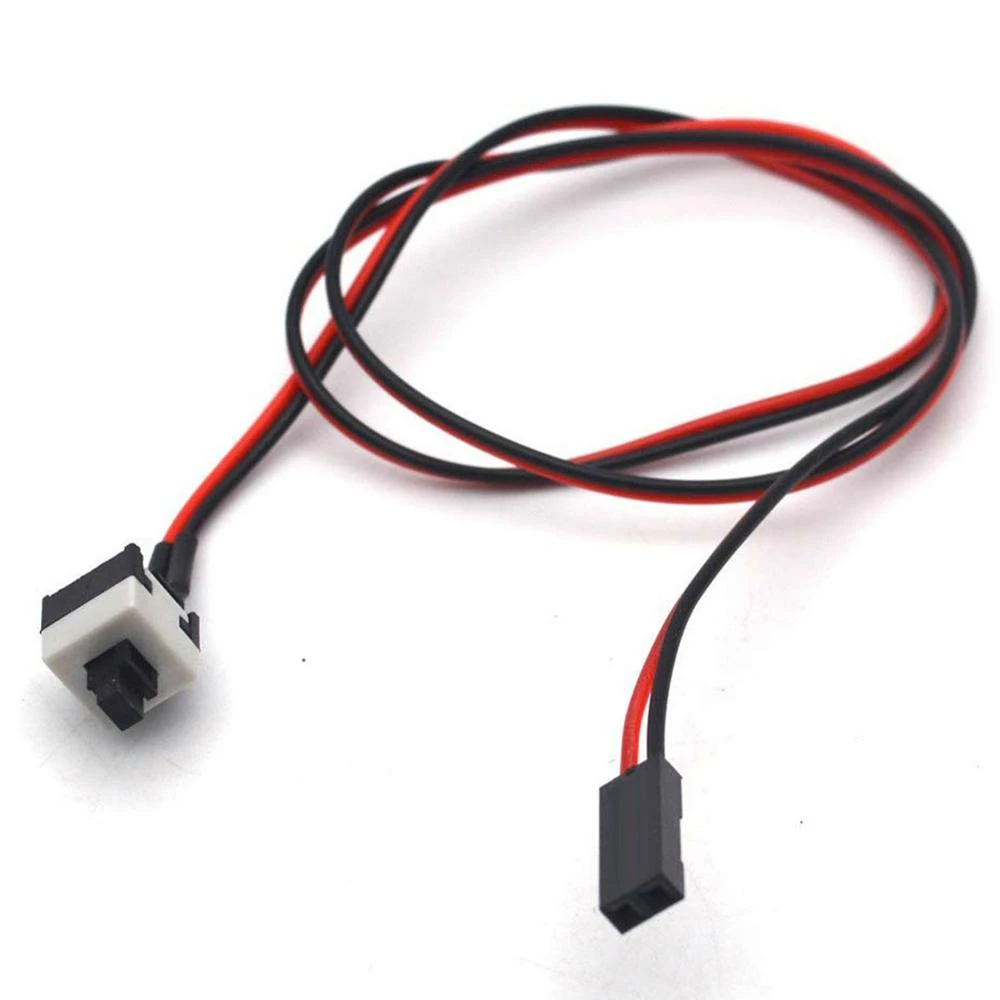
2Pin-PC-Restarting-ATX-Computer-Chassis-Power-Button-Motherboard-Jumper-Switch.jpg_Q90.jpg_.webp


Can get one of this from Sim Lim Square.

It's a new case for my new build, so I will use the reset button for now and RMA. However best solution is get a board and change it myself ASAP so I could close the case.
 

watzup_ken

High Supremacy Member
Joined
Nov 21, 2003
Messages
25,670
Reaction score
2,123
Now I'm using the reset button. But I rather buy a used board than RMA, too much hassle
Actually if you are already using the reset button as a substitute, then just stick with it. I don't know about you, but I can't recall when was the last time I hit my casing's reset switch. Pressing the reset switch is no different from force shutting down in my opinion.
 

wwenze

Greater Supremacy Member
Joined
Dec 2, 2002
Messages
86,463
Reaction score
30,152
I need my power button to switch off monitor... Because SG13's reset switch is... might as well doesn't exist
 

SkyShroud

Arch-Supremacy Member
Joined
Oct 28, 2005
Messages
21,056
Reaction score
1,513
My new case came with a faulty power switch board, pressing power on doesn't work, I'm using a screwdriver to boot now. I will try RMA on Tuesday but if I don't have to dissemble the whole thing it would be best. Not to mention the whole trip back and forth and the sprawling PC on my desk (I rebuilt 3 times and before thinking about testing the power connectors).

I would rather have an old board that could do the job.

Any shifus with spare Tecware board?

3bqgMv6l.png
solder urself? :D
 
Joined
Aug 14, 2015
Messages
7,184
Reaction score
2,055
Use Reset button as Power On and save the trouble. But Tech Dynamic will definitely help to change if it's faulty.

so can power off pc as usual (PSU still switched on)......then use reset button to turn pc on again ??:s11:

2Pin-PC-Restarting-ATX-Computer-Chassis-Power-Button-Motherboard-Jumper-Switch.jpg_Q90.jpg_.webp


Can get one of this from Sim Lim Square.

can enlighten me what's this thing is suppose to be ??:s11:

nothing inside the bios to set it to power on with mouse, keyboard or what??

you mean with pc powered off (PSU still switched on).......can turn pc on again with keyboard meh ??:s14:
 

NightRaven49

Master Member
Joined
May 17, 2019
Messages
3,741
Reaction score
1,579
so can power off pc as usual (PSU still switched on)......then use reset button to turn pc on again ??:s11:
just connect the reset button plugs into the motherboard power pins. power and reset button basically just do the same thing, just see where u connect them to.
2Pin-PC-Restarting-ATX-Computer-Chassis-Power-Button-Motherboard-Jumper-Switch.jpg_Q90.jpg_.webp


Can get one of this from Sim Lim Square.
can enlighten me what's this thing is suppose to be ??:s11:
looks like 3rd party power button.
 
Joined
Aug 14, 2015
Messages
7,184
Reaction score
2,055
just connect the reset button plugs into the motherboard power pins. power and reset button basically just do the same thing, just see where u connect them to.

looks like 3rd party power button.

but my power switch and reset switch share a single header (not 2 separate headers ) that's connected to motherboard

It's a power button switch can get from Sim Lim Tower or Sim Lim Square LV6.

how much does it cost ?

but must bring pc there for shop to fix up ?
 

86technie

High Supremacy Member
Joined
Jun 8, 2006
Messages
40,370
Reaction score
5,954
but my power switch and reset switch share a single header (not 2 separate headers ) that's connected to motherboard


how much does it cost ?

but must bring pc there for shop to fix up ?

Err.. is a switch you can buy from SLS Worldwide Computer Service.
No need bring PC there as it is just a switch just connect to the motherboard.
 

ragnarok95

Senior Moderator
Senior Moderator
Joined
Mar 9, 2004
Messages
125,204
Reaction score
6,441
Do you need reset switch? If don't need just use that and plug into power. My power switch also spoil. i using my reset switch now.
 

wtfh4x

Master Member
Joined
Apr 18, 2010
Messages
3,322
Reaction score
210
Do you need reset switch? If don't need just use that and plug into power. My power switch also spoil. i using my reset switch now.
Seems like humidity causes this over time. I also have experienced this on almost every case I've had, especially when the case is left unused for a while. The button starts feeling like it sticks when coming back out or simply doesn't work at all.

Really making me rethink my next case not having a reset switch now.
 

Yongkit

Supremacy Member
Joined
Oct 9, 2015
Messages
5,906
Reaction score
2,494
Seems like humidity causes this over time. I also have experienced this on almost every case I've had, especially when the case is left unused for a while. The button starts feeling like it sticks when coming back out or simply doesn't work at all.

Really making me rethink my next case not having a reset switch now.
Your mobo no start and reset button?
 

wtfh4x

Master Member
Joined
Apr 18, 2010
Messages
3,322
Reaction score
210
Your mobo no start and reset button?
Nope, I find such features unnecessary cos I'd only use them once or twice anyway.

In everyday use, I'm not going to open the case every time I want to press the start button.

I'm using Power On by PS/2 Keyboard now which works very well but I have to get with the times eventually and move to USB. :s13: So I have to think about that possibility.
 
Important Forum Advisory Note
This forum is moderated by volunteer moderators who will react only to members' feedback on posts. Moderators are not employees or representatives of HWZ Forums. Forum members and moderators are responsible for their own posts. Please refer to our Community Guidelines and Standards and Terms and Conditions for more information.
Top