
You are using an out of date browser. It may not display this or other websites correctly.
You should upgrade or use an alternative browser.
You should upgrade or use an alternative browser.
Text editor has lost all formatting options?
- Thread starter Quala98
- Start date
More options
Who Replied?

- Joined
- Jan 1, 2000
- Messages
- 28,162
- Reaction score
- 3,132
This could be a temporary issue? Possible to let us know if it still persists tomorrow?Chrome via Mobile ios.
Text editor disabled suddenly. Cant insert link anymore. Earlier on no issue. Thanks.


reddevil0728
Great Supremacy Member
- Joined
- Dec 16, 2005
- Messages
- 66,298
- Reaction score
- 5,871
seems okIs it just me?
On Android chrome browser, I can't do any formatting (bold or italic) of my reply?
Tried on mobile and desktop modes.

Mecisteus
Great Supremacy Member
- Joined
- Jun 16, 2002
- Messages
- 55,820
- Reaction score
- 12,254
seems ok
Android chrome?
reddevil0728
Great Supremacy Member
- Joined
- Dec 16, 2005
- Messages
- 66,298
- Reaction score
- 5,871
oh sorry i thought you mean desktop doesn't work.Android chrome?

- Joined
- Dec 15, 2012
- Messages
- 36,431
- Reaction score
- 3,250
Is it just me?
On Android chrome browser, I can't do any formatting (bold or italic) of my reply?
Tried on mobile and desktop modes.
Hello @MikeDirnt78 ,
please click on the yellow highlighted icon in the attached screen shot.

All text editing functionality should work now
- Joined
- Dec 15, 2012
- Messages
- 36,431
- Reaction score
- 3,250
Hello @106gunnerWhat happen to the smilies and emoticons option? Is grey out
Click on the yellow highlighted icon. This step toggles between editing and preview modes.
If the step above does not work
Click on the blue highlighted icon here. This step toggles the options
Let us know if both steps do not work
Last edited:
Mecisteus
Great Supremacy Member
- Joined
- Jun 16, 2002
- Messages
- 55,820
- Reaction score
- 12,254
Hello @MikeDirnt78 ,
please click on the yellow highlighted icon in the attached screen shot.
All text editing functionality should work now
Those icons are greyed out on my mobile.
Yours are not greyed out.
You tested on mobile chrome browser?
- Joined
- Dec 15, 2012
- Messages
- 36,431
- Reaction score
- 3,250
Yep, tested out on both iOS safari, edge chromium and chrome. All on mobile. Please see the updated steps belowThose icons are greyed out on my mobile.
Yours are not greyed out.
You tested on mobile chrome browser?
Last edited:
- Joined
- Dec 15, 2012
- Messages
- 36,431
- Reaction score
- 3,250
@MikeDirnt78
Step 1: Click blue highlighted icon
This step toggles between post preview mode. When in preview mode, your editing options are greyed out.
If Step 1does not work,
Step 1B: Click on the blue highlighted icon here. This step toggles the editing options.
Step 2: Enjoy
Do let us know if both steps do not work.
Step 1: Click blue highlighted icon
This step toggles between post preview mode. When in preview mode, your editing options are greyed out.
If Step 1does not work,
Step 1B: Click on the blue highlighted icon here. This step toggles the editing options.
Step 2: Enjoy
Do let us know if both steps do not work.
Last edited:
- Joined
- Dec 15, 2012
- Messages
- 36,431
- Reaction score
- 3,250
Cheers! Do direct users to this thread and post if you find them encountering the same situation!Okk thank you got it.
- Joined
- Jan 1, 2000
- Messages
- 28,162
- Reaction score
- 3,132
Try clearing cookies & cache. Mine resumed normal after that.
Either that or you've accidentally toggled the BB code option and it stayed that way --- to toggle it off ==>
https://forums.hardwarezone.com.sg/...all-formatting-options.6492094/post-133319401

desmond_yee1
Banned
- Joined
- Feb 7, 2021
- Messages
- 45,137
- Reaction score
- 25,036
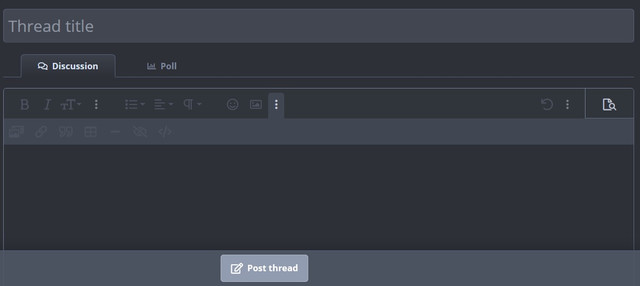
my options panel become grey when using firefox, unable to select any options
- Joined
- Jan 1, 2000
- Messages
- 28,162
- Reaction score
- 3,132
my options panel become grey when using firefox, unable to select any options
It's probably because you've accidentally selected to use BB code and it's remembering the option.
Head into the three dots on the right-hand side, click to enable/disable BB code option -- all the editor options should readily become usable.

HellriderZD
Arch-Supremacy Member
- Joined
- Mar 12, 2017
- Messages
- 17,184
- Reaction score
- 1,739
Hi, my text box only can type text, the rest of the icons all in light grey, cannot click in. Any expert can advise how to resolve? Thx
Important Forum Advisory Note
This forum is moderated by volunteer moderators who will react only to members' feedback on posts. Moderators are not employees or representatives of HWZ Forums. Forum members and moderators are responsible for their own posts.
Please refer to our Community Guidelines and Standards and Terms and Conditions for more information.
